CLOUD & BRICKS SYSTEM & SCREENER WITH SIGNALS [GG ALGO]
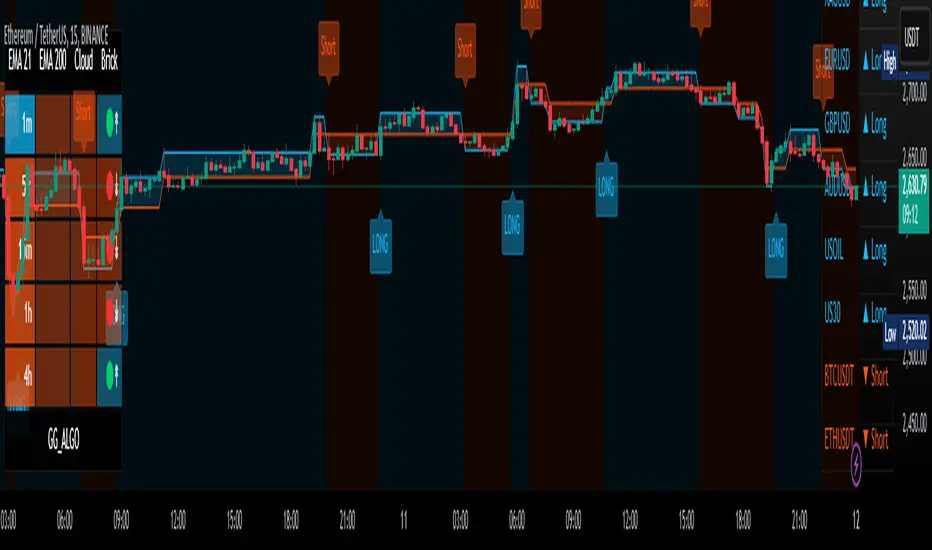
The Cloud Bricks System Screener is an advanced multi-timeframe (MTF) tool designed to simplify trend analysis and signal generation for traders. By combining 4 unique indicators, this script provides actionable insights and customizable options for scalping and trend-following strategies.
---
## Core Features
### 1. Multi-Timeframe Signal Table
- Displays trends and signals from multiple timeframes for the current instrument.
- Works as a visual aid only—does not merge signals with the chart.
### 2. Custom Selection Table
- Allows users to choose one indicator at a time (e.g., EMA 21, EMA 200, Brick System, or Cloud).
- Generates real-time signals for the selected indicator across 10 different instruments.
### 3. Real-Time Updates
- Dynamically reflects live price movements for both tables, ensuring accurate and timely data.
### 4. Customizable Layout
- Offers options to adjust table position, themes, and layout for a personalized experience.
---
## Key Indicators
- EMA (21): Tracks short-term trends for quick opportunities.
- EMA (200): Highlights long-term trends for higher timeframe confirmation.
- Brick System: Detects momentum shifts with proprietary open/close signals.
- Cloud System: Pinpoints critical crossovers and crossunders for trend reversals.
---
## How to Use
1. Apply the script to a TradingView chart.
2. Use the MTF Signal Table to analyze trends across multiple timeframes.
3. Switch to the Custom Selection Table to generate signals for 10 instruments.
4. Follow alerts for potential entry points.
---
⚠ Disclaimer :
This tool is for educational purposes only and does not provide financial advice. Past performance does not guarantee future results.
Invite-only script
Only users approved by the author can access this script. You'll need to request and get permission to use it. This is typically granted after payment. For more details, follow the author's instructions below or contact GG_ALGO directly.
Note that this private, invite-only script has not been reviewed by script moderators, and its compliance with House Rules is undetermined. TradingView does NOT recommend paying for or using a script unless you fully trust its author and understand how it works. You may also find free, open-source alternatives in our community scripts.
Author's instructions

All content provided by GG69Trade is for informational & educational purposes only. Past performance does not guarantee future results. thank you..🙏
Disclaimer
Invite-only script
Only users approved by the author can access this script. You'll need to request and get permission to use it. This is typically granted after payment. For more details, follow the author's instructions below or contact GG_ALGO directly.
Note that this private, invite-only script has not been reviewed by script moderators, and its compliance with House Rules is undetermined. TradingView does NOT recommend paying for or using a script unless you fully trust its author and understand how it works. You may also find free, open-source alternatives in our community scripts.
Author's instructions
All content provided by GG69Trade is for informational & educational purposes only. Past performance does not guarantee future results. thank you..🙏