Planetary Speed - CEPlanetary Speed - Community Edition
Welcome to the Planetary Speed - Community Edition , a specialized tool designed to enhance W.D. Gann-inspired trading by plotting the speed of selected planets. This indicator measures changes in planetary ecliptic longitudes, which may correlate with market timing and volatility, making it ideal for traders analyzing equities, forex, commodities, and cryptocurrencies.
Overview
The Planetary Speed - Community Edition calculates the speed of a chosen planet (Mercury, Venus, Mars, Jupiter, Saturn, Uranus, Neptune, or Pluto) by comparing its ecliptic longitude across time. Supporting heliocentric and geocentric modes, the script plots speed data with high precision across various chart timeframes, particularly for markets open 24/7 like cryptocurrencies. Traders can customize line colors and add multiple instances for multi-planet analysis, aligning with Gann’s belief that planetary cycles influence market trends.
Key Features
Plots the speed of eight planets (Mercury, Venus, Mars, Jupiter, Saturn, Uranus, Neptune, Pluto) based on ecliptic longitude changes
Supports heliocentric and geocentric modes for flexible analysis
Customizes line colors for clear visualization of planetary speed data
Projects future speed data up to 250 days with daily resolution
Works across default TradingView timeframes (except monthly) for continuous markets
Enables multiple script instances for tracking different planets on the same chart
How to Use
Access the script’s settings to configure preferences
Choose a planet from Mercury, Venus, Mars, Jupiter, Saturn, Uranus, Neptune, or Pluto
Select heliocentric or geocentric mode for calculations
Customize the line color for speed data visualization
Review plotted speed data to identify potential market timing or volatility shifts
Add multiple instances to track different planets simultaneously
Get Started
The Planetary Speed - Community Edition provides full functionality for astrological market analysis. Designed to highlight Gann’s planetary cycles, this tool empowers traders to explore celestial influences. Trade wisely and harness the power of planetary speed!
Heliocentric

Planetary Signs - CEPlanetary Signs - Community Edition
Welcome to the Planetary Signs - Community Edition , a specialized tool designed to enhance W.D. Gann-inspired trading by highlighting zodiac sign transitions for selected planets. This indicator marks when planets enter specific zodiac signs, which may correlate with market turning points, making it ideal for traders analyzing equities, forex, commodities, and cryptocurrencies.
Overview
The Planetary Signs - Community Edition calculates the ecliptic longitude of a chosen planet (Sun, Moon, Mercury, Venus, Mars, Jupiter, Saturn, Uranus, Neptune, or Pluto) and highlights periods when it enters user-selected zodiac signs (Aries, Taurus, Gemini, etc.). Supporting heliocentric and geocentric modes, the script plots sign transitions with minute-level accuracy, syncing perfectly with chart timeframes. Traders can customize colors for each sign and add multiple instances for multi-planet analysis, aligning with Gann’s belief that zodiac transitions influence market trends.
Key Features
Highlights zodiac sign transitions for ten celestial bodies (Sun, Moon, Mercury, Venus, Mars, Jupiter, Saturn, Uranus, Neptune, Pluto)
Supports heliocentric and geocentric modes (Pluto heliocentric-only; Sun and Moon geocentric)
Allows selection of one or multiple zodiac signs with customizable highlight colors
Plots vertical lines and labels (e.g., “☿ 0 ♈ Aries”) at sign transitions with minute-level accuracy
Projects future sign transitions up to 120 days with daily resolution
Enables multiple script instances for tracking different planets or signs on the same chart
How to Use
Access the script’s settings to configure preferences
Choose a planet from the Sun, Moon, Mercury, Venus, Mars, Jupiter, Saturn, Uranus, Neptune, or Pluto
Select one or more zodiac signs (e.g., Aries, Taurus) to highlight
Customize the highlight color for each selected zodiac sign
Select heliocentric or geocentric mode for calculations
Review highlighted periods and labeled lines to identify zodiac sign transitions
Use transitions to anticipate potential market turning points, integrating Gann’s astrological principles
Get Started
The Planetary Signs - Community Edition provides full functionality for astrological market analysis. Designed to highlight Gann’s zodiac cycles, this tool empowers traders to explore celestial transitions. Trade wisely and harness the power of planetary alignments!

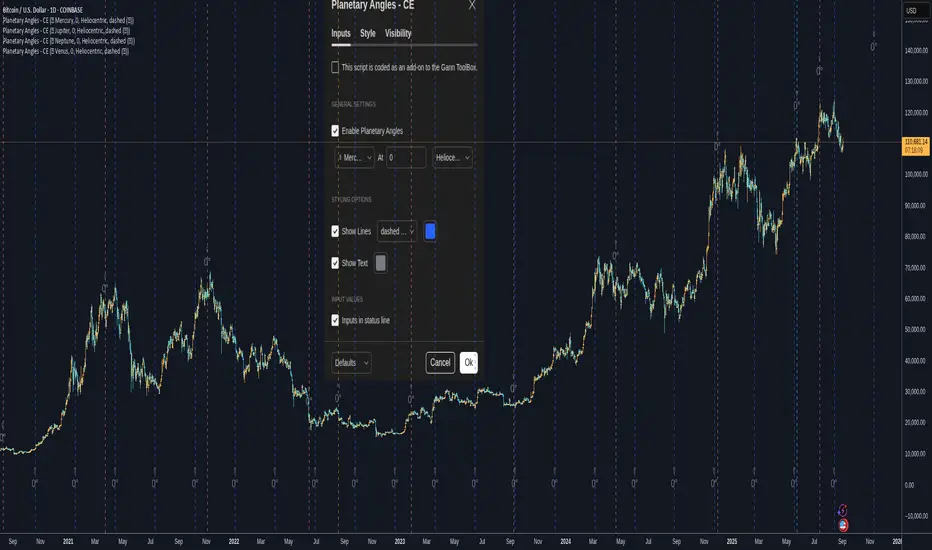
Planetary Angles - CEPlanetary Angles - Community Edition
Welcome to the Planetary Angles - Community Edition, a dynamic tool designed to enhance W.D. Gann-inspired trading by pinpointing dates when a selected planet reaches a user-defined ecliptic longitude angle. This feature-complete indicator provides traders with precise astrological timing for market analysis across equities, forex, commodities, and cryptocurrencies. It empowers traders to integrate celestial events into their strategies with ease.
Overview
The Planetary Angles - Community Edition calculates and plots vertical lines on your chart to mark dates when a chosen planet (Mercury, Venus, Mars, Jupiter, Saturn, Uranus, Neptune, or Pluto) crosses a specific longitude angle (0° to 359.99°) in either heliocentric or geocentric mode. With customizable line and label styling, this script highlights key astrological moments, helping traders identify potential market turning points based on Gann’s time-theory principles. It supports multiple instances on a single chart, offering flexibility for multi-planet analysis.
Key Features
Custom Angle Selection : Choose any ecliptic longitude angle (0° to 359.99°) to track when a planet crosses that precise degree.
Planetary Coverage : Supports eight planets (Mercury, Venus, Mars, Jupiter, Saturn, Uranus, Neptune, Pluto) for comprehensive astrological analysis.
Heliocentric and Geocentric Modes : Toggle between heliocentric and geocentric calculations to align with your preferred perspective.
Styling Options : Customize line styles (solid, dotted, dashed) and colors for lines and labels, with options to enable/disable lines and text for clarity.
Labeled Visuals : Displays labeled markers (e.g., “☿ 90°”) on the chart, with tooltips for easy identification of planetary angle crossings.
Multi-Instance Support : Add the script multiple times to track different planets or angles simultaneously on the same chart.
How It Works
Open Settings : Access the script’s settings to configure your preferences.
Enable the Script : Check the box to activate Planetary Angles.
Select a Planet : Choose from Mercury, Venus, Mars, Jupiter, Saturn, Uranus, Neptune, or Pluto.
Set the Angle : Input a specific ecliptic longitude angle (0° to 359.99°) to track.
Choose Planetary Mode : Select heliocentric or geocentric mode for the calculations.
Customize Styling : Adjust line and label styles and colors, and enable/disable lines or labels as needed.
Analyze and Trade : Observe the plotted vertical lines and labels to identify when the selected planet crosses the chosen angle, using these moments to inform your trading strategy.
Get Started
As a gift to the TradingView community and Gann traders, the Planetary Angles - Community Edition is provided free of charge. With no features locked, this tool offers full access to precise planetary angle tracking for enhanced market timing. Trade wisely and leverage the cosmic precision of Gann’s methodology!
Astro ToolBox - CEAstro ToolBox - Community Edition
Welcome to the Astro ToolBox - Community Edition, a meticulously designed tool that brings precise planetary ephemeris data to the TradingView community. Inspired by W.D. Gann’s astrological principles, this feature-complete indicator empowers traders to integrate celestial data into their market analysis across equities, forex, commodities, and cryptocurrencies.
Overview
The Astro ToolBox - Community Edition delivers accurate ephemeris data, calculating the ecliptic longitude and latitude of celestial bodies for any selected date. Supporting the Sun, Moon, Mercury, Venus, Mars, Jupiter, Saturn, Uranus, Neptune, and Pluto, this script offers both heliocentric and geocentric perspectives with high precision (within 1-2 arc seconds), it provides traders with a robust dataset for time-based analysis, enhancing Gann-inspired trading strategies.
Key Features
Comprehensive Planetary Data : Displays longitude and optional latitude for ten celestial bodies (Sun, Moon, Mercury, Venus, Mars, Jupiter, Saturn, Uranus, Neptune, Pluto) on user-specified dates.
Heliocentric and Geocentric Modes : Toggle between heliocentric and geocentric calculations (Pluto is heliocentric-only; Moon is geocentric-only).
Zodiac Sign Integration : Optionally display the astrological sign and degree for the selected planet’s longitude, enhancing astrological analysis.
Customizable Display Options : Enable/disable exact time display, longitude rounding, and latitude visibility for tailored data presentation.
Flexible Table Positioning : Choose from nine screen positions (e.g., Top Right, Bottom Center) to place the ephemeris table, with customizable colors for seamless chart integration.
High-Precision Calculations : Utilizes optimized algorithms to deliver near-real-time planetary positions without relying on external APIs.
How It Works
Select a Date : Choose the date for which you want to view planetary data using the input field.
Choose a Planet : Select from the Sun, Moon, Mercury, Venus, Mars, Jupiter, Saturn, Uranus, Neptune, or Pluto.
Set Planetary Mode : Toggle between heliocentric or geocentric modes to align with your analysis approach.
Customize Output : Enable options like zodiac signs, sign degrees, latitude, or exact time, and adjust the table’s position and color.
View Results : The ephemeris data appears in a clear, customizable table on your chart, providing longitude, latitude (optional), and astrological sign details.
Analyze and Trade : Leverage the data to identify time-based turning points or correlations with price action, integrating Gann’s astrological principles into your strategy.
Get Started
As a gift to the TradingView community and Gann traders, the Astro ToolBox - Community Edition is offered free of charge. With no features locked, this tool provides full access to precise ephemeris data for astrological market analysis. Trade wisely and harness the power of celestial insights!

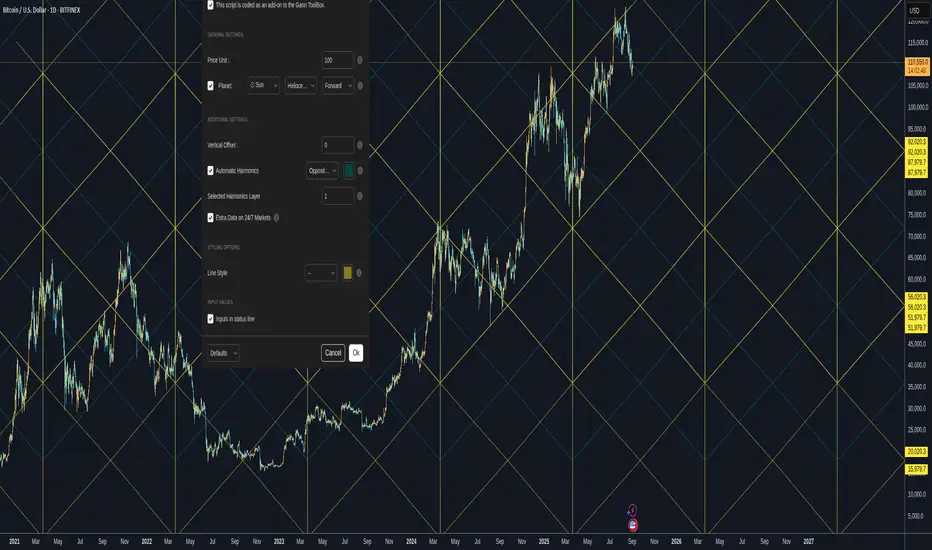
Gann Planetary Lines V1.35 - CEGann Planetary Lines V1.35 - Community Edition
Welcome to the Gann Planetary Lines V1.35 - Community Edition, a powerful tool inspired by W.D. Gann’s astrological trading principles, designed to bring planetary-based price and time analysis to the TradingView community. This feature-complete indicator offers Gann traders and enthusiasts a robust solution for charting planetary influences across equities, forex, commodities, and cryptocurrencies.
Overview
The Gann Planetary Lines V1.35 - Community Edition transforms planetary longitude angles into price levels, leveraging Gann’s methodology to map celestial movements onto financial charts. This script supports plotting lines for the Sun, Moon, Mercury, Venus, Mars, Jupiter, Saturn, Uranus, Neptune, and Pluto, with customizable settings for heliocentric or geocentric perspectives. By integrating harmonic angles and advanced styling options, it provides a comprehensive framework for identifying key price levels and potential market turning points.
Key Features
Planetary Line Projections : Plot lines for ten celestial bodies (Sun, Moon, Mercury, Venus, Mars, Jupiter, Saturn, Uranus, Neptune, Pluto) based on their ecliptic longitudes, offering insights into price-time relationships.
Heliocentric and Geocentric Modes : Switch between heliocentric and geocentric calculations (Pluto is heliocentric-only; Sun and Moon are geocentric).
Customizable Price Unit ($/°) : Adjust the dollar-per-degree value to square planetary lines with your chart’s price scale, ensuring precise alignment.
Harmonic Support : Plot harmonic angles (Opposition, Square, Trine, Sextile, Quintile) with layer selection for multi-level analysis.
Vertical Offset and Styling : Shift lines vertically for custom harmonics and style them with adjustable thickness and colors for clear visualization.
24/7 Market Optimization : Enable extended future data for continuous markets like crypto, enhancing performance and projection accuracy.
Multi-Layer Projections : Display up to nine layers of planetary lines, each offset by 360°, to capture long-term price objectives.
How It Works
Configure Settings : Set the price unit ($/°) to align with your asset’s price action and select a planet from the dropdown menu.
Choose Planetary Mode : Toggle between heliocentric or geocentric modes and enable reverse direction for downward lines.
Enable Harmonics (Optional) : Select desired harmonics (e.g., Square, Trine) and adjust the layer to visualize additional price levels.
Customize Display : Adjust line thickness, color, and vertical offset to enhance chart clarity and match your analysis style.
Analyze and Trade : Use plotted planetary and harmonic lines to identify support, resistance, and potential turning points, integrating Gann’s astrological insights into your trading strategy.
Get Started
As a gift to the TradingView community and Gann traders, the Gann Planetary Lines V1.35 - Community Edition is offered free of charge. No features are locked—enjoy the full power of planetary analysis to enhance your trading. Trade wisely and explore the cosmic edge of Gann’s methodology!
Astro: Planetary Aspects v2.0I have updated the excellent script originally written by @BarefootJoey with additional functionality as listed below the script's original description:
@BarefootJoey:
In astrology, planetary aspects refer to the angles formed between two or more planets in a horoscope or birth chart. These angles are created by the positions of the planets in the sky and are thought to represent a particular energy or influence that can impact events on Earth.
The most common planetary aspects are the conjunction (when two planets are in the same position in the zodiac), the opposition (when two planets are direct across from each other in the zodiac), the trine (when two planets are 120 degrees apart in the zodiac), and the square (when two planets are 90 degrees apart in the zodiac).
This oscillator plots the current geocentric/heliocentric aspect for up to two planets and features a customizable precision of degree (up to +/- 15 degrees) for each aspect.
Additional functionality added in by @Yevolution:
1. Overlay the indicator plot on top of the main chart, with the indicator's scale placed on the left - I found it easier to spot price reactions at a given planetary aspect vs seeing the plot in a separate frame
2. Add options to plot a vertical bar for every occurrence of chosen aspects
The script source code has remained open and additional comments have been added by me to explain the changes where relevant.
When I get some more spare time I will add a function to enable future planetary aspect events to also be displayed on the chart to make forecasting using this data easier.

Planetary Speed█ OVERVIEW
This script is designed to measure the speed of planets from Mercury to Pluto by comparing longitude data across time.
Planetary Speed cycles are very important for those trading Gann theory / Time theory and for Astrology Traders alike. You can toggle the mode of the planet
from a heliocentric setting to a geocentric one. This script is especially important for those who want to research the market and observe the effects of planetary cycles.
Planetary Speed works better on markets that do not close at the moment and on selected time frames ( all the default tradingview timeframes except the monthly ).
This script can also plot 250 days of future data with ease.
█ Future Plans and upgrades to this script may include :
1. Capability to work on different markets that do not open 24/7.
2. Adding lunar and solar speed.
And more! Feel free to contact me with any feature that you would like to see in this script
█ How to use :
1. Open the settings.
2. Select the planet.
3. Choose between Heliocentric and Geocentric
Then Press OK & give the script a few seconds and you should be set. You can add this script to your chart more than once!
This script is coded as an addon to the Gann ToolBox package/scripts.

Planetary Angles█ OVERVIEW
This script is designed to display dates where a selected planet passes through a degree of your choice! You can select between planets from Mercury to Pluto on both Geocentric settings and Heliocentric settings.
The script also lets you play with styling of how these should be labeled or viewed on your chart!
█ Future Plans and upgrades to this script may include :
1. Integrate statistics and repeat functionality
2. More future dates plotting.
And more! Feel free to contact me with any feature that you would like to see in this script
█ How to use :
1. Open the settings.
2. Enable the Planetary Angles script
3. Select your desired planet
4. Pick your angle.
5. Select between Heliocentric / Geocentric
Then Press OK & give the script a few seconds and you should be set. You can add this script to your chart more than once!
This script is coded as an addon to the Gann ToolBox package/scripts.
