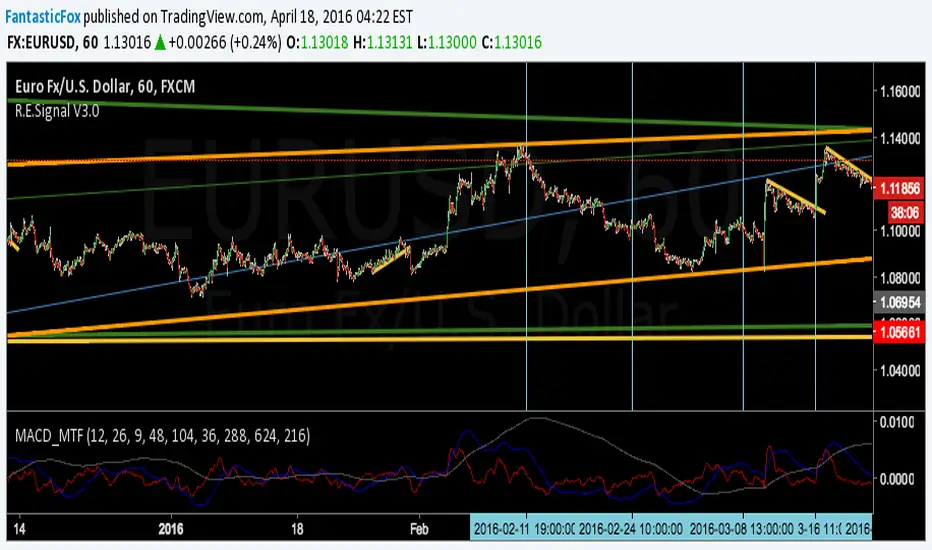
MACD MultiTimeFrame 1h4h1D [Fantastic Fox]Please insert the indicator into 1h time-frame, otherwise you need to change the lengths' inputs.
When there are tops for two of the MACDs and they are near and close* to each other, there is a big opportunity of a "Major Top" for the security, and vice versa for "Major Bottom".
This indicator can be used for tracing multi time-frame divergence. Also, it could help traders to identify the waves of Elliott Wave, and as a signal for confirmation of an impulse after a correction or retracement.
* They should be on top of each others head, not crossing each other. not necessarily touching, but not so far from each other.
Search in scripts for "top"
EMA_ConvergenceFirst I have to give kudos to my son who I asked to take a shot at creating this little indicator. Nice work son!
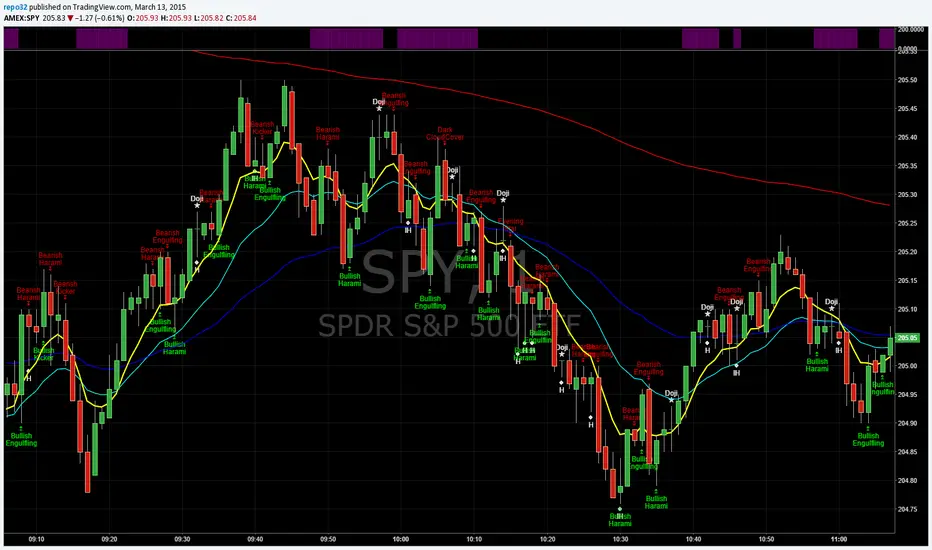
While trading, one of the things I look for is when price or certain EMA's approach another EMA. The example that I use on this 1 minute SPY chart is an 8 EMA and 20 EMA. I am looking for when the 8 and 20 are within' 3 cents of each other. Many times when they are getting close, price is approaching a top or bottom. I am looking for a candlestick reversal around that area. You may want to know when PRICE is near the 50 EMA: Use EMA 1 and 50 for that. Having it light up on top of the page, or elsewhere, makes it easier to look for the convergence when it occurs. If it lights up for a long period, price may be going sideways. I don't enter into a trade until the EMA starts separating, usually with another candlestick formation.
You are able to change the distance for convergence and two EMA's. Unfortunately you will have to adjust the convergence number up as you increase in time frames. This is designed to see when they are close, not when they cross.
The bars on top of this example are lit up purple due to the 8 and 20 EMA are within' 3 cents of each other.
If you want to overlay the price bars, instead of having it separate, just change overlay to "true"
Enjoy.
Daily Bias Panel (with MTF Toggle)Daily Bias Panel Documentation
Overview
The Daily Bias Panel is a TradingView indicator designed to provide a structured, multi factor assessment of market direction for intraday and swing traders. It consolidates several key bias components—Prior Day levels, VWAP, Overnight High/Low, Multi Timeframe Market Structure, and an Overall Bias—into a clean, compact table. A confidence meter summarizes the combined strength of all signals.
This document explains each line item, the rules behind it, and how to interpret the panel.
1. Prior Day Bias
Definition
Compares the current price to the previous day’s high and low.
Rules
• Bullish (1): Close > Prior Day High
• Bearish (-1): Close < Prior Day Low
• Neutral (0): Price is between the prior high and low
Interpretation
This bias reflects whether the market is breaking out above or below the previous day’s range. It is a foundational directional signal.
2. VWAP Bias
Definition
Measures whether price is trading above or below the Volume Weighted Average Price.
Rules
• Bullish (1): Close > VWAP
• Bearish (-1): Close < VWAP
• Neutral (0): Price is at VWAP
Interpretation
VWAP is a widely used institutional benchmark. Trading above VWAP suggests buyers are in control; below VWAP suggests sellers dominate.
3. ONH / ONL Bias (Overnight High / Low)
Definition
Tracks the overnight session’s high and low (18:00–09:30 ET) and compares current price to those levels.
Rules
• Bullish (1): Close > Overnight High
• Bearish (-1): Close < Overnight Low
• Neutral (0): Price is inside the overnight range
Interpretation
ONH/ONL is extremely important for index futures (ES/NQ). Breaking ONH/ONL often signals strong directional intent at the RTH open.
4. Struct MTF (Market Structure Bias)
Definition
A weighted blend of market structure trends across multiple timeframes.
Modes
Swing Mode
• 4H (50%)
• 1H (30%)
• 15M (20%)
Intraday Mode
• 1H (40%)
• 15M (35%)
• 5M (25%)
Rules
Each timeframe is classified as:
• Bullish (1): Higher High + Higher Low
• Bearish (-1): Lower High + Lower Low
• Neutral (0): No clear structure
The weighted average produces a final structure score.
Interpretation
This is your trend engine. It smooths noise and provides a stable directional backbone.
5. Overall Bias
Definition
A strict agreement filter between Prior Day Bias and VWAP Bias.
Rules
• Bullish (1): Both Prior Day and VWAP are bullish
• Bearish (-1): Both are bearish
• Neutral (0): Any disagreement
Interpretation
This prevents false positives by requiring alignment between two major bias components.
6. Confidence Score
Definition
A weighted blend of all bias components:
• Prior Day (25%)
• VWAP (25%)
• ONH/ONL (20%)
• MTF Structure (30%)
Output
A normalized score between -1.00 and +1.00.
Interpretation
• +1.00: Strong bullish alignment across all systems
• -1.00: Strong bearish alignment
• 0.00: Mixed or unclear conditions
7. Confidence Meter (10 Square Visual)
Definition
A visual representation of the confidence score.
Rules
• 0–10 squares filled based on absolute confidence
• Color reflects direction (green/red/yellow)
Interpretation
A quick glance gauge of trend strength.
8. Debug Mode (Optional)
Purpose
Displays all underlying levels and bias markers directly on the chart.
Includes
• Prior High / Low
• VWAP
• ONH / ONL
• Confidence Score line
• Bias markers (P, V, O, M)
Use Case
Great for verifying logic, backtesting visually, and understanding how each component behaves.
9. Panel Layout & Spacing
Top Left Spacer System
When the panel is placed in the top left corner, a 3 row spacer pushes it below the chart header and indicator dropdown.
Panel Size Options
• Small
• Medium
• Large
These adjust font sizes and meter padding.
______________________________________________________________________________
Summary
The Daily Bias Panel is a compact, multi factor decision tool that blends:
• Prior Day context
• VWAP positioning
• Overnight session dynamics
• Multi timeframe trend structure
• A strict overall bias filter
• A confidence scoring engine
Together, these components give traders a clear, structured view of market direction and strength.
This documentation should serve as a complete reference for understanding, using, and publishing the indicator.

Trinity Trend Dashboard"Trinity Trend Dashboard with Trend Alerts & Custom Colors" indicator
### Trading Dashboard – Quick User Guide
**Purpose**
This indicator displays a compact status dashboard showing how the current price relates to several key levels:
- Previous day's VWAP
- Current (session) VWAP
- Previous day's High
- Previous day's Low
- Donchian Channel basis line (midpoint of highest high / lowest low over chosen period)
Each level shows whether price is **Above** (bullish) or **Below** (bearish), with colored backgrounds to make it instantly readable.
An **overall trend summary** combines all five signals into one clear status:
- **Strong Bullish** → all 5 signals are bullish
- **Strong Bearish** → all 5 signals are bearish
- **Mixed Trend** → anything in between
**How to Read the Dashboard**
- **Left column** = name of the level
- **Right column** = current price position ("Above" or "Below")
- **Green background** = price is above the level (bullish signal)
- **Red background** → price is below the level (bearish signal)
- **Bottom merged row** = overall trend verdict + large colored background
**Key Settings You Can Change**
- **Table Position** → top-right (default), top-left, bottom-left, bottom-right
- **Font Size** → tiny / small (default) / normal / large
- **Donchian Channel Period** → default 20 bars (classic value; adjust for faster/slower basis line)
- **Colors** (fully customizable):
- Left column text color (default: yellow)
- Bullish background (default: lime green)
- Bearish background (default: red)
- Mixed trend background (default: gray)
- Header background & text color
- **Alert toggles** → turn on/off notifications for:
- Trend changed → Strong Bullish
- Trend changed → Strong Bearish
- Trend changed → Mixed Trend
**Alerts**
Alerts fire only when the **overall trend status changes** (e.g. Mixed → Strong Bullish).
Recommended setup in TradingView:
1. Add the indicator to chart
2. Create alert → select this indicator
3. Condition = "Any alert() function call"
4. Frequency = "Once Per Bar Close" (cleanest for daily/lower-timeframe use)
5. Add your preferred notification (popup, email, webhook, etc.)
**Tips for Best Use**
- Works on any timeframe, but shines on intraday charts (5 min – 1 hour) when using daily previous levels.
- Previous-day levels update automatically at the start of each new trading day.
- On very low-liquidity symbols, VWAP may behave differently — test first.
- For scalping/day trading: watch when overall status flips to Strong Bullish/Bearish — often strong momentum confirmation.
- Customize colors so they stand out clearly against your chart background (e.g. darker green/red if chart is bright).
Enjoy cleaner, faster decision-making — all important levels in one glance!

Piv X ProPiv X Pro - Advanced Pivot Detection with Multi-Timeframe Confluence Analysis
Overview
Piv X Pro identifies pivot highs and lows using a confluence scoring system. It combines pivot detection, volume-weighted analysis, Williams %R divergence, and multi-timeframe confirmation to highlight higher-probability pivot zones.
What Makes This Script Original
This script combines several components into a single workflow:
Dynamic pivot strength calculation based on ATR
Confluence scoring (10+ factors) to rank pivot quality
Multi-timeframe VWAP analysis (bottom/top extremes plus period-based VWAPs)
Williams %R divergence detection with anchored VWAPs
Market structure shift (CHoCH) identification
Real-time and confirmation modes for different trading styles
How It Works
Pivot Detection:
Uses ATR-based dynamic pivot strength (adjusts to volatility)
Filters pivots by significance (distance from recent averages)
Optional volume confirmation
Real-time mode for immediate detection or confirmation mode for verified pivots
Confluence Scoring System:
Each pivot receives a score (0-100+) based on:
Volume spikes (15 points)
Higher timeframe trend alignment (20 points)
RSI oversold/overbought conditions (25 points)
Price exhaustion signals (10 points)
RSI divergence (15 points)
Swing failure patterns (15 points)
Liquidity sweeps (10 points)
Candle reversal confirmation (10 points)
Key level alignment (10 points)
Fair value gap fills (10 points)
Session weighting (10 points)
Multi-timeframe pivot confluence (15 points)
Major Pivot Thresholds:
Real-time mode: 60+ confluence score
Confirmation mode: 80+ confluence score
Golden zones: 90+ score (highlighted differently)
VWAP Analysis:
Bottom/Top VWAPs: Anchored to absolute extremes within a lookback period
Period VWAPs: Weekly, Monthly, Yearly, plus 4D, 9D, 4H, 8H
Previous period VWAPs: Shows last period's VWAP for reference
Williams Divergence VWAPs: Anchored VWAPs triggered by bullish/bearish divergences
Market Structure:
Identifies Market Structure Shifts (CHoCH) when pivot sequences break
Draws structure lines connecting major pivots
Visual zones around major pivot levels
How to Use
Setup:
Apply to any timeframe (optimized for 1min, 5min, 15min, 1H)
Adjust pivot detection sensitivity via "ATR Pivot Strength Multiplier"
Choose Real-Time Mode (immediate) or Confirmation Mode (verified pivots)
Reading the Signals:
Major Pivot Low (PL): Green zones with confluence score
Major Pivot High (PH): Purple zones with confluence score
Golden Zones: Yellow highlights (90+ score)
CHoCH: Blue dashed lines marking structure breaks
Williams Divergence: Triangles + anchored VWAP lines
Trading Applications:
Support/Resistance: Use major pivot zones as key levels
Entry Timing: Combine confluence scores with price action
Trend Following: Use CHoCH signals for trend changes
Divergence Trading: Williams %R divergences with anchored VWAPs
Multi-Timeframe: Use HTF trend filter and VWAPs for context
Important Notes:
This is a technical analysis tool, not a trading system
Confluence scores indicate probability, not guarantees
Past performance does not predict future results
Always use proper risk management
Combine with your own analysis and strategy
Key Features
Pivot Quality Filters:
ATR-based significance filtering
Volume confirmation (optional)
Multi-timeframe confluence
Session-based weighting (optional)
Visual Elements:
Pivot zones (extendable boxes)
Structure lines (connecting major pivots)
CHoCH markers (market structure shifts)
Multiple VWAP overlays
Williams divergence markers
Customization:
Adjustable pivot strength multiplier
Enable/disable individual confluence factors
Customizable colors and visual styles
Alert system for major pivots and structure shifts
Technical Details
Open Source:
This script is open source. The code is available for review and modification. Users can see exactly how calculations are performed.
Calculations:
Pivot detection uses ta.pivothigh() and ta.pivotlow() with dynamic strength
VWAP calculations use cumulative price×volume / cumulative volume
Confluence scoring is additive based on multiple technical factors
Williams %R divergence uses pivot comparison logic
Limitations:
Historical data access limits apply (Pine Script constraints)
Structure lines limited to 500 bars for performance
Real-time mode may show pivots that later invalidate
Confirmation mode adds lag but increases reliability
Disclaimer
This script is for educational and informational purposes. It does not provide financial advice. Trading involves risk. Always do your own research and use proper risk management. Past performance does not guarantee future results.

SuperBands: Smart Pullback StrategyIndicator Name: SuperBands (Smart Pullback Strategy)
1. Core Concept (The Philosophy)
This indicator represents a smart fusion of two powerful trading methodologies: Trend Following and Mean Reversion. Instead of trying to predict market tops or bottoms, it focuses on joining an established trend at a "Discount Price."
In short: "Buy the dips in an Uptrend, and Sell the rallies in a Downtrend."
2. Technical Components
The indicator consists of two main engines working in harmony:
First: The Trend Filter (Supertrend):
Settings: (ATR 20 / Factor 6.0).
Function: Identifies the long-term market direction. The high Factor (6.0) is deliberately used to filter out noise and minor fluctuations, ensuring the trend direction only changes when there is a significant market shift.
Rule: If the line is Green, only Long trades are allowed. If Red, only Short trades are allowed.
Second: The Sniper (Bollinger Bands):
Settings: (Length 20 / StdDev 2.0).
Function: Identifies temporary Overbought and Oversold zones within the trend.
Rule: The Lower Band acts as a "Value Zone" for buying, while the Upper Band acts as a "Premium Zone" for selling.
3. Signal Logic (How it Works)
The indicator scans the market for specific, high-probability conditions:
A. Buy Signal (Green Triangle):
Appears only when both conditions are met:
Trend is Bullish: Supertrend is Green.
Price is "Cheap": Price drops to touch or break the Lower Bollinger Band.
Logic: The general trend is Up, and the price has pulled back to a dynamic support level. This is a buying opportunity.
B. Sell Signal (Red Triangle):
Appears only when both conditions are met:
Trend is Bearish: Supertrend is Red.
Price is "Expensive": Price rises to touch or break the Upper Bollinger Band.
Logic: The general trend is Down, and the price has rallied to a dynamic resistance level. This is a selling opportunity.
4. User Guide (How to Trade It)
To achieve the best results, consider the following approach when a signal appears:
A. Entry:
Enter the trade immediately upon the close of the candle where the triangle appears (or place a pending order slightly above/below the signal candle for confirmation).
B. Stop Loss (SL):
Conservative: Place the SL at the Supertrend line (if this line breaks, the trend is invalid).
Aggressive: Place the SL slightly below the signal candle's low or the most recent Swing Low.
C. Take Profit (TP):
Target 1: The Bollinger Bands Middle Line (Basis/SMA 20).
Target 2: The Opposite Band (Upper Band for Buy signals, Lower Band for Sell signals).
5. Key Strengths & Limitations
Main Advantage: This indicator prevents a common trader mistake: "FOMO" (Fear Of Missing Out). It stops you from buying at the top or selling at the bottom. It psychologically forces you to wait for the price to come to you.
Best Use Case: The wide Supertrend settings make this highly effective for Crypto and Volatile Stocks where trends are strong and pullbacks are deep.
Limitation: In tight, ranging markets (choppy markets), the price might not touch the bands often, or it might generate a signal followed by sideways movement.
Summary for the Trader:
This indicator tells you: "The trend is Up, but don't chase the price... wait for it to drop to the Lower Band, then strike."
اسم المؤشر: SuperBands (Smart Pullback Strategy)
1. الفكرة الأساسية (الفلسفة وراء المؤشر)
هذا المؤشر هو دمج ذكي بين استراتيجيتين شهيرتين: تتبع الاتجاه (Trend Following) و اقتناص الارتدادات (Mean Reversion). هو لا يحاول التنبؤ بقمة أو قاع السوق، بل يحاول الدخول مع الاتجاه العام القوي ولكن من "نقطة سعرية مخفضة" (Discount Price).
باختصار: "اشترِ الانخفاضات في الاتجاه الصاعد، وبع الارتفاعات في الاتجاه الهابط".
2. المكونات التقنية
يتكون المؤشر من جزأين رئيسيين يعملان كفريق واحد:
أولاً: الحارس (Supertrend):
الإعدادات: (ATR 20 / Factor 6.0).
الوظيفة: تحديد الاتجاه العام "طويل المدى". استخدام العامل 6.0 (وهو رقم كبير) يجعل المؤشر يتجاهل التذبذبات الصغيرة ولا يغير لونه إلا إذا تغير الاتجاه الحقيقي للسوق بقوة.
القاعدة: إذا كان الخط أخضر، يُسمح بالشراء فقط. إذا كان أحمر، يُسمح بالبيع فقط.
ثانياً: القناص (Bollinger Bands):
الإعدادات: (Length 20 / StdDev 2.0).
الوظيفة: تحديد مناطق ذروة البيع والشراء المؤقتة (Overbought/Oversold) داخل الاتجاه.
القاعدة: الحد السفلي يعتبر منطقة "رخيصة" للشراء، والحد العلوي منطقة "غالية" للبيع.
3. كيف تتكون الإشارة (آلية العمل)
يقوم المؤشر بمسح السوق بحثاً عن شروط محددة بدقة:
A. إشارة الشراء (المثلث الأخضر):
تظهر فقط عند تحقق الشرطين معاً:
الاتجاه صاعد: السوبر تريند لونه أخضر.
سعر مغري: السعر هبط ليلامس أو يكسر الحد السفلي للبولنجر باند (Lower Band).
المنطق: الاتجاه العام صاعد، والسعر قام بعمل تصحيح (Pullback) لمستوى دعم ديناميكي، إذن هي فرصة للشراء بسعر أفضل.
B. إشارة البيع (المثلث الأحمر):
تظهر فقط عند تحقق الشرطين معاً:
الاتجاه هابط: السوبر تريند لونه أحمر.
سعر مرتفع: السعر صعد ليلامس أو يخترق الحد العلوي للبولنجر باند (Upper Band).
المنطق: الاتجاه العام هابط، والسعر قام بعمل تصحيح صعودي لمقاومة ديناميكية، إذن هي فرصة للبيع من مكان مرتفع.
4. كيفية الاستفادة منه (دليل المستخدم)
لتحقيق أفضل نتائج، يُنصح باتباع الخطوات التالية عند ظهور الإشارة:
أ. نقاط الدخول (Entry):
ادخل الصفقة بمجرد إغلاق الشمعة التي ظهر عليها المثلث (أو ضع أمر معلق فوق/تحت الشمعة لتأكيد الحركة).
ب. وقف الخسارة (Stop Loss):
الخيار الآمن: ضع الوقف عند خط السوبر تريند (لأنه إذا كُسر الخط، يعني أن الاتجاه تغير).
الخيار المغامر: ضع الوقف أسفل قاع الشمعة السابقة بمسافة بسيطة، أو أسفل آخر قاع (Swing Low).
ج. جني الأرباح (Take Profit):
الهدف الأول: خط المنتصف للبولنجر باند (الخط البرتقالي الخفي أو متوسط 20).
الهدف الثاني: الحد المعاكس للبولنجر باند (الحد العلوي في حالة الشراء، والسفلي في حالة البيع).
5. مميزات وعيوب يجب الانتباه لها
الميزة القوية: يمنعك هذا المؤشر من ارتكاب خطأ شائع وهو "الشراء في القمة" أو "البيع في القاع". هو يجبرك نفسياً على انتظار السعر ليأتي إليك في مناطق التصحيح.
نقطة القوة: إعدادات السوبر تريند (6.0) تجعل الإشارات قوية جداً في العملات الرقمية (Crypto) والأسهم ذات الاتجاه الواضح (Trending Markets).
نقطة الضعف: في الأسواق العرضية المملة (Ranging Markets) ذات النطاق الضيق جداً، قد لا تلمس الأسعار حدود البولنجر كثيراً، أو قد يعطي إشارات دخول والسوق لا يتحرك بعدها بقوة.
ملخص للمتداول:
هذا المؤشر يقول لك: "السوق صاعد، لكن لا تطارد السعر.. انتظر حتى يهبط السعر إليك عند الخط السفلي ثم اشترِ".

Risk & Lot Calculator PanelFXMANS Risk & Lot Panel
Smart Risk Management Tool for TradingView
- Overview
FXMANS Risk & Lot Panel is a lightweight and professional risk management tool designed to help traders calculate position size (lot) and take-profit levels directly on the chart, without cluttering the screen.
The panel is displayed as a minimal table in the top-right corner of the chart and automatically adapts to the currently opened symbol.
This tool focuses on clarity, precision, and usability, making it suitable for scalpers, day traders, and swing traders.
- Key Features
Automatic Direction Detection
The script can automatically determine BUY or SELL direction based on:
Entry Price
Stop Loss Price
Logic:
Stop Loss below Entry → BUY
Stop Loss above Entry → SELL
Manual override is available if auto direction is disabled.
Risk-Based Lot Size Calculation
Calculates position size based on:
User-defined risk amount in USD
Distance between Entry and Stop Loss
Symbol-specific tick size and point value
Ensures consistent risk management across all markets.
Automatic Take Profit (RR Based)
Take Profit is calculated automatically using a predefined Risk / Reward (RR) ratio.
Supports both BUY and SELL scenarios.
- Symbol-Aware Calculation
Uses TradingView’s built-in symbol properties:
syminfo.mintick
syminfo.pointvalue
Works correctly on:
Forex
Indices
Metals
Crypto
- Minimal & Non-Intrusive UI
Small, fixed panel located at the top-right corner
Designed to avoid covering price action
Clean FXMANS-style color palette
- Safe Panel Size Control
Panel size can be adjusted from settings:
Small
Medium
Large
Size changes are handled without modifying layout geometry, preventing UI bugs.
- How It Works
Enter your Entry Price and Stop Loss Price
Define your Risk Amount ($)
Set your desired Risk / Reward ratio
The script automatically calculates:
Trade Direction (BUY / SELL)
Lot Size
Take Profit Level
All results are displayed instantly in the panel
- Example Use Case
Risk: $100
Entry: 1.0850
Stop Loss: 1.0800
RR: 2.0
- The panel will automatically display:
Direction: BUY
Lot Size adjusted to risk exactly $100
Take Profit at 2R
- Important Notes
Entry and Stop Loss prices must be valid (greater than zero).
The tool does not place trades automatically.
Calculations are for position sizing only and may vary slightly depending on broker specifications.
- Disclaimer
This script is intended for educational and analytical purposes only.
Trading involves risk, and users are responsible for their own trading decisions.
- Ideal For
Traders who follow strict risk management rules
Forex, crypto, and index traders
Scalpers and intraday traders
Anyone who wants clean and fast position sizing on TradingView

Stock ScreenerMissing great trade opportunities is annoying, and unless you have 12 screens or only trade one market, you are missing a lot of trades. To fix that, we created this stock screener so you get notified instantly of potential great trading conditions in real time, right on your chart.
You get notified of trading benchmarks being met by the value being displayed on the scanner as well as a color change so that it grabs your attention and makes you aware that you should take a look at the other market and look for a potential trade. It also has built in alerts so you can have an alert notification go off when any of your trading conditions are met instead of needing to watch the scanner for color changes.
The screener will change the ticker symbol background color to red green when price is above or below the previous daily range and above or below both VWAPs. This signals that the ticker is trending, which typically means it is a great time to trade that market and follow the trend.
This stock screener allows you to scan up to 10 different markets at the same time for various different conditions so you always know what is going on with your favorite trading symbols. If you want to scan more tickers, just add the indicator to your chart again and change the table position to the other side of the screen and update the tickers on the 2nd screener, allowing you to have 20 tickers at a time.
The scanner can be fully customized by changing the markets that it screens and turning on or off as many of them as you would like. You can also turn on or off any of the different data sets so that you only get information about trading conditions that matter to you.
The screener can provide data on any type of market, such as stocks, crypto, futures, forex and more. Each ticker can be adjusted to whatever market you would like it to scan for data in the settings panel, the only limitation is that it will not provide data for the VWAP and volume trend score if the ticker you are screening does not provide volume data.
Screener Features
The scanner will provide the following types of data for each ticker that is turned on:
Volume - Provides a volume score compared to the average volume and notifies you of higher than normal volume and volume spikes on individual bars by changing colors.
Volatility - Provides a volatility score compared to the average volatility and notifies you of higher than normal volatility by changing colors.
Oscillator - Choose between the RSI or CCI. The value of that oscillator will be displayed and will notify you when values are in extreme ranges such as overbought or oversold conditions according to the threshold values you enter in the settings panel. When those thresholds have been breached, you will be notified by it changing color.
Big Candles - Compares the current candle to average previous candle sizes, and changes color to notify you of big candles including a big top wick, big bottom wick, big candle body and big candle high to low range.
Daily Level Touches & Trends - Calculates and displays various daily candle and intraday open price levels that act as support and resistance. Notifies you when price is touching any of the daily levels that are turned on. The levels you can have on are as follows: previous day high, previous day low or previous day open. It also will notify you when price is touching the current day’s open, NY 930am open, Asia 8pm open, London 2am open and NY midnight 12am open. It will also say “Above” if price is above the previous day’s high or it will say “Below” if price is below the previous day’s low. The color of the cell will also change when a level touch is happening or price is above the previous day high or below the previous day low.
VWAP - Choose from 2 different VWAP lengths, default settings are daily and weekly VWAPs. You will get notified if price touches either of the VWAPs and they will also say “Above” or “Below” if price is currently above or below each VWAP.
How To Use The Screener To Help You Trade
The main purpose of the screener is to scan other markets and notify you of potential good trading opportunities such as price bouncing off of the daily levels or VWAPs. It can also be used to know when price is trending according to the VWAPs and daily levels. Lastly, you can use it to know how the volume and volatility trends are currently which gives you more confidence in taking a trade with this data when volume and volatility are present.
Volume Score
When volume is high, this represents a good time to trade because there are many market participants and price is likely to be volatile while there is high volume which can present a lot of good trade setups for you to take.
The volume score shown on the screener measures the current volume trend compared to previous volume trends and calculates that into a score based on 100 being the same as the previous volume trend. So any value above 100 means it is high volume and any value less than 100 means it is lower volume than normal.
In the settings panel, you can adjust the volume threshold that needs to be met for a volume notification to show up. The default setting is at 120, so you will get notified when the current volume trend score is 120 or higher or you can adjust that threshold value to whatever value you prefer.
It also will notify you when there is a volume spike on the current bar. This is determined by calculating an average of the recent volume totals and then checking to see if the current bar is greater than or equal to that average multiplied by 3. So if a single bar has volume that is greater than 3 times what the average volume is, then you will get a notification that says “Spike” to make you aware of that volume spike.
The volume trend threshold, volume spike multiplier and lookback length for the average volume used in volume spike calculations can all be adjusted in the settings panel to fit your desired preferences.
Volatility Score
High volatility can mean it is a great time to trade because the market is moving quickly and providing large enough movements that you can get in and out in a short amount of time, while still accruing decent sized trade PnL.
The volatility score will calculate the current volatility for each market compared to previous conditions and then divide the current volatility by the average volatility to give you a volatility score. Anything over 100 means the market is decently volatile and you should look at that market to find potential trade setups to execute on. Anything below 100 means the market is not very volatile and it is usually best to just wait until volatility returns before you start trading again.
The screener will notify you when the volatility score is above the threshold you set. The default value is set to 90, but can be adjusted to your preference. Pay attention to any market that shows an alert and take a look at that chart because the high volatility may present a good trade setup for you in the near future.
Oscillator Score
The oscillator data can be switched between Relative Strength Index(RSI) and Commodity Channel Index(CCI).
The RSI provides a value between 0 and 100 that indicates the momentum and strength of the recent price action. Many traders use the extremes of the 0-100 range to signal overbought or oversold conditions and use that as a sign to look for price to reverse in the near future. The typical values used for this and the default settings to provide notifications are: 70 for overbought and 30 for oversold. The scanner will notify you when the RSI value is considered overbought or oversold so you know to take a look at the chart and analyze if it is ready for a trade to be taken.
The CCI provides a value that can be used to determine the trend strength of the underlying asset when the oscillator moves above 100 or below -100. These extreme values are outside of the normal accumulation range and signify that price is moving strongly in that direction so it may be a good time to take a trade in the direction of the trend. The scanner will show you the value of the CCI for each market and notify you if that value is above 100 or below -100.
Both RSI and CCI settings can be adjusted in the settings panel to your desired settings so you have the exact oscillator settings you prefer to use as well as the exact values that you want to use for being notified.
Big Candles
Big candles can mean that many traders are buying or selling at the same time and many times indicate a good signal to trade in that same direction. That is why we included this calculation in the screener, so you are always aware when a large candle prints.
It calculates the average size of the recent candles and then uses that average as the benchmark to determine if the current candle is considered big and worthy of notifying you to take a look at that chart.
You can adjust the multiplier used for the big candle threshold to whatever you desire, but the default setting is 3 which means the candle will be considered big and notify you if it is 3 times as large as an average candle.
The big candles data will track the following candle values and notify you with these labels:
High to Low candle size = HL
Candle Body from open to close candle size = OC
Top Wick size = TW
Bottom Wick size = BW
Daily Level Touches & Trend
Daily level touches are excellent levels to watch for price to bounce because they often act as support and resistance levels for intraday trading. The scanner will track each market and notify you when the current candle is touching any of the daily levels that you have turned on in the settings panel.
The main levels that are turned on by default and are useful for all markets and how they will be labeled on the scanner are as follows:
Previous Day High = High
Previous Day Low = Low
Previous Day Open = < Open
Previous Day Close = Close
Current Day Open = Open
We also included some extra levels that are useful for futures traders. They are as follows:
NY 930am Open = 930am
NY 12am Midnight Open = 12am
Asia Open at 8pm NY time = Asia
London Open at 2am NY Time = London
Watch how price reacts to these levels and then trade the bounces off of these levels if the price action confirms that it is going to respect that level.
When price is currently above the previous day high, the scanner will say “Above” and show a green color, indicating a bullish trend and that price is above the previous daily candle’s high.
When price is currently below the previous day low, the scanner will say “Below” and show a red color, indicating a bearish trend and that price is below the previous daily candle’s low.
Pay attention to when price is trending above or below the previous daily candle as those trends can provide excellent trend trading opportunities.
The daily levels that you have turned on in the settings will also show as lines on the chart and include a label next to them, identifying each level so you know what each line represents. You can turn on or off all of the lines shown on the chart in the main settings or turn them off one by one in the style panel of the settings. Labels can also be turned on or off for all of the lines in the main settings panel. You can adjust the label positioning in the Label Offset section of the settings panel.
VWAP Touches & Trend
VWAP stands for volume weighted average price and is a very popular tool that traders use to determine trend direction based on volume as well as an excellent level to trade price bounces off of.
The typical VWAP time period used is Daily, which means the volume weighted average price will reset at the beginning of a new day. We set the first VWAP to be the daily VWAP by default and the second one to be the weekly VWAP. You can adjust both of the time periods to be any of the provided time lengths that you choose.
The screener will show “Above” with a green background color when price is above the VWAP, indicating a bullish trend. It will show “Below” with a red background color when price is below the VWAP, indicating a bearish trend. When both VWAPs are showing Above or Below, you can expect price to trend in that direction, so look for pullbacks you can trade in the direction of the trend. If the VWAPs are showing different directions, then you should expect to bounce back and forth between the VWAPs, but be careful and watch out for price to break beyond either one and start a trend.
When the current candle is touching the VWAP, the scanner will change colors and say VWAP to notify you that price is touching the VWAP and you should look at that chart and analyze the market for a potential bounce off of the VWAP to trade.
Trending Market Signals
Strong trends are excellent markets to trade and can many times provide excellent trading opportunities that don’t require expert price action reading skills to be able to take winning trades from. That is why we included a signal to notify you of a strong trending market.
The strong trending market will show up as a green or red background color for the ticker name. If the color of the ticker name is green, it is notifying you that the price is above the previous daily high, above VWAP 1 and above VWAP 2 and is a good market to look for bullish trend trades. If the color of the ticker name is red, it is notifying you that the price is below the previous daily low, below VWAP 1 and below VWAP 2 and is a good market to look for bearish trend trades.
Changing The Tickers It Scans
To change the tickers that the indicator scans, scroll near the bottom of the settings panel and select the ticker symbol you want to update and then search for the exact symbol you want to use. If you want to scan less tickers, then just turn some of the tickers off that you don’t need.
Scanning More Than 10 Tickers
If you want to scan more than 10 tickers, you can add the scanner to your chart again and then just change the table position to the other side of the screen. This will allow you to scan 10 more tickers that will show up separately. Then if you want even more, just add the indicator to your chart again and update the table position until you have as many markets as you want. The table position setting can be found at the bottom of the main settings panel.
Alerts
The screener has alerts that can be used to notify you when any of the data set thresholds have been met or if price is touching one of the levels. You can set alerts for the following events:
Bullish Trend Alert - Price is above the previous daily high and above both VWAPs.
Bearish Trend Alert - Price is below the previous daily low and below both VWAPs.
High Volume Alert - Volume is higher than the threshold or a volume spike is detected.
High Volatility Alert - Volatility is higher than the threshold.
Oscillator Is Extended Alert - Oscillator value has exceeded the upper or lower threshold.
Big Candle Alert - A big candle has been detected.
Daily Level Touch Alert - One of the daily levels that is turned on is being touched.
VWAP Touch Alert - One of the 2 VWAPs are being touched.
An alert will trigger when any one of tickers on your scanner meets the alert conditions, so when you see the alert, you will need to go to your chart and look at the scanner to see which ticker it was and then navigate to that chart to look for potential trade setups.
The alerts will use the exact same settings you have configured in the settings panel to send you alert notifications. With normal settings, this could give you a lot of alerts, so if you only want alerts to fire when abnormal conditions are being met, try setting up a second screener on your chart that has very high threshold values and only has the most important level touches on. Then turn the setting "Do Not Show The Screener On The Chart" to off so the calculations will still run and fire alerts, but won't clog up your charts. This way you can only get alert notifications when major events happen but still have your normal screener settings available on your chart.
Markets This Can Be Used On
This screener uses the price action and volume data so you can use it to scan any type of market you would like as long as the ticker you are scanning has price and volume data feeds. If a market does not have volume data, then it will just show NaN in the volume row and the VWAP rows will not show anything.

PSAR Laboratory [DAFE]PSAR Laboratory : The Ultimate Adaptive Trailing Stop & Reversal Engine
23 Advanced Algorithms. Adaptive Acceleration. Smart Flip Logic. Parabolic SAR Reimagined.
█ PHILOSOPHY: WELCOME TO THE LABORATORY
The standard Parabolic SAR, created by the legendary J. Welles Wilder Jr., is a tool of beautiful simplicity. But in today's complex, algorithm-driven markets, its simplicity is its fatal flaw. Its fixed acceleration and rigid flip logic cause it to fail precisely when you need it most: it whipsaws in choppy conditions and gives back too much profit in strong trends.
The PSAR Laboratory was not created to be just another PSAR. It was engineered to be the definitive evolution of Wilder's original concept. This is not an indicator; it is a powerful, interactive research environment. It is a sandbox where you, the trader, can move beyond the static "one-size-fits-all" approach and forge a PSAR that is perfectly adapted to your specific market, timeframe, and trading style.
We have deconstructed the very DNA of the Parabolic SAR and rebuilt it from the ground up, infusing it with modern quantitative techniques. The result is an institutional-grade suite of 23 distinct, mathematically diverse algorithms that dynamically control every aspect of the PSAR's behavior.
█ WHAT MAKES THIS A "LABORATORY"? THE CORE INNOVATIONS
This tool stands in a class of its own. It is a collection of what could be 23 separate indicators, all seamlessly integrated into one powerful engine.
The 23 Algorithm Engine: This is the heart of the Laboratory. Instead of one rigid formula, you have a library of 23 unique mathematical engines at your command. These algorithms are not simple tweaks; they are complete re-imaginings of how the PSAR should behave, based on concepts from information theory, digital signal processing, fractal geometry, and institutional analysis.
Truly Adaptive Acceleration (AF): The standard PSAR's "gas pedal" (the AF) is dumb; it accelerates at a fixed rate. Our algorithms make it intelligent. The AF can now speed up in clean, trending environments to lock in profits, and automatically slow down in choppy, chaotic conditions to avoid whipsaws.
Advanced Flip Confirmation Logic: Say goodbye to noise-driven flips. You are no longer at the mercy of a single wick touching the SAR. The Laboratory provides multiple layers of flip confirmation, including requiring a bar close beyond the SAR, a volume spike to validate the reversal, or even a multi-bar confirmation .
Comprehensive Noise Filtering Core: In a revolutionary step, you can apply one of over 30 advanced signal processing filters directly to the SAR output itself. From ultra-low-lag filters like the Hull MA and DAFE Spectral Laguerre to adaptive filters like KAMA and FRAMA , you can surgically remove noise while preserving the responsiveness of the core signal.
Integrated Performance Engine: How do you know which of the 23 algorithms is best for your market? You test it. The built-in Performance Dashboard is a comprehensive backtesting and analytics engine that tracks every trade, providing real-time data on Win Rate, Profit Factor, Max Drawdown, and more. It allows you to scientifically validate your chosen configuration.
█ A GUIDED TOUR OF THE ALGORITHMS: 23 PATHS TO AN EDGE
b]These 23 algorithms are not simple settings; they are distinct mathematical philosophies for how a Parabolic SAR should adapt to the market. They are grouped into three primary categories: those that adapt the Acceleration Factor (AF) , those that enhance the Extreme Point (EP) detection, and those that redefine the Flip Logic .
CATEGORY A: ACCELERATION FACTOR (AF) ADAPTATION
These algorithms dynamically change the "gas pedal" of the PSAR.
1. Volatility-Scaled AF
Core Concept: Treats volatility as market friction. The PSAR should be more forgiving in high-volatility environments.
How It Works: It calculates a Volatility Ratio by comparing the short-term ATR to the long-term ATR. If current volatility is high (ratio > 1), it reduces the AF Step. If volatility is low (ratio < 1), it increases the AF Step to trail tighter.
Ideal Use Case: The best all-rounder. Excellent for any market, especially those with clear shifts between high and low volatility regimes (like indices and crypto).
2. Efficiency Ratio (ER) AF
Core Concept: The PSAR should accelerate aggressively in clean, efficient trends and slow down dramatically in choppy, inefficient markets.
How It Works: It uses Kaufman's Efficiency Ratio (ER), which measures the net directional movement versus the total price movement. A high ER (near 1.0) signifies a pure trend, triggering a high AF multiplier. A low ER (near 0.0) signifies chop, triggering a low AF multiplier.
Ideal Use Case: Markets that alternate between strong trends and sideways chop. It is exceptionally good at surviving ranging periods.
3. Shannon Entropy AF
Core Concept: Uses Information Theory to measure market disorder. The PSAR should be conservative in chaos and aggressive in order.
How It Works: It calculates the Shannon Entropy of recent price changes. High entropy means the market is unpredictable ("chaotic"), causing the AF to slow down. Low entropy means the market is organized and trending, causing the AF to speed up.
Ideal Use Case: Advanced traders looking for a mathematically pure way to distinguish between a tradable trend and random noise.
4. Fractal Dimension (FD) AF
Core Concept: Measures the "jaggedness" or complexity of the price path. A smooth path is a trend; a jagged, space-filling path is chop.
How It Works: It calculates the Fractal Dimension of the price series. An FD near 1.0 is a smooth line (high AF). An FD near 1.5 is a random walk (low AF).
Ideal Use Case: Visually identifying the moment a smooth trend begins to break down into chaotic, unpredictable movement.
5. ADX-Gated AF
Core Concept: Uses the classic ADX indicator to confirm the presence of a trend before allowing the PSAR to accelerate.
How It Works: If the ADX value is above a "Strong" threshold (e.g., 25), the AF accelerates normally. If the ADX is below a "Weak" threshold (e.g., 15), the AF is "frozen" and will not increase, preventing the SAR from tightening up in a non-trending market.
Ideal Use Case: For classic trend-following purists who trust the ADX as their primary regime filter.
6. Kalman AF Estimator
Core Concept: A sophisticated signal processing algorithm that predicts the "true" optimal AF by filtering out price "noise."
How It Works: It treats the PSAR's AF as a state to be estimated. It makes a prediction, then corrects it based on how far the actual price deviates. It's like a GPS constantly refining its position. The "Process Noise" input controls how fast it thinks the AF can change, while "Measurement Noise" controls how much it trusts the price data.
Ideal Use Case: Smooth, high-inertia markets like commodities or major forex pairs. It creates an incredibly smooth and responsive AF.
7. Volume-Momentum AF
Core Concept: A trend's acceleration is only valid if confirmed by both volume and price momentum.
How It Works: The AF will only increase if a new Extreme Point is made on above-average volume AND the Rate of Change (ROC) of the price is aligned with the trend's direction.
Ideal Use Case: Any market with reliable volume data (stocks, futures, crypto). It's excellent for filtering out low-conviction moves.
8. Garman-Klass (GK) AF
Core Concept: Uses a more advanced, statistically efficient measure of volatility (Garman-Klass, which uses OHLC data) to adapt the AF.
How It Works: It modulates the AF based on whether the current GK volatility is higher or lower than its historical average. Unlike the standard Volatility-Scaled algo, it tends to slow down more in high volatility and speed up less in low volatility, making it more conservative.
Ideal Use Case: Traders who want a volatility-adaptive model that is more focused on risk reduction during volatile periods.
9. RSI-Modulated AF
Core Concept: The RSI can identify points of potential trend exhaustion or strong momentum.
How It Works: If a trend is bullish but the RSI enters the "Overbought" zone, the AF slows down, anticipating a pullback. Conversely, if the RSI is in the strong momentum mid-range (40-60), the AF is boosted to trail more aggressively.
Ideal Use Case: Mean-reversion traders or those who want to automatically loosen their trail stop near potential exhaustion points.
10. Bollinger Squeeze AF
Core Concept: A Bollinger Band Squeeze signals a period of volatility compression, often preceding an explosive breakout.
How It Works: When the algorithm detects that the Bollinger Band Width is in a "Squeeze" (below a certain historical percentile), it boosts the AF in anticipation of a fast move, allowing the PSAR to catch the breakout quickly.
Ideal Use Case: Breakout traders. This algorithm primes the PSAR to be maximally responsive right at the moment a breakout is most likely.
11. Keltner Adaptive AF
Core Concept: Keltner Channels provide a robust measure of a trend's "normal" volatility channel.
How It Works: When price is trading strongly outside the Keltner Channel, it's considered a powerful trend, and the AF is boosted. When price falls back inside the channel, it's considered a consolidation or pullback, and the AF is slowed down.
Ideal Use Case: Trend followers who use channel breakouts as their primary confirmation.
12. Choppiness-Gated AF
Core Concept: Uses the Choppiness Index to quantify whether the market is trending or consolidating.
How It Works: If the Choppiness Index is below the "Trend" threshold (e.g., 38.2), the AF is boosted. If it's above the "Range" threshold (e.g., 61.8), the AF is significantly reduced.
Ideal Use Case: A more responsive alternative to the ADX-Gated algorithm for distinguishing between trending and ranging markets.
13. VIDYA-Style AF
Core Concept: Uses a Chande Momentum Oscillator (CMO) to create a variable-speed acceleration factor.
How It Works: The absolute value of the CMO is used to create a dynamic smoothing constant. Strong momentum (high absolute CMO) results in a faster, more responsive AF. Weak momentum results in a slower, smoother AF.
Ideal Use Case: Momentum traders who want their trailing stop's speed directly tied to the momentum of the price itself.
14. Hilbert Cycle AF
Core Concept: Uses Ehlers' Hilbert Transform to extract the dominant cycle period of the market and synchronizes the PSAR with it.
How It Works: It dynamically adjusts the AF based on the detected cycle period (shorter cycles = faster AF) and can also modulate it based on the current phase within that cycle (e.g., accelerate faster near cycle tops/bottoms).
Ideal Use Case: Markets with clear cyclical behavior, like commodities and some forex pairs.
CATEGORY B: EXTREME POINT (EP) ENHANCEMENT
These algorithms make the detection of new highs/lows more intelligent.
15. Volume-Weighted EP
Core Concept: A new high or low is more significant if it occurs on high volume.
How It Works: It can be configured to only accept a new EP if the volume on that bar is above average. It can also "weight" the EP by volume, pushing it further out on high-volume bars.
Ideal Use Case: Filtering out weak, low-conviction price probes in markets with reliable volume.
16. Wavelet Filtered EP
Core Concept: Uses wavelet decomposition (a signal processing technique) to separate the underlying trend from high-frequency noise.
How It Works: It calculates a smoothed, wavelet-filtered version of the price. A new EP is only registered if the actual high/low significantly exceeds this smoothed baseline, effectively ignoring minor noise spikes.
Ideal Use Case: Noisy markets where small, insignificant wicks can cause the AF to accelerate prematurely.
17. ATR-Validated EP
Core Concept: A new EP should represent a meaningful move, not just a one-tick poke.
How It Works: It requires a new high/low to exceed the previous EP by a minimum amount, defined as a multiple of the current ATR. This ensures only volatility-significant advances are counted.
Ideal Use Case: A simple, robust way to filter out "noise" EPs and slow down the AF's acceleration in choppy conditions.
18. Statistical EP Filter
Core Concept: A new EP is only valid if the price change that created it is statistically significant.
How It Works: It calculates the Z-Score of the bar's price change relative to recent history. A new EP is only accepted if its Z-Score exceeds a certain threshold (e.g., 1.5 sigma), meaning it was an unusually strong move.
Ideal Use Case: For quantitative traders who want to ensure their trailing stop only tightens in response to statistically meaningful price action.
CATEGORY C: FLIP LOGIC & CONFIRMATION
These algorithms change the very rules of when and why the PSAR reverses.
19. Dual-PSAR Gate
Core Concept: Uses two PSARs—one fast and one slow—to confirm a reversal.
How It Works: A flip signal for the main PSAR is only considered valid if both the fast (sensitive) PSAR and the slow (structural) PSAR have flipped. This acts as a powerful trend filter.
Ideal Use Case: An excellent method for reducing whipsaws. It forces the PSAR to wait for both short-term and longer-term momentum to align before signaling a reversal.
20. MTF Coherence PSAR
Core Concept: Do not flip against the higher timeframe macro trend.
How It Works: It pulls PSAR data from two higher timeframes. A flip is only allowed if the new direction does not contradict the trend on at least one (or both) of those higher timeframes. It also boosts the AF when all timeframes are aligned.
Ideal Use Case: The ultimate tool for multi-timeframe traders who want to ensure their entries and exits are in sync with the bigger picture.
21. Momentum-Gated Flip
Core Concept: A reversal is only valid if it is supported by a significant surge of momentum.
How It Works: A price cross of the SAR is not enough. The script also requires the Rate of Change (ROC) to exceed a certain threshold for a set number of bars, confirming that there is real force behind the reversal.
Ideal Use Case: Filtering out weak, drifting reversals and only taking signals that are initiated with explosive power.
22. Close-Only PSAR
Core Concept: Wicks are noise; the bar's close is the final decision.
How It Works: This algorithm modifies the flip logic to ignore wicks. A flip only occurs if one or more bars close beyond the SAR line.
Ideal Use Case: One of the most effective and simple ways to reduce false signals from volatile wicks. A fantastic default choice for any trader.
23. Ultimate PSAR Consensus
Core Concept: The highest conviction signal comes from the agreement of multiple, diverse mathematical models.
How It Works: This is the capstone algorithm. It runs a "vote" between a selection of the top-performing algorithms (e.g., Volatility-Scaled, Efficiency Ratio, Dual-PSAR). A flip is only signaled if a majority consensus is reached. It can even weight the votes based on each algorithm's recent performance.
Ideal Use Case: For traders who want the absolute highest level of confirmation and are willing to accept fewer, but more robust, signals.
█ PART II: THE NOISE FILTERING CORE - The Shield
This is a revolutionary feature that allows you to apply a second layer of signal processing directly to the SAR line itself, surgically removing noise before the flip logic is even considered.
FILTER CATEGORIES
Basic Filters (SMA, EMA, WMA, RMA): The classic moving averages. They provide basic smoothing but introduce significant lag. Best used for educational purposes.
Low-Lag Filters (DEMA, TEMA, Hull MA, ZLEMA): A family of filters designed to reduce the lag inherent in basic moving averages. The Hull MA is a standout, offering a superb balance of smoothness and responsiveness.
Adaptive Filters (KAMA, VIDYA, FRAMA): These are "smart" filters. They automatically adjust their smoothing level based on market conditions. They will be very smooth in choppy markets and become highly responsive in trending markets.
Advanced DSP & DAFE Filters: This is the pinnacle of signal processing.
Ehlers Filters (SuperSmoother, 2-Pole, 3-Pole): Based on the work of John Ehlers, these use digital signal processing techniques to remove high-frequency noise with minimal lag.
Gaussian & ALMA: These use a bell-curve weighting, giving the most importance to recent data in a smooth, non-linear fashion.
DAFE Spectral Laguerre: A proprietary, non-linear filter that uses a feedback loop and adapts its "gamma" based on volatility, providing exceptional tracking in all market conditions.
How to Choose a Filter
Start with "None": First, find an algorithm you like with no filtering to understand its raw behavior.
Introduce Low Lag: If you are getting too many whipsaws from noise, apply a short-length Hull MA (e.g., 5-8). This is often the best solution.
Go Adaptive: If your market has very distinct trend/chop regimes, try an Adaptive KAMA .
Maximum Purity: For the smoothest possible output with excellent responsiveness, use the DAFE Spectral Laguerre or Ehlers SuperSmoother .
█ THE VISUAL EXPERIENCE: DATA AS ART
The PSAR Laboratory is not just functional; it is beautiful. The visualization engine is designed to provide you with an intuitive, at-a-glance understanding of the market's state.
Algorithm-Specific Theming: Each of the 23 algorithms comes with its own unique, professionally designed color palette. This not only provides visual variety but allows you to instantly recognize which engine is active.
Dynamic Glow Effects: For many algorithms, the PSAR dots will emit a soft "glow." The brightness and color of this glow are not random; they are tied to a key metric of the active algorithm (e.g., trend strength, volatility, consensus), providing a subtle, visual cue about the health of the trend.
Adaptive Volatility Bands: Certain algorithms will display dynamic bands around the PSAR. These are not standard deviation bands; their width is controlled by the specific logic of the active algorithm, showing you a visual representation of the market's expected range or energy level.
Secondary Reference Lines: For algorithms like the Dual-PSAR or MTF Coherence, a secondary line will be plotted on the chart, giving you a clear visual of the underlying data (e.g., the slow PSAR, the HTF trend) that is driving the decision-making process.
█ THE MASTER DASHBOARD: YOUR MISSION CONTROL
The comprehensive dashboard is your unified command center for analysis and performance tracking.
Engine Status: See the currently selected Algorithm, the active Noise Filter, the Trend direction, and a real-time progress bar of the current Acceleration Factor (AF).
Algorithm-Specific Metrics: This is the most powerful section. It displays the key real-time data from the currently active algorithm. If you're using "Shannon Entropy," you'll see the Entropy score. If you're using "ADX-Gated," you'll see the ADX value. This gives you a direct, quantitative look under the hood.
Performance Readout: When enabled, this section provides a full breakdown of your backtesting results, including Win Rate, Profit Factor, Net P&L, Max Drawdown, and your current trade status.
█ DEVELOPMENT PHILOSOPHY
The PSAR Laboratory was born from a deep respect for Wilder's original work and a relentless desire to push it into the 21st century. We believe that in modern markets, static tools are obsolete. The future of trading lies in adaptation. This indicator is for the serious trader, the tinkerer, the scientist—the individual who is not content with a black box, but who seeks to understand, test, and refine their edge with surgical precision. It is a tool for forging, not just following.
The PSAR Laboratory is designed to be the ultimate tool for that evolution, allowing you to discover and codify the rules that truly fit you.
█ DISCLAIMER AND BEST PRACTICES
THIS IS A TOOL, NOT A STRATEGY: This indicator provides a sophisticated trailing stop and reversal signal. It must be integrated into a complete trading plan that includes risk management, position sizing, and your own contextual analysis.
TEST, DON'T GUESS: The power of this tool is its adaptability. Use the Performance Dashboard to rigorously test different algorithms and settings on your chosen asset and timeframe. Find what works, and build your strategy around that data.
START SIMPLE: Begin with the "Volatility-Scaled AF" algorithm, as it is a powerful and intuitive all-rounder. Once you are comfortable, begin experimenting with other engines.
RISK MANAGEMENT IS PARAMOUNT: All trading involves substantial risk. The backtesting results are hypothetical and do not account for slippage or psychological factors. Never risk more capital than you are prepared to lose.
"I don't think traders can follow rules for very long unless they reflect their own trading style. Eventually, a breaking point is reached and the trader has to quit or change, or find a new set of rules he can follow. This seems to be part of the process of evolution and growth of a trader."
— Ed Seykota, Market Wizard
Taking you to school. - Dskyz, Trade with Volume. Trade with Density. Trade with DAFE

Luminous Market Flux [Pineify]Luminous Market Flux - Dynamic Volatility Channel with Breakout Detection
The Luminous Market Flux indicator is a sophisticated volatility-based trading tool that combines dynamic channel analysis with breakout detection and squeeze identification. This indicator helps traders visualize market conditions by creating an adaptive envelope around price action, highlighting periods of compression (low volatility) and expansion (high volatility) while generating actionable buy and sell signals at key breakout moments.
Key Features
Dynamic volatility channel that adapts to changing market conditions using ATR-based calculations
Visual squeeze detection system that warns traders when volatility is contracting
Automatic breakout signal generation for both bullish and bearish scenarios
Luminous gradient fill that provides instant visual feedback on price position within the channel
Bar coloring feature that highlights strong volatility breakouts
Built-in alert conditions for automated trading notifications
How It Works
The indicator operates on three core calculation layers:
1. Baseline Calculation (Central Tendency)
The foundation uses a Running Moving Average (RMA) of the closing price over the specified Flux Length period. RMA was specifically chosen over SMA or EMA because it provides smoother trend detection similar to how RSI and ATR calculations work, reducing noise while maintaining responsiveness to genuine price movements.
2. Volatility Measurement
The channel width is determined by the Average True Range (ATR) multiplied by the Flux Expansion Factor. ATR captures the true volatility of the market by accounting for gaps and limit moves, making the channel responsive to actual market conditions rather than just closing price variations.
3. Squeeze Detection Logic
The indicator compares the current channel width against a 100-period simple moving average of historical channel widths. When the current range falls below 80% of this average, a squeeze condition is identified, signaling that volatility is compressing and a significant move may be imminent.
Trading Ideas and Insights
Breakout Trading: Enter long positions when price breaks above the upper flux channel with a BUY signal, and short positions when price breaks below the lower channel with a SELL signal. These breakouts indicate strong momentum in the direction of the move.
Squeeze Anticipation: When squeeze circles appear at the top of the chart, prepare for a potential explosive move. Squeezes often precede significant breakouts as the market coils before releasing energy in one direction.
Trend Confirmation: Use the bar coloring feature to confirm trend strength. Colored bars indicate that price is trading outside the volatility envelope, suggesting strong directional momentum.
Mean Reversion: When price is within the channel (no bar coloring), the gradient fill helps identify whether price is closer to the upper or lower boundary, potentially useful for mean-reversion strategies.
How Multiple Indicators Work Together
This indicator integrates several technical concepts into a cohesive system:
The RMA baseline provides the trend anchor, while the ATR-based envelope adapts to volatility conditions. These two components work together to create a channel that expands during volatile periods and contracts during quiet markets. The squeeze detection layer adds a third dimension by comparing current volatility to historical norms, alerting traders when the market is unusually quiet.
The visual elements reinforce this analysis: the gradient fill shows price position within the channel at a glance, bar coloring confirms breakout strength, and shape markers provide discrete entry signals. This multi-layered approach ensures traders receive consistent information across different visualization methods.
Unique Aspects
The "Luminous" visual design uses color gradients that dynamically shift based on price position, creating an intuitive heat-map effect within the channel
Unlike traditional Bollinger Bands that use standard deviation, this indicator uses ATR for volatility measurement, making it more responsive to actual price range movements
The squeeze detection compares current volatility to a longer-term average (100 periods), providing context-aware compression signals rather than arbitrary thresholds
Signal generation uses proper state tracking to ensure breakout signals only fire on the initial breakout, not on every bar during an extended move
How to Use
Add the indicator to your chart. It will overlay directly on price with the volatility channel visible.
Watch for BUY labels appearing below bars when price breaks above the upper channel - these indicate bullish breakout opportunities.
Watch for SELL labels appearing above bars when price breaks below the lower channel - these indicate bearish breakout opportunities.
Monitor for small circles at the top of the chart indicating squeeze conditions - prepare for potential breakouts when these appear.
Use the colored bars as confirmation of breakout strength - green bars confirm bullish momentum, red bars confirm bearish momentum.
Set up alerts using the built-in alert conditions to receive notifications for buy signals, sell signals, and squeeze warnings.
Customization
Flux Length (default: 20): Controls the lookback period for both the baseline and ATR calculations. Lower values create more responsive but noisier channels; higher values create smoother but slower-reacting channels.
Flux Expansion Factor (default: 2.0): Multiplier for the ATR value that determines channel width. Higher values create wider channels with fewer signals; lower values create tighter channels with more frequent signals.
Smooth Signal : Toggle for signal smoothing preference.
Bullish Energy : Customize the color for bullish breakouts and upper channel highlights.
Bearish Energy : Customize the color for bearish breakouts and lower channel highlights.
Compression/Neutral : Customize the color for squeeze indicators and neutral channel states.
Conclusion
The Luminous Market Flux indicator provides traders with a comprehensive volatility analysis tool that combines channel-based trend detection, squeeze identification, and breakout signaling into a single, visually intuitive package. By using ATR-based volatility measurement and RMA smoothing, the indicator adapts to changing market conditions while filtering out noise. Whether you are a breakout trader looking for momentum entries or a swing trader waiting for volatility expansion after compression periods, this indicator offers the visual clarity and signal precision needed to make informed trading decisions.

Pivot Points (PP/BC/TC)A) Central Pivot (CP)
The Central Pivot is the main equilibrium level for the session. It represents fair value where buyers and sellers are balanced. Price above CP shows bullish bias; price below CP shows bearish bias.
B) Top Central (TC)
The Top Central is the upper boundary of the CPR. It acts as short-term resistance in normal conditions and support in strong bullish trends. Acceptance above TC suggests upside continuation.
C) Bottom Central (BC)
The Bottom Central is the lower boundary of the CPR. It acts as short-term support in normal conditions and resistance in strong bearish trends. Acceptance below BC suggests downside continuation.

Sequential 9(Setup Count)- KoRCThis indicator is a simplified Sequential 9-count (Setup 9) tool inspired by widely known “sequential counting” concepts. It detects potential exhaustion points by counting consecutive closes relative to the close 4 bars earlier:
Buy Setup (DIP): close < close for 9 consecutive bars (optional strict mode: <=)
Sell Setup (TOP): close > close for 9 consecutive bars (optional strict mode: >=)
Enhancements / Filters (optional):
Trend filter (default ON): uses EMA(200) as a macro trend filter and EMA(20) as a fast context filter.
Volatility filter (optional): ignores signals in low-volatility regimes using ATR% threshold.
Dedupe (default ON): prevents repeated signals within a short window (one-shot per swing concept).
Perfected highlight:
Signals are visually emphasized when a simple “perfected” condition is met (bar 8 or 9 extends beyond recent reference highs/lows), displayed with brighter colors.
How to use:
Use DIP/TOP labels as potential exhaustion alerts, not standalone trade signals. Combine with your own risk management and confirmation tools.
Disclaimer:
Not affiliated with or endorsed by any third-party. This script is provided for educational/visualization purposes only and does not constitute financial advice.

Sequential 9(Setup Count)- KoRCThis indicator is a simplified Sequential 9-count (Setup 9) tool inspired by widely known “sequential counting” concepts. It detects potential exhaustion points by counting consecutive closes relative to the close 4 bars earlier:
Buy Setup (DIP): close < close for 9 consecutive bars (optional strict mode: <=)
Sell Setup (TOP): close > close for 9 consecutive bars (optional strict mode: >=)
Enhancements / Filters (optional):
Trend filter (default ON): uses EMA(200) as a macro trend filter and EMA(20) as a fast context filter.
Volatility filter (optional): ignores signals in low-volatility regimes using ATR% threshold.
Dedupe (default ON): prevents repeated signals within a short window (one-shot per swing concept).
Perfected highlight:
Signals are visually emphasized when a simple “perfected” condition is met (bar 8 or 9 extends beyond recent reference highs/lows), displayed with brighter colors.
How to use:
Use DIP/TOP labels as potential exhaustion alerts, not standalone trade signals. Combine with your own risk management and confirmation tools.
Disclaimer:
Not affiliated with or endorsed by any third-party. This script is provided for educational/visualization purposes only and does not constitute financial advice.

Sequential 9(Setup Count)- KoRCThis indicator is a simplified Sequential 9-count (Setup 9) tool inspired by widely known “sequential counting” concepts. It detects potential exhaustion points by counting consecutive closes relative to the close 4 bars earlier:
Buy Setup (DIP): close < close for 9 consecutive bars (optional strict mode: <=)
Sell Setup (TOP): close > close for 9 consecutive bars (optional strict mode: >=)
Enhancements / Filters (optional):
Trend filter (default ON): uses EMA(200) as a macro trend filter and EMA(20) as a fast context filter.
Volatility filter (optional): ignores signals in low-volatility regimes using ATR% threshold.
Dedupe (default ON): prevents repeated signals within a short window (one-shot per swing concept).
Perfected highlight:
Signals are visually emphasized when a simple “perfected” condition is met (bar 8 or 9 extends beyond recent reference highs/lows), displayed with brighter colors.
How to use:
Use DIP/TOP labels as potential exhaustion alerts, not standalone trade signals. Combine with your own risk management and confirmation tools.
Disclaimer:
Not affiliated with or endorsed by any third-party. This script is provided for educational/visualization purposes only and does not constitute financial advice.

Adaptive Regime Master: The Dual-Engine FrameworkAdaptive Regime Master: The Dual-Engine Framework
Overview
The Adaptive Regime Master: The Dual-Engine Framework is a sophisticated technical analysis tool designed to solve the "Indicator Paradox"—the reality that trend-following tools fail in sideways markets, and mean-reversion tools fail in strong trends.
Instead of forcing a single mathematical model onto an ever-changing market, this framework utilizes a Master Switch logic. It continuously analyzes market volatility and directional strength to dynamically toggle between two specialized trading engines. By identifying the current "Market Regime," the indicator automatically reconfigures its visual interface and signal logic to match the environment.
The Dual-Engine Architecture
The framework operates on a logic-gate system powered by the Average Directional Index (ADX) :
1. The Momentum Engine (Trendy Regime):
Activation: Triggered when ADX rises above the 25 threshold, signaling a confirmed trend.
Logic: Utilizes a combination of Exponential Moving Averages (EMA) for trend-following and MACD Histogram for momentum confirmation.
Visuals: The chart de-clutters to show only the EMA trend-line and momentum-based signals.
2. The Mean-Reversion Engine (Choppy Regime):
Activation: Triggered when ADX falls below 25, signaling a range-bound or consolidating market.
Logic: Switches to Bollinger Bands and the Relative Strength Index (RSI) to identify overextended price action at the range extremes.
Visuals: The EMA disappears, and the chart displays Bollinger Bands to help users visualize the "value area" and potential reversal zones.
Key Features
Alternating Signal Logic: Built-in state management ensures that signals always alternate (Buy → Sell → Buy). This prevents "signal clustering" and provides a clean, actionable roadmap for the user.
Dynamic ATR-Based Protection: The indicator calculates Stop Loss (SL) and Take Profit (TP) levels using the Average True Range (ATR) . Crucially, the multipliers adjust based on the regime: wider stops for volatile trends and tighter stops for quiet ranges.
Intrabar Execution Guard: To prevent "false exits," the framework includes a calculation safeguard that prevents SL/TP triggers on the same candle as the entry, ensuring the trade has room to breathe.
Real-Time Regime Dashboard: An on-chart table provides an immediate summary of the current ADX value, the active engine mode, and the current position status.
Visual Regime Indicator: Background color changes dynamically—Blue for Trend Mode, Orange for Range Mode.
Comprehensive Alert System: Built-in alerts for Long Entry, Short Entry, TP Hit, and SL Hit events.
How to Use
Identify the Background: A Blue background indicates the Momentum Engine is active; an Orange background indicates the Mean-Reversion Engine is active.
Execution: Follow the BUY and SELL labels. The framework handles the logic of whether it is a "breakout" or a "reversal" based on the active engine.
Risk Management: Once a signal appears, Red (SL) and Lime (TP) crosses will appear on the chart. These are your mathematical boundaries for the trade.
The Exit: The position is considered closed when price hits the SL/TP markers (indicated by orange/yellow crosses) or when an opposing signal is generated.
Monitor the Dashboard: Use the top-right table to track the current regime, ADX value, active mode, and position status in real-time.
Input Parameters
ADX Length: Period for ADX calculation (default: 14)
ADX Smoothing: Smoothing period for ADX (default: 14)
ADX Trend Threshold: Threshold to distinguish trend from range (default: 25)
EMA Length: Period for the Exponential Moving Average (default: 20)
BB Length: Period for Bollinger Bands (default: 20)
BB Multiplier: Standard deviation multiplier for Bollinger Bands (default: 2.0)
RSI Length: Period for RSI calculation (default: 14)
ATR Length: Period for Average True Range (default: 14)
ATR Mult (Trend): ATR multiplier for stop loss in trend mode (default: 1.5)
ATR Mult (Range): ATR multiplier for stop loss in range mode (default: 0.8)
Min SL % (of price): Minimum stop loss as percentage of price (default: 0.5%)
Pros and Cons
Pros:
Versatility: Performs in all market conditions, reducing the need for multiple separate indicators.
Reduced Fakeouts: Filters out "trend signals" during flat markets and "reversal signals" during parabolic moves.
Visual Clarity: Only shows the indicators relevant to the current market state, reducing cognitive load and chart clutter.
Automated Risk-Reward: Automatically plots 1:2 Risk-Reward levels based on current volatility.
Professional-Grade Logic: Implements state management to prevent signal conflicts and ensure clean alternating entries.
Multi-Timeframe Compatibility: Works on any timeframe, though optimized for intraday and swing trading.
Cons:
Lagging Nature: Like all ADX-based systems, there is a slight lag when the market transitions from a range to a trend.
Threshold Sensitivity: The default ADX threshold of 25 may need tuning for extremely low-volatility assets or different timeframes.
Not a "Holy Grail": While it filters many bad trades, sudden fundamental news or black swan events can still bypass technical logic.
Requires Discipline: Users must follow the signals and respect the SL/TP levels for the framework to be effective.
Learning Curve: New users may need time to understand the regime-switching concept and trust the automated logic.
Why Use This Framework?
Most traders lose money because they apply the wrong tool to the wrong market. They use RSI to "sell the top" of a breakout, or use Moving Averages to "buy the dip" in a sideways grind. The Adaptive Regime Master removes the emotional guesswork by mathematically defining the market state and forcing the strategy to adapt.
This is a professional-grade framework for traders who value:
Logic over emotion
Discipline over impulse
Chart cleanliness over indicator overload
Adaptive systems over static strategies
Whether you're a scalper, day trader, or swing trader, this framework provides a systematic approach to reading market conditions and executing high-probability setups with predefined risk management.
Best Practices
Never forget to adjust Stop Loss and Take Profit level related to the interval you (will) use. (Default parameters are optimized for 60m)
Always backtest the indicator on your specific asset and timeframe before live trading
Adjust the ADX threshold based on the volatility characteristics of your market
Use the framework in conjunction with proper position sizing and account risk management
Pay attention to the regime dashboard—avoid forcing trades when the market is transitioning between regimes
Set up alerts for all signal types to avoid missing opportunities
Consider fundamental analysis and news events alongside technical signals
Detailed Disclaimer
FINANCIAL RISK WARNING:
Trading foreign exchange, stocks, indices, cryptocurrencies, and commodities on margin carries a high level of risk and may not be suitable for all investors. The high degree of leverage can work against you as well as for you. Before deciding to invest in any financial instrument, you should carefully consider your investment objectives, level of experience, and risk appetite. The possibility exists that you could sustain a loss of some or all of your initial investment; therefore, you should not invest money that you cannot afford to lose.
NO INVESTMENT ADVICE:
The "Adaptive Regime Master: The Dual-Engine Framework" is an educational tool designed to assist in technical analysis. It does not constitute investment advice, financial advice, trading advice, or a recommendation to buy or sell any security or financial instrument. All content provided by this indicator is for informational and educational purposes only.
PAST PERFORMANCE:
Past performance is not indicative of future results. Hypothetical or simulated performance results have certain limitations. Unlike an actual performance record, simulated results do not represent actual trading and may not be impacted by brokerage and other slippage fees. Simulated trading programs in general are also subject to the fact that they are designed with the benefit of hindsight.
NO GUARANTEE:
No representation is being made that any account will or is likely to achieve profits or losses similar to those shown in any backtests or forward tests. The author and developers of this indicator make no warranties, expressed or implied, regarding the accuracy, completeness, or reliability of the information provided.
USER RESPONSIBILITY:
Users should perform their own due diligence and test the logic on a demo or paper trading account before applying it to live capital. You are solely responsible for your own investment and trading decisions. The author and developers assume no responsibility for any financial losses, damages, or adverse consequences incurred through the use of this tool.
ACCEPTANCE OF TERMS:
Use of this indicator constitutes acceptance of these terms and acknowledgment that you understand the risks involved in trading financial instruments.
REGULATORY NOTICE:
This indicator is not affiliated with, endorsed by, or approved by any financial regulatory authority. Always consult with a licensed financial advisor before making investment decisions.

SR EMA ORBSR EMA ORB combines your Support/Resistance pivot levels + EMA crossover labels/alerts with an optional Opening Range Breakout (ORB) module that can work on higher timeframes using LTF calculation (via request.security).
What it shows
1) Support/Resistance (Pivot based)
Plots pivot Resistance (red) and Support (blue).
Optional break labels:
B for break with volume confirmation (Volume Osc > Threshold)
Bull Wick / Bear Wick wick-based breaks
2) EMA Crossovers (visual + alerts)
Labels:
Up (ST EMA crosses above MT EMA)
Down (ST EMA crosses below MT EMA)
Buy (MT EMA crosses above LT EMA)
Sell (MT EMA crosses below LT EMA)
Includes the original alert() messages exactly like your Script 1.
3) ORB (Opening Range Breakout)
Builds an opening range for the configured “ORB Window” (default: 10 minutes).
After the window ends, it waits for a breakout:
Breakout based on Close or EMA
Optional breakout buffer %
Optional volume filter (uses your Volume Threshold logic)
Entry requires retests based on sensitivity:
High = 0 retests
Medium = 1 retest
Low = 2 retests
Lowest = 3 retests
Shows:
ORB High / ORB Low lines (unique colors, bold width)
ORB Entry label (ORB)
Optional TP1/SL markers (if enabled)
4) Confluence (optional confidence marker)
Prints a separate CONF label when:
ORB entry happens AND
EMA direction agrees (rule selectable)
Optional: also require SR break in the same direction
5) RR helper (optional)
Draws Entry / SL / TP target lines at 1:2 or 1:3
Trigger can be:
ORB Entry
Confluence only (recommended)
6) Dashboards (optional)
Compact ORB dashboard: current bias + entry + SL
Backtest dashboard: trades, wins, losses, win%
Timeframe behavior (important)
ORB supports these window selections: 1m, 5m, 10m, 15m, 30m, 1h, 1D, 1W, 1M
ORB supports these calc TF selections: 1m, 3m, 5m, 10m, 15m, 30m, 1h
Mode
Auto: uses Native when chart TF is supported, otherwise switches to LTF calculation
Native: ORB runs only on supported chart TF; disables otherwise
LTF: ORB always calculates on Calc TF (best for 1H/1D chart viewing)
Examples (recommended setups)
Example 1 — Your main setup (10m ORB on intraday chart)
Goal: trade ORB normally with minimal complexity
Chart TF: 1m / 3m / 5m
ORB:
Mode: Auto
ORB Window: 10m
Calc TF: 10m (or 5m if you want slightly earlier structure)
Sensitivity: Medium
Breakout Condition: Close
TP Method: Dynamic
Stop Loss: Balanced
Visuals:
Draw ORB Lines: ON
Entry Labels: ON
TP/SL Marks: OFF (keeps chart clean)
Example 2 — View ORB on a 1H chart (LTF-on-HTF mode)
Goal: see 10m ORB levels/signals while looking at 1H structure
Chart TF: 1H
ORB:
Mode: LTF
ORB Window: 10m
Calc TF: 5m or 10m
Sensitivity: Medium
Note: On HTF, multiple LTF events can compress into fewer visible updates (normal with security data).
Example 3 — Higher winrate attempt (fewer trades, more filtering)
Goal: reduce bad ORB entries
ORB:
Sensitivity: Low (2 retests)
Breakout Buffer %: 0.10 – 0.25
Use Vol Osc Filter: ON
Educational Use Only: This script is provided for educational and informational purposes only and is not financial advice—use it at your own risk, as trading involves substantial risk of loss.
Confluence:
Enable Confluence: ON
EMA Rule: Stack (strict)
Require SR Break Same Direction: ON (optional, strict)
RR:
RR Lines: ON
RR: 1:3
Trigger: Confluence
This usually reduces signals but can improve quality depending on ticker.
Example 4 — Conservative risk control (visual RR planning)
Goal: only take trades that offer clear RR
RR:
Show RR Lines: ON
RR: 1:2
Trigger: Confluence
Result: you only see RR targets when the entry is “higher confidence”.
Example 5 — Dashboards only when needed
Goal: keep chart clean, but enable quick stats occasionally
ORB UI:
Show ORB Dashboard: OFF normally
Show Backtest Dashboard: ON only during tuning
Positions: set to Top Right / Top Center as you prefer
Notes on alerts (how to use)
Your SR/EMA alerts are built-in alert() calls, so when creating an alert choose:
“Any alert() function call”
ORB/CONF alerts are alertcondition(), so create alerts selecting:
ORB Entry
ORB TP1
ORB SL
CONF Buy / CONF Sell

Support Resistance EMA Crossovers with ORB and AlertsSR EMA ORB combines your Support/Resistance pivot levels + EMA crossover labels/alerts with an optional Opening Range Breakout (ORB) module that can work on higher timeframes using LTF calculation (via request.security).
What it shows
1) Support/Resistance (Pivot based)
Plots pivot Resistance (red) and Support (blue).
Optional break labels:
B for break with volume confirmation (Volume Osc > Threshold)
Bull Wick / Bear Wick wick-based breaks
2) EMA Crossovers (visual + alerts)
Labels:
Up (ST EMA crosses above MT EMA)
Down (ST EMA crosses below MT EMA)
Buy (MT EMA crosses above LT EMA)
Sell (MT EMA crosses below LT EMA)
Includes the original alert() messages exactly like your Script 1.
3) ORB (Opening Range Breakout)
Builds an opening range for the configured “ORB Window” (default: 10 minutes).
After the window ends, it waits for a breakout:
Breakout based on Close or EMA
Optional breakout buffer %
Optional volume filter (uses your Volume Threshold logic)
Entry requires retests based on sensitivity:
High = 0 retests
Medium = 1 retest
Low = 2 retests
Lowest = 3 retests
Shows:
ORB High / ORB Low lines (unique colors, bold width)
ORB Entry label (ORB)
Optional TP1/SL markers (if enabled)
4) Confluence (optional confidence marker)
Prints a separate CONF label when:
ORB entry happens AND
EMA direction agrees (rule selectable)
Optional: also require SR break in the same direction
5) RR helper (optional)
Draws Entry / SL / TP target lines at 1:2 or 1:3
Trigger can be:
ORB Entry
Confluence only (recommended)
6) Dashboards (optional)
Compact ORB dashboard: current bias + entry + SL
Backtest dashboard: trades, wins, losses, win%
Timeframe behavior (important)
ORB supports these window selections: 1m, 5m, 10m, 15m, 30m, 1h, 1D, 1W, 1M
ORB supports these calc TF selections: 1m, 3m, 5m, 10m, 15m, 30m, 1h
Mode
Auto: uses Native when chart TF is supported, otherwise switches to LTF calculation
Native: ORB runs only on supported chart TF; disables otherwise
LTF: ORB always calculates on Calc TF (best for 1H/1D chart viewing)
Examples (recommended setups)
Example 1 — Your main setup (10m ORB on intraday chart)
Goal: trade ORB normally with minimal complexity
Chart TF: 1m / 3m / 5m
ORB:
Mode: Auto
ORB Window: 10m
Calc TF: 10m (or 5m if you want slightly earlier structure)
Sensitivity: Medium
Breakout Condition: Close
TP Method: Dynamic
Stop Loss: Balanced
Visuals:
Draw ORB Lines: ON
Entry Labels: ON
TP/SL Marks: OFF (keeps chart clean)
Example 2 — View ORB on a 1H chart (LTF-on-HTF mode)
Goal: see 10m ORB levels/signals while looking at 1H structure
Chart TF: 1H
ORB:
Mode: LTF
ORB Window: 10m
Calc TF: 5m or 10m
Sensitivity: Medium
Note: On HTF, multiple LTF events can compress into fewer visible updates (normal with security data).
Example 3 — Higher winrate attempt (fewer trades, more filtering)
Goal: reduce bad ORB entries
ORB:
Sensitivity: Low (2 retests)
Breakout Buffer %: 0.10 – 0.25
Use Vol Osc Filter: ON
Confluence:
Enable Confluence: ON
EMA Rule: Stack (strict)
Require SR Break Same Direction: ON (optional, strict)
RR:
RR Lines: ON
RR: 1:3
Trigger: Confluence
This usually reduces signals but can improve quality depending on ticker.
Example 4 — Conservative risk control (visual RR planning)
Goal: only take trades that offer clear RR
RR:
Show RR Lines: ON
RR: 1:2
Trigger: Confluence
Result: you only see RR targets when the entry is “higher confidence”.
Example 5 — Dashboards only when needed
Goal: keep chart clean, but enable quick stats occasionally
ORB UI:
Show ORB Dashboard: OFF normally
Show Backtest Dashboard: ON only during tuning
Positions: set to Top Right / Top Center as you prefer
Notes on alerts (how to use)
Your SR/EMA alerts are built-in alert() calls, so when creating an alert choose:
“Any alert() function call”
ORB/CONF alerts are alertcondition(), so create alerts selecting:
ORB Entry
ORB TP1
ORB SL
CONF Buy / CONF Sell
Educational Use Only: This script is provided for educational and informational purposes only and is not financial advice—use it at your own risk, as trading involves substantial risk of loss.

Mean Reversion [SIMI]This mean reversion indicator identifies extreme price deviations from the mean, providing high-probability reversal signals. Designed for confluence-based trading, it works best when combined with complementary indicators such as VWAP, price action, and volume analysis.
📊 Core Features
Signal Types
Prime Signals (Bright Green/Red Dots): Extreme reversions usually beyond ±1.5 SD - highest probability setups (you can customise this zone!)
Regular Signals (Dark Green/Red Dots): Standard reversions - moderate probability
Leader Line (Pink Dotted): Early warning indicator for potential reversals
Histogram Weakness: Momentum divergence signals
Normalisation Methods:
Institutional Hybrid (Z-ATR) (Recommended): Volatility-adjusted Z-score - adapts to changing market conditions
Percentile Ranking: Statistical ranking - excellent for ranging markets
PPO + ATR Hybrid: Percentage-based with volatility adjustment
Efficiency Ratio: Trend-strength weighted
ATR: Pure volatility-based
None: Raw Z-score
⚙️ Quick Setup Guide
1. Institutional Presets
Pre-configured parameter sets optimised for different timeframes:
5M Day Trading (5/21/5): Intraday scalping
1H Options Trading (6/24/5): Options-focused setups
1D Monthly Cycle (5/20/5): Swing trading
2. Signal Filtering
Prime Thresholds: Adjust ±1.5 SD to control signal quality (tighter = fewer, higher quality, adjust this zone per asset traded)
Dot Filters: Fine-tune entry zones (-0.03/+0.03 default - this ignores noisy signals near Zero line)
Volume Filter: Enable to require volume confirmation (1.4x average recommended, but fine tune yourself)
3. Advanced Filters
Dynamic SD Thresholds: Auto-adjusts for volatility regimes (tighter in low vol, wider in high vol)
Time of Day Filter: Avoids first 30 minutes, last 15 minutes, and lunch hour (11:30-13:00 EST)
💡 Trading Strategy Recommendations
Optimal Usage
This indicator is not intended as a standalone system. Use it for confluence alongside:
VWAP (institutional positioning)
Price action (support/resistance)
Options flow (institutional direction)
Volume analysis (conviction confirmation)
Signal Interpretation
Prime Signals: Wait for these for highest-probability entries - mean reversion may take hours to days
Manual Entries: Don't wait for dots - trade the ±2 SD zones directly using your own confirmation
Options Strategy: Prime sell signals at +2 SD make excellent short call setups; prime buy signals at -2 SD for long calls
Timeframe Guidance
Lower Timeframes (1M-5M): Higher noise - require additional confluence
Higher Timeframes (1H-1D): More reliable signals - suitable for options and swing trades
Best Results: Multi-timeframe analysis (check 1H and 4H alignment on 5M entries)
🔔 Alert System
Master Alert
Enable customisable alerts via the Master Alert System:
Toggle individual signal types (Prime Buy/Sell, SD Crosses, Leader, Histogram)
Receives bespoke messages with ticker, timeframe, and price
One alert condition handles all selected signals
Individual Alerts
Separate alert conditions available for Prime and Regular signals if preferred.
📈 Backtesting Notes
Important: Backtest results are date-sensitive and should not be the primary focus. Instead:
Dial in settings visually on your chosen asset
Aim for signals near actual tops and bottoms
Test different normalisation methods for your specific instrument
Optimise for signal quality, not backtest ROI
Asset Testing: Primarily developed using SPY, QQQ, and IWM as main assets to trade. Other instruments may require parameter adjustment - mess around!
Backtest Engine
Entry/Exit modes (All Signals, Prime Only, Early Signals)
Position sizing (percentage-based)
Slippage and fill method (candle close recommended)
Date range selection
⚠️ Best Practices
Always use confluence - never trade on MR signals alone
Start with Institutional Hybrid normalisation - most adaptive to market conditions
Focus on Prime signals for quality over quantity
Test on your specific asset - optimal settings vary by instrument
Longer timeframes = higher reliability - 1H+ for best results
Enable Time Filter on intraday charts to avoid volatile periods
Use Dynamic SD in highly volatile markets (earnings, FOMC, etc.)
🛠️ Troubleshooting
Too many signals: Increase Prime Thresholds or enable Volume Filter
Too few signals: Decrease Prime Thresholds or reduce Dot Filters
False signals: Enable Time of Day Filter and Dynamic SD
Signals don't align with tops/bottoms: Try different normalisation method
📝 Feedback & Development
Bug Reports: Please report any issues via TradingView comments or direct message.
Strategy Sharing: I'd love to hear how you're using this indicator and what strategies you've developed.
Open Source: Feel free to fork and modify this indicator. If you create an improved version, please share it with the community!
🙏 Acknowledgements
Developed through AI-assisted collaboration.
Special thanks to Lazy Bear for his open source MACD histogram (volume based).
Open source forever - use freely, modify, and share.
Happy Trading!
Remember: Past performance does not guarantee future results. Always manage risk appropriately.
Pandas rock \m/

Michael LipsiusTitle: Michael Multi-Timeframe Trend Dashboard (HTF Bias & LTF Execution)
Description:
Overview This indicator is a specialized Top-Down Analysis tool designed to assist traders in identifying the dominant market direction across multiple timeframes instantly. Built around the principles of Michael's Trading Strategy and institutional trend following, this dashboard eliminates the noise and provides a clear, color-coded directional bias (Prognosis) for both High Time Frame (HTF) structure and Low Time Frame (LTF) momentum.
Core Functionality The dashboard generates a real-time matrix displayed directly on the chart, analyzing price action relative to the 50-period Exponential Moving Average (EMA). This specific metric is chosen to filter out minor fluctuations and reveal the true institutional flow of money.
1. High Time Frame (HTF) Prognosis – The "Compass" The indicator monitors the Daily (D1) and 4-Hour (H4) timeframes to establish the macro trend.
Bullish 🟢: Price is holding above the 50 EMA. This indicates that Smart Money is accumulating, and traders should focus primarily on Long setups.
Bearish 🔴: Price is trading below the 50 EMA. This suggests institutional distribution, meaning Short setups have a higher probability of success.
Purpose: The HTF modules act as your safety filter. By respecting the D1/H4 signals, you avoid trading against the major trend, significantly reducing the risk of being stopped out by macro flows.
2. Low Time Frame (LTF) Execution – The "Trigger" Simultaneously, the indicator analyzes the 1-Hour (H1) and 15-Minute (M15) timeframes.
These timeframes are crucial for timing entries and managing intraday volatility.
Conflict Warning: If the HTF is Bullish (Green) but the LTF is Bearish (Red), the market is likely in a pullback phase. This warns the trader to wait for the LTF to realign with the HTF before entering.
How to Use This Tool This dashboard is designed to be the first step in your trading routine:
Check Confluence: Look for a "Full Green" or "Full Red" board. When D1, H4, and H1 align, the probability of a successful trade increases exponentially.
Identify Pullbacks: If D1/H4 are Green, but M15 is Red, do not sell. Instead, treat this as a discount phase and wait for the M15 to flip back to Green for a high-precision entry.
Risk Management: Use the HTF bias to determine your risk exposure. Trade with full risk only when HTF and LTF are aligned.
Settings & Customization
Table Position: Fully adjustable (Top Right, Bottom Right, etc.) to fit your workspace.
EMA Period: Default is set to 50 (Standard Michael Strategy), but can be adjusted to fit other strategies.
Visuals: Clean, non-intrusive design with clear color coding for instant readability.
Disclaimer This tool is for informational purposes only and serves as a trend-confirmation aid. It should be used in conjunction with price action analysis, key levels, and proper risk management.

MC: Smart Money Concepts - Trend (LTF & HTF)
Clear Smart Money Concepts trend/bias for both LTF and HTF
Top arrows = current timeframe (LTF) trend
Bottom arrows = higher timeframe (HTF) trend
HTF is automatically derived from the chart timeframe
Non-repainting, confirmed strictly on candle close
Overview
MC: SMC Trend on LTF & HTF is a clean, stable, and non-repainting trend indicator based on Smart Money Concepts (SMC) principles.
It is designed to keep traders aligned with market structure and directional bias across multiple timeframes, without clutter or misleading intrabar signals.
This indicator focuses on trend/bias clarity, not on plotting full structure lines or zones.
Its goal is to provide a reliable directional framework that can be used alongside discretionary or systematic trading strategies.
Core Logic
Trend and bias are derived from market structure, using Internal structure & Swing structure
Both structures are evaluated using CHoCH (Change of Character) and BOS (Break of Structure) logic.
CHoCH flips the bias only when it occurs against the current bias, preventing unnecessary noise.
BOS confirms the active bias and is displayed using stronger / darker arrows.
An optional Confluence Filter can be enabled to reduce weak or noisy CHoCH signals
Multi-Timeframe Visualization
Top arrows display the trend/bias of the current chart timeframe (LTF).
Bottom arrows display the trend/bias of the Higher Time Frame (HTF).
The HTF is calculated automatically using a rule-based mapping derived from the chart timeframe (a manual override is available if needed).
HTF behaviour is strictly non-repainting:
While the HTF candle is forming, the HTF bias is shown as grey.
A single coloured arrow is printed only when the HTF candle closes.
This guarantees: zero flicker ; correct timing alignment; full consistency between LTF and HTF
Non-Repainting Philosophy
All confirmed signals are validated strictly on bar close, per timeframe.
Historical data never repaints.
Visual updates on live candles are clearly distinguished from confirmed states.
Acknowledgement
This indicator is based on and inspired by the “Smart Money Concepts (SMC)” methodology by LuxAlgo.
I am deeply grateful to LuxAlgo for their outstanding work in structuring and popularizing Smart Money Concepts, which made this project possible.
This script is not a copy, but a clean, independent implementation focused on trend/bias clarity and multi-timeframe consistency, built with great respect for the original concept.

Indian Equities Theme Tracker [EWT] - Sector Rotation HeatmapIdentify where the "Smart Money" is flowing in the Indian Markets.
The Indian Equities Theme Tracker is a powerful visual dashboard designed for NSE traders and investors to monitor sector rotation and relative strength in real-time. By tracking the most liquid Exchange Traded Funds (ETFs), this tool provides a birds-eye view of the Indian economy—from core benchmarks like Nifty 50 and Nifty 500 to high-growth themes like Defence, EV, Tourism, and Energy.
In modern markets, capital doesn't move into all stocks at once; it rotates between sectors. This script helps you spot the leaders and laggards across five different timeframes, ensuring you are always positioned in the strongest themes.
🚀 Key Features :
23+ Essential Themes: Tracks Broad Market, Market Caps (Mid/Small), Sectors (IT, Bank, Auto, Metal), and Narratives (Defence, Tourism, EV, Energy).
Dynamic Performance Sorting: Automatically reorders the table based on your selected lookback (1 Day, 1 Week, 1 Month, 3 Months, or YTD).
Heatmap Logic: Intuitive color coding helps you instantly identify extreme bullishness or bearishness across the board.
Liquidity Focused: Uses the most liquid NSE ETFs (BeES and equivalent) to ensure the data is accurate and reflects tradeable prices.
Pro UI Design: A clean, professional dashboard that can be positioned anywhere on your chart without cluttering your price action analysis.
📊 Themes Included :
Benchmarks: Nifty 500, Nifty 50, Nifty Next 50.
Market Caps: Midcap 150, Smallcap 250.
Sectors: Private & PSU Banks, IT, Pharma, Healthcare, FMCG, Auto, Metals, Infra, Realty.
Thematic/Narratives: Defence, Tourism, Energy, EV & New Age Automotive, Consumption.
Safe Havens: Gold & Silver.
🛠️ How to use :
Timeframe: Switch to the Daily (D) timeframe for the best results.
Settings: Use the inputs to change the table position (Top/Middle/Bottom) and the sorting criteria.
Strategy: Look for themes that are consistently at the top of the "1 Month" and "3 Month" lists—these are your structural leaders. Use "1 Day" to spot quick tactical bounces.
Disclaimer: This indicator is for educational and informational purposes only and does not constitute financial advice. Always perform your own due diligence.

MAG7 and VIXMAG7 and VIX is a institutional-grade market breadth and sentiment dashboard designed specifically for Nasdaq (NQ) traders. Instead of relying on a single price chart, this indicator provides a "look under the hood" of the market by tracking the volatility of the entire index and the individual performance of the seven stocks that drive over 40% of the Nasdaq 100's movement.
Core Components
1. The Fear Gauges (Volatility Monitoring)
This section tracks the VIX (S&P 500 Volatility) and VXN (Nasdaq Volatility).
The Logic: Volatility and price usually have an inverse relationship.
Risk-On: When these numbers are Green (negative %), volatility is dropping, which usually provides a "tailwind" for stocks to rise.
Risk-Off: When these numbers turn Red (positive %), fear is entering the market, often preceding a sharp sell-off or indicating that a rally is built on "shaky ground."
2. Tech Leaders (Market Breadth)
This monitors the Mag7 (NVDA, AAPL, MSFT, AMZN, GOOG, META, TSLA). The dashboard calculates a Weighted Average of these leaders to show the true strength of the "engines" behind the NQ.
Weights: NVDA, AAPL, and MSFT are given 1.5x weight because their market caps have the highest impact on the index.
Individual Heatmap: Each stock has its own cell that changes color based on its performance relative to the daily open.
Using the Dashboard for Divergence Trading
The primary value of this indicator is spotting Divergence, which occurs when the NQ price is lying to you but the internal data shows the truth.
Bearish Breadth Divergence: The NQ hits a new high, but the Tech Leaders Average is negative, and most individual cells (like NVDA or MSFT) are red. This indicates the move is "thin" and likely a bull trap.
Bullish Breadth Divergence: The NQ is flushing to new lows, but the Tech Leaders are starting to turn green or the Fear Gauges are rapidly dropping. This often signals that a bottom is being put in.
Dashboard Placement & Aesthetics
Top Center Positioning: Placed by default at the top-center of your chart to keep your eyes on the price action while maintaining peripheral awareness of the macro data.
Large UI: Designed for high-resolution screens so you can read the percentage shifts without squinting during fast-moving "Turbo" sessions.
Real-Time Updates: The data is fetched dynamically using request.security, ensuring the "Heatmap" reflects current intraday strength rather than just yesterday's close.

Gapper SHORT Signal# TradingView Publication Description
## Title
**Gapper Short Signal - Genetic Optimized (81.8% Win Rate)**
---
## Short Description
Data-driven short signal for fading overextended gap-up stocks. Optimized using genetic algorithms on 166 historical gappers.
---
## Full Description
### 📊 What Is This?
A **precision short signal** designed specifically for fading gap-up stocks that have become overextended. Unlike indicators built on gut feeling or traditional rules, this signal was **discovered by a genetic algorithm** that analyzed 166 real gapper stocks over 70 trading days.
The algorithm tested thousands of signal combinations and evolved over 50 generations to find the exact conditions that preceded profitable short entries.
---
### 🎯 Performance (Backtest)
| Metric | Value |
|--------|-------|
| **Win Rate** | 81.8% |
| **Profit Factor** | 20.34 |
| **Stop Loss** | 3.4% |
| **Take Profit** | 8.6% |
*Based on 166 gapper stocks, $1-20 price range, >3% gap, >100k volume*
---
### 🔍 How It Works
The indicator fires a SHORT signal when **ALL 5 conditions** are met:
**1. Overextended Above VWAP**
Price must be trading more than 1.5 ATR above VWAP. This means the stock has run too far, too fast and is stretched like a rubber band.
**2. Volume Dying Down**
NOT a volume climax (RVOL < 3x). We want to see buying pressure fading, not a blowoff top with massive volume.
**3. Rejection Candle (Key Signal!)**
Upper wick must be >51% of the candle range. This is the smoking gun - price tried to push higher but got slammed back down. Sellers are stepping in.
**4. Still Elevated**
Price must be at least 6.66% above the low of day. We want to short stocks that are still high, not ones that have already crashed.
**5. Time Window**
Within the first 5.5 hours of trading. Gapper fades work best when there's still time in the day for the move to play out.
---
### 📈 Best Used On
- **Timeframe:** 1-minute charts
- **Stocks:** Gap-up stocks (>3% gap from previous close)
- **Price Range:** $1-20 (small caps / penny stocks)
- **Volume:** High relative volume days
- **Session:** Regular trading hours
---
### 🖥️ Features
✅ Clean visual signals (red triangles)
✅ Auto-drawn stop loss and take profit levels
✅ Real-time info table showing all conditions
✅ Condition status indicators (✓/✗)
✅ Entry label with exact stop/target prices
✅ Built-in alerts
---
### ⚙️ Settings
| Input | Default | Description |
|-------|---------|-------------|
| Stop Loss % | 3.4% | Distance to stop loss |
| Take Profit % | 8.6% | Distance to profit target |
| Show Info Table | On | Display condition status |
| Show All Conditions | Off | Expanded table view |
---
### 🧬 The Science Behind It
This indicator wasn't designed by a human - it was **evolved**.
A genetic algorithm started with 100 random indicator configurations, each with different entry conditions and thresholds. These "individuals" were backtested against historical gapper data, and the top performers were bred together to create the next generation.
After 50 generations of evolution, only the fittest signals survived. The result is the 5-condition setup you see here.
**Why genetic optimization?**
- Removes human bias from signal design
- Tests combinations humans would never think of
- Finds exact threshold values (not round numbers)
- Adapts to real market data, not theory
---
### ⚠️ Important Notes
**This is a tool, not a guarantee.**
- Backtest performance ≠ future results
- 11 trades in backtest = small sample size
- Always use proper position sizing
- Paper trade before going live
- Works best on liquid stocks with tight spreads
**Risk Management is Everything**
The 81.8% win rate means nothing if you size incorrectly or move your stops. Stick to the 3.4% stop / 8.6% target that the algorithm optimized for.
---
### 💡 Trading Tips
1. **Wait for the signal** - Don't anticipate. Let all 5 conditions align.
2. **Check the table** - Use the info panel to see which conditions are met.
3. **Respect the stop** - The 3.4% stop is part of the edge. Don't widen it.
4. **Let winners run** - 8.6% target gives you 2.5:1 reward-to-risk.
5. **One trade per setup** - Don't re-enter if stopped out.
---
### 🔔 Alerts
Set up alerts for "SHORT Signal" to get notified when all conditions align. Works with TradingView mobile notifications.
---
### 📝 Changelog
**v1.0** (January 2026)
- Initial release
- Genetic optimization on 166 gappers / 70 trading days
- 5-condition SHORT signal
---
### 🙏 Credits
Built using genetic algorithm optimization techniques applied to Polygon.io historical data. Special thanks to the algo trading community for inspiration.
---
### ⚖️ Disclaimer
This indicator is for educational and informational purposes only. It is not financial advice. Trading involves substantial risk of loss. Past performance does not guarantee future results. Always do your own research and consult with a qualified financial advisor before making trading decisions.
---
## Tags
`short` `gapper` `gap-up` `fade` `mean-reversion` `genetic-algorithm` `machine-learning` `day-trading` `momentum` `vwap` `rejection` `small-cap` `penny-stocks`
---
## Category
Trend Analysis / Momentum / Volatility
