Indicator moves separately or is not attached to the price
You might encounter a situation where an added indicator or script displays incorrectly:
- The indicator moves independently from the candles when you scroll or zoom the chart.
- The line "floats" across the screen and doesn't "stick" to the price bars.
- The indicator appears as a flat line (compressed) at the very bottom or top of the screen, even though the calculations seem correct.
- The indicator scale does not align with the price scale.
This usually happens because the indicator is set to No Scale or is pinned to a different scale (e.g., the Left scale) than the main chart symbol.
To synchronize the indicator with the price data, you need to pin them to the same scale.
- Right-click directly on the indicator line or its name in the legend (top-left corner of the chart area).
- Hover over the Pin to Scale menu option.
- Check which option is currently selected:
- If No Scale is selected: the indicator will "float" freely and won't move with the chart.
- If Left or Right is selected (but not the one the price is on): the indicator may look compressed or offset.
- Select the same scale that your main chart is attached to.
- In most cases, this is Scale A (Pin to Scale A) or the Right scale.
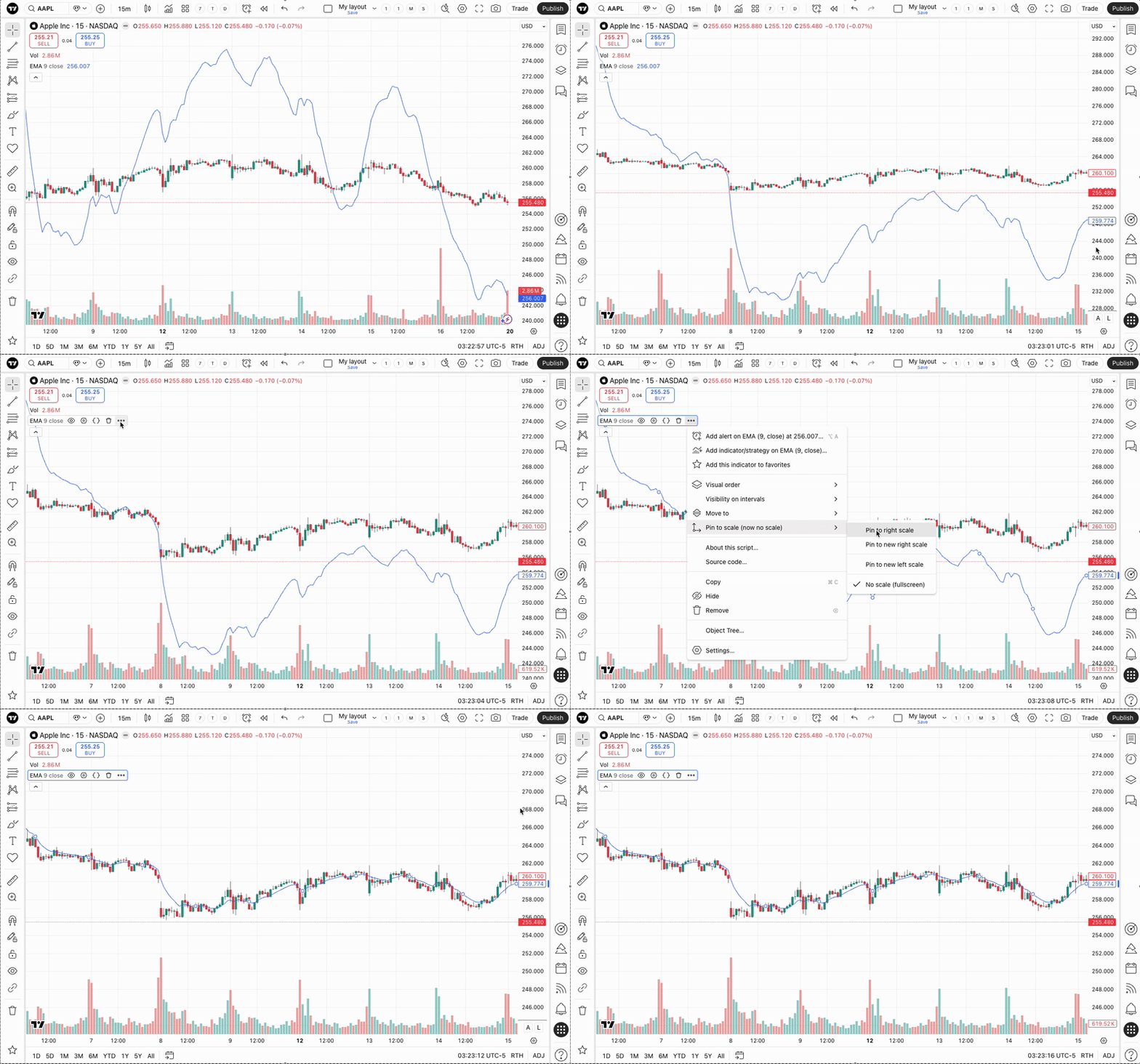
Once selected, the indicator and the price candles will share the same coordinate axis and move synchronously.