FX4 [oH/Lc]
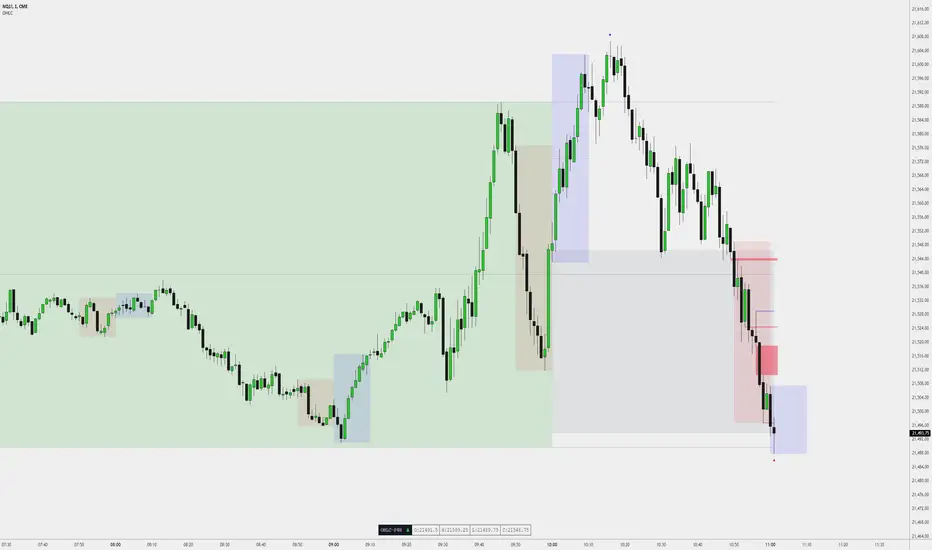
High Value for Fair Value. You're Welcome.🤝.
- Changed Triangle from Small to Tiny (Looks better).
- Changed some feature titles.
- Minors bugs
- was too small on mobile.
- changed how the triangle show up to be more available consistently on every type of charts.
- changed some title of function (minor)
Added - the possibility to show more than 1 OHLC Background (In the past)
Added - Fractal Order Flow High and Low from M5, M15, M30 (BSL, SSL)
Added - Tooltip for a lot of settings (for more clarity)
Improved, Cleaned - Lot of code behind
- Higher Performance
- Higher Accuracy
- Higher Precision
Enjoy the update folks!
- Changed P30 Liquidity for P60
- Many mores updated settings
- Join the Discord to get access EDU included with the tool (FX4model.com)
- Weekly Profile Customizable: All aspects of the feature, including line style and display, can be fully customized to suit user preferences.
Added: Dynamic Separator Display
Separators now dynamically disappear when the chart is above the selected timeframe.
Fixed: Separator issue that prevented correct display on certain brokers and assets.
(Thanks for reporting this bug)
:)
(Last update for a couple months, unless major bugs)
Enjoy! :)
David
Reflect 17:00 like it supposed instead of 18:00.
Added : Show the Latest FVG (most recent FVG on the timeframe you're actually on)
with customization options. (Colors, Horizontal Extension, Midpoint Line..
Available NOW!
Trust me, you don't need more than 5... 😉
David
Added ARL : Algorithmic Range Lookback
ARL stands for Algorithmic Range Lookback, authored by FX4LIVING.
Great Sunday ;)
(Default:OFF) When 'Open to Close Mode' is enabled, the background box will be drawn from the opening price to the closing price of the selected range, instead of from the high to the low. This mode allows the box to reflect only the open and close prices, providing a more precise visualization of the candle's body without considering the wicks (high/low).
See example below :
Which simulate a Bar withing the Range
(Open, High, Low, Close)
- Added Index/Futures x Forex ICT Killzone as background with the ability to change visibility under the 1m, 5m, and 15m timeframes
- Slightly changed some settings for clarity's sake
Make sure you are in the Discord; I will start pushing more videos soon.
Also, for better understanding, joining the Bootcamp is probably the fastest route to deeply understanding this tool.
fx4model.com
Sorry for the notification ;)
Alright Last one folks, Good week ;)
Lot of change on the user interface mainly.
Removed: ARL (Algorithmic Range Lookback). Will be reintroduced in the future.
Added: Current Open OHLC Framework.
Changed: Fractal High/Low tooltip, now showing the timeframe used as well.
Join the Discord then claim your role contacting FX4LIVING by email to info@fx4model.com
Mandatory Update!
- New Version of the Table (OHLC Dashboard) with massive improvements.
- Updated some tooltips to make them easier for new users to understand.
- Removed the extended lines on algorithmic swing highs/lows.
- Added Style, Color, Width on the Quarters Levels 25/75%
- AddedCustom Intraday OHLC Overlay (colored-bar with time-range)
Happy Holidays!
David
FX4LIVING
Hourly Macro - Open (Start: XX:00 | End: XX:10)
Hourly Macro - Close (Start: XX:50 | End: XX:59)
enjoy
- Complete remaster of the FVG logic.
- Now displaying Reclaimed FVGs
- Now displaying iFVG (Inversion Fair Value Gaps).
- Now displaying labels at the end of extended lines from previous ranges (e.g., PD-H, PD-EQ, PD-L).
- Added extra spacing to the left of lines/labels for better visibility of price action.
- Some other minor details.
The indicator is now faster than ever before.
Enjoy
David
- Added a toggle to enable/disable FVG labels.
- Slightly adjusted the iFVG color # for better visibility across both dark and light chart backgrounds.
Enjoy!
David
• Improved the Extended Lines: Lines now extend to the end of the selected timeframe, making it easier to anticipate candle closes. (H/L/EQ/25%/75%)
• Skeleton Bar Mode Enhancements: Improved visuals and accuracy. Integrated the Body from Open Mode into the same function for a more plug-and-play experience.
• Settings Update: Reorganized and renamed inputs for better clarity and usability.
Enjoy!
fx4_living
Extend to Current Price: Lines for high, low, and midpoint now extend to the current price bar by default, providing real-time updates instead of projecting to the future closing price.
5-Minute Open Price History: Added support for displaying historical 5-minute open prices as horizontal lines, similar to the existing 15-minute and 60-minute options.
Improved Setting Names: Renamed several settings for better clarity and ease of use, making the indicator more intuitive for all users.
Adjusted Box Opacity: Set the default opacity of the bullish (green) price range box to 10%, matching the bearish (gray) box for consistent visibility.
Extended Swing High/Low Lines: Algorithmic swing high and low lines now extend bars by default (+3 in future) for improved visibility on charts including potential Swings.
Custom Fractal Timeframe & Labels: Added a customizable timeframe setting for fractal high/low real time and an option to display text labels instead of the default triangle (▼/▲) symbols.
Dashboard Disabled by default. I will improve the dashboard in a future update making it more relevant for the trader.
Feedback Welcome: If you encounter any issues or have suggestions, please share them in our Discord community. I'm committed to making this the ultimate all-in-one OHLC trading indicator!
Cleaner Macro Borders: Added a style setting for macro borders, giving a sleeker and more polished look.
Smoother Timeframe Switching: No more annoying errors! The OHLC range box, skeleton lines, and high/low/midpoint lines now automatically hide when your chart’s timeframe is higher than the selected timeframe. This makes the indicator super easy to use on any timeframe, while features like Fair value gaps and swing points stay active.
Minor tweak to Fair Value Gaps: Made a small update to how fair value gaps look for a better visual experience.
fx4_living
Added the ability for 5-minute and 15-minute open lines to extend to the end of the hour when their respective toggles are enabled, ensuring consistent alignment with hourly intervals.
Limited the number of Open lines to a maximum 9-hour lookback to improve overall internal memory performance.
Refined line styling for improved reliability when multiple options are active:
Before:
5m — Solid Green, Width 1
15m — Solid Blue, Width 1
60m — Solid Black, Width 1
After:
5m — Dotted Dark Gray, Width 1
15m — Dashed Dark Gray, Width 2
60m — Solid Dark Gray, Width 3
Enjoy, and have a great Saturday!
fx4_living
- Added 4h Liquidity (so now available: 5m, 15m, 1h, 4h)
- Added FVG's Toggle on/off conserving the input for the amount of them
- Added on request, previous Day/Week time-based liquidity
- Improved some settings clarity
- Improved dynamic separator calculation, specifically for BTC/USD
Enjoy!
fx4_living
- 7 Customizable Sessions (HH:MM to HH:MM)
- The important session liquidity based are setup by default (see examples down below)
Default Liquidity-Based Sessions:
- Asia Session
- London Session
- Pre-Market Session
- New York AM Session
- Lunch Time Session
- New York PM Session
- Electronic Hours Session
Default color is Dark gray for all of them excluding the electronic trading hour session as white.
You will be able to set the color you prefer yourself.
You can manually change all of these and toggle extended lines for the high and low of each session.
Ideally, do not activate all of them at once—it will immediately clutter your charts.
As ICT mentioned in his lecture today:
Liquidity formed in one session is often targeted or used in subsequent sessions.
Enjoy, and feel free to suggest new features on Discord. I'm actively planning to completely remake the dashboard soon to make it more useful for OHLC traders.
— fx4_living
- Added customizable box for session
- Added customizable text for session
- Added line extension stop on raid
- Modified: Settings input for Time-Based Liquidity
- Fixed: the Daily, Weekly, and Monthly separators to ensure proper alignment and visibility on 4h timeframe.
- Corrected: the overnight session plotting issue, ensuring it no longer displays/extend on the following day.
- Added: Seven customizable time-based open price vertical and horizontal lines with labels.
Enjoy!
Keep reporting bugs or ideas to discord.gg/OHLC
fx4_living
- Fixed a bug related to FVG's Labels
Enjoy!
fx4_living
- Minor visual change
Enjoy!
fx4_living
- Fixed a recently reported bug with custom open lines
- Customized some default style values
Enjoy your Saturday!
fx4_living
Invite-only script
Only users approved by the author can access this script. You'll need to request and get permission to use it. This is typically granted after payment. For more details, follow the author's instructions below or contact FX4_LIVING directly.
Note that this private, invite-only script has not been reviewed by script moderators, and its compliance with House Rules is undetermined. TradingView does NOT recommend paying for or using a script unless you fully trust its author and understand how it works. You may also find free, open-source alternatives in our community scripts.
Author's instructions

Disclaimer
Invite-only script
Only users approved by the author can access this script. You'll need to request and get permission to use it. This is typically granted after payment. For more details, follow the author's instructions below or contact FX4_LIVING directly.
Note that this private, invite-only script has not been reviewed by script moderators, and its compliance with House Rules is undetermined. TradingView does NOT recommend paying for or using a script unless you fully trust its author and understand how it works. You may also find free, open-source alternatives in our community scripts.