PROTECTED SOURCE SCRIPT
Updated ALGOME - Standard SupeRTrend_V22.14.0
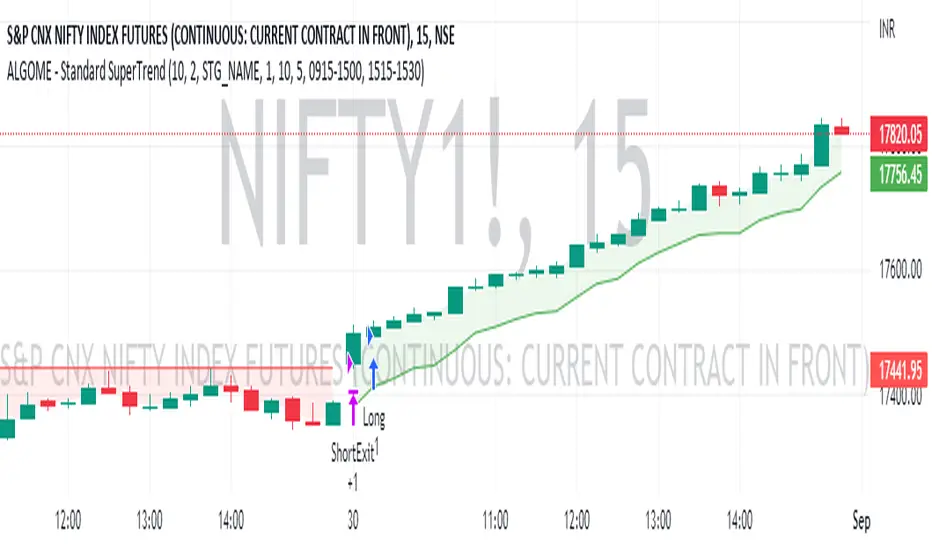
SuperTrend indicator helps analyze the trend & customize the setup for various scrips.
About SuperTrend:
tradingview.com/chart/?solution=43000634738
Directional Indication:
Useful Parameters & Settings:
Alert Message:
Type in the alert message as "{{strategy.order.alert_message}}"
How To Access, Setup, Integrate & Execute Live Alerts?
algome.in/post/how-to-setup-strategy-create-alerts-on-tradingview
About SuperTrend:
tradingview.com/chart/?solution=43000634738
Directional Indication:
- Enter LONG position when Super Trend changes direction from down-trend to up-trend (Red to Green trend line )
- Enter SHORT position when Super Trend changes direction from up-trend to down-trend (Green to Red trend line )
Useful Parameters & Settings:
- Set ATR Length, Factor & Time Frame values that best suits
- Tick "Intraday-First Bar Entry" to enter a trade at the first bar of the day based on the SuperTrend trend indication.
- To trade on the Real-time bar, Go to Strategy Settings >> Properties >> Recalculate and select the "On Every Tick" option.
- Untick the "Signal Labels" option from Settings >> Style property window for a clean chart view.
Alert Message:
Type in the alert message as "{{strategy.order.alert_message}}"
How To Access, Setup, Integrate & Execute Live Alerts?
algome.in/post/how-to-setup-strategy-create-alerts-on-tradingview
Release Notes
Minor updates: Cleaner chart & populating minimal required information.Protected script
This script is published as closed-source. However, you can use it freely and without any limitations – learn more here.

Disclaimer
The information and publications are not meant to be, and do not constitute, financial, investment, trading, or other types of advice or recommendations supplied or endorsed by TradingView. Read more in the Terms of Use.
Protected script
This script is published as closed-source. However, you can use it freely and without any limitations – learn more here.
Disclaimer
The information and publications are not meant to be, and do not constitute, financial, investment, trading, or other types of advice or recommendations supplied or endorsed by TradingView. Read more in the Terms of Use.