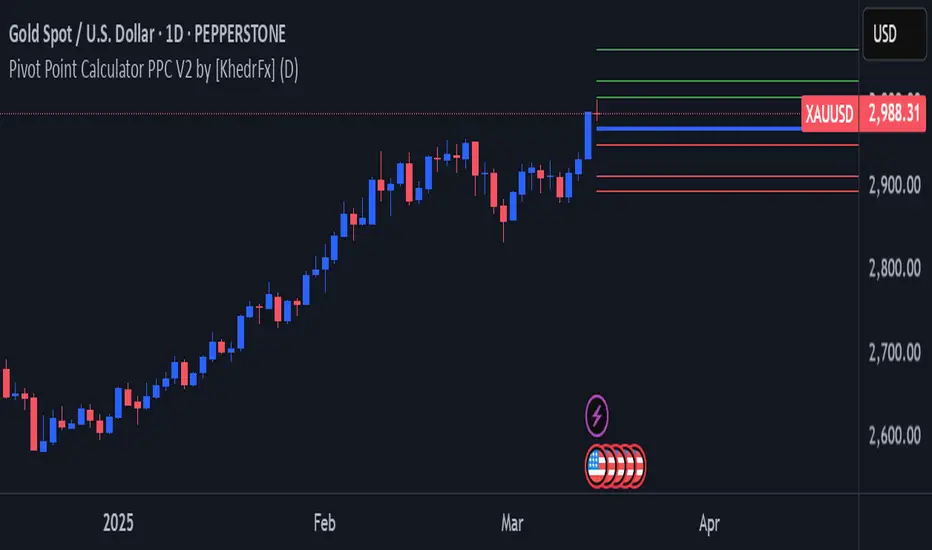
Zero-Lag Linear Regression Candles🚀 Zero-Lag Linear Regression Candles
📊 What It Does
The Zero-Lag Linear Regression Candles change traditional candlestick analysis by creating smoothed, predictive candles that eliminate the lag inherent in standard linear regression methods. Instead of waiting for price confirmation, this indicator anticipates market movements using advanced mathematical modeling.
🎯 Key Features
Tri-Layer Super Responsive System
Layer 1: Weighted Linear Regression with exponential decay weighting
Layer 2: Zero-lag correction algorithm that projects future price direction
Layer 3: Adaptive intelligence that adjusts to current market volatility and momentum
Smart Market Adaptation
Automatically adjusts sensitivity based on market volatility (ATR)
Responds to momentum changes in real-time
Filters out market noise while preserving important signals
Customizable
Regression Length: Fine-tune responsiveness (2-50 periods)
Weight Decay Factor: Control how much emphasis to place on recent vs. historical data
Zero-Lag Periods: Adjust the aggressiveness of lag elimination
Adaptive Factor: Set market adaptation strength
🛠️ Usage Instructions
1. Add to Chart: Apply the indicator to any timeframe
2. Configure Settings: Adjust regression length and sensitivity to match your trading style
3. Interpret Signals:
- Green Candles: Bullish linear regression trend
- Red Candles: Bearish linear regression trend
Created by B3AR_Trades
Search in scripts for "Candlestick"
Trendline Breakouts With Volume Strength [TradeDots]Trendline Breakouts With Volume Strength is an innovative indicator designed to identify potential market turning points using pivot-based trendline detection and volume confirmation. By merging dynamic trendline analysis with multi-tiered volume filters, this tool helps traders quickly spot breakouts or breakdowns that may signal significant shifts in price action.
📝 HOW IT WORKS
1. Pivot-Based Trendline Detection
The script automatically scans for recent pivot highs and lows over a user-defined lookback period.
When it finds higher pivot lows, it plots green uptrend lines; when it finds lower pivot highs, it plots red downtrend lines.
These dynamic lines update as new pivots form, providing continuously refreshed trend guidance.
2. Volume Ratio Analysis
A moving average of volume is compared against the current bar’s volume to calculate a ratio (e.g., 1.5×, 2×).
Higher ratios suggest above-average volume, often interpreted as stronger participation.
The script applies color-coded cues to highlight the intensity of volume surges.
3. Breakout & Breakdown Detection
Each trendline is monitored for a defined “break threshold,” which helps avoid minor penetrations that can trigger premature signals.
When price closes beyond a threshold below an uptrend line, the indicator labels it a “BREAKDOWN.” If it closes above a threshold on a downtrend line, it labels it a “BREAKOUT.”
Volume surges accompanying these breaks are highlighted with contextual emojis and distinct color gradients for quick visual reference.
4. Trend Direction Table
A small on-chart table provides a snapshot of the current market trend—Uptrend, Downtrend, or Sideways—based on a simple moving average slope and the number of active uptrend or downtrend lines.
This table also displays quick stats on how many lines are actively tracked, helping traders assess the broader market posture at a glance.
🛠️ HOW TO USE
1. Choose a Timeframe
This script works on multiple timeframes. Intraday traders can monitor minute or hourly charts for frequent pivot updates, while swing and position traders may prefer daily or weekly intervals to reduce noise.
2. Observe Trendlines & Labels
Watch for newly drawn green/red lines connecting pivots.
When you see a “BREAKOUT” or “BREAKDOWN” label, confirm whether volume was abnormally high based on the ratio or color-coded bars.
3. Consult the Trend Table
Use the table in the bottom-right corner to quickly check if the market is trending or range-bound.
Look at the count of active uptrend vs. downtrend lines to gauge broader sentiment.
4. Employ Additional Analysis
Combine these signals with other tools (e.g., candlestick patterns, oscillators, or fundamental analysis).
Validate potential breakouts using standard techniques like retests or support/resistance checks.
❗️LIMITATIONS
Delayed Pivots: Trendlines only adjust once new pivot highs or lows form, which can introduce a slight lag in highly volatile environments.
Choppy Markets: Rapid, back-and-forth price moves may produce conflicting trendline signals and frequent breakouts/breakdowns.
Volume Data Reliability: Gaps in volume data or unusual market conditions (holidays, low-liquidity sessions) can skew ratio readings.
RISK DISCLAIMER
Trading any financial instrument involves substantial risk, and this indicator does not guarantee profits or prevent losses. All signals and visual cues are for educational and informational purposes only; past performance does not assure future outcomes. You retain full responsibility for your trading decisions, including proper risk management, position sizing, and the use of additional confirmation methods. Always consider the possibility of losing some or all of your original investment.

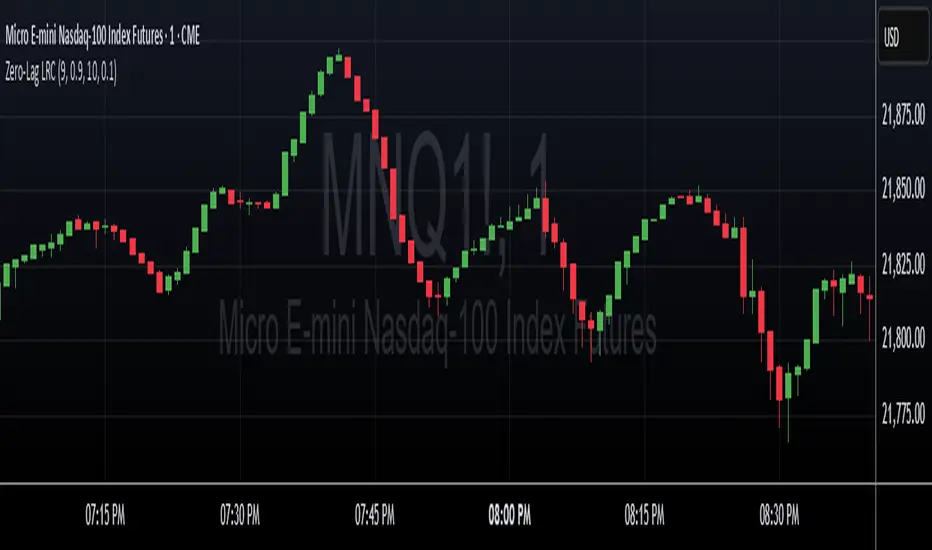
Bounce Zone📘 Bounce Zone – Indicator Description
The "Bounce Zone" indicator is a custom tool designed to highlight potential reversal zones on the chart based on volume exhaustion and price structure. It identifies sequences of candles with low volume activity and marks key price levels that could act as "bounce zones", where price is likely to react.
🔍 How It Works
Volume Analysis:
The indicator calculates a Simple Moving Average (SMA) of volume (default: 20 periods).
It looks for at least 6 consecutive candles (configurable) where the volume is below this volume SMA.
Color Consistency:
The candles must all be of the same color:
Green candles (bullish) for potential downward bounce zones.
Red candles (bearish) for potential upward bounce zones.
Zone Detection:
When a valid sequence is found:
For green candles: it draws a horizontal line at the low of the last red candle before the sequence.
For red candles: it draws a horizontal line at the high of the last green candle before the sequence.
Bounce Tracking:
Each horizontal line remains on the chart until it is touched twice by price (high or low depending on direction).
After two touches, the line is automatically removed, indicating the zone has fulfilled its purpose.
📈 Use Cases
Identify areas of price exhaustion after strong directional pushes.
Spot liquidity zones where institutions might step in.
Combine with candlestick confirmation for reversal trades.
Useful in both trending and range-bound markets for entry or exit signals.
⚙️ Parameters
min_consecutive: Minimum number of consecutive low-volume candles of the same color (default: 6).
vol_ma_len: Length of the volume moving average (default: 20).
🧠 Notes
The indicator does not repaint and is based purely on historical candle and volume structure.
Designed for manual strategy confirmation or support for algorithmic setups.
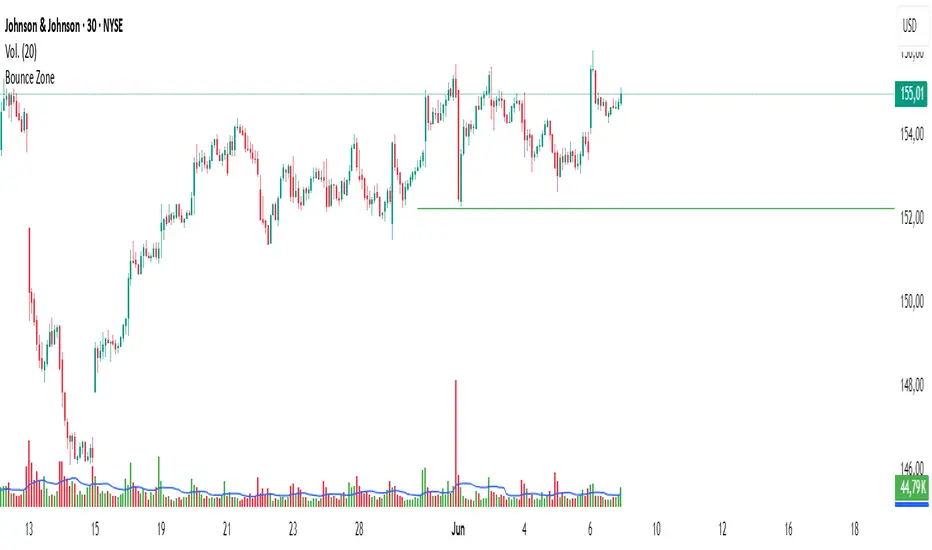
Liquidity mark-out indicator(by Lumiere)This indicator marks out every High that has a bullish candle followed by a bearish one, vice versa for lows.
Once the price reaches the marked-out liquidity, the line is removed automatically.
This indicator only shows the current liquidity of the time frame you are at.
(To get it look like the picture just chance the length to 30-50)
Key Features of the Liquidity Mark-Out Indicator:
🔹 Identifies Liquidity Zones – Marks highs and lows based on candlestick patterns.
🔹 Customizable Settings – Toggle highs/lows visibility 🎚️, adjust line colors 🎨, and set line length (bars) 📏.
🔹 Smart Clean-Up – Automatically removes swept levels (when price breaks through) for a clean chart 🧹.
🔹 Pattern-Based Detection –
Highs: Detects two-candle reversal patterns (🟢 bullish close → 🔴 bearish close).
Lows: Detects two-candle reversal patterns (🔴 bearish close → 🟢 bullish close).
🔹 Dynamic Lines – Projects liquidity levels forward (adjustable length) to track key zones 📈.
Perfect For Traders Looking To:
✅ Spot potential liquidity grabs 🎯
✅ Identify key support/resistance levels 🛑
✅ Clean up their chart from outdated levels 🖥️

Opening Range Breakout with John Wick + CDH/CDLOpening Range Breakout (ORB) De Luxe with John Wick Pattern - User Manual Table of Contents
1. Introduction
2. Key Features
3. Installation
4. Configuration Guide
5. Trading Signals
6. Pattern Recognition
7. Zone Trading
8. Alert Setup
9. Trading Strategies
10. Best Practices
11. Troubleshooting
________________________________________
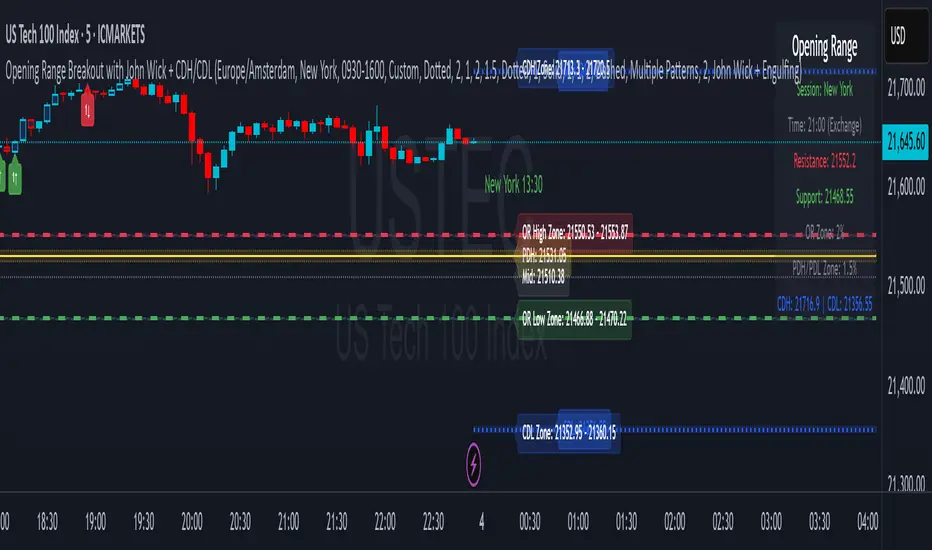
1. Introduction The Opening Range Breakout (ORB) with John Wick indicator is a comprehensive trading tool designed for intraday and swing traders. It combines the classic Opening Range Breakout strategy with advanced candlestick pattern recognition, including the unique "John Wick" pattern. What is Opening Range Breakout? The Opening Range (OR) is the price range established during the first 15 minutes of a trading session. This range often acts as support and resistance for the remainder of the trading day. Breakouts above or below this range can signal strong directional moves. Key Concepts: • Opening Range High: The highest price during the first 15 minutes • Opening Range Low: The lowest price during the first 15 minutes • Breakout: Price movement above OR High (bullish) or below OR Low (bearish) • Pattern Zones: Areas around key levels where pattern recognition is most effective • PDH/PDL: Previous Day High and Previous Day Low - key reference levels from the prior trading day • CDH/CDL: Current Day High and Current Day Low - dynamically updating intraday extremes
________________________________________
2. Key Features Core Features: • Multi-Session Support: New York, London, Tokyo, Sydney, Frankfurt, and Custom sessions • Opening Range Visualization: Automatic OR High/Low detection and plotting • Pattern Recognition: Engulfing, Hammer/Shooting Star, Doji, and John Wick patterns • Zone Trading: Customizable zones around OR and PDH/PDL/CDH/CDL levels • Previous Day Levels: PDH (Previous Day High) and PDL (Previous Day Low) • Current Day Levels: CDH (Current Day High) and CDL (Current Day Low) - real-time tracking • Mid-Point Levels: Automatic calculation of OR mid-point • Real-Time Alerts: Breakout and pattern-based alerts • Multi-Timezone Support: Exchange or custom timezone selection Visual Features: • Dynamic color-coded levels • Triangle signals for breakouts • Pattern labels with clear identification • Information table with current session data • Fully customizable colors and styles
________________________________________
3. Installation Step 1: Add to Chart
4. Open TradingView and navigate to your desired chart
5. Click on "Indicators" (or press /)
6. Search for "Opening Range Breakout with John Wick"
7. Click to add the indicator to your chart Step 2: Initial Setup
8. The indicator will automatically detect your chart's timezone
9. Default session is set to "New York"
10. All features are enabled by default Recommended Timeframes: • Optimal: 1-minute to 15-minute charts • Suitable: Up to 1-hour charts • Not Recommended: Daily or higher timeframes
________________________________________
4. Configuration Guide Timezone Settings Use Exchange Timezone • Enabled (Default): Uses the exchange's native timezone • Disabled: Uses chart timezone or custom selection Timezone Selection Available when "Use Exchange Timezone" is disabled: • America/New_York • Europe/London • Europe/Amsterdam • Asia/Tokyo • Australia/Sydney Session Selection Trading Sessions • Sydney: 09:00-16:00 Sydney time • Tokyo: 09:00-15:00 Tokyo time • London: 08:00-16:30 London time • Frankfurt: 09:00-17:30 Frankfurt time • New York: 09:30-16:00 New York time • Custom: User-defined session • Previous Sessions: Shows multiple historical ORs Custom Session Settings • Custom Session Time: Define your own trading hours • Custom Session Name: Label for your custom session Display Options Line Settings • Line Width: 1-5 (Default: 2) • Line Style: Solid, Dashed, or Dotted • Show Current Only: Hide historical OR lines • Show Session Name: Display session label on chart Color Customization • OR Resistance (High): Default red • OR Support (Low): Default green • Session Colors: Unique color per session type • Zone Colors: Separate colors for OR and PDH/PDL zones Pattern Zone Settings Zone Configuration • Show Pattern Detection Zone: Enable/disable zones • OR Zone Size: Percentage of OR range (Default: 2%) • PDH/PDL Zone Size: Percentage of PDH-PDL range (Default: 1.5%) • CDH/CDL Zone Size: Percentage of CDH-CDL range (Default: 1.5%) • Show Zone Labels: Display zone boundary values • Only Detect Patterns in Zone: Limit pattern detection to zones Mid-Point Settings • Show Opening Range Mid-Point: Display OR midline • Mid-Point Color: Default gray • Mid-Point Style: Dotted, Dashed, or Solid • Show Mid-Point Label: Display midpoint value Previous Day Levels • Show Previous Day High/Low: Enable PDH/PDL lines • PDH/PDL Colors: Default yellow • PDH/PDL Line Style: Customizable style • Show PDH/PDL Labels: Display level values
Current Day Levels • Show Current Day High/Low: Enable CDH/CDL lines • CDH/CDL Colors: Default blue • CDH/CDL Line Style: Customizable style • Show CDH/CDL Labels: Display level values • Update Frequency: Real-time updates as new highs/lows are made
________________________________________
5. Trading Signals Signal Types
6. Breakout Signals • Bullish (Buy): Green triangle below candle when price breaks above OR High • Bearish (Sell): Red triangle above candle when price breaks below OR Low
7. Pattern-Enhanced Signals Signals are generated when breakouts occur WITH confirming patterns: • Stronger probability of follow-through • Reduced false breakouts • Better risk/reward setups Signal Configuration Alert Settings • Enable Alerts: Turn alerts on/off • Show Buy/Sell Signals: Visual signals on chart • Show Signal Text: Display "BUY"/"SELL" labels Pattern Filter Options • Use Candle Pattern Filter: Require patterns for signals • Pattern Combination Mode: o Any Pattern: Signal on any single pattern o Multiple Patterns: Require minimum pattern count o Specific Combo: Require specific pattern combinations
________________________________________
6. Pattern Recognition Supported Patterns
7. Engulfing Pattern • Bullish Engulfing: Large green candle completely engulfs previous red candle • Bearish Engulfing: Large red candle completely engulfs previous green candle • Label: "E"
8. Hammer/Shooting Star • Hammer: Small body at top, long lower wick (2x body size) • Shooting Star: Small body at bottom, long upper wick (2x body size) • Labels: "H" (Hammer), "S" (Shooting Star)
9. Doji Pattern • Definition: Open and close nearly equal (body < 10% of average) • Significance: Indecision, potential reversal • Label: "D"
10. John Wick Pattern (Unique Feature) • Bullish John Wick: o Opens below previous candle's low o 30-70% of body extends below previous low o Strong momentum indication • Bearish John Wick: o Opens above previous candle's high o 30-70% of body extends above previous high • Label: "JW" Pattern Visualization • Pattern Markers: Small circular labels with pattern abbreviations • Pattern Count: Number showing total patterns detected • Pattern Background: Optional highlighting (disabled by default) • Positioning: o Bullish patterns: Below candles at varying distances o Bearish patterns: Above candles at varying distances
________________________________________
7. Zone Trading Zone Concept Zones are buffer areas around key levels where price action and patterns are monitored more closely. Zone Types
8. Opening Range Zones • OR High Zone: Area around the OR High level • OR Low Zone: Area around the OR Low level • Purpose: Identify potential breakout or rejection areas
9. PDH/PDL Zones • PDH Zone: Area around Previous Day High • PDL Zone: Area around Previous Day Low • Purpose: Monitor reactions at key daily levels
10. CDH/CDL Zones • CDH Zone: Area around Current Day High • CDL Zone: Area around Current Day Low • Purpose: Track reactions at evolving intraday extremes • Dynamic Nature: These zones move as new highs/lows are established Zone Features • Visual Representation: Semi-transparent colored boxes • Customizable Size: Percentage-based calculation • Pattern Detection: Option to only detect patterns within zones • Bar Coloring: Candles change color when in zones Zone Trading Strategy
11. Wait for price to enter a zone
12. Look for pattern formation within the zone
13. Trade breakouts with pattern confirmation
14. Use zone boundaries as stop-loss references
________________________________________
8. Alert Setup Creating Alerts Step 1: Basic Alert Setup
9. Right-click on the chart
10. Select "Add Alert"
11. Choose "ORB The Luxe" from Condition dropdown
12. Select alert type Step 2: Alert Types • Any alert() function call: All indicator alerts • Crossed above OR High: Bullish breakout • Crossed below OR Low: Bearish breakout Alert Messages Alerts include: • Session name (e.g., "New York") • Direction (above/below) • Level crossed • Pattern detected (if applicable) • Zone information (if in zone) Alert Best Practices
13. Set alerts after the OR is established (15+ minutes into session)
14. Use pattern filters to reduce false signals
15. Consider zone alerts for higher probability setups
16. Set stop-loss alerts at opposite OR level
________________________________________
9. Trading Strategies Strategy 1: Classic ORB
10. Entry: o Long: Break above OR High o Short: Break below OR Low
11. Stop Loss: Opposite OR level
12. Target: 1:2 or 1:3 risk/reward
13. Best Time: First 2 hours after OR Strategy 2: ORB with Pattern Confirmation
14. Entry Requirements: o Breakout signal o At least one confirming pattern o Preferably within a zone
15. Stop Loss: Mid-point of OR
16. Target: Previous day's high/low or current day's high/low
17. Win Rate: Higher than classic ORB Strategy 3: Zone Rejection Trading
18. Setup: Price enters zone but fails to break OR
19. Entry: Reversal pattern in zone
20. Stop Loss: Just outside zone boundary
21. Target: Opposite OR level
22. Best For: Range-bound markets Strategy 4: Multi-Session Confluence
23. Look for: Alignment of multiple session ORs
24. Entry: Break of aligned levels
25. Confirmation: Pattern at confluence point
26. Target: Extended moves expected
27. Additional Edge: Watch for CDH/CDL tests during the session
Strategy 5: CDH/CDL Breakout Trading
1. Setup: Price approaches current day's high or low
2. Entry: Break and hold above CDH or below CDL
3. Confirmation: Volume increase or pattern formation
4. Stop Loss: Just inside the CDH/CDL level
5. Target: Measured move based on intraday range
6. Best For: Trending days with momentum Risk Management Rules • Position Size: Risk 1-2% per trade • Max Daily Loss: 3-5% of account • Avoid: First and last 15 minutes of session • Best Days: Tuesday through Thursday
________________________________________
10. Best Practices Do's:
• Wait for OR to be established (15 minutes)
• Use multiple confirmations (pattern + zone + volume)
• Trade in the direction of the larger trend
• Set alerts to avoid missing opportunities
• Keep a trading journal of ORB trades
• Adjust zones based on market volatility
• Use proper position sizing Don'ts:
• Trade immediately at market open
• Ignore the overall market context
• Trade every OR breakout
• Use in choppy/low volume markets
• Set stops too close to entry
• Trade against strong trends
• Over-leverage positions Market Conditions Best Performance: • Trending days • High volume sessions • Economic news days • Clear market sentiment Avoid During: • Low volume holidays • Extremely choppy conditions • Major uncertainty events • End of month/quarter repositioning
________________________________________
11. Troubleshooting Common Issues and Solutions Issue: No signals appearing Solutions: • Ensure "Show Buy/Sell Signals" is enabled • Check if pattern filter is too restrictive • Verify correct session is selected • Confirm market has broken OR levels Issue: Too many false signals Solutions: • Enable pattern filter requirement • Use "Multiple Patterns" mode • Trade only within zones • Increase zone size percentage Issue: Incorrect session times Solutions: • Check timezone settings • Verify exchange timezone option • Use custom session for specific needs • Ensure chart timeframe is appropriate Issue: Overlapping indicators Solutions: • Disable pattern markers if too cluttered • Turn off signal text • Hide PDH/PDL or CDH/CDL if not needed • Use "Show Current Only" option Performance Tips
12. Reduce Chart Load: Hide historical sessions
13. Clean View: Disable unused pattern types
14. Mobile Trading: Increase line widths for visibility
15. Multiple Monitors: Use different sessions per screen Getting Help • Check indicator settings tooltips • Test on demo account first • Document your settings for consistency • Join ORB trading communities for tips
________________________________________
Conclusion The Opening Range Breakout with John Wick indicator is a powerful tool that combines time-tested ORB strategies with advanced pattern recognition. Success comes from understanding each component, practicing proper risk management, and adapting the tool to your trading style. Remember: No indicator guarantees profits. Always use proper risk management and continuous education to improve your trading results. Happy Trading!
________________________________________
Version: 1.0 Last Updated: June 2025 Pine Script Version: 6
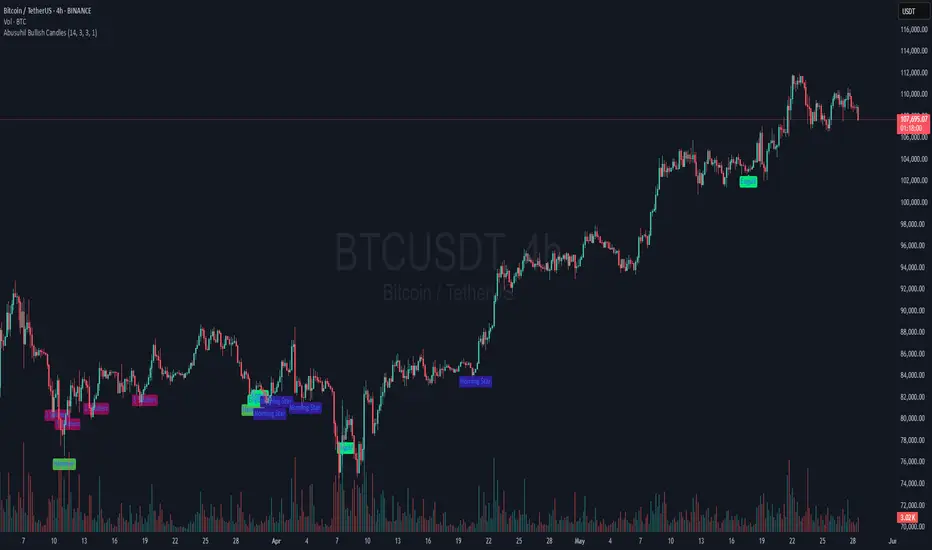
Abusuhil Bullish CandlesAbusuhil Bullish Candles is a pattern recognition indicator designed to identify key bullish reversal candlestick formations including Hammer, Bullish Engulfing, Morning Star, Piercing Line, Three White Soldiers, and Three Inside Up.
The script includes optional filters such as Stochastic and Volume Confirmation, providing more precise signal detection.
Each pattern and filter is fully customizable via settings. Alerts are also included to support active trading workflows.
This script was written originally and does not copy open-source indicators. It's ideal for traders seeking visual clarity on bullish opportunities with professional-grade logic.
مؤشر الشموع الصعودية هو مؤشر احترافي يكتشف أبرز نماذج الانعكاس الصعودي في الشموع اليابانية مثل: Hammer، Bullish Engulfing، Morning Star، Piercing Line، Three White Soldiers، و Three Inside Up.
يوفر المؤشر فلاتر إضافية مثل فلتر Stochastic وفلتر الفوليوم لتعزيز دقة الإشارات. جميع الإعدادات قابلة للتعديل بما يتناسب مع احتياج كل متداول.
يحتوي المؤشر أيضًا على تنبيهات تلقائية لدعم استراتيجيات التداول اللحظي. تمت برمجة المؤشر من الصفر ويعتمد على منطق خاص غير منسوخ من سكربتات مفتوحة المصدر.
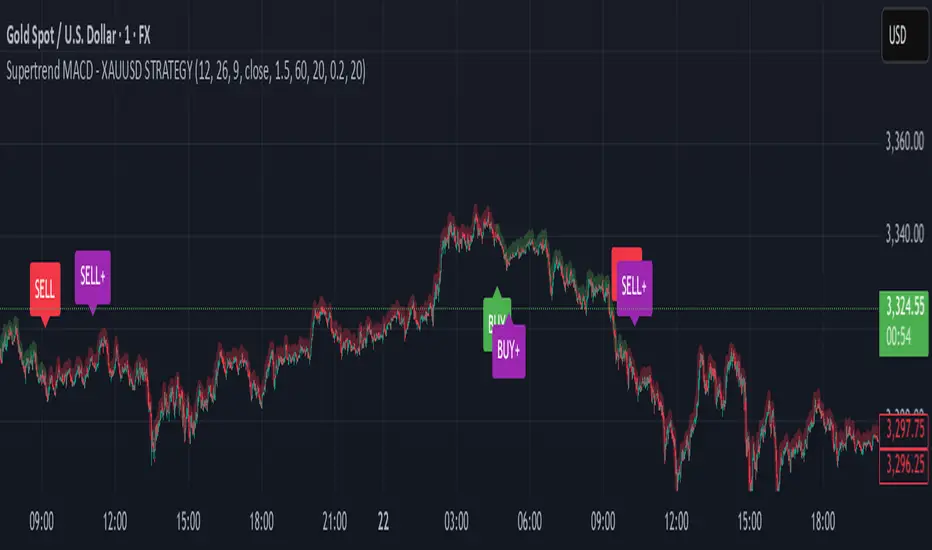
Supertrend MACD - XAUUSD STRATEGY 🔶 Supertrend MACD - XAUUSD STRATEGY (v6) (XAUUSD ONLY FOR NOW)
A high-performance, multi-filtered MACD-based strategy tailored for XAUUSD (Gold) traders seeking precision entries during trending conditions. This indicator intelligently combines multiple technical layers—momentum, trend strength, volatility, and market structure—to help identify high-probability trade setups with improved reliability.
🧠 Core Logic & Features Explained:
🔸 MACD Momentum Engine
At the heart of the strategy lies the traditional MACD indicator (Moving Average Convergence Divergence), calculating the difference between two EMAs (fast and slow) and smoothing it with a signal line.
Buy Signal: Triggered when the MACD line crosses above the signal line.
Sell Signal: Triggered when the MACD line crosses below the signal line.
These signals are the foundation, but only the beginning of a layered decision-making process.
🔸 Higher Timeframe (HTF) Trend Confirmation
To filter out noise and false breakouts, the indicator references MACD values from a higher timeframe (configurable by the user). This powerful multi-timeframe approach ensures that entries only occur in alignment with the dominant macro-trend.
Ensures entries are not taken counter to larger market movements.
Helps identify momentum continuation setups and avoid chop.
🔸 Support Arrow Display (Optional)
For visual traders, an option to display support arrows on the chart can be enabled. These assist in identifying visually intuitive entry points and enhance situational awareness.
⚙️ User-Customizable Inputs:
MACD Settings: Fast EMA, Slow EMA, Signal EMA lengths.
Signal Offset: For visual alignment and candle matching.
HTF MACD Settings: Select any timeframe for higher timeframe filtering.
ATR and ADX Thresholds: Fine-tune filters to match your trading style.
Structure Break Lookback: Adjust BOS+ logic sensitivity.
Arrow Toggles: Enable or disable visual support arrows as needed.
THIS indicator is in its alpha stage, currently it only works on XAUUSD pairs, i plan to update this indicator so that it functions on every single pair available on Trading view
Another note, the signals given only become solid after the second the candlestick, after this the signal becomes solid. REPAINTING CAN HAPPEN AFTER THE FIRST CANDLE STICK OF THE SIGNAL BUT NOT AFTER THE SECOND
As this indicator is only in its alpha stage it should be used as such, every person is responsible for there own personal investments
Same Date Last Year PatternThis tool is designed to help you analyze past price patterns from the same date last year to gain insights into potential market behavior today. It’s perfect for traders who want to spot recurring trends or directional cues (buy or sell signals) based on historical candle formations, rather than focusing on exact price levels. Here’s how it works and how to use it:
How It Works
Historical Lookback: The script examines the price action from the same calendar date last year (e.g., May 26, 2024, for today, May 26, 2025). Since markets may be closed on weekends or holidays (like Memorial Day), it automatically finds the nearest trading day with available data.
Pattern Detection: Instead of showing raw prices (which may not match today’s higher or lower price range), it analyzes the candle’s shape and direction. It tells you if the past candle was bullish (closing higher, suggesting a potential buy) or bearish (closing lower, suggesting a potential sell), along with details like wick size and the trend leading up to it.
Contextual Insight: It checks the trend from the previous few days (uptrend, downtrend, or sideways) to give you a sense of the market’s mood back then. This helps you decide if the pattern might repeat.
Prediction Suggestion: Based on last year’s candle direction, it offers a simple guess for the next candle’s potential move (e.g., bullish or bearish), though this is for reference only and not a guaranteed signal.
Key Features
Customizable Asset Type: You can set it for "Traditional" markets (e.g., stocks, forex) or "Crypto" (e.g., Bitcoin), adjusting how it searches for data based on whether the market runs 24/7.
Visual Cues: Labels appear on your chart showing the pattern and prediction, with colors (green for bullish, red for bearish, blue for prediction) to make it easy to read.
Range Consideration: This tool works best when the chart’s price range is around 1000 (e.g., stocks trading near $1000 or crypto pairs with similar values). Outside this range, the label positioning might not align perfectly due to scaling differences.
How to Use
Add to Chart: Load this script into TradeLocker’s indicator section on a daily chart for best results.
Select Asset Type: In the settings, choose "Traditional" for stocks or forex, or "Crypto" for 24/7 markets like Bitcoin.
Check Data: On the same date each year (e.g., May 26), it will display the pattern from last year’s nearest trading day. Ensure your chart has at least 455 days of historical data loaded to cover the search range.
Interpret Results: Look at the label to see the pattern (e.g., "Bullish Candle, Potential Buy"), trend context, and prediction. Use this to inform your trading decisions, but combine it with other tools for confirmation.
Important Notes
Limitations: It may show "No Data Found" if historical data isn’t available within its search window (up to 90 days around the target date for traditional markets). This is more likely for weekends or holidays. For best results, test it on assets trading around the 1000 price range.
Not a Guarantee: The prediction is based solely on last year’s candle and trend, not a definitive signal. Use it as a guide alongside your strategy and market analysis.
Customization: If you need it to work outside the 1000 range or add more pattern details (e.g., specific candlestick types), let the community know, and we can refine it!
This tool was crafted to help traders explore historical patterns in a user-friendly way. Share your feedback or suggestions in the TradeLocker community to make it even better!

CCT SuperTrade 2025CCT SuperTrade 2025
An original combination of two well-established methodologies for identifying potential market entry and exit opportunities.
General Concept
This script merges principles from the Hi-Lo Activator and the “Holy Grail” strategy developed by Linda Raschke and Laurence Connors. It was conceived by the Central Crypto Traders team and remains closed-source to protect the originality of its logic and scoring system.
Hi-Lo Activator
The Hi-Lo Activator focuses on points of price compression followed by breakouts, much like a compressed spring releasing its energy. This indicator monitors market contraction using simple MAs focusing in low and High candle points.
Holy Grail
Based on the work of Linda Raschke and Laurence Connors, the “Holy Grail” centers on 20-period simple moving average and pullbacks in trending markets using ADX indicator. In this script, we incorporate additional price filters to reinforce the identification of strong trends and pinpoint entry opportunities during retracements.
Unique Scoring System
The script’s logic evaluates multiple factors (trend, momentum, volatility) and generates a proprietary scoring system.
Each signal arises from a confluence of criteria, providing clearer indications for traders looking to identify buy or sell opportunities.
Triple Bollinger Bands and Strategic Zoning
This indicator integrates a customized triple Bollinger Bands setup to establish clear internal trading zones: Sell Zone, Neutral Zone, and Buy Zone. These zones guide traders on potential market reversals or continuation points. Additionally, the outer Bollinger Band set at 3 standard deviations (Dev3) identifies extreme volatility boundaries—price action rarely sustains movements beyond this level, signaling potential short-term exhaustion or reversal points.
Color Candle System (Trend + Volume + Momentum)
The indicator utilizes an advanced 9-color candle system, combining real-time trend, volume, and momentum data into a visual scale. Each candle color corresponds to a unique market condition, providing traders with instant and intuitive insights into current market sentiment and strength.
Additional Indicator Features
The indicator also includes several supplementary tools to enhance analysis precision:
Four customizable moving averages, selectable among EMA, SMA, WMA, HMA, DEMA, and VWMA, allowing tailored trend analysis.
A proprietary Fibonacci-based trendline, developed exclusively by our team, for dynamic identification of market direction and key support/resistance levels.
Labels clearly identifying plotted lines, significantly simplifying chart interpretation.
Pivot indicators, highlighting critical swing-high and swing-low points, aiding traders in spotting potential market reversals and continuation patterns.
The indicator also features an optional flag to highlight Inside Bars, candlestick patterns indicating price consolidation that can signal impending breakouts or reversals.
The indicator includes dedicated signals to detect potential Pump and Dump scenarios, identified through abnormal volume spikes coupled with significant short-term price fluctuations, warning traders of potentially manipulated or highly speculative market movements.
The indicator identifies possible trend reversals triggered by volume spikes, highlighting moments when significant increases in trading volume coincide with abrupt price changes, potentially signaling exhaustion or initiation of new trends.
Parabolic SAR Integration
The indicator also integrates the Parabolic SAR (Stop and Reverse), clearly marking dynamic points of trend reversal on the chart. This allows traders to quickly visualize potential changes in market direction and manage trade entries or exits more effectively.
Integrated Information Panel
The indicator features a dynamic Info Panel that provides real-time textual readings of all relevant indicators used within the combined strategies. This panel conveniently displays values such as trend strength, momentum status, volatility levels, stochastic signals, ADX strength, and other key metrics already mapped by the script, allowing traders to quickly interpret market conditions and make informed decisions.
Usage and Application
Designed for various trading styles (swing or intraday), this indicator highlights trend shifts and potential reversal points.
When applied to the chart, CCT SuperTrade 2025 should be active unically to avoid unnecessary clutter and ensure straightforward interpretation.
Originality
The key innovation lies in the way we combine and score the signals using our unique score system with the “Hi-Lo Strategy” and the “Holy Grail.”
The code is closed-source due to the unique research and development carried out by our team, resulting in a hybrid algorithm that has no open-source equivalent.
Disclaimer
This script does not guarantee success and does not replace independent analysis. Financial markets carry risks; traders should proceed with caution and further study before making decisions. DYOR
Technical Disclaimer
This indicator is programmed using Pine Script V6, leveraging standard functions and calculations provided by ©TradingView , ensuring the accuracy, integrity, and reliability of the presented market data and signals. However, past performance does not guarantee future results. Always conduct independent analysis and trade responsibly.
It is important to clarify that the CCT SuperTrade 2025 is not a “multi-indicator” developed solely for the purpose of aggregating various visual tools into a single script.
Each of its components—despite being optionally visible as standalone plots—feeds critical data into the script’s integrated scoring system.
These internal modules are interdependent, and none function in isolation or deliver valid signals independently.
Therefore, this makes the CCT SuperTrade 2025 a singular, cohesive algorithm rather than a modular toolkit. The architecture was intentionally designed this way to preserve the logic, flow, and accuracy of the signal generation engine, reinforcing the integrity of the system as a whole. Any attempt to separate these components would compromise the core mechanism and invalidate its analytical structure.

Failed 2s - The StratDescription:
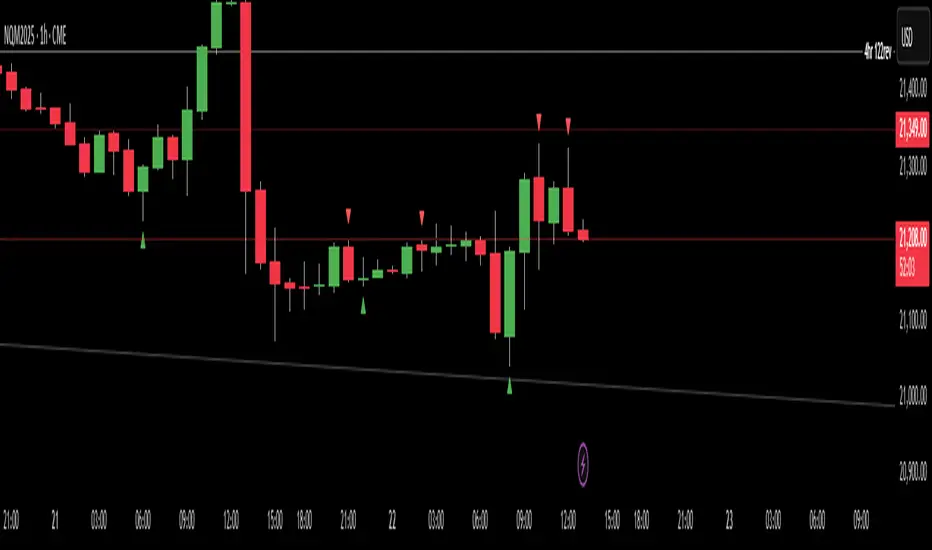
This indicator detects and highlights "Failed 2" candlestick patterns from The Strat methodology — key price action setups signaling potential reversals or continuation points. It automatically identifies Failed 2 Down (Failed 2D) and Failed 2 Up (Failed 2U) signals by analyzing two consecutive bars, with special attention to price interaction at the 50% midpoint of the previous candle.
Visuals:
- Green upward triangles mark Failed 2 Down signals (bullish setups).
- Red downward triangles mark Failed 2 Up signals (bearish setups).
- Special signals that touch the 50% midpoint of the previous candle are emphasized but use the same shapes.
Alerts:
Built-in alert conditions let you receive notifications when these patterns occur, so you never miss a trade opportunity.
How to Use ALERTS in TradingView
- Paste this code into Pine Editor on TradingView.
- Click Add to Chart.
Set alerts:
- Click "Alerts" → "Condition" = your indicator name
- Choose the alert type (e.g. "Failed 2D Bar Alert")
- Set "Once per bar close"
- Customize the notification method (pop-up, app, email, etc.)
Candle Wick Analysis🔍 What This Indicator Does
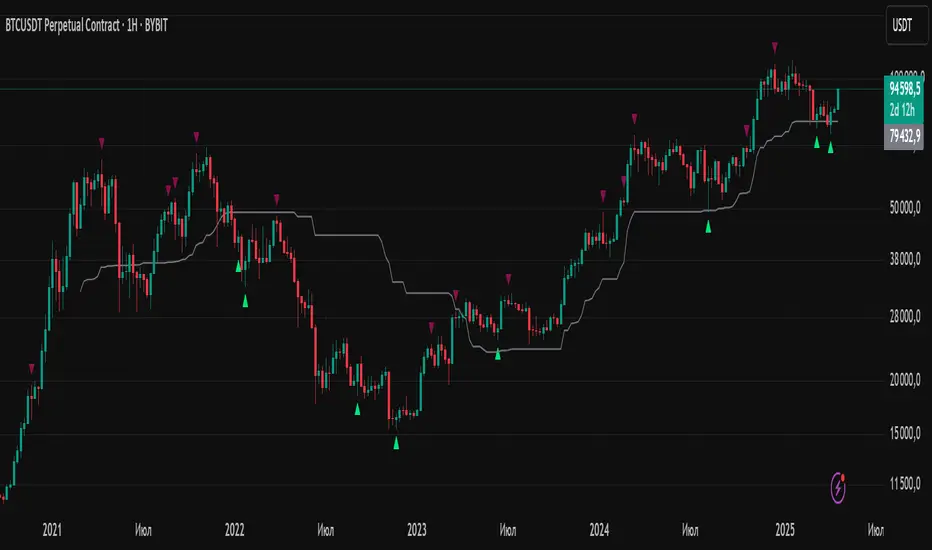
The Candle Wick Analysis indicator dynamically colors each candle body based on the comparative strength of its wicks and body, helping traders visually assess market sentiment, rejection zones, and momentum exhaustion with higher clarity.
This tool is especially useful for:
Price action traders
Scalpers
Reversal and trend continuation traders
Anyone who uses candlestick structure for confirmations
📊 How It Works
The indicator analyzes each candle and compares the percentage change of the upper wick, body, and lower wick relative to the opening price. Based on this relationship, it assigns a green or red color to the candle body to indicate likely price strength or weakness.
🧠 Logic Breakdown
✅ If the Candle is Bullish (close > open):
🔵 Green Candle Body: If the upper wick is smaller than the combined percentage size of the body + lower wick
→ Indicates strong bullish momentum with low upper rejection.
🔴 Red Candle Body: If the upper wick is larger than body + lower wick
→ Suggests potential exhaustion or rejection at the top.
✅ If the Candle is Bearish (close < open):
🔴 Red Candle Body: If the lower wick is smaller than the combined percentage size of the body + upper wick
→ Indicates strong bearish momentum with low lower support.
🟢 Green Candle Body: If the lower wick is larger than body + upper wick
→ Suggests potential downside rejection or support zone bounce.
⚪ Neutral Candles:
If the candle does not meet any specific wick/body criteria, it is displayed in gray to indicate neutrality or indecision (such as a doji).
🛠️ Technical Highlights
Built in Pine Script v5
Uses precise percentage-based wick/body comparison
Works on any timeframe and instrument
Minimalist coloring style: only the body color changes, while wicks stay gray
💡 Use Cases
Quickly spot exhaustion candles, where strong wicks may indicate a reversal or trap.
Validate trend strength: strong candles are colored green, weak ones red, even within bullish or bearish structures.
Filter entries and exits using visual confirmation of wick-to-body dynamics.
📌 Notes
This is a visual tool, not a buy/sell signal indicator.
Best used in conjunction with other forms of analysis (support/resistance, volume, moving averages, etc.)
Can be enhanced with alerts, filters (e.g., volume spikes), or labeling based on user feedback.

Long Bar With ATR Multi Timframe | Amoo HassanLong Bar with ATR Multi Timeframe | Amoo Hassan
Looking for a smarter way to spot powerful moves in the market?
Long Bar with ATR Multi Timeframe is built exactly for that!
This tool helps you catch strong trend breakouts and potential reversals — in a simple, clear, and effective way.
What This Script Does:
Detects Long Bars: It looks for candles with a larger body compared to recent averages and confirms them with ATR (Average True Range). Only truly significant moves are highlighted.
Trend Filtering: Uses fast and slow moving averages (60 EMA, 34 EMA, and 200 SMA) to check if the overall market trend supports your trade.
Multi-Timeframe Supertrend: Supertrend signals are combined across different timeframes to give extra confirmation and reduce false signals.
Sharp Peaks and Valleys: Special candlestick patterns like sharp tops and bottoms are detected automatically.
Smart Trading Sessions: Trades are filtered based on the most active trading hours, avoiding dead times when price action is messy.
Important Date Control: On days with historically strange price action (like the 13th and 20th), the script stays cautious by disabling trades.
Clear Buy and Sell Labels: When all conditions are aligned, you'll see clean and clear "BUY" or "SELL" signals right on your chart.
Why You'll Like It:
It's easy to use, even if you're not a technical analysis expert.
It helps you avoid bad trades and focus on quality setups.
It fits into your existing trading system — or it can work as a standalone entry tool.
Friendly Reminder:
No indicator is 100% perfect! Always combine signals with good risk management and your own judgment.
And remember: Past results don't guarantee future performance.
Best Timeframes:
For the best results, we recommend using this script on 5-minute and 1-minute timeframes.

SMC Entry Signals MTF v2📘 User Guide for the SMC Entry Signals MTF v2 Indicator
🎯 Purpose of the Indicator
This indicator is designed to identify reversal entry points based on Smart Money Concepts (SMC) and candlestick confirmation. It’s especially useful for traders who use:
Imbalance zones, order blocks, breaker blocks
Liquidity grabs
Multi-timeframe confirmation (MTF)
📈 How to Use the Signals on the Chart
✅ LONG Signal (green triangle below the candle):
Conditions:
Price is in a discount zone (below the FIB 50% level)
A bullish engulfing candle appears
A bullish Order Block (OB) or Breaker Block is detected
There’s an upward imbalance
A bullish OB is confirmed on the higher timeframe
➡️ How to act:
Consider entering long on the current or next candle.
Place your stop-loss below the OB or the nearest swing low.
Take profit at the nearest liquidity zone or premium area (above FIB 50%).
🔻 SHORT Signal (red triangle above the candle):
Conditions:
Price is in a premium zone (above FIB 50%)
A bearish engulfing candle appears
A bearish OB or Breaker Block is detected
There’s a downward imbalance
A bearish OB is confirmed on the higher timeframe
➡️ How to act:
Consider short entry after the signal.
Place your stop-loss above the OB or swing high.
Target the discount zone or the next liquidity pocket.
⚙️ Recommended Settings by Trading Style
Trading Style Suggested Settings Notes
Intraday (1–15m) fibLookback = 20–50, obLookback = 5–10, htf_tf = 1H/4H Fast signals. Use Discount/Premium + Engulfing.
Swing/Position (1H–1D) fibLookback = 50–100, obLookback = 10–20, htf_tf = 1D/1W Higher trust in MTF confirmation. Ideal with fundamentals.
Scalping (1m) fibLookback = 10–20, obLookback = 3–5, htf_tf = 15m/1H Remove Breaker and MTF for quick reaction trades.
🧠 Best Practices for Traders
Trend Filtering:
Use EMAs or volume to confirm the current trend.
Take longs only in uptrends, shorts in downtrends.
Liquidity Zones:
Use this indicator after liquidity grabs.
OBs and Breakers often appear right after stop hunts.
Combine with Manual Zones:
This works best when paired with manually drawn OBs and key levels.
Backtest the Signals:
Use Bar Replay mode on TradingView to test past signals.
🧪 Example Trade Setup
Example on BTCUSDT 15m:
Price drops into the discount zone.
A green triangle appears (bullish engulfing + OB + imbalance + HTF OB).
You enter long, stop below the OB, target the premium zone.
🎯 This type of setup often gives a risk/reward ratio of 1:2 or better — profitable even with a 40% win rate.
⏰ Alerts & Automation
Enable alerts:
"SMC Long Entry" — fires when a long signal appears.
"SMC Short Entry" — fires when a short signal appears.
You can integrate this with bots via webhook, like:
TradingConnector, 3Commas, Alertatron, etc.
✅ What This Indicator Gives You
High-probability entries using SMC logic
Customizable filters for entry logic
Multi-timeframe confirmation for stronger setups
Suitable for both intraday and swing trading
DRT - Dynamic Range Indicator [TraderVlad]Dynamic Range Theory (DRT) Indicator
Decode Market Structure with Precision
Overview
Welcome to the Dynamic Range Theory (DRT), a revolutionary approach to price action analysis that transforms market chaos into a structured, actionable roadmap.
Say goodbye to confusing candlestick patterns and hello to a visually intuitive system that highlights range expansion , volume compression , and volatility squeezes .
The DRT Indicator empowers traders to anticipate breakouts, spot stealth accumulation, and ride momentum.
DRT structures price action into four key constructs:
Main Ranges: Bold candles igniting market momentum.
Inside Range Candles: Gray candles signaling consolidation within a range.
Inside Candles Below Average Volume: Pink candles marking silent accumulation.
Tight Closes: Vibrant markers of volatility contraction, priming explosive moves.
This indicator is your lens to decode the market’s hidden rhythm, making complex price action simple and tradable.
How It Works
The DRT Indicator visually organizes price action with color-coded candles and customizable settings:
Main Ranges (Blue): Identifies breakout candles that set the market’s structural foundation, displayed as blue.
Inside Range Candles (Gray): Highlights candles with closes within the Main Range, signaling momentum consolidation. Perfect for spotting setups in the simplified DRT Inside Ranges variant, where ranges with a main candle plus gray candles are marked.
Inside Candles Below Average Volume: Flags candles within the Main Range with volume below a 50-period SMA, indicating volume compression—a sign of stealth positioning by smart money.
Tight Closes (Pink): Marks non-main candles with ranges less than 60% of the 14-period ATR, highlighting volatility squeezes ready to erupt.

Market Sessions & Viewer Panel [By MUQWISHI]▋ INTRODUCTION :
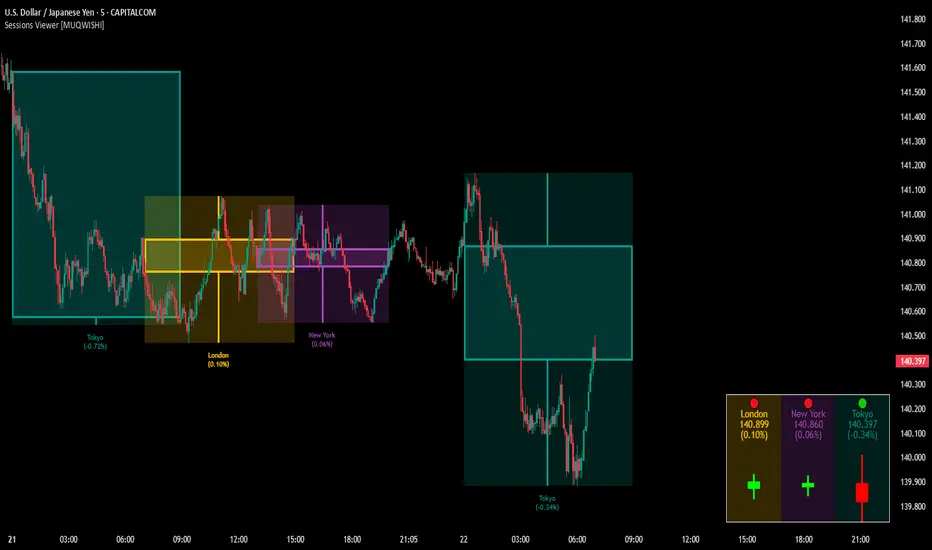
The “Market Sessions & Viewer Panel” is a clean and intuitive visual indicator tool that highlights up to four trading sessions directly on the chart. Each session is fully customizable with its name, session time, and color. It also generates a panel that provides a quick-glance summary of each session’s candle/bar shape, helping traders gain insight into the volatility across all trading sessions.
_______________________
▋ OVERVIEW:
_______________________
▋ CREDIT:
This indicator utilizes the “ Timezone — Library ”. A huge thanks to @n00btraders for effort and well-organized work.
_______________________
▋ SESSION PANEL:
The Session Panel allows traders to visually compare session volatility using a candlestick/bar pattern.
Each bar represents the price action during a session and includes the session status, session name, closing price, change(%) from open, and a tooltip that reveals detailed OHLC and volume when hovered over.
Chart Type:
It offers two styles Bar or Candle to display based on traders’ preference
Sorting:
Allowing to arrange session candles/bars based on…
—Left to Right: The most recently opened on the left, moving backward in time to the right.
—Right to Left: The most recently opened on the right, moving backward in time to the left.
—Default: Arrange sessions in the user-defined input order.
_______________________
▋ CHART VISUALIZATION:
The chart visualization highlights each trading session using color-coded backgrounds in two selectable drawing styles that span their respective active timeframes. Each session block provides session’s name, close price, and change from open.
Chart Type: Candle
Chart Type: Box
Extra Drawing Feature:
This feature may not exist in other indicators within the same category, it extends the session block drawing to the projected end of the session. This's done through estimation based on historical data; however, it doesn’t function fully on seconds-based timeframes due to drawing limitations.
_______________________
▋ INDICATOR SETTINGS:
Section(1): Sessions
(1) Universal Timezone.
(2) Each Session: Enable/Disable, Name, Color, and Time.
Section(2): Session Panel
(1) Show/Hide Session Panel.
(2) Chart Type: Candle/Bar.
(3) Bar’s Up/Down color.
(4) Width and Height of the bar.
(5) Location of Session Panel on chat.
(6) Sort: Left to Right (most recent session is placed on the left), Right to Left (most recent session is placed on the right), and Default (as input arrangement).
Section(3): Chart Visualization
(1) Show/Hide Chart Block Visualization.
(2) Draw Shape: Box/Candle.
(3) Border Style and Size.
(4) Label Styling includes location, size, and some essential selectable infos.
Please let me know if you have any questions

Super Wick Volumized Rejection/Reversal @MaxMaserati**Super Wick Volumized Rejection/Reversal @MaxMaserati** 🚀
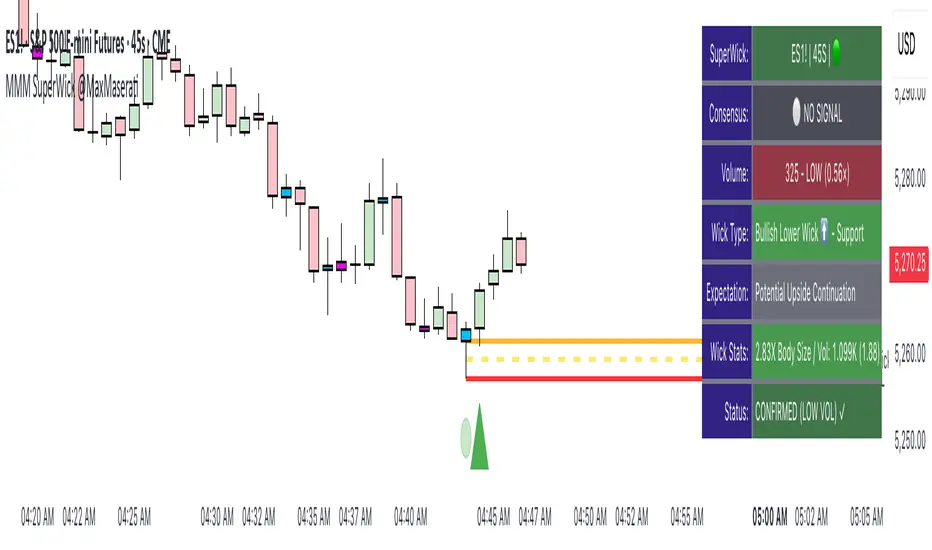
**Overview**: The "MMM Super Wick Volumized Rejection/Reversal" indicator spots key candlestick wicks with high volume to catch potential reversals or continuations. It overlays charts with lines, labels, and an info panel, with customizable timeframe analysis, signal confirmation, and bar coloring. 📊
**Key Features**:
- **Wick Analysis** 🕯️: Detects big upper/lower wicks using a wick-to-body ratio (default 1.2x) and volume thresholds (high: 1.5x, medium: 1.0x, low: 0.7x avg volume).
- **Signals** 🚦: Creates Buy, Sell, Exit Long, Exit Short, and Weak signals, with optional confirmation via follow-up candle.
- **Timeframe Flexibility** ⏰: Analyzes user-selected or chart timeframe (default: chart).
- **Visuals** 🎨: Draws lines at high/low, open/close, midpoints, and significant wicks, with custom colors, widths, and labels.
- **Bar Coloring**🎨 : Colors bars by wick type (bullish/bearish) and volume strength.
- **Info Panel** ℹ️: Shows market bias, signal status, volume, and wick details (position, size adjustable).
- **Line Management** 🧹: Caps displayed candles (default: 3) and lines (max: 500), with a one-time clear option.
- **Alerts** 🔔: Triggers on confirmed signals (Buy, Sell, Exit Long, Exit Short).
**Inputs** ⚙️:
- **Timeframe** ⏳: Pick analysis timeframe or use chart default.
- **Analysis** 🔍: Lookback period (default: 20), volume thresholds, wick-to-body ratio, confirmation toggle.
- **Display** 🖼️: Toggle lines (high/low, open/close, midpoints, significant wicks), bar coloring (wick/volume-based).
- **Labels** 🏷️: Show/hide labels, set text color/size.
- **Info Panel** 📋: Enable/disable, set position (top_right default), text size, wick details.
- **Line Management** 📏: Line extension (50 bars), candles analyzed (21), visible lines (3), clear all toggle.
- **Colors/Widths** 🎨: Customize lines and wicks (high/low, body, midpoints, significant wicks).
**How It Works** 🛠️:
1. Finds significant wicks (upper/lower) by size vs. body and avg wick length. 🔎
2. Checks volume to rate strength (high, medium, low). 📈
3. Generates signals: Buy (bullish, lower wick, high volume) 📈, Sell (bearish, upper wick, high volume) 📉, Exit (trend weakness) ⚠️, Weak (low volume wicks) ❓.
4. Draws lines at key levels (high/low, open/close, midpoints) and significant wicks, with labels. ✏️
5. Colors bars to show wick type and volume. 🖌️
6. Displays live data in an info panel: trend, signal, volume, wick stats. 📑
7. Keeps line count low, clearing old ones to stay within limits. 🗑️
**Usage** 🎯:
- Apply to any chart for reversal/continuation signals. 📅
- Adjust timeframe for wide/granular views. 🔧
- Use confirmation for safer trades. ✅
- Customize visuals for clarity (lines, colors, panel). 🖥️
- Set alerts for signal notifications. 📢
**Notes** 💡:
- Shines in volatile markets with clear wicks. ⚡
- Confirmation cuts false signals but slows entries. ⏲️
- Tune inputs for specific assets/timeframes. 🛠️
- Clear lines occasionally for smooth performance. 🧼
- Test and retest beofre incorporate it in your strategy
Multi-Timeframe S/R Confluence - EnhancedOverview
The "Multi-Timeframe S/R Confluence - Enhanced" indicator is a powerful tool designed to identify high-probability support and resistance zones for trading BTC/USDT on a 15-minute chart. By analyzing pivot highs and lows across multiple timeframes (1-hour, 4-hour, and 8-hour), it pinpoints confluence zones—price levels where significant alignments occur—enhancing their reliability. These zones are visualized as dashed horizontal lines with dynamic labels, making it easy to spot potential reversal or bounce areas in real-time.
What It Does
Multi-Timeframe Analysis: Aggregates pivot points from 1h, 4h, and 8h charts to detect zones where price has historically reversed or consolidated.
Confluence Detection: Identifies levels where pivot highs (resistance) or lows (support) across different timeframes align within a user-defined threshold (default 1%), indicating stronger zones.
Dynamic Visualization: Plots dashed lines that extend across the chart, locked horizontally for visibility, and updates their positions as new confluence levels emerge.
Color Coding: Lines are green when above the current price (potential resistance or broken support) and red when below (potential support or broken resistance), adapting dynamically.
Labeled Zones: Adds labels (e.g., "R1" for resistance, "S1" for support) to each line, numbered sequentially, for quick identification.
How It Works
Pivot Detection: Uses ta.pivothigh and ta.pivotlow to find significant highs and lows on 1h, 4h, and 8h timeframes, with a configurable lookback period (default 5 bars).
Confluence Calculation: Compares pivot levels across timeframes. If two levels (e.g., 1h and 4h pivot highs) are within the threshold (default 1% relative difference), their average is plotted as a confluence zone.
Resistance: Alignments of pivot highs (1h-4h, 1h-8h, 4h-8h).
Support: Alignments of pivot lows (1h-4h, 1h-8h, 4h-8h).
Line Drawing: Renders dashed lines at these levels, extending them rightward to span the chart. Lines update dynamically as new pivots form, ensuring relevance to current price action.
Labeling: Attaches labels ("R1", "R2", etc. for resistance; "S1", "S2", etc. for support) to each zone, with resistance labels below the line and support labels above for clarity.
Key Features
High-Probability Zones: Confluence across multiple timeframes increases the likelihood of price reactions, ideal for swing or scalping strategies on BTC/USDT.
Dynamic Updates: Lines adjust to the latest pivot data, keeping the indicator responsive without manual intervention.
Customizable Inputs:
Pivot Lookback: Controls pivot sensitivity (default 5). Higher values (e.g., 10) detect broader zones; lower values (e.g., 3) focus on recent extremes.
Threshold: Sets confluence tolerance (default 0.01 or 1%). Increase (e.g., 0.02) for more zones, decrease (e.g., 0.005) for stricter alignment.
Line Width: Adjusts line thickness (default 2) for visibility.
Enhanced Visuals: Dashed lines and labeled zones provide a clean, professional look, avoiding chart clutter.
How to Use
Setup:
Add the indicator to a 15-minute BTC/USDT chart (e.g., BINANCE:BTCUSDT) via TradingView’s Pine Editor.
Apply it by clicking “Add to Chart.”
Interpretation:
Green Lines (e.g., "R1", "R2"): Resistance zones above the current price. Watch for reversals or resistance if price approaches from below.
Red Lines (e.g., "S1", "S2"): Support zones below the current price. Anticipate bounces or support if price nears from above.
Color Shifts: As price crosses a line, its color changes (green to red or vice versa), signaling a potential breakout or breakdown.
Trading Applications:
Reversal Trades: Enter short near resistance (e.g., "R1") or long near support (e.g., "S1") when price shows rejection (e.g., candlestick patterns).
Breakout Trades: Trade breakouts above resistance or below support if confirmed by volume or momentum.
Risk Management: Place stops just beyond these zones to protect against false breaks.
Customization:
Adjust Pivot Lookback to match your trading style (e.g., higher for swing trading, lower for scalping).
Tweak Threshold based on BTC/USDT volatility—wider thresholds may suit choppy markets.
Set Line Width for better visibility on your screen.
Example
Price at 83,000:
"R1" at 85,200 (green): Resistance confluence from 1h and 4h pivot highs. Expect selling pressure if price rises.
"S1" at 80,400 (red): Support confluence from 4h and 8h pivot lows. Look for a bounce if price drops.
Outcome: Price hits 85,200, forms a shooting star, and reverses—validating "R1" as a key level.
Notes
Initial Delay: Lines may take a few bars to appear as pivot data accumulates from higher timeframes.
Chart Compatibility: Optimized for BTC/USDT 15m but can work on other pairs/timeframes with adjustments.
Not a Standalone Signal: Combine with other indicators (e.g., RSI, volume) or price action for confirmation.
Purpose
This indicator empowers traders by highlighting multi-timeframe confluence zones, offering a clear, actionable view of where BTC/USDT is likely to react. Whether you’re scalping, day trading, or swing trading, it provides a robust framework for identifying critical price levels with enhanced precision and visual appeal.

Gold Futures vs Spot (Candlestick + Line Overlay)📝 Script Description: Gold Futures vs Spot
This script was developed to compare the price movements between Gold Futures and Spot Gold within a specific time frame. The primary goals of this script are:
To analyze the price spread between Gold Futures and Spot
To identify potential arbitrage opportunities caused by price discrepancies
To assist in decision-making and enhance the accuracy of gold market analysis
🔧 Key Features:
Fetches price data from both Spot and Futures markets (from APIs or chart sources)
Converts and aligns data for direct comparison
Calculates the price spread (Futures - Spot)
Visualizes the spread over time or exports the data for further analysis
📅 Date Created:
🧠 Additional Notes:
This script is ideal for investors, gold traders, or analysts who want to understand the relationship between the Futures and Spot markets—especially during periods of high volatility. Unusual spreads may signal shifts in market sentiment or the actions of institutional players.
Overlay Hourly Candle [odnac] * This script overlays 1-hour candlestick representations on the chart.
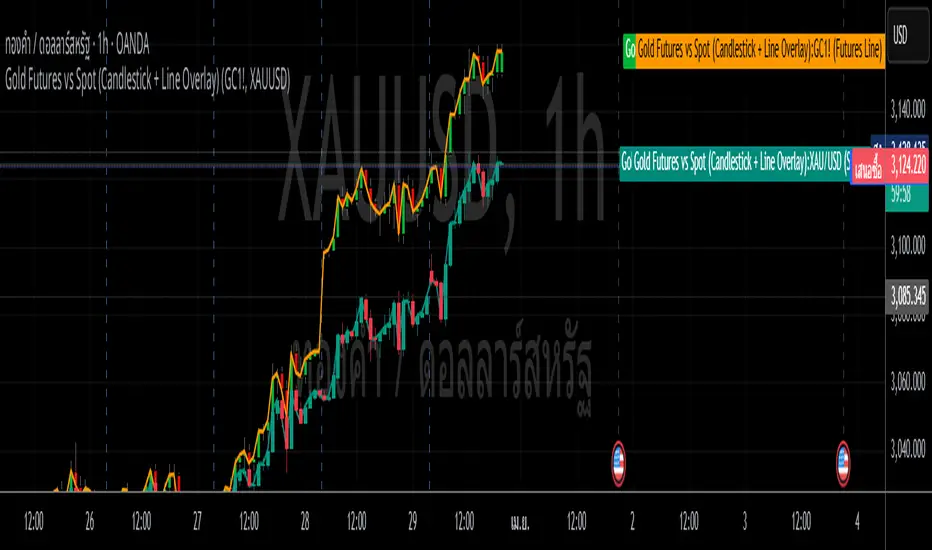
* It captures the open, close, high, and low prices for each hourly period.
* The script dynamically updates as new hourly candles form and adjusts the
* box and wick positions accordingly.
*
* Features:
* - Draws an hourly candle with body and wicks.
* - Colors bullish candles in green and bearish candles in red.
* - Updates dynamically as new hourly candles form.
* - Uses TradingView's box and line functions to represent candle structures.
*
* Usage:
* - Add the script to your TradingView chart as an overlay.
* - Observe how the hourly candles appear distinctly on any timeframe.
Basic Pivot-Based S/R with Stopping LinesBasic Pivot-Based S/R with Intrabar Pressure Analysis
Overview:
This indicator identifies potential support and resistance levels based on a combination of traditional pivot point analysis and a unique intrabar volume pressure assessment. It goes beyond simply identifying pivot highs and lows; it qualifies these pivots by examining the underlying buying and selling pressure within the candles that form the pivot. This approach aims to identify stronger, more reliable support and resistance levels than those based on price action alone.
Core Concepts and Calculations:
Pivot Points: The indicator uses the standard ta.pivothigh() and ta.pivotlow() functions to detect pivot highs and lows. The user can choose whether to use the candle wicks ("Wick" mode) or the candle bodies ("Body" mode) for pivot detection. The leftBars and rightBars parameters control the number of bars on either side of the pivot used in the calculation.
Intrabar Volume Pressure: This is the indicator's key differentiator. It analyzes the volume distribution within each candle by accessing data from a lower timeframe (specified by the user, defaulting to 1-second data). For each candle:
Up Volume: The total volume associated with price increases within the candle is calculated (on the lower timeframe). This uses the volume multiplied by how much the price has moved up.
Down Volume: The total volume associated with price decreases within the candle is calculated (on the lower timeframe). This uses the volume multiplied by how much the price has moved down.
These up and down volumes are then summed across all lower timeframe candles.
Pressure Imbalance at Pivots: The indicator then checks for a specific condition at each identified pivot point
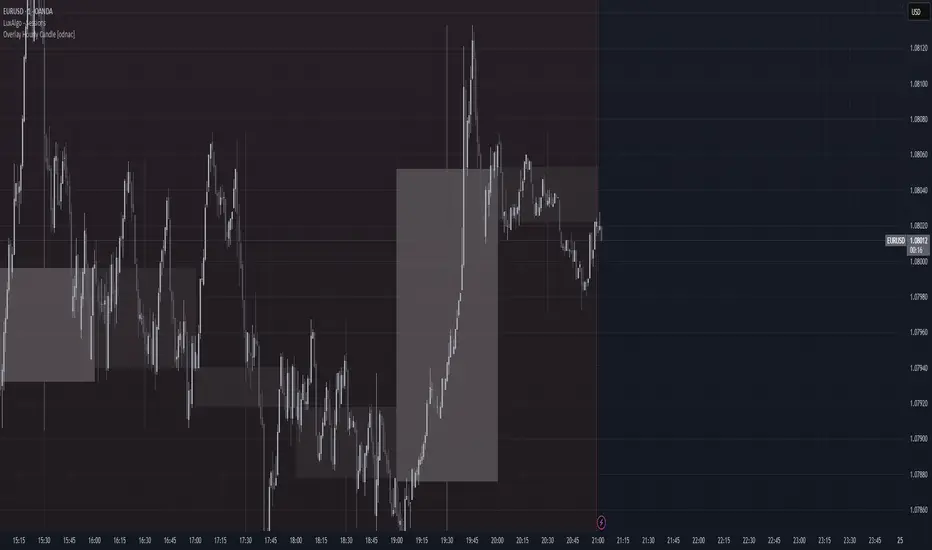
These lines are dynamic. They continue to extend to the right as long as the price does not decisively cross them.
A support line (green) stops extending if the price closes below the line.
A resistance line (red) stops extending if the price closes above the line. *This behavior reflects the idea that a support/resistance level is "validated" as long as the price respects it and "invalidated" once the price breaks through.
Interpretation and Usage:
The core idea is that a pivot point where the internal volume pressure contradicts the external price action (e.g., a green candle with more selling pressure) is a stronger and more reliable support or resistance level. This suggests that there's hidden buying or selling interest at that level, which may not be immediately obvious from the candlestick pattern alone.
Green Lines (Support): Indicate potential areas where buyers are likely to step in, even if the price is currently declining. These are levels where buying pressure was surprisingly strong despite a red candle forming at a pivot low.
Red Lines (Resistance): Indicate potential areas where sellers are likely to emerge, even if the price is currently rising. These are levels where selling pressure was surprisingly strong despite a green candle forming at a pivot high.
Line Extensions: The length of the line indicates how long the support or resistance level has held. Longer lines suggest stronger, more established levels.
Line Breaks: When a line stops extending, it indicates that the support or resistance level has been broken. This can be a signal of a potential trend change or a breakout.
Advantages:
Combines Price and Volume: Integrates both price action (pivots) and volume information (intrabar pressure) for a more comprehensive analysis.
Identifies "Hidden" S/R: Highlights support and resistance levels that might be missed by traditional pivot analysis.
Dynamic Lines: The lines adapt to market conditions, extending only as long as the S/R level remains valid.
Simple Visualization: Uses clear, horizontal lines for easy identification of potential support and resistance.
High Resolution Data: Uses data from a user selectable lower timeframe for better accuracy.
Limitations:
Lower Timeframe Data Dependency: The accuracy of the intrabar pressure analysis depends on the availability and quality of lower timeframe data.
Parameter Sensitivity: The indicator's performance is influenced by the pivot detection parameters (leftBars, rightBars) and the chosen lowerTimeframe.
Not a Standalone System: This indicator, like all indicators, should be used in conjunction with other forms of analysis and as part of a complete trading strategy.
In summary, this indicator offers a refined approach to identifying support and resistance levels by combining classic pivot point analysis with a detailed examination of the volume dynamics within the candles that form those pivots. This provides a more nuanced view of buying and selling pressure, potentially leading to the identification of stronger and more reliable S/R levels.

CandelaCharts - CRT Model📝 Overview
Candle Range Theory (CRT) is a framework that treats every candle as a tradable range. A candle defines high/low, the next candle often sweeps one side (manipulation), reclaims back inside, and distributes toward the opposite side with 50% of the range as a common first target.
It posits that each candlestick represents a distinct range of price action, defined by its high, low, open, and close, and that price movements are structured within these ranges.
📦 Features
Timeframe Pairing: This indicator highlights movements on lower timeframes within higher timeframe candles, providing insights into micro trends, structural changes, and potential entry points.
Bias Selection: This feature allows analysts to manage bias and identify setups, displaying bullish, bearish, or neutral models that align with higher timeframe trends.
Double Purge Sweeps: A double purge is a type of sweep where the price breaks both the high and low of the previous candle (through the wicks) before closing within the range of that same candle.
CRT Times: Times when high-probability CRTs occur.
HTF Candles: The CRT Model is rooted in the ICT Power of Three, assisting traders in identifying key turning points and market transitions across multiple timeframes.
Auto-bias: Identify models using the HTF candle bias
Dashboard: Create a customizable table that displays key details such as timeframe pairing, time to next candle close, bias, and time filter settings.
Any Market: Ideal for all markets - stocks, forex, crypto, futures, commodities and more - delivering consistent results and insights across diverse trading environments.
⚙️ Settings
Core
Status: Filter models by status — All, Successful, Invalidated, or Active.
Real-time Models: Enable models formed and shown in real-time (before HTF candle close).
Bias: Choose model bias — Automatic, Neutral, Bearish, or Bullish.
Fractal: Select timeframe pairing like 1m - 15m, 4H - 1W, or Custom.
Custom Fractal TFs: Set LTF (e.g. 5) and HTF (e.g. 60) timeframes.
Model Labels: Show model labels (C1, C2, etc.) and choose label size and background color.
Exclude Non-profitable: Hide models deemed non-profitable based on CISD position.
Sweep
Sweep Line: Show model sweep lines with style, width, and color.
Sweeps with CISD: Filter sweeps that are linked with CISD models.
Invalidated Sweeps: Show invalidated sweeps (I-sweep), including LTF and HTF options.
D-purge Sweeps: Display double purge sweeps with customization options.
CISD
CISD Line: Display CISD (Change in State of Delivery) on the chart with style, width, and length.
CISD Colors: Set line colors for Bullish and Bearish CISD.
CRT
Box High/Low: Show CRT box high/low with style, width, and color for bullish, bearish, and current.
High/Low Mean: Enable the mean line of the CRT H/L range with line customization and color.
CRT Labels: Show CRT box labels and choose label size.
Hide Overlapped: Option to hide overlapping CRT boxes.
History
Model History Lookback: Define how many past CRT models to retain and show.
Time
2-3-4: Filter models based on 2-3-4 AM hours.
7-8-9: Filter models based on 7-8-9 AM hours.
8-9-10: Filter models based on 8-9-10 AM and PM hours.
1-5-9: Filter models based on 1-5-9 AM and PM hours.
2-6-10: Filter models based on 2-6-10 AM and PM hours.
Custom: Filter models based on a user-defined custom session.
HTF
Show Candles: Display HTF candles with number, colors, and spacing.
Offset: Adjust the HTF candle offset from the current chart.
Space: Adjust the HTF candle spacing.
Size: Choose HTF candle size (e.g., Small, Large).
Labels: Show HTF candle labels with size and color options.
Open Trace Line: Show line for HTF open with style, width, and color.
True Day Open: Toggle display of TDO line.
PD Array: Enable and configure HTF PD arrays (FVG, IFVG), with style, color, threshold, line, and border.
LTF
High/Low Lines: Show H/L lines with line style, width, and color.
Open/Close Lines: Show O/C lines with style, width, and color.
Dashboard
Information Panel: Toggle visibility and choose position.
Display Mode: Select between Pro or Stack display layout.
Alerts
Model Formed: Alert when a model is formed.
Model Completed: Alert when a model is successfully completed.
Model Invalidated: Alert when a model becomes invalid.
Sweep: Alert on sweep events.
D-purge: Alert on double purge events.
💡 Framework
The CRT Model is designed to analyze and interpret price action patterns through various components, each of which plays a critical role in identifying market trends and providing actionable insights.
The model incorporates the following timeframe alignments:
15s - 5m
1m - 15m
2m - 20m
3m - 30m
5m - 1H
15m - 4H
30m - 12H
1H - 1D
4H - 1W
1D - 1M
1W - 3M
Below are the key components that make up the model:
Sweep
D-purge
CISD
Mean
CRT H/L
The CRT Model follows a specific lifecycle, which highlights the current state of the model and determines whether a trade opportunity is valid.
The model's lifecycle includes the following statuses:
Formation (grey)
Invalidation (red)
Success (green)
By utilizing the phases of Formation, Invalidation, and Success, traders can efficiently manage their positions, reduce risk, and take advantage of high-probability setups offered by the CRT Model.
Trading Candle 2 (The Reversal)
Use Candle 2’s wick, body, and context to judge whether the next leg trends or mean-reverts.
Expansion vs. reversal
Expansion candle: Small wicks, strong body, one-way momentum.
Reversal (Candle 2): Drives opposite, prints a long opposing wick, closes near open—context decides if it’s tradable.
Key idea: Small wicks favor continued expansion; large wicks often cap expansion because the range was “spent” building the wick.
Why wick size matters
Small-wick reversal: More “runway”—target prior highs/lows, liquidity pools, standard-deviation projections.
Large-wick reversal: Range consumed—expect mean-reversion toward the open or session extremes.
Think of wick size as a fuel gauge: less wick → more potential.
Trading Candle 3 (The Continuation)
Candle 2 flips bias; Candle 3 aims to capture the follow-through (Candle 4 often offers secondary continuation).
Wick size on Candle 2 decides the play:
Small wick → you can trade Candle 2 directly.
Large wick → let Candle 2 close and trade Candle 3 instead.
Avoid chasing weak continuations:
If Candle 2 has already expanded hard, Candle 3 can become a chase into retrace/chop.
Demand extra LTF confluence: protected swings, SMT divergence, and multiple continuation cues aligning.
⚡️ Showcase
Introducing the CRT Model is a powerful trading tool designed to elevate your market analysis and boost your trading success. Built with precision and advanced algorithms, this indicator helps you identify key trends, potential entry and exit points, and optimize your strategy for better decision-making.
Bearish Models
Bullish Models
Active Models
HTF PD Arrays
Lead with context, not the pattern: set a clear higher-timeframe bias, then sync the intermediate and lower timeframes to it.
🚨 Alerts
This script offers alert options for all model types. The alerts need to be set up manually from TradingView.
The CRT Model supports the following alert types, each designed to signal key moments in the model’s development and execution:
Model Formation: Signals the initial setup of the CRT Model with a bullish (+B) or bearish (-B) bias, indicating a potential trade opportunity is developing.
Model Successful: Confirms that the CRT setup has played out successfully.
Model Invalidated: Indicates the model has failed or been broken.
Model Sweep: Alerts when a liquidity sweep occurs during model formation.
Model D-Purge Sweep: Occurs when a single candle is swept on both sides (high and low).
⚠️ Disclaimer
These tools are exclusively available on the TradingView platform.
Our charting tools are intended solely for informational and educational purposes and should not be regarded as financial, investment, or trading advice. They are not designed to predict market movements or offer specific recommendations. Users should be aware that past performance is not indicative of future results and should not rely on these tools for financial decisions. By using these charting tools, the purchaser agrees that the seller and creator hold no responsibility for any decisions made based on information provided by the tools. The purchaser assumes full responsibility and liability for any actions taken and their consequences, including potential financial losses or investment outcomes that may result from the use of these products.
By purchasing, the customer acknowledges and accepts that neither the seller nor the creator is liable for any undesired outcomes stemming from the development, sale, or use of these products. Additionally, the purchaser agrees to indemnify the seller from any liability. If invited through the Friends and Family Program, the purchaser understands that any provided discount code applies only to the initial purchase of Candela's subscription. The purchaser is responsible for canceling or requesting cancellation of their subscription if they choose not to continue at the full retail price. In the event the purchaser no longer wishes to use the products, they must unsubscribe from the membership service, if applicable.
We do not offer reimbursements, refunds, or chargebacks. Once these Terms are accepted at the time of purchase, no reimbursements, refunds, or chargebacks will be issued under any circumstances.
By continuing to use these charting tools, the user confirms their understanding and acceptance of these Terms as outlined in this disclaimer.

1-3-1 Setup DetectorThis TradingView indicator is designed to identify the "1-3-1" candlestick pattern, a potential market reversal setup. The script classifies each candle based on its relationship with the previous candle’s high and low values, searching specifically for a sequence of a lower-high & higher-low candle (denoted as "1"), followed by a higher-high & lower-low candle ("3"), and ending with another lower-high & higher-low candle ("1"). When this pattern is detected on the latest bar, a signal is generated. This tool is useful for traders looking to capitalize on potential reversals signaled by the 1-3-1 setup. The indicator plots a midpoint for additional analysis and does not overlay on the main chart, ensuring clarity in visualization. Ideal for use in various markets and timeframes as part of a comprehensive trading strategy.

Pivot Point Calculator PPC V2 by [KhedrFx]📈 Trade Smarter with the Pivot Point Calculator (PPC) by KhedrFx
Want to spot key price levels and make better trading decisions? The Pivot Point Calculator (PPC) by KhedrFx is your go-to TradingView tool for identifying potential support and resistance zones. Whether you’re a Scalper trader, day trader, swing trader, or long-term investor, this script helps you plan precise entries and exits with confidence.
🔹 How to Use Pivot Points in Trading
📊 Step 1: Identify Key Levels
The PPC automatically plots:
Pivot Point (P): The main level where sentiment shifts between bullish and bearish.
Support Levels (S1, S2, S3): Areas where price may bounce higher.
Resistance Levels (R1, R2, R3): Areas where price may face selling pressure.
These levels act as dynamic price zones, helping you anticipate potential market movements.
🔥 Step 2: Choose Your Trading Strategy
1️⃣ Breakout Trading
Buy when the price breaks above the pivot point (P) with strong momentum.
Sell when the price drops below the pivot point (P) with strong momentum.
Use R1, R2, or R3 as profit targets in an uptrend and S1, S2, or S3 in a downtrend.
2️⃣ Reversal (Bounce) Trading
Buy when the price pulls back to S1, S2, or S3 and shows bullish confirmation (e.g., candlestick patterns like a bullish engulfing or hammer).
Sell when the price rallies to R1, R2, or R3 and shows bearish confirmation (e.g., rejection wicks or a bearish engulfing pattern).
🎯 Step 3: Set Smart Stop-Loss & Take-Profit Levels
Stop-Loss: Place it slightly below support (for buy trades) or above resistance (for sell trades).
Take-Profit: Use the next pivot level as a target.
Extreme Zones: R3 and S3 often signal strong reversals or breakouts—watch them closely!
🚀 How to Get Started
1️⃣ Add the PPC script to your TradingView chart.
2️⃣ Choose a timeframe that fits your strategy (5m, 15m, 30m, 1H, 4H, Daily, or Weekly).
3️⃣ Use the pivot points and support/resistance levels to fine-tune your trade entries, exits, and risk management.
⚠️ Trade Responsibly
This tool helps you analyze the market, but it’s not a guarantee of profits. Always do your own research, manage risk, and trade with caution.
💡 Ready to take your trading to the next level? Try the Pivot Point Calculator (PPC) by KhedrFx and start trading with confidence today! 🚀