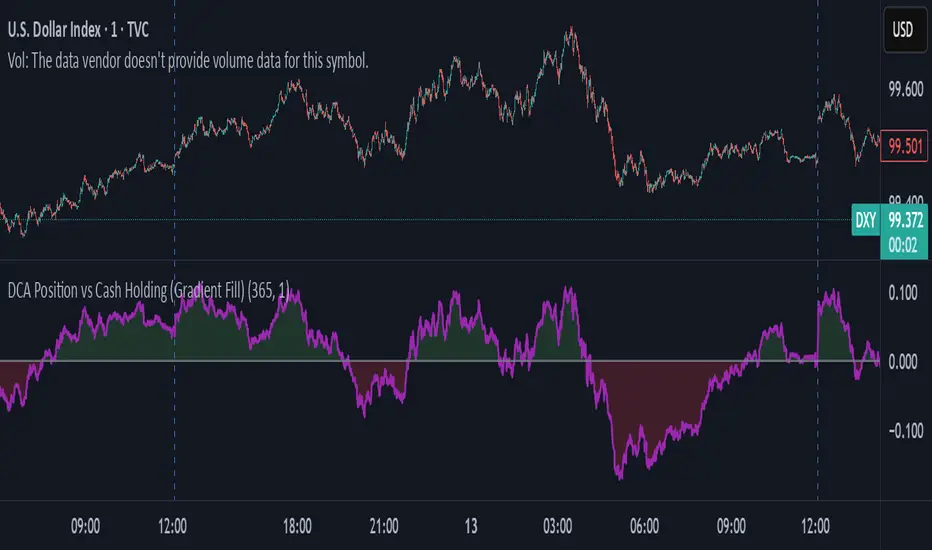
PRT Cycle (replica 1:1) — linea verde/rossaIndicatore di ciclo ispirato a quello che usavo su un altro sistema di grafici finanziariPine Script® indicatorby zernolo20
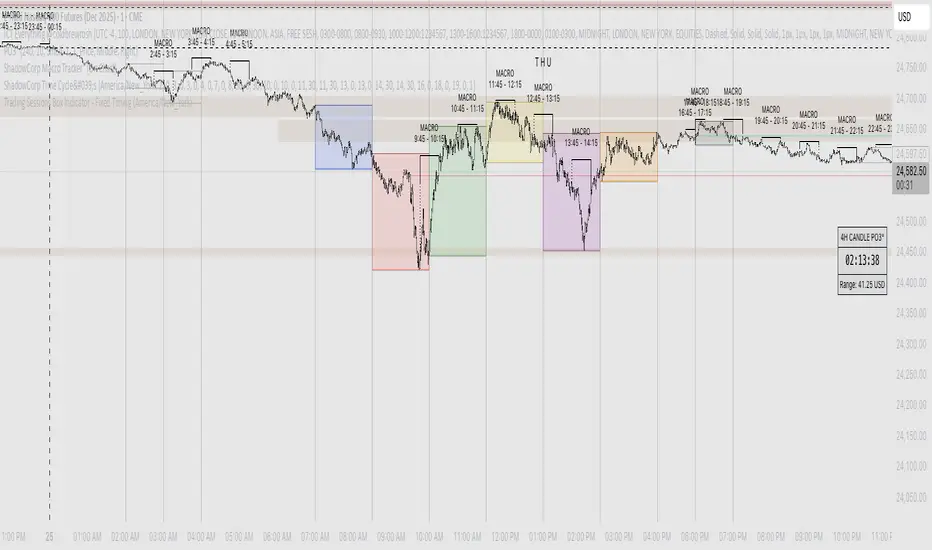
Shadow Corp 90min Boxes90-min cycle boxes, marks 90min session highs and lows with color coded boxes.Pine Script® indicatorby BlackRabbitFX28
ShadowCorp Time Cycle'sThis indicator marks key intraday windows — 7:00–8:30, 8:30–10:00 (NYO), 10:00–11:30, 11:30–13:00, 13:00–14:30, 14:30–16:00, and 18:00–19:00 — and draws a true **price-range box** for each window. Each box builds **in real time** from that window’s running **high/low**, then **persists on the chart** after the window ends for historical study. It’s **timezone-aware** (configurable) and gives you **per-window color** controls. Use it to visualize session volatility, ranges, and liquidity sweeps across the day on any intraday chart. Pine Script® indicatorby BlackRabbitFX19
GOLDEN SCALP DEXDescription: This tool is designed for traders who want to capture momentum shifts that occur within larger timeframe structures. The strategy identifies unique breakout opportunities inside the HTF cycle and provides precise entry and exit signals without cluttering the chart. The system focuses on: Pinpointing immediate momentum breakouts Clean chart visualization with intuitive buy/sell markers Full backtesting capability through TradingView’s Strategy Tester Customizable position sizing for futures, forex, and crypto traders It is especially useful for traders who prefer fast, rule-based signals during high-impact intraday moves. ⚠️ Disclaimer: This is a trading tool, not financial advice. Results may vary depending on market conditions, and proper risk management is essential.Pine Script® indicatorby dirdex50
Intraday Time Cycle Levels (Labels + Alerts + Colors)Jag japp detta spelet fram och tbx. Tack för ert förtoende.Pine Script® indicatorby Andreipip1121
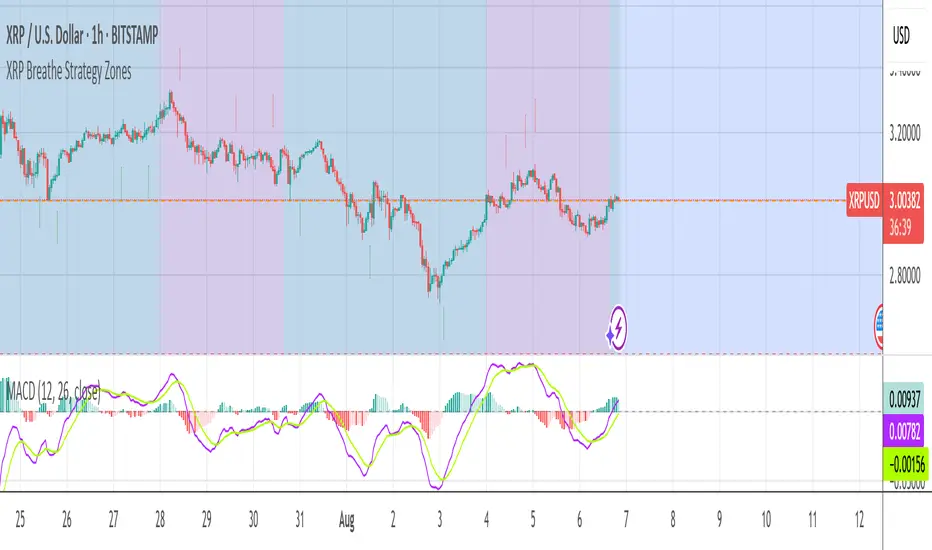
XRP Breathe Strategy Zones +🫁 XRP Breathe Strategy Zones A time-based trading overlay designed specifically for XRPUSD. This tool highlights weekly "Inhale" and "Exhale" phases based on a 20-day cycle of price action. It visually guides traders through expected accumulation and distribution zones, helping align trades with market rhythm. 🔹 Key Features: Color-coded Inhale and Exhale phases Critical price levels marked for support and resistance Built-in signal arrows for trend confirmation Perfect for swing traders and intraday strategists looking to trade XRP with more structure, timing, and confidence. Pine Script® indicatorby pwonsey80
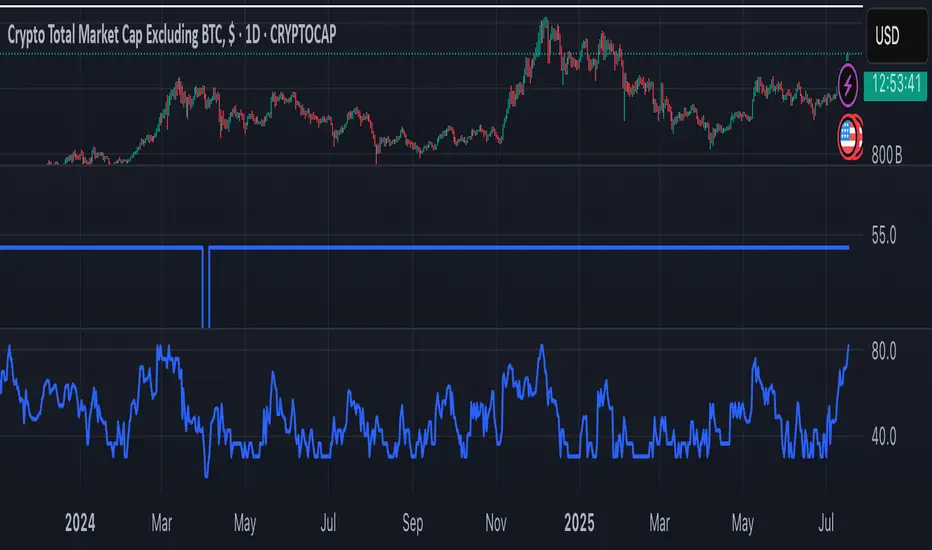
SCPEM - Socionomic Crypto Peak Model (0-85 Scale)SCPEM Indicator Overview The SCPEM (Socionomic Crypto Peak Evaluation Model) indicator is a TradingView tool designed to approximate cycle peaks in cryptocurrency markets using socionomic theory, which links market behavior to collective social mood. It generates a score from 0-85 (where 85 signals extreme euphoria and high reversal risk) and plots it as a blue line on the chart for visual backtesting and real-time analysis. #### How It Works The indicator uses technical proxies to estimate social mood factors, as Pine Script cannot fetch external data like sentiment indices or social media directly. It calculates a weighted composite score on each bar: - Proxies derive from price, volume, and volatility data. - The raw sum of factor scores (max ~28) is normalized to 0-85. - The score updates historically for backtesting, showing mood progression over time. - Alerts trigger if the score exceeds 60, indicating high peak probability. Users can adjust inputs (e.g., lengths for RSI or pivots) to fine-tune for different assets or timeframes. Metrics Used (Technical Proxies) Crypto-Specific Sentiment Approximated by RSI (overbought levels indicate greed). Social Media Euphoria Based on volume relative to its SMA (spikes suggest herding/FOMO). Broader Social Mood Proxies Derived from ATR volatility (high values signal uncertain/mixed mood). Search and Cultural Interest Proxied by OBV trend (rising accumulation implies growing interest). Socionomic Wildcard Uses Bollinger Band width (expansion for positive mood, contraction for negative). Elliott Wave Position Counts recent price pivots (more swings indicate later wave stages and exhaustion).Pine Script® indicatorby gtvsteve8
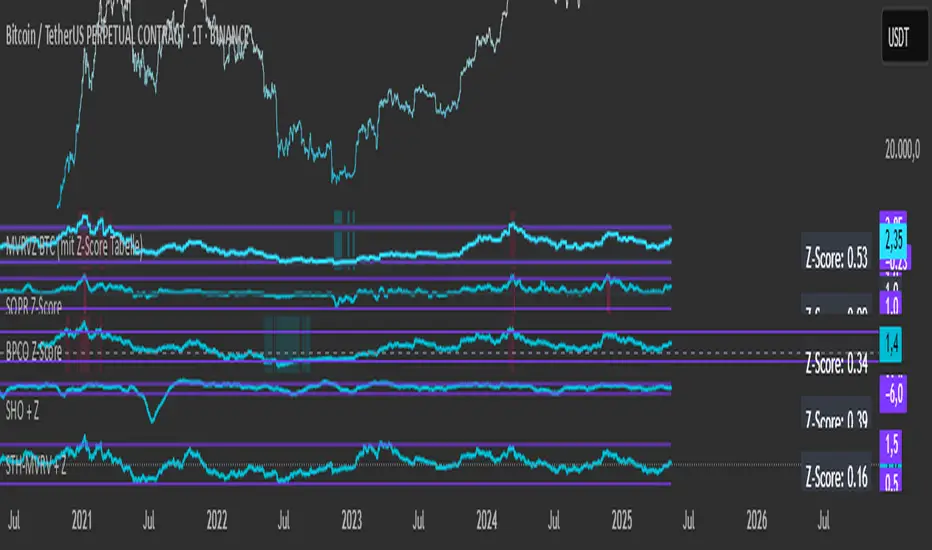
Simplified STH-MVRV + Z-ScoreSimplified Short Term Holder MVRV (STH-MVRV) + Z-Score Indicator Description: This indicator visualizes the Short Term Holder Market Value to Realized Value ratio (STH-MVRV) and its normalized Z-Score, providing insight into Bitcoin’s market cycle phases and potential overbought or oversold conditions. How it works: The STH-MVRV ratio compares the market value of coins held by short-term holders to their realized value, helping to identify periods of profit-taking or accumulation by these holders. The indicator calculates three versions: STH-MVRV (MVRV): Ratio of current MVRV to its 155-day SMA. STH-MVRV (Price): Ratio of BTC price to its 155-day SMA. STH-MVRV (AVG): Average of the above two ratios. You can select which ratio to display via the input dropdown. Threshold Lines: Adjustable upper and lower threshold lines mark significant levels where market sentiment might shift. The indicator also plots a baseline at 1.0 as a reference. Z-Score Explanation: The Z-Score is a normalized value scaled between -3 and +3, calculated relative to the chosen threshold levels. When the ratio hits the upper threshold, the Z-Score approaches +2, indicating potential overbought conditions. Conversely, reaching the lower threshold corresponds to a Z-Score near -2, signaling potential oversold conditions. This Z-Score is shown in a clear table in the top right corner of the chart for easy monitoring. Data Sources: MVRV data is fetched from the BTC_MVRV dataset. Price data is sourced from the BTC/USD index. Usage: Use this indicator to assess short-term holder market behavior and to help identify buying or selling opportunities based on extremes indicated by the Z-Score. Combining this tool with other analysis can improve timing decisions in Bitcoin trading.Pine Script® indicatorby simonweisser_business44
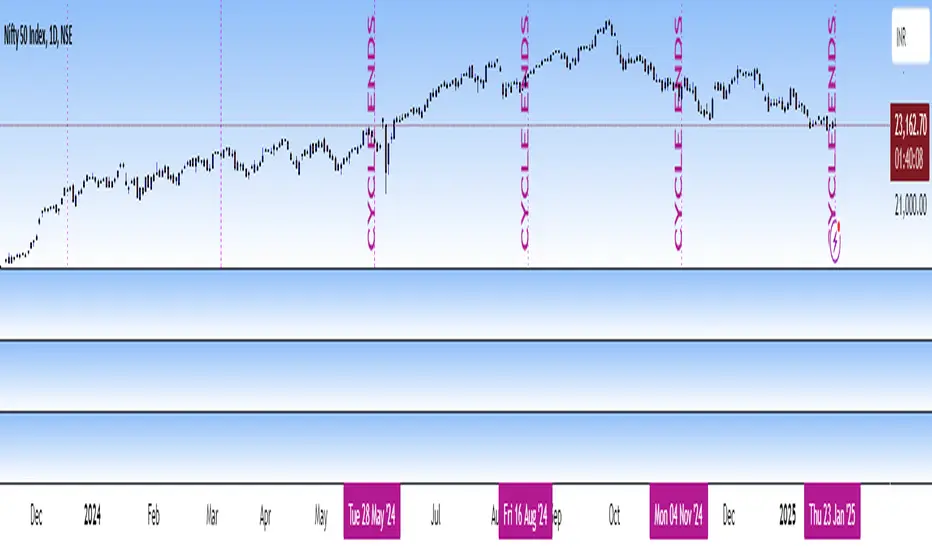
Katik Cycle 56 DaysThis script plots vertical dotted lines on the chart every 56 trading days, starting from the first bar. It calculates intervals based on the bar_index and draws the lines for both historical and future dates by projecting the lines forward. The lines are extended across the entire chart height using extend=extend.both, ensuring visibility regardless of chart zoom level. You can customize the interval length using the input box. Note: Use this only for 1D (Day) candle so that you can find the changes in the trend...Pine Script® indicatorby Katik1438
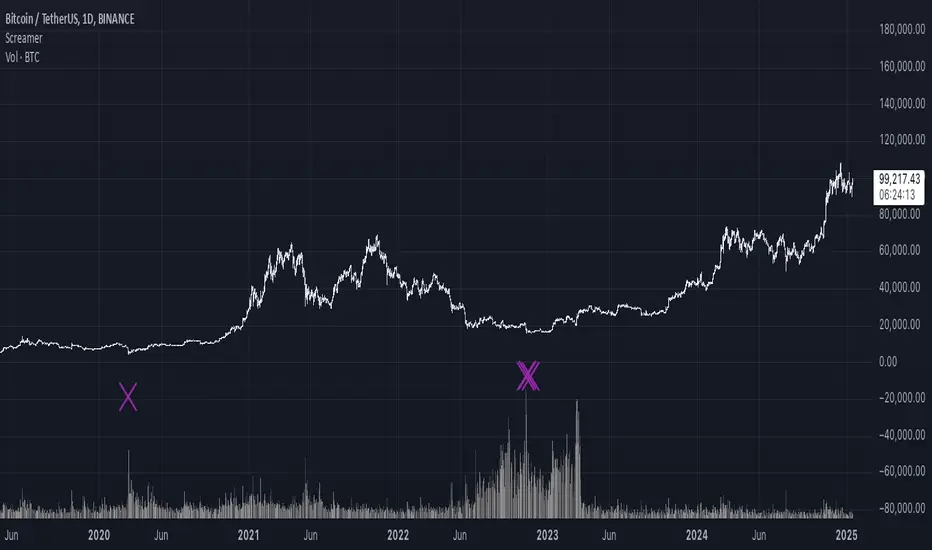
It Screams When Crypto BottomsGet ready to ride the crypto rollercoaster with your new favourite tool for catching Bitcoin at its juiciest, most oversold moments. This isn’t just another boring indicator — it screams when it’s time to load your bags and get ready for the ride back up! Expect it to scream just once or twice per cycle at the very bottom, so you know exactly when the party starts! Why You'll Love It: Crypto-Exclusive Magic: It does not really matter what chart you are on; this indicator only bothers about the original and realised market cap of BTC. We all know the rest will follow. Big Picture Focus: Designed for daily. No noisy intraday drama — just pure, clear signals. Screaming Alerts: When the signal hits, it’s like a neon sign screaming, “Crypto Bottomed!" Think of this indicator as your backstage pass to the crypto world’s most dramatic moments. It’s not subtle — it’s bold, loud, and ready to help you time the market like a pro. P.S.: Use it only on a daily chart. Don’t even try it on shorter timeframes — it won’t scream, and you’ll miss the show! 🙀Pine Script® indicatorby AlexFuch44
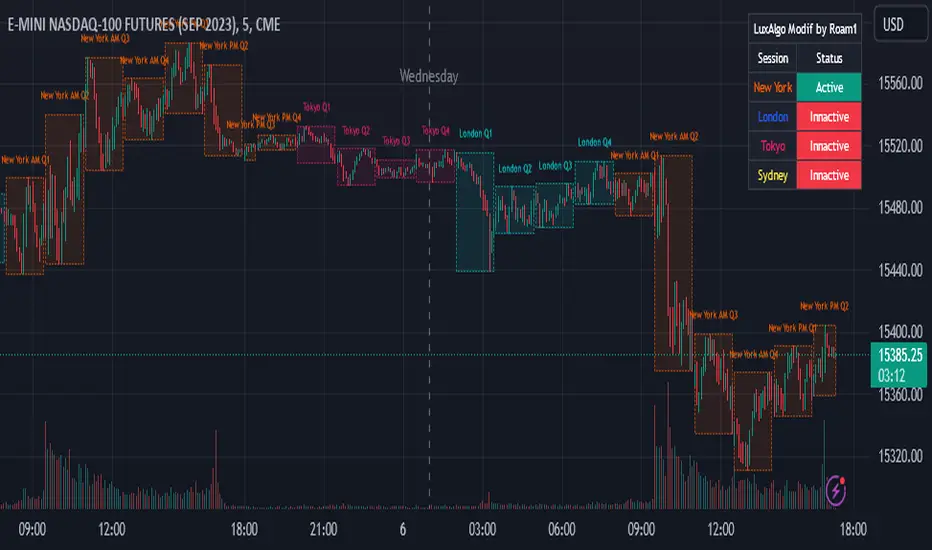
AMDX Time ZoneThis script is base on the theory of @traderdaye, on the TimeZone AMDX Accumulation Manipulation Distribution X reversal / continuation OR AMDX It show you the box on intraday Timeframe: Q1: 18.00 - 19.30 | Q2: 19.30 - 21.00 | Q3: 21.00 - 22.30 | Q4: 22.30 - 00.00 (90min Cycles of the Asian Session) Q1: 00.00 - 01.30 | Q2: 01.30 - 03.00 | Q3: 03.00 - 04.30 | Q4: 04.30 - 06.00 (90min Cycles of the London Session) Q1: 06.00 - 07.30 | Q2: 07.30 - 09.00 | Q3: 09.00 - 10.30 | Q4: 10.30 - 12.00 (90min Cycles of the NY Session) Q1: 12.00 - 13.30 | Q2: 13.30 - 15.00 | Q3: 15.00 - 16.30 | Q4: 16.30 - 18.00 (90min Cycles of the PM Session) You can extend this theory to the day => to the week => to the month Thanks LuxAlgo for the base, Hope you enjoy it Pine Script® indicatorby roamin12955741
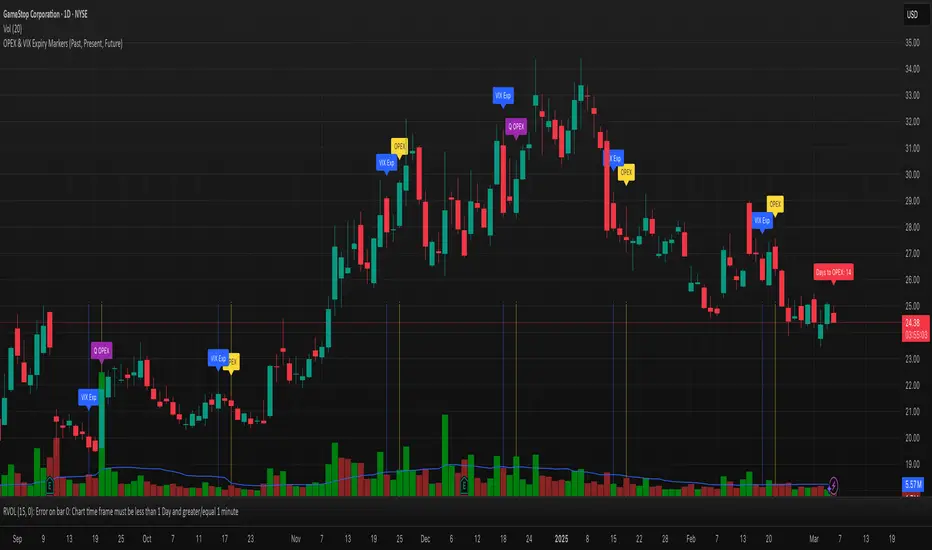
OPEX & VIX Expiry Markers (Past, Present, Future)Expiry Date Indicator for Options & Index Traders Track Key Expiration Dates Automatically For traders focused on options, indices, and expiration-based strategies, staying aware of key expiration dates is essential. This TradingView indicator automatically plots OPEX, VIX Expiry, and Quarterly Expirations on your charts—helping you plan trades more effectively without manual tracking. Features: ✔ OPEX Expiration Markers – Highlights the third Friday of each month, when equity and index options expire. ✔ VIX Expiration Tracking – Marks Wednesday VIX expirations, useful for volatility-based trades. ✔ Quarterly Expiration Highlights – Identifies major market expiration cycles for better trade management. ✔ Live Countdown to Next OPEX – Displays how many days remain until the next expiration. ✔ Works on Any Timeframe – Past, present, and future expiration dates update dynamically. ✔ Customizable Settings – Enable or disable specific features based on your trading style. Ideal for Traders Who Use: 📈 SPX / SPY / NDX / VIX Options Strategies 📅 Iron Condors, Credit Spreads, and Expiration-Based Trades This tool helps traders stay ahead of expiration cycles, ensuring they never miss an important date. Simple, effective, and built for seamless integration into your trading workflow. This keeps it professional and to the point without overhyping it. Let me know if you'd like any further refinements! 🚀Pine Script® indicatorby similarTruffle374471151
345min Cycles Riyadh Session BOXThe idea is to divide the session into four periods and draw levels above the level for a buy market and below it for a sell market.Pine Script® indicatorby FARHAN301
ICT IPDA LookbackThis description is tailored for the TradingView community, using the specific terminology associated with Michael Huddleston's (ICT) Interbank Price Delivery Algorithm (IPDA). 📜 TradingView Indicator Description ICT IPDA Lookback Engine (20-40-60 Day Cycles) Overview This indicator automates the IPDA Data Range lookback periods as taught by Michael J. Huddleston (ICT). In the Interbank Price Delivery Algorithm, time is the primary filter. The algorithm references specific lookback windows—20, 40, and 60 trading days—to seek liquidity and rebalance inefficiencies. Instead of manually counting bars every morning, this tool plots precise vertical anchors to help you identify the Institutional Order Flow and the "Draw on Liquidity" (DOL) within the current dealing range. 🛠️ Key Features Rolling Lookback Anchors: Automatically plots red vertical lines at the 20, 40, and 60-day intervals. Time-Based Accuracy: Calculated using calendar-adjusted trading days to ensure the lines land on the correct institutional data points, regardless of weekends or holidays. Multi-Asset Support: Works seamlessly across Forex, Futures, Indices, and Commodities. Real-Time Movement: The lines shift dynamically with the current candle, maintaining the exact IPDA window as the algorithm processes new data. 💡 How to Use (ICT IPDA Logic) Define the Context: Look back at the 20-day range (Short-term), 40-day range (Intermediate-term), and 60-day range (Long-term). Identify PD Arrays: Use these vertical lines to anchor your search for Old Highs/Lows, Fair Value Gaps (FVG), and Order Blocks (OB) within those specific windows. Determine Premium vs. Discount: Check where the current price sits relative to the Highs and Lows of these three ranges to establish your Daily Bias. Quarterly Shifts: Monitor how price reacts as it reaches the extremity of the 60-day lookback, often signaling a potential "Quarterly Shift" in institutional direction. 📖 Technical Details Indicator Type: Overlay Calculations: Uses timenow and millisecond conversion for precise "Calendar Day" placement. Best Timeframes: Designed for the Daily (1D) chart but can be used on lower timeframes (H4, H1, M15) to visualize the higher-timeframe data ranges while scalping.Pine Script® indicatorby jellylungs9
All-time high and percentage dropsThis indicators tell you about percentage drops from all time highs. please use it after learning the cycles properly. Pine Script® indicatorby Rajat08Updated 4
Bitcoin Cycles Halvins/Tops/Bottoms By CrBeThis Script shows you the actual Bitcoin tops and bottoms dates.Pine Script® indicatorby crs199349
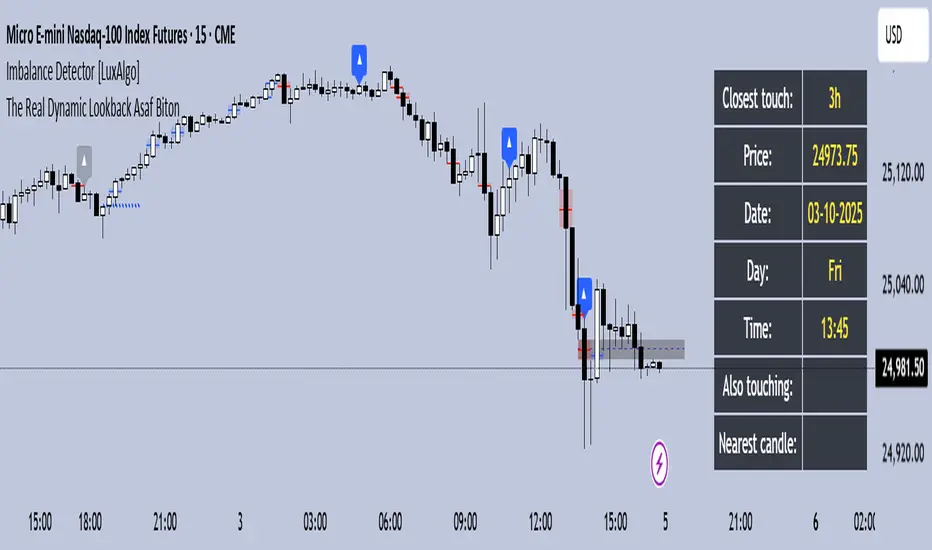
The Real Dynamic Lookback Asaf BitonThe Real Dynamic Lookback – Asaf Biton This indicator dynamically tracks historical candles at predefined lookback intervals (in hours) and visually highlights them on the chart. Dynamic Lookback Arrows: Marks candles from the chosen lookback groups (3h, 6h, 12h, … up to 336h) with arrows. Colors indicate whether the candle falls on the same New York trading day or not. HUD Panel: Displays real-time information about the closest candle that overlaps with the current price range, including its price, date, day, and time. Also Touching: If multiple candles overlap with the current bar, the closest one in time is prioritized, and the rest are listed as "Also touching". Nearest Candle: If no overlap occurs, the HUD shows the nearest candle in terms of price proximity. Timeframe Restriction: Works only on 15m, 30m, and 1h charts to maintain accuracy. Customization: Users can enable or disable different lookback groups and toggle HUD/arrows. This tool is useful for identifying recurring price reactions, time-based cycles, and historical reference points in a structured, visual way. 📌 תיאור בעברית The Real Dynamic Lookback – אסף ביטון האינדיקטור מזהה ומציג נרות היסטוריים לפי מחזורי זמן מוגדרים מראש (בשעות), ומסמן אותם באופן ויזואלי על הגרף. חצים דינמיים: סימון נרות במחזורי זמן נבחרים (3h, 6h, 12h ועד 336h). הצבע משתנה בהתאם אם הנר נמצא באותו יום מסחר בניו יורק או לא. תצוגת HUD: מציגה בזמן אמת את הנר הקרוב ביותר שנוגע בטווח המחירים של הנר הנוכחי, כולל המחיר, התאריך, היום והשעה. Also Touching: כאשר יותר מנר אחד נוגע בטווח הנר הנוכחי, האינדיקטור נותן עדיפות לנר הקרוב ביותר בזמן ואת השאר מציג ברשימה. Nearest Candle: אם אין נרות שנוגעים במחיר הנוכחי, מוצג הנר הקרוב ביותר מבחינת מרחק מחיר. מגבלת טיים פריים: עובד אך ורק על גרפים של 15 דקות, 30 דקות או שעה, לשמירה על דיוק. התאמה אישית: ניתן לבחור אילו קבוצות מחזורי זמן להפעיל ולהחליט האם להציג חצים ו-HUD. האינדיקטור מיועד לניתוח חזרות מחירים, מחזורי זמן והשוואה לנקודות היסטוריות בצורה ברורה ונוחה.Pine Script® indicatorby asafbiton11
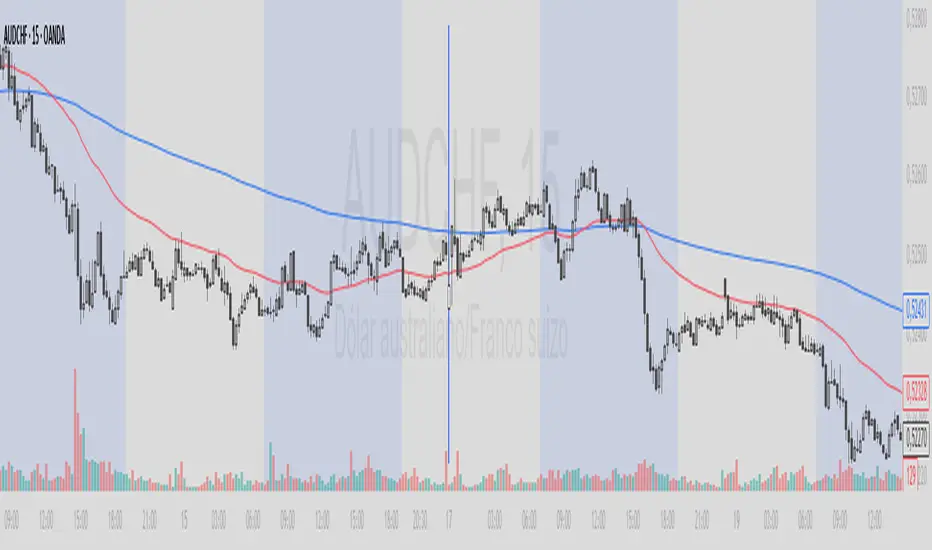
Inicio de Semana (línea vertical completa)This indicator plots a vertical line at the start of each new trading week. The line extends across the entire chart window, making it easy to visually identify weekly boundaries. Key features: Full-height vertical lines marking the beginning of every week. Customizable color, width, and style (solid, dotted, or dashed). Works on any timeframe (daily, intraday, etc.), automatically adjusting to weekly changes. Purpose: This tool is designed to help traders quickly spot the start of a new trading week, improving time-based analysis and making it easier to evaluate price action, weekly cycles, and strategy performance.Pine Script® indicatorby franjaparedes902
Time CyclesA new version because the previous didn't work, only for my own entertainmentPine Script® indicatorby DanielMarcell141
Timeframe Quadrants | InvrsROBINHOODTimeframe Quadrant Visualizer Summary This indicator is a powerful visualization tool designed to help traders analyze price action by dividing various timeframes into four distinct, color-coded quadrants. By breaking down periods from a full year to a single minute, it offers a unique perspective on market cycles and intraday patterns. The script includes fully customizable colors and display styles, allowing you to tailor the visual output to your specific charting needs. Key Features Multiple Timeframe Divisions: Choose to divide a Year, Month, Week, Day, Hour, or Minute into four parts. Customizable Quadrant Logic: Year: Divided into calendar quarters (Jan-Mar, Apr-Jun, Jul-Sep, Oct-Dec). Month: Divided into four approximate weeks (Days 1-7, 8-14, 15-21, 22-end). Week: Divided into four 42-hour blocks, starting from Sunday at 00:00. Day: Divided into four 6-hour blocks. Hour: Divided into four 15-minute blocks. Minute: Divided into four 15-second blocks. Flexible Display Options: Visualize the quadrants as either a full Background Color overlay or a Bar Overlay that colors the price bars directly. Timeframe Separators: A vertical line is automatically drawn at the beginning of each selected timeframe (e.g., at the start of each new day when "Day" is selected), making it easy to see where each period begins. Full Color Customization: All four quadrant colors are user-definable, along with a global transparency setting to ensure the indicator complements your chart without obscuring price action. Timezone-Aware: All calculations are performed based on a user-selected timezone from a dropdown menu, ensuring accuracy and consistency across different markets and trading sessions. As an added option, there is a manual input if the timezone is not available. How to Use Add to Chart: Add the "Timeframe Quadrants" indicator to your chart. Open Settings: Hover over the indicator's name on your chart and click the Settings (gear) icon. Configure the Indicator: Timeframe: Select the primary time period you want to divide (e.g., "Day", "Week", "Hour"). Display Method: Choose whether you want the quadrants to appear as a Background Color or a Bar Overlay. Timezone: Select the desired timezone from the dropdown menu. This is crucial for aligning the quadrants with specific market sessions (e.g., "America/New_York" for the NYSE session). Quadrant Colors: Customize the color for each of the four quadrants. Transparency %: Adjust the transparency of the colors to your preference. Underlying Concepts This script operates by using Pine Script's built-in time and date variables. It identifies the current bar's position within the user-selected timeframe (timeframe_choice) and assigns it to one of four quadrants based on pre-defined logic. For example, when "Day" is selected, it uses the hour() function to determine which 6-hour block the current bar falls into. The vertical separator lines are generated by detecting a change in the relevant time unit (e.g., ta.change(dayofmonth)), which marks the first bar of a new period. Disclaimer: This tool is intended for visual analysis and pattern recognition. It does not generate buy or sell signals and should be used in conjunction with your own trading strategy and risk management. Past performance is not indicative of future results.Pine Script® indicatorby InvrsROBINHOOD17
Day of Week Highlighter# 📅 Day of Week Highlighter - Global Market Edition **Enhanced visual trading tool that highlights each day of the week with customizable colors across all major global financial market timezones.** ## 🌍 Global Market Coverage This indicator supports **27 major financial market timezones**, including: - **Asia-Pacific**: Tokyo, Sydney, Hong Kong, Singapore, Shanghai, Seoul, Mumbai, Dubai, Auckland (New Zealand) - **Europe**: London, Frankfurt, Zurich, Paris, Amsterdam, Moscow, Istanbul - **Americas**: New York, Chicago, Toronto, São Paulo, Buenos Aires - **Plus UTC and other key financial centers** ## ✨ Key Features ### 🎨 **Fully Customizable Colors** - Individual color picker for each day of the week - Transparent overlays that don't obstruct price action - Professional color scheme defaults ### 🌐 **Comprehensive Timezone Support** - 27 major global financial market timezones - Automatic daylight saving time adjustments - Perfect for multi-market analysis and global trading ### ⚙️ **Flexible Display Options** - Toggle individual days on/off - Optional day name labels with size control - Clean, professional appearance ### 📊 **Trading Applications** - **Market Session Analysis**: Identify trading patterns by day of week - **Multi-Market Coordination**: Track different markets in their local time - **Pattern Recognition**: Spot day-specific market behaviors - **Risk Management**: Avoid trading on historically volatile days ## 🔧 How to Use 1. **Add to Chart**: Apply the indicator to any timeframe 2. **Select Timezone**: Choose your preferred market timezone from the dropdown 3. **Customize Colors**: Set unique colors for each day in the settings panel 4. **Enable/Disable Days**: Toggle specific days on or off as needed 5. **Optional Labels**: Show day names with customizable label sizes ## 💡 Pro Tips - Use different color intensities to highlight your preferred trading days - Combine with other session indicators for comprehensive market timing - Perfect for swing traders who want to identify weekly patterns - Ideal for international traders managing multiple market sessions ## 🎯 Perfect For - Day traders tracking intraday patterns - Swing traders analyzing weekly cycles - International traders managing multiple markets - Anyone wanting better visual organization of their charts **Works on all timeframes and instruments. Set it once, trade with confidence!** --- *Compatible with Pine Script v6 | No repainting | Lightweight performance*Pine Script® indicatorby Vandalistt7
Bull Bear Indicator (BBI)/Introduction The Bull Bear Indicator (BBI) identifies bull market conditions and bear market conditions for equity investors so they can avoid missing a bull market or getting caught in a bear market. /Signals There are two signals: 1. Bull Market Alert - This indicates prices of stocks in the broader market are rising. 2. Bear market Alert - This indicates prices of stocks in the broader market are falling. Both signals are indicated by a background colour and an upward/downward triangle. A green background and an upward green triangle below the bar signifies an environment of rising prices. A red background and a downward red triangle above the bar indicates an environment of falling prices. Lack of a coloured background indicates a transition period from Bull to Bear or Bear to Bull conditions. The transitions may be rapid during periods of high volatility. /Construction The indicator is constructed using market breadth, price action and moving averages. 1.Market Breadth: Definition: Market breadth refers to the number of stocks advancing versus the number declining in the stock market. It provides insight into the overall health and strength of a market move. Use in Identifying Bull/Bear Markets: Bull Market Indicators: In a bull market, market breadth is typically strong, with a large number of stocks advancing. This indicates widespread participation in the market rally, confirming the strength and sustainability of the upward trend. Bear Market Indicators: Conversely, in a bear market, market breadth weakens, with more stocks declining than advancing. This suggests that the downward movement is broad-based across the market, reinforcing the bearish sentiment. How the indicator does this: The number of stocks in a bullish/bearish trend is counted and normalised to a percentage to determine what percentage of stocks in the overall market are bullish/bearish. 2. Price Action: Definition: Price action involves the study of historical price movements to predict future price direction. It includes analyzing patterns, trends, and the reactions of prices to certain levels (like support and resistance). Use in Identifying Bull/Bear Markets: Bull Market Indicators: In a bull market, price action typically shows higher highs and higher lows, indicating an ongoing upward trend. The reaction to support levels is often strong, with prices bouncing off these levels. Bear Market Indicators: In a bear market, the price action is characterized by lower highs and lower lows. Prices tend to break through support levels and bounce off resistance levels, reflecting the dominant downward trend. 3. Trend Analysis: Definition: Trend analysis involves identifying the direction and strength of market movements. This was done using moving averages. Use in Identifying Bull/Bear Markets: Bull Market Indicators: A bull market is often identified by upward-sloping trendlines and prices consistently staying above key moving averages. Bear Market Indicators: In a bear market, the trendlines slope downwards, and prices remain below key moving averages. How the indicator does this: The average closing prices of the largest capitalised stocks and their intermediate trend is assessed relative to their moving averages, the moving average combines price action and trend because it is simply the average closing price over time. /Originality This indicator is simple and effective in that it uses multiple factors to assess the market environment. Market breadth gives an overview of the participation level in the market trend, price action helps identify specific patterns and reactions to key levels indicating a bull or bear market, and trend analysis provides a macro view of the market direction and its strength. Combining these tools can gives a comprehensive picture of the market environment and help in distinguishing between bull and bear markets. The market environments are boldly marked out through background colours and triangle markers. The indicator performance is only valid from 2002 to date because the market breadth data used is not available before this date. Why market Market breadth: Because it takes into account all the stocks in the market, this is essential in identifying the level of participation in a trend. Why moving averages: Because it ensures that the price action and overall trend of the stocks can be monitored over a given lookback period So together, moving average/price action + market breadth = trend + participation Note: The indicator has no predictive power, performance described here does not guarantee future results. Equity markets are particularly volatile and prone to cycles, and individual psychology can significantly affect indicator interpretation. Price data may also vary across exchanges. /Settings The parameters are fixed and there is no room for optimisation however, style settings can be modified by the user. /Tickers The BBI indicator is ticker agnostic but best viewed on a 1 day chart of the SPY.Pine Script® indicatorby oluisrel24
cycleIt's possible to buy signal when the blue line cross up 0.Pine Script® indicatorby kayaademogullari35