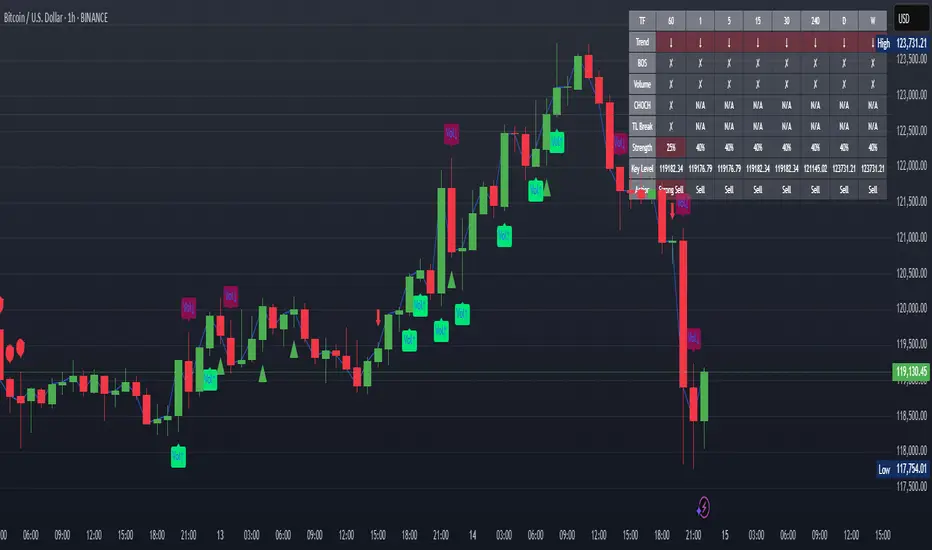
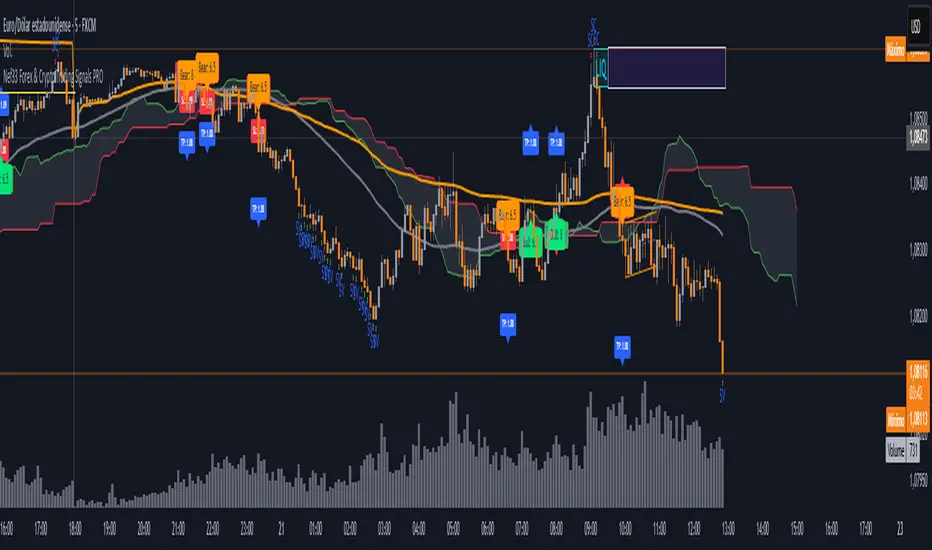
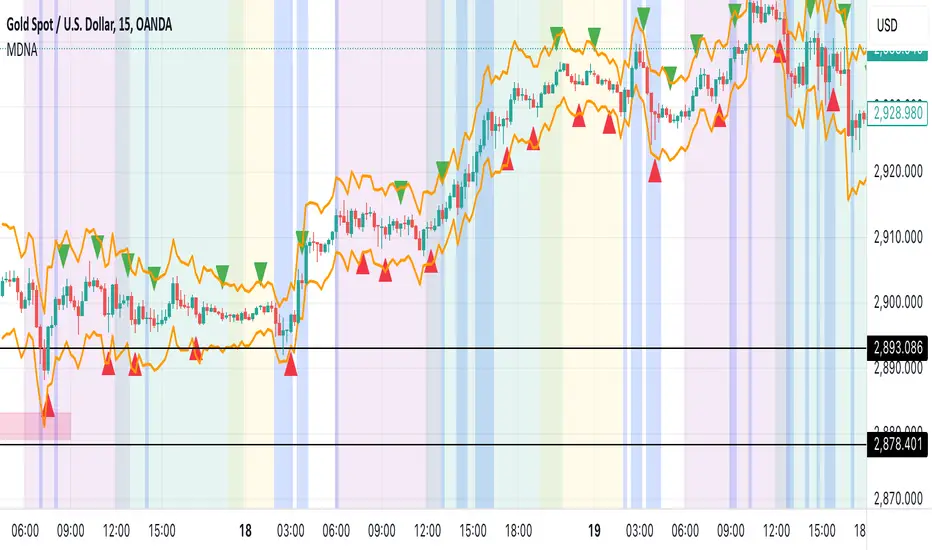
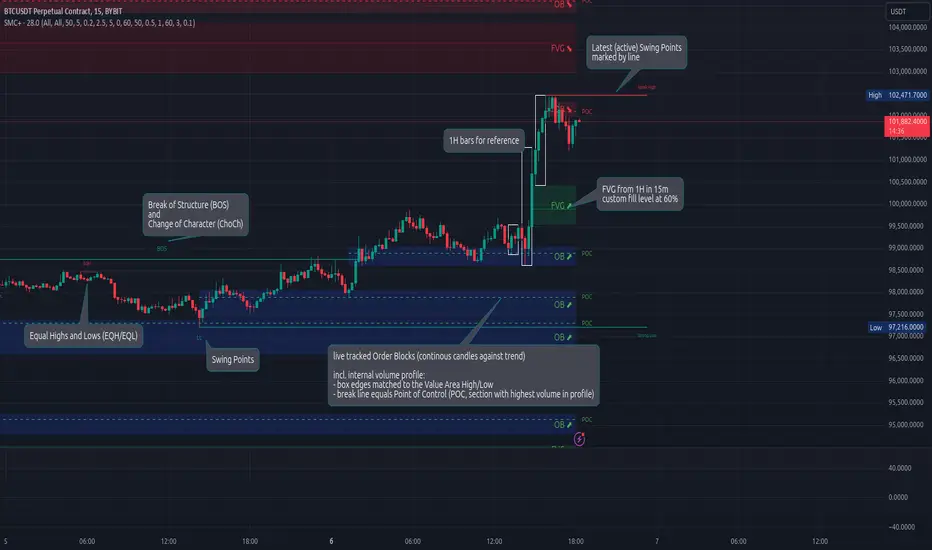
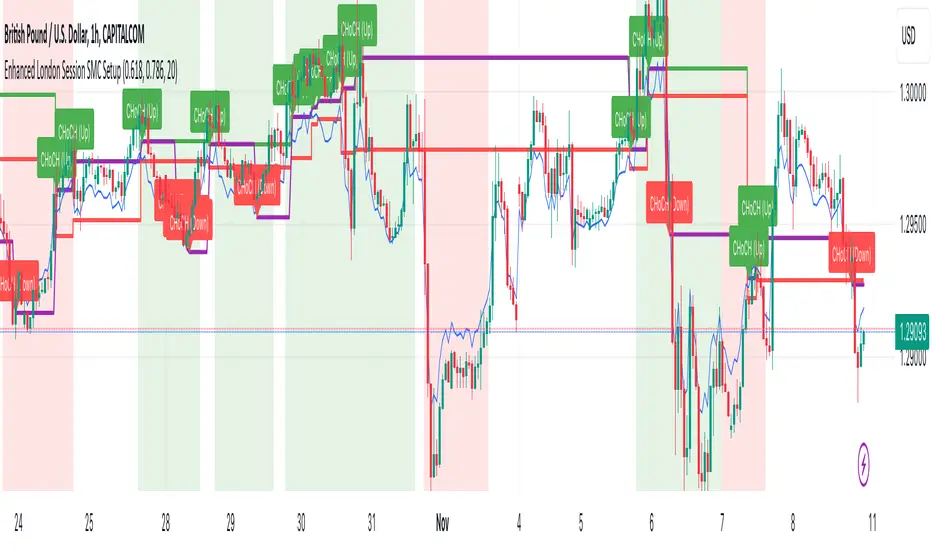
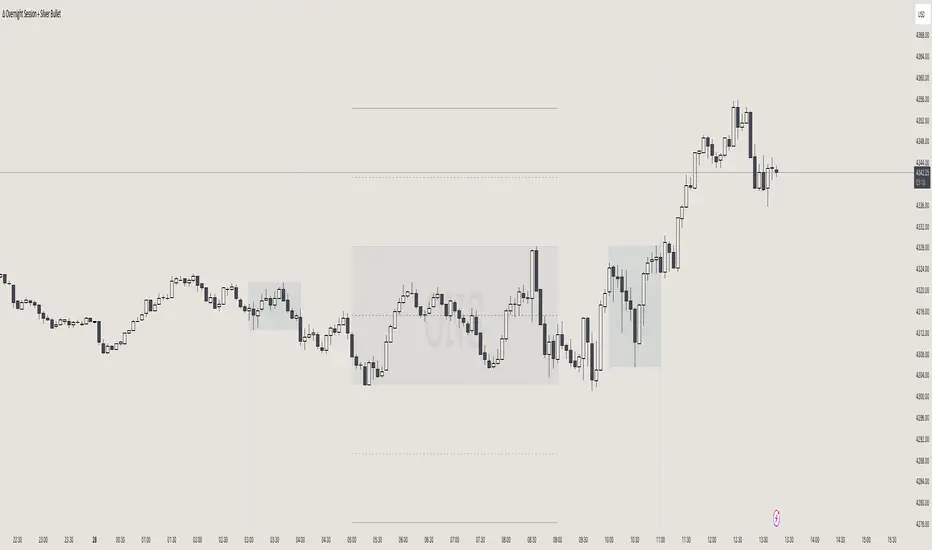
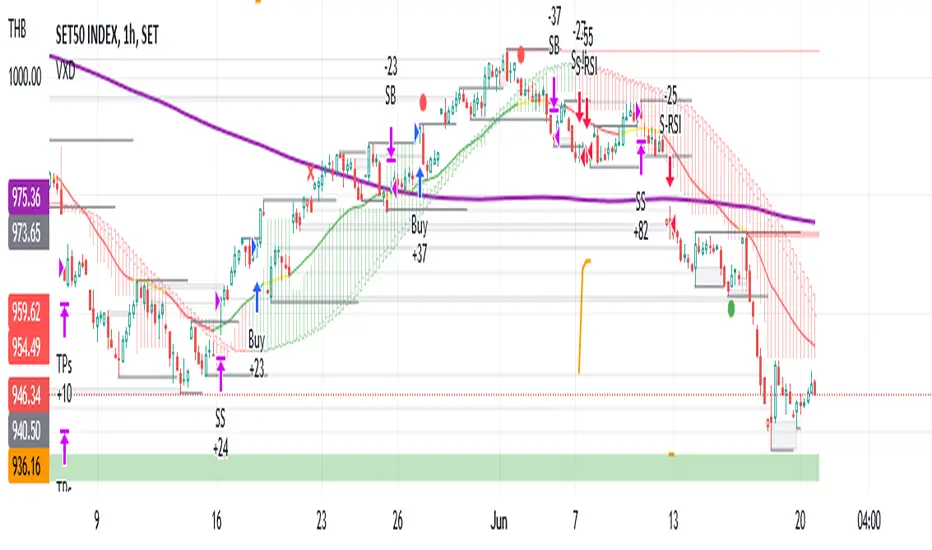
All in One Trend Indicator by Nicks**Multi-Factor Confluence Suite (7-in-1 Overlay)**
### **Description:**
**Overview**
This script is a comprehensive workspace optimizer designed to combine 7 essential trading tools into a single, efficient overlay. By merging trend analysis, market structure, liquidity zones, and momentum signals, this tool allows traders to bypass the standard indicator limit and view high-probability confluence setups without a cluttered chart.
**Key Features & Functionality**
* **Trend Filtering (Hull Suite):**
* A lag-reduced moving average system that visualizes the macro trend.
* Includes candle coloring options to easily identify trend alignment.
* **Market Structure (SMC):**
* Automatically maps Break of Structure (BOS) and Change of Character (CHoCH).
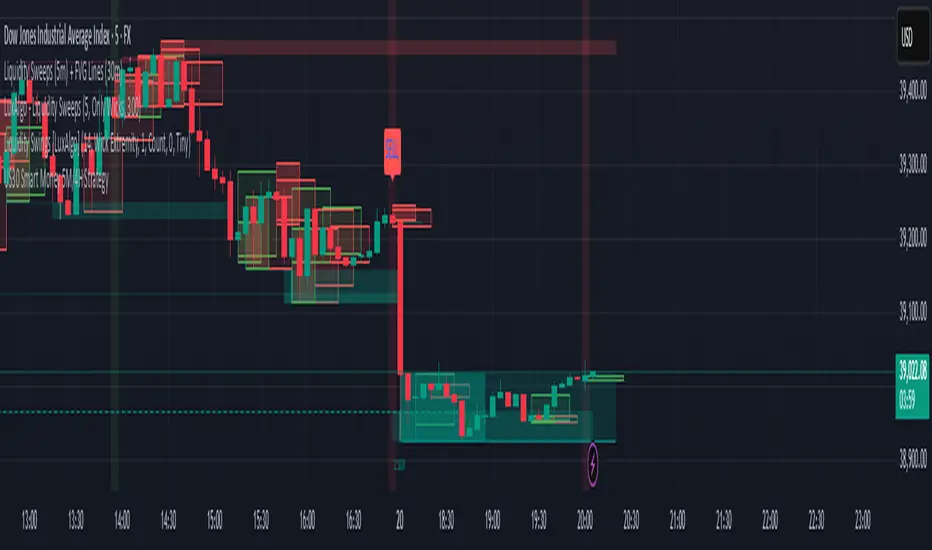
* Identifies Order Blocks and Fair Value Gaps (FVG) for potential entry/exit zones.
* **Liquidity Analysis:**
* **Swings:** Highlights key swing highs and lows where stop losses typically reside.
* **Grabs:** Specifically detects "stop hunts" where price wicks liquidity before reversing (Bubbles visualization).
* **Momentum Signals (UT Bot & MACD):**
* **UT Bot:** Provides high-sensitivity Buy/Sell labels based on ATR trailing stops.
* **MACD Overlay:** Plots signal crossovers directly on the price chart (arrows) to identify momentum shifts without occupying a separate oscillator pane.
* **Session Timing:**
* Visualizes major trading sessions (NY, London, Tokyo, Sydney) with an optional dashboard table.
**How to Use**
This suite is designed for "Confluence Trading."
1. **Identify Trend:** Use the Hull Suite color to determine the directional bias.
2. **Find Structure:** Wait for price to react at an SMC Order Block or Liquidity Zone.
3. **Confirm Entry:** Look for a UT Bot label or MACD Arrow in the direction of the trend.
**Settings**
Each module is separated by headers in the settings menu. You can toggle specific indicators on/off to suit your trading style and keep the chart clean.
**Credits & Attribution**
This script is a compilation of open-source logic from the TradingView community, adapted and updated to Pine Script v5/v6 for compatibility. Special thanks to the original authors for their foundational work:
* *InSilico* (Hull Logic)
* *LuxAlgo* (SMC & Liquidity Swings Logic)
* *Flux Charts* (Liquidity Grabs Logic)
* *QuantNomad* (UT Bot Logic)
* *TraderHariKrishna* (Session Logic)
**License**
This source code is subject to the terms of the Mozilla Public License 2.0 and/or Creative Commons (CC BY-NC-SA 4.0) where applicable by the original authors. This script is intended for educational and personal use.
---
Search in scripts for "fvg"
ICT Kill Zones PanelICT Kill Zones Panel - Clean & Simple Trading Sessions Indicator
A simple, objective indicator to identify ICT Kill Zones with real-time status and smart visual highlighting based on New York timezone.
WHAT MAKES IT DIFFERENT:
Traditional indicators clutter charts with dozens of colored boxes from past sessions. This tool provides a clean alternative:
- Real-time information panel showing current active session
- Smart dual-transparency painting: ACTIVE session displays stronger (more visible), historical sessions display softer (less clutter)
- Accurate session timing: Only shows active when session is actually happening
- Mobile-optimized size for phone trading
- Professional interface that doesn't interfere with price action
FEATURES:
- Real-Time Detection: Panel uses actual NYC time (timenow) to show which session is active NOW
- Precise Timing: Sessions activate ONLY during their specific time windows - all zones show inactive outside trading hours
- Smart Visual System: Currently active session has stronger background color, past sessions are softer
- Color Synchronization: Active session color in panel matches chart background color automatically
- Clean Highlighting: Optional background painting with adjustable transparency levels
- Full Customization: 9 panel positions, 4 sizes (Mobile/Small/Normal/Large), fully customizable colors
- All Sessions: Asian (20:00-01:00), London (02:00-05:00), NY AM (08:00-11:00), London Close (10:00-12:00), NY PM (13:00-16:00)
KILL ZONE SCHEDULE (NYC TIME):
1. Asian: 20:00 - 01:00 (5 hours)
2. INACTIVE: 01:00 - 02:00
3. London: 02:00 - 05:00 (3 hours)
4. INACTIVE: 05:00 - 08:00
5. NY AM: 08:00 - 11:00 (3 hours) - overlaps with London Close
6. London Close: 10:00 - 12:00 (2 hours) - overlaps with NY AM
7. INACTIVE: 12:00 - 13:00
8. NY PM: 13:00 - 16:00 (3 hours)
9. INACTIVE: 16:00 - 20:00
During INACTIVE periods, all sessions show as inactive in the panel.
COLOR SYSTEM:
ALL COLORS ARE FULLY CUSTOMIZABLE:
- Each Kill Zone has its own color setting (Asian, London, NY AM, London Close, NY PM)
- Default colors shown in screenshots are just examples
- Active session in panel: displays with its assigned color (e.g., green for NY AM by default)
- Same color appears on chart background with adjustable transparency
- Inactive sessions in panel: display with gray (also customizable)
- Panel background and text colors: fully customizable
- Choose colors that match your chart theme
The green color shown for active sessions in examples is the DEFAULT color for NY AM - you can change it to any color you prefer.
TRANSPARENCY SYSTEM EXPLAINED:
ACTIVE SESSION (happening right now):
- Default 70% transparency = STRONGER/MORE VISIBLE background
- Instantly shows which Kill Zone is unfolding
- Panel row highlights with the session's assigned color
- Chart background displays same color stronger
HISTORICAL SESSIONS (already passed):
- Default 90% transparency = SOFTER/LESS VISIBLE background
- Provides context without visual clutter
- Panel rows show gray (inactive color)
- Both transparency levels fully adjustable in settings
MOBILE OPTIMIZED:
Select "Mobile" panel size for optimal viewing on phone screens - compact layout perfect for smaller displays.
REPAINTING BEHAVIOR:
Panel Status & Colors: Update in real-time as sessions change - panel color switches to match the new active session (intentional for current awareness)
Active Session Highlighting: Adjusts in real-time to show current session stronger on chart
Historical Background Colors: Do NOT repaint - accurately mark when sessions occurred
Session Activation: Sessions activate and deactivate precisely at their scheduled times
CUSTOMIZATION:
- Panel: 9 positions, 4 sizes including Mobile
- Colors: Individual customizable color for each Kill Zone
- Panel Colors: Customizable background, text, and inactive zone colors
- Transparency: Separate controls for active (default 70%) and historical (default 90%) sessions
- Toggle: Show/hide individual zones
- Chart Painting: On/off
HOW TO USE:
1. Add to chart - panel appears top-right
2. Active session displays with its assigned color in panel and stronger on chart
3. Panel shows all zones as inactive during non-trading hours (accurate timing)
4. Panel color automatically changes when new session begins
5. Adjust all colors in settings to match your preferences
6. Adjust transparency settings for optimal visibility
7. Use "Mobile" size for phone trading
BEST FOR:
- ICT traders timing entries during high-liquidity periods
- Smart money concepts (FVG, Order Blocks, Liquidity)
- Traders who want clean charts with essential information
- Traders needing accurate session timing without false signals
- Mobile traders needing compact, clear displays
- Traders who want to customize colors to match their chart theme
TECHNICAL:
- Works on all timeframes
- Built with Pine Script v6
- NYC timezone with automatic DST adjustment
- Precise hour-based session detection
- Lightweight and optimized
- Open source
FEEDBACK WELCOME:
All comments, critiques, and suggestions are welcome! Your input helps improve this tool for the trading community.
Created by ivrank13 for traders who value simplicity, accuracy, and clean charts.
© 2026 ivrank13. All Rights Reserved.
#ICT #KillZones #SmartMoney #ForexSessions #CleanCharts #MobileTrading #CustomColors #AccurateTiming
Auto Parallel Channel [KTY] Auto Parallel Channel
Automatically detects and draws parallel channels based on ZigZag pivot structure. Supports multi-level channel detection, slope filtering, and channel extension after breakout.
━━━━━━━━━━━━━━━━━━━━━━━━━━━━━━━
📊 Features
- Auto Channel Detection
- Automatically generates parallel channels by connecting swing highs and lows
- Bullish Channel (Green): Based on HL (Higher Low) pivots
- Bearish Channel (Red): Based on LH (Lower High) pivots
- Multi-Level Structure
- Major Channels: Large trend structure (solid lines)
- Minor Channels: Short-term swing structure (dashed/dotted lines)
- 8 channels total (Major/Minor × External/Internal × Bull/Bear)
- Midline
- Dotted line at the 50% level of each channel
- Serves as a mean reversion reference
- Slope Display
- Each channel label shows its slope (%)
- Positive (+) for ascending, Negative (-) for descending
- Slope Filter
- Option to display only channels above a minimum slope threshold
- Separate threshold settings for bullish and bearish channels
- Channel Extension
- Extends the channel by N bars after price breaks out
- Adjustable extension length (default: 30 bars)
- Alerts
- Bullish Channel Touch: Price touches bullish channel support
- Bearish Channel Touch: Price touches bearish channel resistance
- Bullish Channel Break: Price breaks below bullish channel
- Bearish Channel Break: Price breaks above bearish channel
━━━━━━━━━━━━━━━━━━━━━━━━━━━━━━━
✅ How to Use
1. Channel bottom touch → Check for bounce
2. Channel top touch → Check for resistance
3. Channel break → Check for trend reversal or acceleration
4. Midline reaction → Check for mean reversion
━━━━━━━━━━━━━━━━━━━━━━━━━━━━━━━
💡 Tips
- Major channels are more reliable than Minor channels
- Channel breakout with increasing volume = higher confidence
- Overlapping channels = stronger support/resistance zones
- Combine with FVG, Order Blocks, and liquidity sweeps for confluence
━━━━━━━━━━━━━━━━━━━━━━━━━━━━━━━
📌 Notes
This indicator is open-source under the Mozilla Public License 2.0.
Created by Kim Thank You (김땡큐)
━━━━━━━━━━━━━━━━━━━━━━━━━━━━━━━
⚠️ Disclaimer
This indicator is provided for educational purposes only.
It is not financial advice. Always trade at your own risk.
IBPDA Time Markers Daily OnlyThis indicator plots IBPDA (Interbank Price Delivery Algorithm) time markers based on true bar counts, not calendar days.
Unlike many time-cycle tools that rely on calendar arithmetic, this script calculates 20 / 40 / 60 daily candles, ensuring accuracy across:
market holidays
shortened sessions
exchange-specific trading calendars
It is intentionally restricted to the Daily timeframe, where each bar represents one completed trading session.
🔍 What This Indicator Does
Draws vertical lines at:
−20 / −40 / −60 bars (exact historical daily candles)
+20 / +40 / +60 bars (future projections for planning)
Uses bar index–based logic, not calendar dates
Prevents misuse by enforcing Daily timeframe only
Draws lines once per chart load to avoid clutter and object limits
⚙️ Key Design Choices (Important)
Past markers are exact
Past levels use time , which means “n completed daily sessions ago” — no approximation.
Future markers are projected
Since future bars do not exist yet, forward levels are projected using a configurable day-step. These are meant for time-window awareness, not precision forecasting.
No repainting
All levels are fixed once drawn.
🧠 How to Use (Best Practice)
IBPDA time levels are time magnets, not trade signals.
They work best when combined with:
Higher-timeframe PD arrays (weekly/monthly highs & lows)
Fair Value Gaps (FVGs)
Liquidity pools
Market structure shifts
Watch for price expansion, liquidity events, or displacement occurring near these time markers.
🛑 Limitations (By Design)
Daily timeframe only
Future levels are projections (exchange calendars cannot be predicted perfectly)
This script does not generate buy/sell signals
🎯 Intended Audience
This indicator is designed for:
ICT / SMC traders
Index futures traders (NQ, ES, YM, etc.)
Swing traders and position traders
Traders who respect time as a variable, not just price
🧩 Notes
Best used as a contextual framework, not a standalone strategy
Clean, lightweight, and safe for long-term chart usage
Built with strict Pine Script v5 compatibility and publishing standards
ICT Liquidity Sweep [KTY] ICT Liquidity Sweep
Hi, I'm Kim Thank You 👋
KTY = Kim Thank You (김땡큐)
Detects sweep candles that grab liquidity at swing highs/lows and reverse back inside.
━━━━━━━━━━━━━━━━━━━━━━━━━━━━━━━
📊 FEATURES
- Liquidity Sweep Detection
- Wick breaks level + Close inside = Sweep ✅
- Break and close outside = Real breakout (no sweep)
- Visual Display
- ⇩: High liquidity swept (BSL)
- ⇧: Low liquidity swept (SSL)
- Sweep line connects liquidity level to sweep candle
- Vertical line marks sweep candle wick area
- Multi-Timeframe
- LTF and HTF sweep detection
- HTF sweeps are more significant
━━━━━━━━━━━━━━━━━━━━━━━━━━━━━━━
✅ HOW TO USE
- ⇩ detected → Check for potential bearish reversal
- ⇧ detected → Check for potential bullish reversal
- Combine with OB/FVG for better accuracy
- HTF sweeps carry more weight than LTF
━━━━━━━━━━━━━━━━━━━━━━━━━━━━━━━
💡 TIPS
- Sweeps indicate smart money grabbing liquidity
- Wait for confirmation before entering
- Multiple sweeps at same level = stronger signal
- Use with market structure for confluence
━━━━━━━━━━━━━━━━━━━━━━━━━━━━━━━
⚠️ DISCLAIMER
This indicator is for educational purposes only.
Not financial advice. Always do your own research.
FX-CLINIC/ICT/IFVGICT Indicator
Show IFVG
Automatic update
direct create if break FVG by candle body100%
direct delete if break IFVG by candle body 100%
Created by FX-CLINIC
NY PM Session Highlighter (For Hawaiian Traders)Purpose: This script is designed for traders targeting the New York PM Session (1:30 PM – 4:00 PM ET). Based on 5-year historical data for ES and NQ, this window represents a high-probability period for 2:1 Risk-to-Reward setups as institutional traders rebalance and drive price toward the daily close.
Key Features:
DST-Automated Tracking: Uses the America/New_York timezone to ensure the lines stay accurate during Daylight Saving transitions.
Visual Guidance: Draws a dashed vertical line at the 1:30 PM ET start and the 4:00 PM ET close.
Session Boxing: Highlights the background in a soft blue to define the "trading zone," helping you ignore the low-volume "lunch doldrums" that occur immediately before.
Hawaii-Friendly: Automatically adjusts to your local Hawaii Standard Time (HST) so you don't have to calculate the 5 or 6-hour offset manually.
Trade Logic:
Wait for the 1:30 PM ET (8:30 AM HST) line.
Look for a sweep of the 12:00 PM – 1:00 PM (Lunch) range.
Enter on a Market Structure Shift (MSS) or Fair Value Gap (FVG).
Target a 2:1 Reward-to-Risk ratio, aiming to exit by the 4:00 PM ET line.
ICT Trend Candles [KTY]ICT Trend Candles Indicator
This indicator colors candles based on market structure direction.
Candle colors change when BOS (Break of Structure) or CHoCH (Change of Character) occurs, allowing you to quickly identify the current trend direction.
Structure-Based Coloring
- Bullish structure break → Candles turn bullish color
- Bearish structure break → Candles turn bearish color
- Color changes at trend shift points
Two Structure Options
- INTERNAL: Short-term structure based, faster color changes
- EXTERNAL: Long-term structure based, slower but more reliable
1. Select structure type (INTERNAL or EXTERNAL)
2. Watch for candle color changes to identify trend shifts
3. Combine with other ICT concepts (OB, FVG, Liquidity) for confluence
Pro Tips:
- Use INTERNAL for scalping and short-term trading
- Use EXTERNAL for swing trading and position trading
- Color change after liquidity sweep = high probability reversal signal
Show Trend Candles: Toggle candle coloring on/off
Structure Type: Select INTERNAL or EXTERNAL
Bullish Color: Color when in bullish structure
Bearish Color: Color when in bearish structure
This indicator is designed for educational purposes.
Color change does not guarantee trend reversal.
Always combine with proper risk management.
If you find this indicator helpful, please leave a like and follow for more ICT-based tools!
ICT Kill Zone [KTY]ICT Kill Zone Indicator
This indicator displays ICT Kill Zones, which are high-liquidity trading periods during major exchange opening hours.
Smart money tends to make significant moves during these times, resulting in increased volatility and trading volume.
Four Kill Zones
- AS KZ (Asian): Lower volatility, range formation period
- LDN KZ (London): European session start, liquidity surge
- NY KZ (New York): Europe + US overlap, strongest moves
- LDN CL KZ (London Close): London closing, position unwinding period
Market Hours Display
- Shows actual trading hours for Asian, London, and New York markets
- High/low lines for each session
Session Indicators
- Visual markers at the bottom of chart showing active kill zones
- Labels when each kill zone begins
1. Identify which kill zone is currently active
2. Signals during kill zones (CHoCH/BOS, OB, FVG) have higher significance
3. Watch for Asian range breakout in London/New York sessions
4. Be cautious of false moves outside kill zone hours
Pro Tips:
- New York kill zone typically has the strongest moves
- London open often sets the daily direction
- Asian session forms the range that gets broken later
- Combine kill zones with other ICT concepts for best results
Show Kill Zones: Toggle kill zone display on/off
Show Market Hours: Toggle market hours lines on/off
Show Latest Data Only: Display only the most recent kill zone
Daylight Saving Time: Apply DST adjustment (On/Off)
Asian Kill Zone Started
London Kill Zone Started
New York Kill Zone Started
London Close Kill Zone Started
This indicator is designed for educational purposes.
Kill zones only display on 15-minute or lower timeframes.
Always combine with proper risk management.
If you find this indicator helpful, please leave a like and follow for more ICT-based tools!
ICT OTE [KTY]ICT OTE (Optimal Trade Entry) Indicator
This indicator automatically displays the OTE (Optimal Trade Entry) level based on ICT (Inner Circle Trader) methodology.
OTE is the 70.5% Fibonacci retracement level, which is considered a key level where price often reacts during pullbacks.
70.5% Fibonacci Level
- Automatically calculates and displays the OTE level
- Green line with ⬆ indicates uptrend retracement
- Red line with ⬇ indicates downtrend retracement
Multi-Timeframe Support
- Display OTE from two different timeframes simultaneously (LTF & HTF)
- HTF OTE levels carry more significance
Dynamic Calculation
- Automatically identifies swing high and low for the selected timeframe
- OTE level updates as new highs/lows form
1. Identify the OTE level on your chart
2. Watch for price reaction when approaching the OTE line
3. Combine with Market Structure (CHoCH/BOS) for directional bias
4. Look for confluence with OB, FVG, or Liquidity zones at OTE level
Pro Tips:
- HTF OTE (4H, 1D) is more reliable than LTF
- OTE aligned with Order Block increases significance
- Most effective in trending markets, less reliable in ranging conditions
Show OTE: Toggle OTE display on/off
LTF: Enable and select lower timeframe for OTE calculation
HTF: Enable and select higher timeframe for OTE calculation
Price Touched OTE Level
OTE Direction Changed to Bullish
OTE Direction Changed to Bearish
This indicator is designed for educational purposes.
OTE level touch does not guarantee price reversal.
Always combine with proper risk management.
If you find this indicator helpful, please leave a like and follow for more ICT-based tools!
ICT Premium & Discount [KTY]ICT Premium & Discount Indicator
This indicator automatically displays Premium and Discount Zones based on ICT (Inner Circle Trader) methodology.
Premium & Discount zones divide the current price range into upper and lower areas based on swing highs and lows. This helps traders understand where price sits within the broader range.
Three-Zone Structure
- Premium Zone (Red): Upper portion of the range
- Equilibrium (Gray Dashed): Middle 50% line, fair value reference point
- Discount Zone (Green): Lower portion of the range
Multi-Timeframe Support
- Display zones from two different timeframes simultaneously (LTF & HTF)
- HTF zones carry more significance than LTF zones
Dynamic Range Calculation
- Automatically identifies swing high and low for the selected timeframe
- Zones update as new highs/lows form
1. Identify the current zone - Is price in Premium, Equilibrium, or Discount?
2. Combine with Market Structure - Use CHoCH/BOS to confirm directional bias
3. Look for confluence - OB, FVG, or Liquidity zones within Premium/Discount add significance
4. Use Equilibrium as reference - Price often reacts around the 50% level
Pro Tips:
- HTF zones (4H, 1D) are more significant than LTF zones
- Most effective when combined with other ICT concepts
- Ranging markets may see price oscillate between zones without clear direction
Show Premium & Discount Zones: Toggle zone display on/off
LTF: Enable and select lower timeframe for zone calculation
HTF: Enable and select higher timeframe for zone calculation
Price Entered Premium Zone
Price Entered Discount Zone
This indicator is designed for educational purposes.
Always combine with proper risk management.
If you find this indicator helpful, please leave a like and follow for more ICT-based tools!
ICT Market Structure [KTY]ICT Market Structure Indicator
Overview
This indicator automatically detects and displays Market Structure based on ICT (Inner Circle Trader) methodology.
Market structure analysis identifies trend direction and potential reversal points by tracking swing highs and lows. Understanding structure is fundamental to ICT trading concepts.
Key Features
Internal & External Structure
Internal Structure: Short-term swings for quick trend detection (displayed with dashed lines)
External Structure: Long-term swings for major trend identification (displayed with solid lines)
Choose to display Internal, External, Both, or None
CHoCH & BOS Detection
CHoCH (Change of Character): First sign of potential trend reversal
BOS (Break of Structure): Confirmation of trend continuation
Internal labels: lowercase (choch/bos)
External labels: uppercase (CHOCH/BOS)
Equal Highs & Equal Lows
EQH: Multiple highs at similar price levels — liquidity pool above
EQL: Multiple lows at similar price levels — liquidity pool below
Smart money often sweeps these levels before reversing
Swing Point Labels
HH (Higher High): Uptrend continuation
HL (Higher Low): Uptrend confirmation
LH (Lower High): Downtrend continuation
LL (Lower Low): Downtrend confirmation
How to Use
Identify the trend using HH/HL (bullish) or LH/LL (bearish) patterns
Wait for CHoCH as the first signal of potential reversal
Confirm with BOS in the new direction
Watch EQH/EQL levels for potential liquidity sweeps
Combine with OB, FVG, Liquidity zones for higher probability setups
Pro Tips:
External structure is more reliable than internal structure
CHoCH after liquidity sweep = high probability reversal
Multiple timeframe analysis increases accuracy
Internal CHoCH can provide early entries, but with higher risk
Settings
SettingDescriptionStructure TypeSelect INTERNAL, EXTERNAL, ALL, or NONEInternal Structure ColorsCustomize bullish/bearish colors for internal structureExternal Structure ColorsCustomize bullish/bearish colors for external structureEQL & EQHToggle equal highs/lows display with custom colorsSwing PointsToggle HH/HL/LH/LL labels with custom color
Alerts
Structure Alerts:
🟢 Bullish CHoCH (Internal)
🔴 Bearish CHoCH (Internal)
🟢 Bullish CHOCH (External)
🔴 Bearish CHOCH (External)
🟢 Bullish BOS (Internal)
🔴 Bearish BOS (Internal)
🟢 Bullish BOS (External)
🔴 Bearish BOS (External)
Equal Levels Alerts:
🔴 Equal Highs (EQH)
🟢 Equal Lows (EQL)
Swing Point Alerts:
📈 Higher High (HH)
📈 Higher Low (HL)
📉 Lower High (LH)
📉 Lower Low (LL)
Notes
This indicator is designed for educational purposes
Internal structure provides faster signals but more noise
External structure is slower but more reliable
Always combine with proper risk management
If you find this indicator helpful, please leave a like and follow for more ICT-based tools!
ICT Order Block [KTY]ICT Order Block Indicator
Overview
This indicator automatically detects and displays Order Blocks (OB) based on ICT (Inner Circle Trader) methodology.
Order Blocks are price zones where Smart Money (institutions, banks) executed large buy/sell orders. These zones often act as strong support and resistance levels, making them valuable for identifying high-probability entry points.
Key Features
Multi-Timeframe Support
Display OBs from two different timeframes simultaneously (LTF & HTF)
HTF Order Blocks provide stronger, more reliable levels
Bullish & Bearish Order Blocks
Bullish OB: Last bearish candle before a significant up move → Acts as support
Bearish OB: Last bullish candle before a significant down move → Acts as resistance
Breaker Block Detection
When an OB is broken, it converts to a Breaker Block (BB)
Role reverses: Former support becomes resistance, and vice versa
Volume Analysis
Displays volume at OB formation
Shows upper/lower volume balance ratio (%)
Lower percentage = stronger one-sided order flow = more significant zone
OB Body Lines
Dotted lines showing the candle body (open/close) within the OB
Useful for precise entry points
How to Use
Identify the trend on higher timeframes
Wait for price to re-enter an Order Block zone
Look for confirmation (candlestick patterns, lower timeframe structure break)
Enter within the OB, set stop loss below/above the OB
Pro Tips:
OBs that overlap with FVG (Fair Value Gap) or OTE (Optimal Trade Entry) have higher probability
HTF Order Blocks are more reliable than LTF
Fresh (untested) OBs tend to have stronger reactions
Settings
SettingDescriptionLTF / HTFEnable and select timeframes for Order Block detectionBullish OB CountNumber of Bullish Order Blocks to display (1-10)Bearish OB CountNumber of Bearish Order Blocks to display (1-10)Show Breaker BlocksToggle Breaker Block displayShow OB Body LinesToggle candle body lines within OBLabel ColorCustomize text color inside OB boxes
Alerts
🟢 Bullish OB Detected
🔴 Bearish OB Detected
🟢 Bullish OB Touched
🔴 Bearish OB Touched
🟢 Bullish BB Touched
🔴 Bearish BB Touched
💥 Bullish OB → BB Conversion
💥 Bearish OB → BB Conversion
Notes
This indicator is designed for educational purposes
Always combine with proper risk management
Past performance does not guarantee future results
If you find this indicator helpful, please leave a like and follow for more ICT-based tools!
Gold Professional MacrosMacro Window Descriptions
London Opening Sweep (08:00 – 08:30 CET)
Purpose: The "Judas Swing" window. It captures the initial surge of European liquidity, often creating a false move to sweep Asian Session highs or lows before establishing the true London trend.
London LOD/HOD (09:30 – 10:00 CET)
Purpose: The "Maturity" window. This is where the morning trend often establishes its Low of Day (LOD) or High of Day (HOD) before entering a mid-day consolidation.
Pre-NY News Window (13:30 – 14:00 CET)
Purpose: The "High-Impact" window. Corresponds to 07:30–08:00 NY Time, aligning with major US economic data releases (CPI, Jobless Claims) that trigger immediate repricing in Gold.
NY Open Power Surge (15:15 – 15:45 CET)
Purpose: The "Volatility" window. Marks the official New York open. This is the prime time for ICT Silver Bullet setups as heavy institutional volume enters the market.
The Gold Fix Liquidation (16:00 – 16:30 CET)
Purpose: The Master Macro. This is the London Gold Fix. It is the most critical period for Gold, often resulting in massive reversals or final daily expansions as central banks and bullion dealers settle prices globally.
PM Reversal (19:30 – 20:00 CET)
Purpose: The "Correction" window. Often sees Gold retracing to fill Fair Value Gaps (FVG) or imbalances created during the violent NY morning session.
Key Features of the Script
Visual Time-Boxing: Color-coded background zones for instant recognition.
Automated Labeling: Clearly identifies each macro at the moment of inception.
Multi-Timeframe Compatible: Optimized for M1, M5, and M15 execution charts.
Timezone Synchronized: Hard-coded to Europe/Paris (CET) to align perfectly with European and US market overlaps.
ICT Silver Only Toolkit (XAGUSD) No Baby ICTThis indicator is designed exclusively for Silver (XAGUSD) and applies core ICT concepts to help traders identify high-probability smart-money setups. It automatically plots the Asia session range, London and New York killzones, previous day high/low, equal highs and lows (liquidity pools), Asia liquidity sweeps, and ICT fair value gaps (FVGs).
The toolkit also includes “Do Nothing” warning labels to help traders avoid low-quality conditions such as trading outside killzones, extended pre-NY moves, or impulsive candles. Built for precision and patience, this indicator supports traders who wait for liquidity, displacement, and retracement rather than chasing price.
Best used on 1–15 minute charts during London and New York sessions.
No indicators for bias guessing. No scalping gimmicks. Just clean ICT structure for Silver.
NY Open 60-Min VarBox + Pure ICT FVG V8This is little indicator that shows the NY-Stock Exc. opening candles with a vertical line and a label. It works for different time scales. It also finds the bullish FVGs. It is a good tool for those who follow the opening of the exchange.
cephxs + fadi / Previous Time Based Dealing RangesPREVIOUS TIME BASED DEALING RANGES
Visualize previous and current higher timeframe dealing ranges with dual-box OHLC representation, extending reference lines, and HTF candle displays.
Open Source Fork of @fadizeidan 's HTF Candles Indicator
OVERVIEW
This indicator displays time-based dealing ranges from higher timeframes directly on your chart. It shows the complete price action structure of previous (or current/forming) periods using a dual-box system: one box for the full High-Low range and another for the Open-Close body. Reference lines extend from key levels to help identify potential support, resistance, and mean reversion zones.
Perfect for traders who use ICT concepts, market structure analysis, or any methodology that relies on understanding where price has been relative to previous dealing ranges.
KEY FEATURES
Dual-Box Range Visualization: Each range displays two boxes - the full H-L range (outer) and the O-C body (inner) - giving immediate visual context of candle structure
Multiple Timeframes: Support for 90m, 4H, 6H, 1D, 1W, 1M, and 3M ranges
Previous/Current Mode: View completed ranges (Previous) or the forming range (Current) with real-time updates
Auto Mode: Automatically selects the appropriate range based on your chart timeframe
Reference Lines: Extending lines from High, Mid, Low (or Quadrants: H/75/M/25/L) with trade-into detection
HTF Candle Display: Visual HTF candles positioned to the right of price for context
6H Session Support: Session-aware ranges for Asia, London, NY AM, and NY PM with labeled names
Open Line: Vertical line marking the range's opening price/time
Imbalance Detection: Fair Value Gaps and Volume Imbalances highlighted on HTF candles
MODE OPTIONS
Previous/Current: Previous shows the last completed range. Current shows the forming range with dynamic H/L/C updates
Auto/Manual: Auto selects range by chart TF. Manual lets you choose specific ranges
Extend Box (Current): In Current mode, extends the box's right edge as price develops
AUTO MODE TIMEFRAME LOGIC
Auto mode now selects up to 3 ranges automatically based on chart timeframe, providing multi-timeframe context:
Chart ≤ 3m → 90m + 6H + 1D
Chart 4m-14m → 6H + 1D + 1W
Chart 15m-59m → 1D + 1W (+ 1M available)
Chart 1H-3H → 1D + 1W + 1M
Chart 4H-23H → 1W + 1M + 3M
Chart ≥ 1D → 1M + 3M
INPUTS
Mode
Mode: Previous/Current - Choose completed or forming range
Auto/Manual: Auto selects range by chart TF, Manual lets you choose
Extend Box (Current): Extends box right edge with price (Current mode only)
Show Range Boxes: Toggle box visibility (lines remain visible when off)
Filter Lines by Distance: When boxes are hidden, hide reference lines that are too far from current price (Really Close / Balanced / Slightly Far)
Previous Ranges
Range 1: Enable/disable, select timeframe (90m/4H/6H/1D/1W/1M/3M), max display count (1-2)
Range 2: Second range layer for multi-timeframe analysis
Range 3: Third range layer for additional context
Reference Lines
Line Mode: Levels (H/M/L) or Quadrants (H/75/M/25/L)
Line Style: Solid, dashed, or dotted
Line Thickness: 1-4 pixels
Show Labels: Toggle reference line labels
Label Offset: Distance of labels from current price (1-20 bars)
HTF Candle Levels: Show mini H/M/L lines on HTF candles
Open Line: Vertical line at range open with customizable style
Range Boxes & Colors
Per-Range Colors: Customize box and line colors for each timeframe (90m, 4H, 6H, 1D, 1W, 1M, 3M)
HTF Candle Styling
Show HTF Candles: Toggle HTF candle display
Body/Border/Wick Colors: Customize bull and bear candle appearance
Padding/Buffer/Width: Control candle spacing and size
Labels
HTF Label: Show timeframe label above/below candles
Remaining Time: Countdown timer to candle close
Label Position: Top, Bottom, or Both
Label Alignment: Align across timeframes or follow individual candles
Imbalance
Fair Value Gap: Highlight FVGs on HTF candles
Volume Imbalance: Highlight VIs on HTF candles
HOW TO USE
Add the indicator to your chart
Choose Previous or Current mode based on your analysis preference
Use Auto mode for intelligent range selection, or Manual to select specific timeframes
Reference lines extend from range levels - watch for price reactions at H/M/L
In Current mode, observe how the range develops with real-time updates
Use the HTF candles on the right for quick multi-timeframe context
REFERENCE LINE LABELS
Labels follow this format:
Previous mode: pD-H (previous Daily High), pW-M (previous Weekly Mid), p6H-London-L (previous 6H London Low)
Current mode: D-H (Daily High), W-M (Weekly Mid), 6H-Asia-L (6H Asia Low)
6H SESSION NAMES
Asia: 18:00-00:00 ET
London: 00:00-06:00 ET
NYAM: 06:00-12:00 ET
NYPM: 12:00-18:00 ET
RECOMMENDED TIMEFRAMES
Tick/Second charts: 90m ranges
1-5 minute charts: 6H or 1D ranges
15-60 minute charts: 1D or 1W ranges
4H charts: 1W or 1M ranges
Daily charts: 1M or 3M ranges
Or simply use Auto mode to let the indicator choose the optimal range.
TIPS
The Mid (M) level often acts as equilibrium - watch for mean reversion plays
High and Low levels are natural support/resistance zones
In Current mode, watch how price interacts with the forming range boundaries
Combine with your existing analysis for confluence
The Open Line helps identify the "true open" of each range for gap analysis
DISCLAIMER
This indicator is for educational and informational purposes only.
Past performance does not guarantee future results.
Always use proper risk management and never risk more than you can afford to lose.
Trading involves substantial risk of loss and is not suitable for all investors.
CREDITS
Original indicator by @fadizeidan.
Enhanced by cephxs/fstarcapital
CHANGELOG
Pro + v1.1: Reupload + Added 90m ranges for ultra-low timeframe analysis, distance-based line filtering (lines-only mode), third range slot.
Open sourced so users can add more slots.
Enjoy 🤙
Asian Liquidity Sweep + NY Reversal [NY Only]Asian Liquidity Sweep + NY Reversal
Concept
Asia builds a tight range → liquidity pool
London / early NY raids that liquidity (stop hunt)
New York delivers the real move in the opposite direction
Sessions utc+3
Asia range: 04:00 – 10:00
Liquidity sweep: London open → pre-NY (≈10:00–14:00)
Execution window: NY Kill Zone 15:00 – 18:00
Step-by-Step Model
Define Asia Range
Mark:
Asia High
Asia Low
Liquidity Sweep (Stop Hunt)
Price must do ONE of the following:
Sweep above Asia High → bullish liquidity taken
Sweep below Asia Low → bearish liquidity taken
NY Reversal Confirmation (Key Part)
Wait for NY Kill Zone and look for:
Strong rejection candle
Displacement / impulsive move back inside range
Optional: small internal structure break on lower TF
Entry Rules (High Probability)
🔻 If Asia High is swept:
Bias: SELL
Entry:
After NY rejection
On pullback to:
Discount zone / FVG
OR Asia High retest
SL: Above sweep high
TP:
Asia Low (TP1)
NY session low / next HTF liquidity (TP2)
If Asia Low is swept:
Bias: BUY
Entry:
NY rejection + displacement
Pullback to imbalance / Asia Low
SL: Below sweep low
TP:
Asia High
Daily high / premium liquidity
arrows/labels-will show when to buy or sell
signal-once per day
Use volume profile (max) for confirmation of entry point
Lets win together
Time Zones PROGeopbytech – Time Zones PRO (v6)
Geopbytech – Time Zones PRO is a professional market session indicator designed for intraday, scalping, and Smart Money Concepts (SMC) traders who want precise market timing and clean chart context.
This indicator allows you to visualize up to 5 configurable market sessions in a single script, fully adaptable to any timezone and trading style.
5 independent sessions (ON / OFF per session)
Custom session time ranges
Editable timezone (IANA format: America/New_York, Europe/London, UTC, etc.)
Soft and clean background shading
Session start flag (🚩) printed at the exact opening candle
Works on Forex, Indices, Gold, and Crypto
Built with Pine Script v6 (latest version)
Common Use Cases
London Session – Early liquidity grabs and manipulation
New York Killzone – High-probability SMC entries
Asia Range – Range building and target mapping
Custom sessions based on your local timezone
Easy Configuration
All settings are accessible from the indicator panel:
Enable or disable each session
Edit session names and time ranges
Adjust background colors
Select your real local timezone
Toggle session start flags on or off
No need to load multiple indicators — everything is centralized into one professional tool.
Indicator Philosophy
This indicator does NOT provide buy or sell signals.
Its purpose is to provide market context, timing, and structure , helping traders focus only on periods where institutional liquidity is active.
Perfectly compatible with:
Smart Money Concepts (SMC)
Order Blocks
Fair Value Gaps (FVG)
Market Structure
Liquidity Sweeps
Author
Geopbytech – Juan Delgado
Disclaimer
This indicator is for educational purposes only.
It does not constitute financial advice.
Always trade with proper risk management.
Auto Supply and Demand and ICT ExecutionsAuto Supply and Demand and ICT Executions is a professional-grade technical analysis suite designed to automate the visualization of institutional market structure and "Smart Money" execution signals. By combining automated Supply/Demand zoning with key ICT (Inner Circle Trader) concepts, this indicator provides a complete roadmap for identifying high-probability reversal and continuation setups on any timeframe.
Core Features:
Auto Supply & Demand Zones:
Automatically identifies and plots active Supply (Red) and Demand (Green) zones based on significant market structure pivots.
Persistent Logic: Zones remain active on the chart until price "mitigates" (closes beyond) them, ensuring you never miss a retest of a key level.
ATR Clutter Filter: Uses an Average True Range (ATR) algorithm to prevent zones from overlapping, keeping your chart clean and readable.
ICT Execution Signals (MSS):
Market Structure Shifts (MSS): Automatically detects valid shifts in market structure when price breaks a key structural high or low following a liquidity sweep.
Instant Signal Labels: clearly labels breakout points with "MSS ↑" (Bullish) or "MSS ↓" (Bearish) tags.
Auto Risk/Reward Projections:
Upon detecting an MSS signal, the indicator instantly projects a Risk/Reward (R:R) Box (default 1:2) anchored to the breakout candle.
This provides immediate, visual Take Profit (Green) and Stop Loss (Red) targets, allowing for instant trade assessment without manual measuring.
Multi-Timeframe (MTF) Confluence:
Projects Higher Timeframe (HTF) Zones (default: 15-minute) directly onto your current chart.
This allows you to align your lower-timeframe entries (e.g., 1-minute) with the dominant institutional trend without switching screens.
Institutional Concepts:
Liquidity Sweeps: Highlights "Stop Hunt" pivots where price briefly breaches a recent swing high/low to trap traders before reversing.
Fair Value Gaps (FVG): Visualizes historical price imbalances (gaps) where aggressive institutional buying or selling occurred.
Silver Bullet Session: Automatically highlights the high-probability 10:00 AM - 11:00 AM NY trading window.
How to Trade with This Indicator:
Identify Structure: Wait for price to approach a Supply or Demand Zone (especially if it overlaps with an MTF Zone).
Confirm the Sweep: Look for the "Sweep" label, indicating liquidity has been grabbed.
Execute on Signal: Enter the trade when the "MSS" label appears, confirming the reversal.
Manage the Trade: Use the automated R:R Box to set your Stop Loss and Take Profit levels.
PD Location Screener (NY Session)Scan only for DISCOUNT or PREMIUM
Ignore everything at equilibrium
Then apply:
Liquidity sweep
Displacement
FVG / OB
One trade. Done.