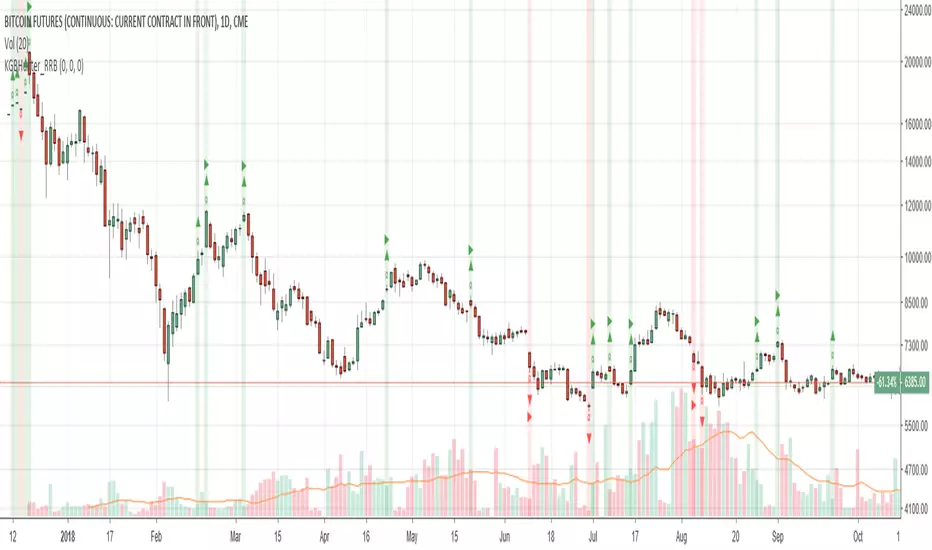
Katana Gaps Bounty Hunter (Show Gaps Counter) by RRBKatana Gaps Bounty Hunter (KGB_Hunter) by RagingRocketBull 2018
Version 1.0
This indicator shows/counts/filters gaps on a chart
There are several versions: Simple, Pro and Zones. This is the Simple version. The Differences are listed below.
- Simple: shows/counts gaps, changes color based on gap dir (2 colors), filters out price gaps within session, large gaps, and high volume gaps
- Pro: +shows all types of gaps, multi color, more filters (time gaps, doji, etc)
- Zones: +shows gaps as dynamic horiz zones
Features:
- highlights gaps using barcolor and plotchar chars (2 colors x 2 dirs)
- can show/hide gaps/chars based on gap dir
- changes color of gaps/chars based on gap dir
- displays chars above/below bar based on gap dir
- can filter out price gaps, large gaps, and high volume gaps
- counts all filtered gaps
Good Luck! Feel free to reuse the code and make it your own
Search in scripts for "pro"
Multi SMA EMA WMA HMA BB (5+5 MAs + Bollinger Bands) MTF by RRBMulti SMA EMA WMA HMA BB (5+5 Moving Averages of Any Type with Bollinger Bands) MTF by RagingRocketBull 2018
Version 1.0
This indicator shows multiple MAs of any type (SMA EMA WMA HMA etc) with BB and MTF support
There are several versions: Simple, MTF, Pro MTF and Ultimate MTF. This is the MTF version. The Differences are listed below. All versions have BB
- Simple: you have 2 groups of MAs that can be assigned any type (5+5)
- MTF: +assign 1 custom Timeframe to any group combo (5+5 Custom TF)
- Pro MTF: +multiple Timeframes for multiple MA groups (4*3 MTF), horizontal levels and show max bars back options
- Ultimate MTF: +individual settings for each MA, multiple Timeframes
There are 2 groups of MAs, 3rd group is BB. You can:
- show/hide all MAs in a group. Use length 0 to hide a particular MA independently or uncheck in Style.
- apply any MA type to all MAs in a particular MA group. For example, you can assign all EMAs the HMA type. Groups are called EMAs and SMAs just for reference.
- assign Custom Timeframe to a particular MA/BB group combination or all groups. For example, show daily (D) EMAs+SMAs on H1 Timeframe, or only H4 (240) BB on H1.
You can use different types of MAs as dynamic S/R levels to trade of off and MA crosses as signals for possible trend change (golden/death bull/bear crosses).
Current Timeframe MAs can be used together with Custom Timeframe MAs on a single chart. Higher TF MAs are more important than lower TF MAs.
Most common MA types are: SMA, EMA, WMA, HMA.
Most common MA lengths are: 12, 20, 26, 30, 50, 100, 200, 400 etc.
MTF Notes:
- Script UI uses simple timeframe textbox instead of input resolution dropdown to allow for 240 120 and other custom TFs
- Groups that are not assigned a Custom TF will use Current Timeframe (0).
- MTF will work for any MA type assigned to the group. BB group always uses SMA type.
- MTF works both ways: you can display a higher TF MA/BB on a lower TF or a lower TF MA/BB on a higher TF.
- MTF MA values are normally aligned at the boundary of their native timeframe. This produces stair stepping when a higher TF MA is viewed on a lower TF.
Therefore Point Density/Smoothing is applied by default on MA MTF for visual aesthetics. Set to 0 to disable and see exact ma mtf values (lines with stair stepping and original mtf alignment).
- Smoothing is disabled for BB MTF because fill doesn't work with smoothed MAs after duplicate values are replaced with na.
- MTF MA Value fluctuation is possible on the current bar due to default security lookahead
Features:
- 2 groups of custom 5+5 MAs of any type including Hull Moving Average (HMA)
- BB
- 1x Custom Timeframe with step line smoothing for 3 groups (MAs + BB)
1. based on 3EmaBB, uses plot, fill, security, change, barstate, stdev and custom hma functions
2. you can't set certain constants from input due to Pinescript limitations - change the code as needed, recompile and use as a private script version
3. you can't have plot* inside ?/if/for/function, and implementing condition forks using 2 sets of plots (na vs non-na) doubles indicator params and styles - confusing
4. swma has a fixed length = 4, alma and linreg have additional offset and smoothing params
Feel free to use. Good Luck!

Multi SMA EMA WMA HMA BB (5+5 MAs + Bollinger Bands) by RRB
Multi SMA EMA WMA HMA BB (5+5 Moving Averages of Any Type with Bollinger Bands) by RagingRocketBull 2018
Version 1.0
This indicator shows multiple MAs of any type (SMA EMA WMA HMA etc) with BB on a chart at the same time with/without MTF support depending on the version.
There are several versions (published later): Simple, MTF, Pro MTF and Ultimate MTF. This is the Simple version. The Differences are listed below. All versions have BB
- Simple: you have 2 groups of MAs that can be assigned any type (5+5)
- MTF: +assign 1 custom Timeframe to any group combo (5+5 Custom TF)
- Pro MTF: +multiple Timeframes for multiple MA groups (4*3 MTF), horizontal levels and show max bars back options
- Ultimate MTF: +individual settings for each MA, multiple Timeframes
You can use different types of MAs as dynamic S/R levels to trade of off and MA crosses as signals for possible trend change (golden/death bull/bear crosses).
Most common MA types are: SMA, EMA, WMA, HMA.
Most common MA lengths are: 12, 20, 26, 30, 50, 100, 200, 400 etc.
Features:
- 2 groups of custom 5+5 MAs of any type including Hull Moving Average (HMA)
- BB
1. based on 3EmaBB, uses plot, fill, stdev and custom hma functions
2. swma has a fixed length = 4, alma and linreg have additional offset and smoothing params
Feel free to use. Good Luck!

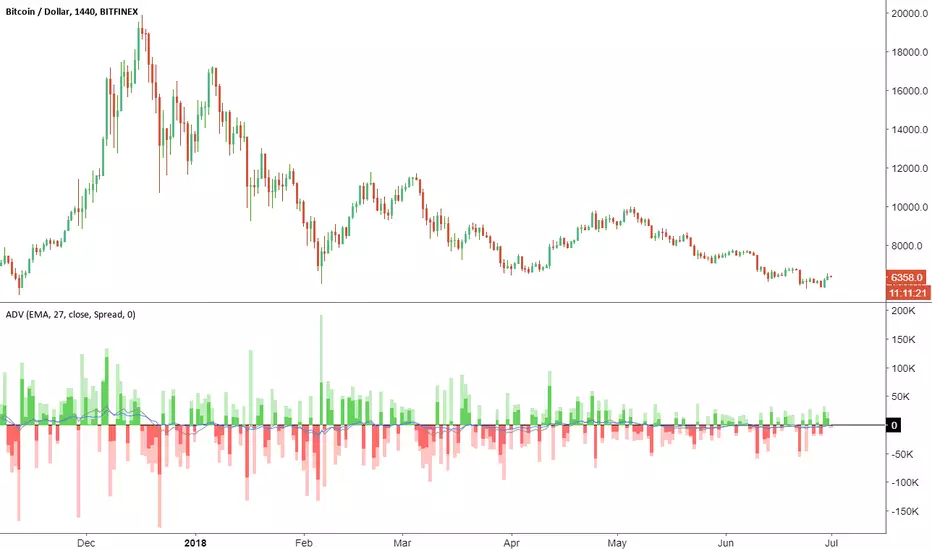
Accumulation/Distribution VolumeThis is a simple yet powerful indicator that can replace volume, Money Flow, Chaikin Money Flow, Price Volume Trend (PVT), Accumulation/Distribution Line (ADL), On Balance Volume (OBV).
When "Baseline Chart" option is disabled, it looks similar to regular volume. The volume bars has two shades of green and red. The dark shade shows amount of accumulation and the light shade shows total volume (what you see on a regular volume indicator). Blue line is the moving average (or cumulative total) of A/D and the gray line is for total volume.
When money volume is enabled, volume it multiplied by price. As you can see in the chart below, trade volume in terms of USD was declining after ATH. This is not the case in regular volume chart which shows instrument volume (chart above).
In Baseline view, the aggregation method you choose can turn it into different indicators. With EMA/SMA aggregation, blue and gray line shows buy/sell pressure. At 0, there is not buy or sell pressure.
If you turn off volume bars (from style menu), it gives you a reliable indicator to measure divergence. This should be more reliable than most other range-bound indicators (i.e. RSI, MFI, CMF). I will publish a TA about correctly measuring divergence (it's a must read even if you are a pro trader). Make sure that the length is set to a large number on smaller TFs such as 4h.
For following results, set aggregation to cumulative and turn off money volume:
When wick weight=0, the GRAY line is identical to OBV indicator.
When normalized by spread and wick weight=10, the BLUE line is identical to ADL (improved by true range).
When normalized by previous bar price, wick weight=0, the BLUE line is identical to PVT.
How I use this indicator:
- Baseline chart, replaced my regular volume indicator
- Mostly 4h TF for divergence
- EMA aggregation (and occasional cumulative aggregation) with length above 50. I change the length to 100 and 200 for confirmation.
- Wick weight=0 or max 2.
With this indicator, you can learn how different indicators are built and how they are different from each other. I will publish a TA to explain more about different indicators and their pros and cons.
I will publish this indicator without volume bars and additional options to make it range bound.
TTM SQUEEZE with ALERT by NM// ######################################################################################
// This script was created because the original TTM Squeeze script
// did trigger when only one of the Bollinger Bands was
// in the Keltner channel. It now gives the option to use it as was
// or to force it to only give a signal when both BB are in the Keltner channels
//
// Furthermore an alert was added to fire when we are squeezing
// no matter which option your choose (original or strict)
//
// To create an alert, click on the alerts in the right column on your screen
// then click on the +button to add an alert.
// Select from the conditions "CTTV Squeeze" and "Once per bar close"
// Keep in mind that you set this alert for one instrument and one particular time frame
//
// If you would have any questions, contact me :
// TradingView : @Nico.Muselle
// ######################################################################################
How to start using this script ?
1. Add this script to your favorites
2. Click on the Indicator-button on the top bar of your chart
3. Click on Favorites and find CTTV TTM
Do also check out my other indicators :
Percentage change -
Power Moving Average Pro - (use Moving Averages of higher time frames on lower time frame charts) -
Power Moving Average - (use 1 moving average of a higher time frame on the current time frame) -
BitFinex Longs vs. Shorts -
Relative Strength Index Direction -
Reversal Candles -
EMADiff -
Improved Linear Regression Bull and Bear Power v02 -
Improved Linear Regression Bull and Bear Power v01 -
PS : Sorry about the messy chart - Bottom indicators show the TTM Squeeze, top one being the original posted here, bottom one being the more strict option.

Multiple Moving AveragesThis is really simple. But useful for me as I don't have a paid account. No-pro users can only use 3 indicators at once and because I rely heavily on simple moving averages it can be a real pain.
This one indicator features:
20 MA
50 MA
100 MA
200 MA
which I find are the most useful overall. The 20 and 50 over all time frame but in particular < 1 day, the 100 and 200 at > 4 hr time frames. In general I don't use the 100 MA that much. The daily 200 MA is a critical support for many assets like stocks and cryptos. I'm by no means a pro and if you are learning I recommend becoming familiar with moving averages right at the beginning.
If you want to deactivate some of the lines, you can do it via the indicator's settings icon.

Custom Time Frame, Inverse Price CapabilityAt it again. This time I've added to the custom time frame indicator an inversion capability. This way you can look at the inverse price of custom time frames, again without having to go pro!
I use it too look at downtrends with the same bias as I do uptrends. Unfortunately usually to look at the inverse on timeframes anything other than the 1D chart you need a pro account, but not with this indicator!
Enjoy.

Guerrilla AdvancedThis indicator was designed with people without Pro License in mind (Including many of my close friends).
Basically, you will get a combo of few different tools in one box, with ability to turn them on and off with a single check mark, also, you have total control over the input numbers that was used in calculations if you so want to, for example, sometimes when i see a massive bullish up trend, i reduce the short rally from 12 to 8 even 6 to get faster signal for selling the trend.
So, what will you get in this pack?
1- Ichimoko. Yes, you heard it right, although we have it in the default tools but hey, it will use one indicator slot and if you don't have a pro license, you will use that slot
2- Rally. This is an old yet very powerful system for getting buy or sell signals, basically, you get two lines and for making the life easier i draw a cloud between them. when the trend passes above the cloud and it was bellow it in past, right after the very first candle that gets above the cloud you can put the buy order, and vice versa, the moment a candle body enters the cloud, if you want an aggressive signal, you can sell, if not, you may want to wait to see if the candles drop bellow the cloud or not then decide.
3- Resistance Support Cloud. Most of us always heard about resistance and support "lines" but many of us don't know that, in each trend, the trend line itself is a resistance or support line, and when you are going in a bullish or bearish tunnel, the floor and roof of tunnels are again resistance and supports, using this part of the tool, just like rally, you get a cloud that shows you the resistance / support "zone"
4- William Fractals. To be honest, I got this part of the code from another source available around. Why? looking at those fractal indicators, you can easily eyeball the trend line or existence of a tunnel.
5- Different EMA lines. If you are one of those people that use EMA lines for their trading, have fun with them, there are few different standard ones and even a custom one that you can put your desired number for it.
Inside Bar Breakout ( candlestick pattern).📌 What Is This Indicator?
BOIB Pro identifies a very strict form of inside bar:
✅ The inside bar candle’s entire range (body + wicks) must be inside the BODY of the previous candle (mother candle).
❌ If even a single wick is outside the mother body, the setup is rejected.
This filters out weak and noisy inside bars and focuses only on true compression candles.
⸻
📐 Pattern Rules (Strict)
1️⃣ Mother Candle
• The candle immediately before the inside bar
2️⃣ Body-Only Inside Bar (BOIB)
A valid BOIB must satisfy:
• Inside bar high ≤ mother candle body high
• Inside bar low ≥ mother candle body low
⚠️ Normal inside bars (inside wicks only) are ignored.
⸻
⏱️ Breakout Window Logic
After a valid BOIB forms:
• The indicator waits for the next 1 to 5 candles (user-configurable)
• Entry is triggered only if price CLOSES outside the BOIB range
✅ Long Signal
• Candle closes above BOIB high
✅ Short Signal
• Candle closes below BOIB low
If no breakout occurs within the window → setup expires automatically
⸻
🎯 Entry, Stop Loss & Take Profit Logic
Once a valid breakout/breakdown occurs, the indicator automatically draws a professional trade template:
Entry
• At the close of the breakout candle
Stop Loss
• Long → below BOIB low
• Short → above BOIB high
• Optional buffer:
• ATR-based
• Percentage-based
• Or none
Take Profits
• TP1: Risk-Reward based (default 1R)
• TP2: Extended target (default 2R)
All levels are clearly visualized using:
• Horizontal price lines
• Risk and reward boxes
• Informational labels
⸻
📊 Best Use Cases
• Crypto (BTC, ETH, major alts)
• Timeframes:
• Scalping: 5m
• Day trading: 15m / 30m
• Works best when combined with:
• Market structure
• Trend bias
• Support / resistance
⸻
⚠️ Important Notes
• This is NOT an auto-trading system
• Signals should always be used with:
• Proper risk management
• Market context
• Inside bars in sideways or low-volume markets may fail
⸻
📚 Educational Purpose Disclaimer
This indicator is provided for educational and analytical purposes only.
It does not constitute financial advice.
Trading involves risk, and past behavior does not guarantee future results.

3C Breakout PRO Investing involves risk. Study carefully before making an investment decision.
Access may be suspended or changed later.
Thank you GJ daytrad

Indian Equities Theme Tracker [EWT] - Sector Rotation HeatmapIdentify where the "Smart Money" is flowing in the Indian Markets.
The Indian Equities Theme Tracker is a powerful visual dashboard designed for NSE traders and investors to monitor sector rotation and relative strength in real-time. By tracking the most liquid Exchange Traded Funds (ETFs), this tool provides a birds-eye view of the Indian economy—from core benchmarks like Nifty 50 and Nifty 500 to high-growth themes like Defence, EV, Tourism, and Energy.
In modern markets, capital doesn't move into all stocks at once; it rotates between sectors. This script helps you spot the leaders and laggards across five different timeframes, ensuring you are always positioned in the strongest themes.
🚀 Key Features :
23+ Essential Themes: Tracks Broad Market, Market Caps (Mid/Small), Sectors (IT, Bank, Auto, Metal), and Narratives (Defence, Tourism, EV, Energy).
Dynamic Performance Sorting: Automatically reorders the table based on your selected lookback (1 Day, 1 Week, 1 Month, 3 Months, or YTD).
Heatmap Logic: Intuitive color coding helps you instantly identify extreme bullishness or bearishness across the board.
Liquidity Focused: Uses the most liquid NSE ETFs (BeES and equivalent) to ensure the data is accurate and reflects tradeable prices.
Pro UI Design: A clean, professional dashboard that can be positioned anywhere on your chart without cluttering your price action analysis.
📊 Themes Included :
Benchmarks: Nifty 500, Nifty 50, Nifty Next 50.
Market Caps: Midcap 150, Smallcap 250.
Sectors: Private & PSU Banks, IT, Pharma, Healthcare, FMCG, Auto, Metals, Infra, Realty.
Thematic/Narratives: Defence, Tourism, Energy, EV & New Age Automotive, Consumption.
Safe Havens: Gold & Silver.
🛠️ How to use :
Timeframe: Switch to the Daily (D) timeframe for the best results.
Settings: Use the inputs to change the table position (Top/Middle/Bottom) and the sorting criteria.
Strategy: Look for themes that are consistently at the top of the "1 Month" and "3 Month" lists—these are your structural leaders. Use "1 Day" to spot quick tactical bounces.
Disclaimer: This indicator is for educational and informational purposes only and does not constitute financial advice. Always perform your own due diligence.

XAUUSD Pro Strategy //@version=5
indicator("XAUUSD RR Buy Sell Indicator", overlay=true, max_labels_count=500, max_boxes_count=100)
// ===== INPUT =====
rr = input.float(2.0, "Risk Reward", step=0.1)
sl_pips = input.int(300, "Stop Loss (points)")
show_boxes = input.bool(true, "Show Entry SL TP Box")
// ===== EMA =====
ema9 = ta.ema(close, 9)
ema50 = ta.ema(close, 50)
ema200 = ta.ema(close, 200)
plot(ema9, color=color.yellow)
plot(ema50, color=color.blue)
plot(ema200,color=color.red)
// ===== TREND =====
bull = ema50 > ema200
bear = ema50 < ema200
// ===== ENTRY CONDITIONS =====
buyCond = bull and close > ema9 and close < ema9
sellCond = bear and close < ema9 and close > ema9
// ===== PRICE CALC =====
buyEntry = close
buySL = buyEntry - sl_pips * syminfo.mintick
buyTP = buyEntry + (buyEntry - buySL) * rr
sellEntry = close
sellSL = sellEntry + sl_pips * syminfo.mintick
sellTP = sellEntry - (sellSL - sellEntry) * rr
// ===== DRAW =====
if buyCond
label.new(bar_index, low, "BUY", style=label.style_label_up, color=color.green, textcolor=color.white)
if show_boxes
box.new(bar_index, buyEntry, bar_index + 5, buySL, bgcolor=color.new(color.red,80))
box.new(bar_index, buyTP, bar_index + 5, buyEntry, bgcolor=color.new(color.green,80))
if sellCond
label.new(bar_index, high, "SELL", style=label.style_label_down, color=color.red, textcolor=color.white)
if show_boxes
box.new(bar_index, sellSL, bar_index + 5, sellEntry, bgcolor=color.new(color.red,80))
box.new(bar_index, sellEntry, bar_index + 5, sellTP, bgcolor=color.new(color.green,80))

FX Momentum Breakout Detector# FX Momentum Breakout Strategy
A TradingView Pine Script indicator that detects momentum breakouts in forex pairs and automatically executes trades via SignalStack integration. The strategy uses EMA crossovers, swing structure breaks, and Fibonacci retracement levels for entry, stop loss, and take profit placement.
## Overview
This strategy identifies bullish and bearish momentum breakouts by combining:
- **EMA (Exponential Moving Average)** for trend direction
- **Swing High/Low** structure breaks for entry signals
- **Fibonacci retracement levels** for stop loss and take profit
- **Volume and time filters** to improve signal quality
- **Dynamic position sizing** based on Fibonacci stop distance and risk percentage
### Key Features
- ✅ **Automated Order Execution**: Direct integration with SignalStack for hands-free trading
- ✅ **Risk-Based Position Sizing**: Automatically calculates lot size based on stop distance and account risk
- ✅ **Fibonacci-Based TP/SL**: Uses Fibonacci 0.5 levels for take profit and stop loss
- ✅ **Time Window Filter**: Only trades during active market hours (7AM-7PM Japan Time)
- ✅ **Volume Filter**: Requires volume above 10-day moving average
- ✅ **Single Alert System**: One alert handles both long and short signals
## Strategy Logic
### Entry Conditions
**Long (Buy) Signal:**
- Price crosses above EMA 20, OR
- Price breaks above swing high structure
- AND: Minimum 3 consecutive bull bars (strong momentum)
- AND: Price is above EMA 20 (if EMA filter enabled)
- AND: Volume is above 10-day MA
- AND: Time is within 7AM-7PM JST window
**Short (Sell) Signal:**
- Price crosses below EMA 20, OR
- Price breaks below swing low structure
- AND: Minimum 3 consecutive bear bars (strong momentum)
- AND: Price is below EMA 20 (if EMA filter enabled)
- AND: Volume is above 10-day MA
- AND: Time is within 7AM-7PM JST window
### Stop Loss & Take Profit
- **Long Positions:**
- Take Profit: Fibonacci 0.5 level above entry (`fib_up_0_5`)
- Stop Loss: Fibonacci 0.5 level below entry (`fib_dn_0_5`)
- **Short Positions:**
- Take Profit: Fibonacci 0.5 level below entry (`fib_dn_0_5`)
- Stop Loss: Fibonacci 0.5 level above entry (`fib_up_0_5`)
### Position Sizing
Position size is calculated dynamically based on:
1. **Account Balance**: Your account size in USD (default: $125,000)
2. **Risk Percentage**: Risk per trade (default: 1.0%)
3. **Stop Loss Distance**: Distance from entry to Fibonacci stop level (in pips)
**Formula:**
```
Risk in Dollars = Account Balance × (Risk % / 100)
Stop Loss (pips) = |Entry Price - Stop Loss Price| / Pip Size
Position Size (lots) = Risk $ / (Stop Loss (pips) × $10 per pip per lot)
```
The strategy rounds to 0.01 lot increments (micro lots) for precise position sizing.
## Setup Instructions
### Prerequisites
1. **TradingView Account**: Pro plan or higher (required for webhook alerts)
2. **SignalStack Account**: Active account with connected broker (e.g., OANDA)
3. **SignalStack Webhook URL**: Get this from your SignalStack dashboard
### Step 1: Add Strategy to TradingView
1. Open TradingView and navigate to your chart
2. Click "Pine Editor" (bottom panel)
3. Copy the code from `v2.0_fx_breakout_strategy.md`
4. Paste into Pine Editor
5. Click "Save" and then "Add to Chart"
### Step 2: Configure Strategy Inputs
In the strategy settings panel, configure:
**Technical Parameters:**
- **EMA Length**: Default 20 (trend filter)
- **Swing High/Low Lookback**: Default 7 bars
- **Min Consecutive Bull/Bear Bars**: Default 3 (momentum requirement)
- **Require EMA Filter**: Default `true` (price must be on correct side of EMA)
**Risk Management:**
- **Account Balance (USD)**: Your account size (default: 125,000)
- **Risk Per Trade (%)**: Risk percentage per trade (default: 1.0%)
- **ATR Length**: Default 14 (for informational ATR display)
**Filters:**
- **Volume MA Length**: Default 10 (volume filter period)
- **Enable Webhook Alerts**: Set to `true` for automated trading
- **Alert Frequency**: `once_per_bar_close` (recommended)
- **Asset Label**: Leave empty to use chart symbol, or override if needed
### Step 3: Create TradingView Alert
1. Click the "Alerts" icon (bell) at the top of the chart, or press `Alt+A` (Windows) / `Option+A` (Mac)
2. Click "Create Alert" or the "+" button
3. Select the chart with your strategy
**Alert Configuration:**
**Condition Tab:**
- **Condition**: Select "FX Momentum Breakout Detector" (your strategy name)
- **Trigger**: "Once Per Bar Close" (matches strategy setting)
- **Expiration**: Set as needed (or leave unlimited)
**Notifications Tab:**
- **Webhook URL**: Paste your SignalStack webhook URL
- **Message**: Leave as default (strategy generates JSON automatically)
4. Save the alert with a descriptive name (e.g., "EURUSD Breakout SignalStack")
### Step 4: Verify SignalStack Connection
1. Check your SignalStack dashboard for incoming webhooks
2. Verify the broker connection is active
3. Test with a paper trading account first
For detailed SignalStack setup, see (./SIGNALSTACK_SETUP.md).
## Webhook Payload Format
The strategy sends a JSON payload in SignalStack format. Primary fields:
```json
{
"symbol": "EURUSD",
"action": "buy",
"quantity": 2.78,
"take_profit": 1.0895,
"stop_loss": 1.0805,
"ticker": "EURUSD",
"ticker_id": "OANDA:EURUSD",
"base": "EUR",
"quote": "USD",
"timeframe": "15",
"price": 1.0850,
"ema20": 1.0820,
"range": 0.0050,
"breakout_price": 1.0850,
"fib_up_0_5": 1.0895,
"fib_dn_0_5": 1.0805,
"atr_pips": 25.0,
"stop_loss_pips": 45.0,
"position_size_lots": 2.78,
"risk_dollars": 1250.0,
"signal": "bullish momentum breakout",
"bar_time": "2024-01-15T10:30:00"
}
```
**SignalStack Required Fields:**
- `symbol`: Trading symbol
- `action`: "buy" or "sell"
- `quantity`: Position size in lots
- `take_profit`: Take profit price
- `stop_loss`: Stop loss price
## Testing
Use the included test script to verify webhook integration:
```bash
# Test both Discord and SignalStack
python test_webhook.py
# Test Discord only
python test_webhook.py --discord
# Test SignalStack only
python test_webhook.py --signalstack
```
The test script sends sample payloads matching the strategy format and verifies webhook delivery.
## Configuration Examples
### Conservative Setup (Lower Risk)
- Account Balance: 125,000 USD
- Risk Per Trade: 0.5%
- EMA Length: 20
- Min Bull/Bear Bars: 4
- Require EMA Filter: `true`
### Aggressive Setup (Higher Risk)
- Account Balance: 125,000 USD
- Risk Per Trade: 2.0%
- EMA Length: 15
- Min Bull/Bear Bars: 2
- Require EMA Filter: `false`
### Multiple Currency Pairs
To trade multiple pairs:
1. Add the strategy to each chart
2. Create a separate alert for each pair
3. Use the same SignalStack webhook URL for all alerts
4. SignalStack routes orders based on the `symbol` field
## Time Window Filter
The strategy only trades during **7AM-7PM Japan Time (JST)**, which corresponds to:
- **UTC**: 22:00 (previous day) to 10:00 (same day)
- This covers the Asian and early European trading sessions
To modify the time window, edit the `timeWindowFilter` calculation in the strategy code.
## Position Sizing Examples
### Example 1: EURUSD Long
- Account Balance: $125,000
- Risk: 1.0% = $1,250
- Entry Price: 1.0850
- Stop Loss (fib_dn_0_5): 1.0805
- Stop Distance: 45 pips
- Position Size: $1,250 / (45 pips × $10) = **2.78 lots**
### Example 2: GBPUSD Short
- Account Balance: $125,000
- Risk: 1.0% = $1,250
- Entry Price: 1.2650
- Stop Loss (fib_up_0_5): 1.2700
- Stop Distance: 50 pips
- Position Size: $1,250 / (50 pips × $10) = **2.50 lots**
## Troubleshooting
### Alert Not Triggering
1. **Check Strategy Settings:**
- Ensure "Enable Webhook Alerts" is `true`
- Verify time window (7AM-7PM JST)
- Check volume filter (must be above 10-day MA)
2. **Check Alert Settings:**
- Verify webhook URL is correct
- Ensure alert is active (not expired)
- Check alert frequency matches strategy setting
### Webhook Not Received by SignalStack
1. **Verify URL:**
- Check SignalStack dashboard for correct webhook URL
- Ensure URL is complete (no truncation)
2. **Check Payload Format:**
- SignalStack expects `symbol`, `action`, `quantity`, `take_profit`, `stop_loss`
- Verify these fields are present in the payload
3. **Test Webhook:**
- Use TradingView's "Test Alert" feature
- Check SignalStack logs for incoming requests
- Run `test_webhook.py` to verify format
### OANDA Authentication Error
If you receive a 401 Unauthorized error:
1. **Check OANDA API Token Permissions:**
- Log in to OANDA
- Go to "My Account" > "My Services" > "Manage API Access"
- Ensure token has **Trading** permissions (not just read-only)
2. **Update SignalStack Configuration:**
- Go to SignalStack dashboard
- Navigate to OANDA broker connection settings
- Update API token with a token that has trading permissions
- Verify account ID matches your OANDA account
For detailed troubleshooting, see (./SIGNALSTACK_SETUP.md).
### Position Size Issues
1. **Check Account Balance Input:**
- Verify account balance matches your actual account size
- Ensure risk percentage is appropriate (1% recommended)
2. **Verify Stop Loss Calculation:**
- Stop loss is based on Fibonacci 0.5 level
- Position size automatically adjusts to maintain risk percentage
- Check that pip size is correct for your currency pair
## Files
- **v2.0_fx_breakout_strategy.md**: Pine Script strategy code
- **test_webhook.py**: Python test script for webhook validation
- **SIGNALSTACK_SETUP.md**: Detailed SignalStack configuration guide
- **design.md**: Strategy design notes and considerations
## Risk Disclaimer
⚠️ **Trading forex involves substantial risk of loss. This strategy is provided for educational purposes only.**
- Always test with paper trading before using real funds
- Past performance does not guarantee future results
- Use appropriate risk management (1-2% risk per trade recommended)
- Monitor positions and adjust stop losses as needed
- This strategy does not guarantee profits
## Support
- **SignalStack Documentation**: Check SignalStack's official docs for webhook requirements
- **TradingView Support**: For alert/webhook issues in TradingView
- **Strategy Issues**: Review the strategy code comments for configuration options
## License
This strategy is provided as-is for personal use. Modify and adapt as needed for your trading requirements.

Advanced Market Structure [Rogman]Rogman's Advanced Market Structure Indicator
The Ultimate All-in-One Market Structure Analysis Tool for TradingView
Take your technical analysis to the next level with a comprehensive, professional-grade tool designed for traders who demand precision and clarity in their charts.
🎯 Who Is This For?
ICT/SMC Traders seeking liquidity zones and market structure analysis
Day Traders monitoring session-based price action and kill zones
Swing Traders identifying key higher timeframe levels
Price Action Traders analyzing structure breaks and trend changes
Any Serious Trader wanting a clean, comprehensive market structure overlay
✨ Key Features
📊 Market Sessions Visualization
Track the three major trading sessions with our unique bracket-style display:
Asia, London, and New York sessions are clearly marked
Sessions display as SESSION ════════════ below price action
Smart vertical stacking prevents overlapping when sessions have similar lows
Fully customizable session times for any timezone
Perfect for identifying session highs/lows and optimal kill zone timing
📈 Higher Timeframe (HTF) Levels
Never miss a key level again:
Display Daily and Weekly Open, High, and Low levels
Instant visual reference for HTF support and resistance
Separate color controls for lines and labels
Choose from Solid, Dashed, or Dotted line styles
Essential for determining HTF bias and key decision points
🔄 Automatic Swing Detection
Let the indicator do the heavy lifting:
Auto-detection of swing highs (▼) and swing lows (▲)
Configurable lookback period for sensitivity adjustment
Optional horizontal level lines extending from swing points
Customizable colors, widths, and line styles
Identify potential reversal points and structure levels instantly
💧 Liquidity Zone Mapping
See where the money is hiding:
Automatic identification of buy-side liquidity (above swing highs)
Automatic identification of sell-side liquidity (below swing lows)
Visual zones show where stop losses are clustered
Real-time tracking when liquidity gets swept
Swept zones change color — know when liquidity has been taken
📉 Multi-Method Trend Detection
Three powerful methods to confirm trend direction:
Swing Structure — Based on higher highs/lows or lower highs/lows
EMA — Trend based on price position relative to EMA
Supertrend — Uses the popular Supertrend indicator
Features include:
Optional background coloring for at-a-glance trend identification
Real-time trend status label (UPTREND/DOWNTREND/NEUTRAL)
Customizable colors and transparency
🏷️ HH/HL/LH/LL Labels
Automatic market structure labeling:
HH (Higher High) — Bullish continuation signal
HL (Higher Low) — Bullish continuation signal
LH (Lower High) — Bearish continuation signal
LL (Lower Low) — Bearish continuation signal
Color-coded for instant visual recognition
📋 Information Dashboard
All critical data at a glance:
Current ticker symbol
Trend direction and status
Daily and Weekly bias
Last swing high and low prices
Active liquidity zone count
Positionable in any corner of your chart
🔔 Built-in Alerts
Never miss a key event:
Trend change alerts (Bullish/Bearish)
Swing high/low formation alerts
Set up notifications for critical market structure changes
🎨 Fully Customizable
Every feature can be:
Toggled on/off individually via the Feature Toggles menu
Color customized to match your chart theme
Size adjusted for optimal visibility
Fine-tuned with sensitivity parameters
Organized settings groups make configuration intuitive and fast.
🚀 Why Choose This Indicator?
Feature: Benefit: All-in-One Solution. Replace multiple indicators with one comprehensive tool. Clean Design and Thoughtful visual hierarchy keep charts readable. Smart Overlap Prevention. Session bars automatically stack to avoid visual clutter. Real-Time Updates: All elements update dynamically as the price moves. Professional Quality-Built with best practices in Pine Script v6. Extensive Documentation, clear code comments, and an organized structure
📖 How to Use
Add the indicator to your TradingView chart
Enable/disable features using the Feature Toggles menu
Customize colors and settings to match your preferences
Adjust session times for your timezone
Set up alerts for trend changes and swing formations
Pro Tips:
Use session times to identify optimal entry windows during kill zones
Watch for price sweeping liquidity zones before looking for reversals
Combine HTF bias with lower timeframe entries for higher probability trades
Use swing levels as potential support/resistance for entries and targets
Monitor the dashboard for a quick market assessment before trading
⚠️ Disclaimer
This indicator is provided for educational and informational purposes only. It does not constitute financial advice. Trading involves substantial risk and is not suitable for all investors. Past performance is not indicative of future results. Always conduct your own analysis and consider your financial situation before making trading decisions.

Smart Scalper Pro Template + VWAP
📌 Author
Garry Evans
Independent system developer focused on:
Risk-first automation
Market structure & liquidity behavior
Discipline, consistency, and capital preservation
“The edge isn’t the market — it’s the man who survives it.”
⚙️ Risk Management & Position Sizing
The script is built around capital protection, not signal frequency.
Risk logic includes:
Fixed or dynamic risk per trade
Market-adaptive position sizing
Session-based trade limits
Daily trade caps and auto-lockout protection
Volatility-aware sizing (futures & crypto)
⚠️ Profit is pursued only after risk is controlled.
📊 Track Record
Backtested across multiple market environments
Forward-tested and actively used by the author
Real-account trades are logged where platform rules allow
Results vary by market, timeframe, and user-defined risk settings.
🌍 Supported Markets
Designed to work across all liquid markets, including:
Stocks
Crypto (spot & futures)
Options (signal-based framework)
Futures (indices, metals, crypto futures)
The system adapts to volatility and structure — it is not market-specific.
⚖️ Leverage
Leverage is not required
If used, leverage is fully user-controlled
Risk logic scales exposure conservatively
No martingale.
No revenge sizing.
No over-exposure logic.
🧪 Backtesting
✔ Yes
Strategy logic has been backtested
Filters reduce chop, noise, and forced trades
Focus on drawdown control over curve-fitting
🛠 Support
✔ Yes
Direct author support
Ongoing improvements and updates
Feature refinement based on real usage and feedback
👥 Community
✔ Yes
Private user access
High-quality feedback environment
No public signal spam or hype-driven chat rooms
⏳ Trial Period
✔ Yes
Limited trial access available
Designed for evaluation only
Trial users do not receive full feature access
🚫 Who This Script Is NOT For
This system is not for:
Traders looking for guaranteed profits
Users expecting copy-paste “signal calls”
Over-leveraged gamblers
Those unwilling to follow risk rules
Anyone seeking overnight results
This is a discipline and automation tool, not a shortcut.
🧠 Final Positioning
This is not a signal service.
This is a risk-controlled execution framework designed to:
Enforce discipline
Reduce emotional trading
Protect capital during bad market conditions
Scale responsibly during favorable ones

Absorption Pro V4This indicator detects absorption-style reversal setups and scores them with a multi-factor model.
It builds key levels from ZigZag/Fibonacci and round numbers across multiple timeframes, then flags potential absorption candles using volume and a delta-proxy filter plus strict candle-structure rules. Signals are validated with trend context (MA/SMMA/EMA/ATR), VWAP positioning, and optional momentum/volatility filters (RSI, Stoch, CCI, MACD, ADX, Volume Profile). Only score-threshold crosses can trigger long/short markers and alerts (defaults tuned for NQ).

Wyckoff + VSA Pro [M.22]Wyckoff + VSA with side window and tooltips
Wyckoff appears as background colors (4 phases)
Only strong VSA signals in harmony with the phases
the side window has many signals
also put the mouse on the signals to see the side tooltip

Gold Profit Target SystemGOLD PROFIT TARGET SYSTEM
Track Real Profits, Exit With Confidence
Best on Daily or Weekly - copy and mod as you see fit. Have fun!
WHAT THIS INDICATOR DOES:
This indicator tracks your gold position from entry and shows color-coded profit targets as the price rises. Instead of guessing when to exit, you see exact profit levels in real-time: 1%, 2%, 3%, 4%, 5%, 10%, 15%, 20%, 25%, and 25%+.
Simple concept: BUY on the signal, SELL at YOUR chosen profit level.
HOW IT WORKS - 3 SIMPLE STEPS:
STEP 1: Wait for BUY Signal
• Green triangle (▲) appears below the composite line
• Triggered when inverse assets (DXY, rates, etc.) show strong correlation and are falling
• Entry price is automatically recorded
• Position tracking begins
STEP 2: Watch Profit Targets Appear
• As gold rises, color-coded symbols appear above the composite line
• Each symbol represents a profit milestone
• The info table shows your current profit
• You decide when to exit based on YOUR target
STEP 3: Exit at Your Chosen Level
• Conservative? Exit at 5-10%
• Moderate? Exit at 10-15%
• Aggressive? Hold for 20%+
• The indicator just shows the levels - YOU make the call
THE COMPOSITE LINE - WHAT IT MEANS:
The main line is a weighted composite of inverse-correlated assets:
• DXY (US Dollar Index)
• Real Interest Rates (10Y TIPS)
• US 10-Year Treasury Yield
• US 2-Year Treasury Yield
• Bitcoin (optional)
• Copper (optional)
Line Position:
• Below -30 (Bright Green): Very strong inverse correlation - excellent BUY conditions
• Below 0 (Green): Inverse correlation present - moderate BUY conditions
• Above 0 (Red): Inverse assets rising - neutral to bearish
• Above 30 (Bright Red): Strong inverse rally - bearish for gold
What Causes BUY Signals:
When the composite line is negative (inverse assets falling) AND shows strong correlation (>0.3), this suggests gold is likely to rise. The indicator records your entry and begins tracking profits.
COLOR-CODED PROFIT TARGETS:
EARLY PROFITS (Green Circles):
• 1% - Very Light Green (#c8e6c9) - First confirmation
• 2% - Light Green (#a5d6a7) - Building profit
• 3% - Green (#81c784) - Good profit
• 4% - Medium Green (#66bb6a) - Strong profit
• 5% - Dark Green (#4caf50) - Solid profit!
EXCELLENT PROFIT (Yellow Diamond):
• 10% - Yellow (#ffd54f) - Double digits, excellent trade!
OUTSTANDING PROFIT (Orange Diamonds):
• 15% - Orange (#ffb74d) - Exceptional profit, consider partial exit
EXCEPTIONAL PROFIT (Red Diamonds):
• 20% - Light Red (#ff8a65) - Rare territory, strong exit consideration
• 25% - Red (#f44336) - Extraordinary profit, very rare!
PEAK PROFIT (Purple Star):
• 25%+ - Purple (#9c27b0) - Once in a blue moon! The home run trade!
STOP LOSS (Red X):
• Default -5% - Protection against losses
• Position auto-resets if stop is hit
THE PROFIT BAR (Histogram):
Below the composite line, you'll see a colored histogram when in position:
Bar Color = Your Current Profit Tier
• Light green bar = 1-2% profit
• Green bar = 3-5% profit
• Yellow bar = 10% profit
• Orange bar = 15% profit
• Red bar = 20-25% profit
• Purple bar = 25%+ profit
• Red negative bar = Currently at a loss
Bar Height = Current Profit %
The taller the bar, the larger your profit. Negative bars extend downward when you're at a loss.
THE INFORMATION TABLE:
The table (top-right by default) shows everything at a glance:
Position: ✓ IN (green) or ✗ OUT (gray)
Shows whether you're currently holding a position
Entry Price: Your recorded buy price
Example: 2,100.50
Current Price: Gold's current price
Example: 2,142.75
Current P/L: YOUR PROFIT %
This is the most important metric - shows exactly how much you're up (or down)
Color matches your current profit tier
Example: +2.01% in light green
Profit Tier: Current milestone reached
Shows which profit level you've hit: "1%", "2%", "5%", "10%", etc.
Next Target: The next profit level to watch
Tells you what milestone is coming up next
Bars Held: How long you've been in the trade
Helps track holding time
Composite: Current correlation strength
Shows the underlying composite correlation value
REFERENCE LINES:
Zero Line (Gray):
The center line. Above = bearish for gold, Below = bullish for gold
Strong Bull Line (Green dashed at -30):
When composite crosses below -30, very strong BUY conditions
Strong Bear Line (Red dashed at +30):
When composite crosses above +30, strong bearish conditions
BACKGROUND SHADING:
Very Light Green Background:
You're in profit (position open and above entry price)
Very Light Red Background:
You're at a loss (position open and below entry price)
No Background:
No position currently open
SYMBOLS ON CHART:
▲ Green Triangle Below Line: BUY SIGNAL
Enter long position here. Entry price recorded.
● Small Green Circles Above Line: 1-5% Profits
Early profit targets. Light green to dark green progression.
◆ Diamonds Above Line: 10-25% Profits
Major profit milestones. Yellow → Orange → Red progression.
★ Purple Star Above Line: 25%+ Profit
The holy grail! Peak profit achieved.
✖ Red X Below Line: STOP LOSS HIT
Trade went against you. Position resets (if auto-reset enabled).
PROFIT-TAKING STRATEGIES:
Strategy 1: Fixed Target (Simple)
Pick one target (e.g., 10%) and always exit there.
Best for: Beginners, disciplined traders
Strategy 2: Scaled Exit (Advanced)
Exit in portions:
• 5% profit → Sell 25%
• 10% profit → Sell 25% (50% total out)
• 15% profit → Sell 25% (75% total out)
• 20%+ profit → Let final 25% ride
Best for: Risk management, maximizing upside
Strategy 3: Trailing Stop
• Hit 10%? Set stop at 5%
• Hit 15%? Set stop at 10%
• Lock in profits while letting winners run
Best for: Trend followers, bull markets
Strategy 4: Adaptive
• Strong uptrend → wait for 15-20%
• Choppy market → exit at 5-10%
• Weakening trend → exit at any profit
Best for: Experienced traders
SETTINGS YOU CAN CUSTOMIZE:
Profit Target Levels:
Change any profit % to match your strategy
• Conservative: Lower targets (0.5%, 1%, 2%, 3%, 5%)
• Aggressive: Higher targets (2%, 5%, 10%, 20%, 30%)
Assets to Include:
• Enable/disable Bitcoin
• Enable/disable Copper
• Toggle which inverse assets to track
Display Options:
• Show all targets or just current tier
• Show/hide profit bar
• Show/hide composite line
• Move table position
Stop Loss:
• Set your risk tolerance (default 5%)
• Enable/disable auto-reset on stop loss
Correlation Periods:
• Adjust for your timeframe
• Hourly: 14/30/60
• Daily: 20/50/100
• Weekly: 10/20/50
ALERTS AVAILABLE:
Set alerts for any profit milestone:
Critical Alerts:
• "BUY Signal" - Entry notification
• "5% Profit Target" - First major milestone
• "10% Profit Target" - Decision point
• "Stop Loss Hit" - Risk protection
Optional Alerts:
• 1%, 2%, 3%, 4% - Early confirmations
• 15%, 20%, 25% - Major milestones
• Individual levels for your strategy
BEST TIMEFRAMES:
Daily Chart (Recommended):
Best for swing traders holding 3-10 days
Use default settings (20/50/100 periods)
Target 5-15% profits
4-Hour Chart:
Good for active swing traders
Adjust periods to 14/30/60
Target 3-10% profits
Hourly Chart:
For day traders and scalpers
Use shorter periods (14/30/60)
Target 1-5% profits
Adjust profit levels lower (0.5%, 1%, 2%, 3%)
WHY THIS INDICATOR IS DIFFERENT:
Most indicators tell you WHEN to enter.
This one tells you WHEN TO EXIT with profit.
Most indicators use vague signals.
This one shows EXACT profit percentages.
Most indicators leave exit decisions to you.
This one gives CLEAR, COLOR-CODED milestones.
Most indicators don't track your P/L.
This one shows your profit in text you can't miss.
QUICK START GUIDE:
1. Add indicator to gold chart (XAUUSD, GLD, GC1!)
2. Wait for green triangle (▲) BUY signal
3. Watch your profit grow in the table
4. Exit when you hit YOUR target (5%, 10%, 15%, etc.)
5. Repeat
That's it. Simple. Effective. Profitable.
IMPORTANT NOTES:
• This is for LONG positions only - not for shorting gold
• Position tracking begins only after a BUY signal
• The indicator shows levels - YOU decide when to exit
• Always use stop losses (default 5% is reasonable)
• Past performance doesn't guarantee future results
• Not financial advice - use for educational purposes
PRO TIPS:
Tip 1: Don't get greedy - 10-15% is an excellent profit for most trades
Tip 2: Purple stars (25%+) are RARE - don't wait for them on every trade
Tip 3: The profit bar color change is your visual cue - green→yellow→orange→red
Tip 4: Combine with resistance levels - "10% profit + resistance = exit"
Tip 5: Set alerts for YOUR target level so you never miss it
Tip 6: The giant P/L number in the table removes emotion from decisions
EXAMPLE TRADE:
Day 1: ▲ BUY signal at $2,100
Table shows: Position ✓ IN | Entry: 2,100
Day 2: Current P/L: +1.8%
First green circle appears (1% target hit)
Table tier: "1%"
Day 4: Current P/L: +5.2%
Dark green circle appears (5% target hit)
Profit bar is dark green
Decision point: Exit 50% here?
Day 7: Current P/L: +10.5%
Yellow diamond appears (10% target hit!)
Table shows: +10.5% in yellow text
Decision point: Exit remaining 50%?
Result: Average exit ~7.5% over 7 days. Excellent swing trade!
WORKS ON:
• Gold Spot (XAUUSD)
• Gold Futures (GC1!)
• Gold ETFs (GLD, IAU)
• Any gold instrument
Inverse Assets Tracked:
• DXY (US Dollar Index)
• Real Interest Rates (TIPS)
• US Treasury Yields (2Y, 10Y)
• Bitcoin (optional)
• Copper (optional)
THE BOTTOM LINE:
Stop guessing when to take profits.
Start SEEING your profit levels in real-time.
The indicator shows you the targets.
YOU choose when to cash out.
That's YOUR edge.
Developed for traders who want clear, actionable profit targets instead of vague signals.

Gold Inverse Correlation TrackerGold Inverse Correlation Tracker - Professional Multi-Asset Analysis
What This Indicator Does:
This indicator monitors the real-time correlation between Gold and five key financial assets that historically move inversely (opposite) to gold prices. It displays these relationships across three different timeframes simultaneously, giving you both short-term trading signals and long-term trend confirmation.
The indicator tracks:
US Dollar Index (DXY) - Historical correlation: -0.63
Real Interest Rates (TIPS) - Historical correlation: -0.82 (strongest inverse relationship)
10-Year Treasury Yield - Nominal interest rate proxy
S&P 500 (SPX) - Equity market sentiment (variable correlation)
VIX - Volatility index (optional, flight-to-safety indicator)
Why Inverse Correlations Matter for Gold Trading:
Understanding inverse correlations is critical for gold traders because:
Predictive Power - When assets move opposite to gold consistently, you can use their strength/weakness to predict gold's next move
Hedging Opportunities - Strong inverse correlations let you hedge gold positions by trading the inverse asset
Regime Detection - When correlations break down, it signals a market regime change or increased uncertainty
Confirmation Signals - Multiple strong inverse correlations validate your gold trade thesis
Risk Management - Knowing what moves against gold helps you understand your portfolio's true exposure
The Science Behind the Numbers:
Real interest rates have the strongest inverse correlation to gold (approximately -0.82) because:
Gold pays no yield or dividend
When real rates rise, the opportunity cost of holding gold increases
Investors shift to interest-bearing assets when they offer positive real returns
When real rates go negative, gold becomes relatively more attractive
The US Dollar shows strong inverse correlation (approximately -0.63) because:
Gold is priced in US dollars globally
A stronger dollar makes gold more expensive for foreign buyers, reducing demand
A weaker dollar makes gold cheaper internationally, increasing demand
Both compete as reserve assets and stores of value
Why the Indicator is Weighted This Way:
Three Timeframe Approach:
Short-term (20 periods) - Captures recent correlation shifts for day trading and swing trading
Medium-term (50 periods) - The primary signal - balances noise reduction with responsiveness
Long-term (100 periods) - Confirms structural correlation trends for position trading
Correlation Thresholds:
Strong Inverse (<-0.7) - Statistically significant inverse relationship; highest confidence for inverse trades
Moderate Inverse (<-0.3) - Meaningful inverse relationship; still useful but less reliable
Weak Inverse (<0.0) - Slight inverse tendency; correlation may be breaking down
Positive (>0.0) - Assets moving together; inverse relationship has failed
How to Use This Indicator:
For Inverse Trading Strategies:
When DXY shows RED correlation (<-0.7), consider shorting DXY when gold is strong
When Real Rates show RED correlation, rising rates = falling gold (and vice versa)
When multiple assets show strong inverse correlation, confidence is highest
For Regime Detection:
All RED = Classic gold market behavior; correlations intact
Mixed colors = Transitional market; be cautious
All GREEN/GRAY = Correlation breakdown; paradigm shift occurring
For Hedging:
Use assets with strong inverse correlation to hedge gold positions
When correlation weakens, reduce hedge size
When correlation strengthens, increase hedge effectiveness
Alert System:
The indicator includes built-in alerts for:
Individual assets crossing strong inverse threshold
Multiple assets simultaneously showing strong inverse correlation (highest probability setup)
Correlation breakdowns that may signal regime changes
Color Guide:
RED - Strong inverse correlation (<-0.7) - Best inverse trading opportunity
ORANGE - Moderate inverse (<-0.3) - Useful but less reliable
YELLOW - Weak inverse (<0.0) - Correlation weakening
GRAY - Weak positive (0.0 to 0.7) - Assets moving together
GREEN - Strong positive (>0.7) - Inverse relationship broken
Recommended Settings:
Day Trading (1H-4H charts):
Short: 14 periods
Medium: 30 periods
Long: 60 periods
Swing Trading (Daily charts):
Short: 20 periods (default)
Medium: 50 periods (default)
Long: 100 periods (default)
Position Trading (Weekly charts):
Short: 10 periods
Medium: 20 periods
Long: 50 periods
Pro Tips:
Watch for divergences - when gold moves but correlations don't confirm
Correlation breakdowns often precede major trend reversals
The Medium-term (50p) correlation is plotted on the chart as your primary reference
Use the Status column for quick assessment of each asset's relationship
Set alerts for "Multiple Strong Inverse" to catch highest-probability setups
Important Notes:
This indicator is designed for Gold charts only (XAUUSD, GLD, GC1!, etc.)
Correlations are not static - they change over time based on market conditions
A correlation of -0.82 means 82% of gold's price movements can be explained by real interest rates
Always combine with other technical analysis and fundamental factors
Past correlations do not guarantee future relationships
Based on Research:
The correlation coefficients used in this indicator are based on peer-reviewed research:
Erb & Harvey (1997-2012): Real rates to gold correlation of -0.82
World Gold Council (2024): US Dollar to gold correlation of -0.63
Multiple academic studies confirming gold's inverse relationship with opportunity cost assets
Use this indicator to trade smarter, hedge better, and understand the macro forces driving gold prices.

Brahma Creation Field (SALSA Edition)
# ⭐ **1. INDICATOR TITLE**
Use a clear, branded, professional name:
### **Brahma Creation Field (BCF) — SALSA© Market Imbalance Indicator**
---
# ⭐ **2. SHORT DESCRIPTION (appears in search results)**
**Identifies Brahma Creation Fields (BCFs) using SALSA© Market Logic. A rewritten, original imbalance tool inspired by displacement zones, with Creation Strength Line (CSL), integrity breaks, and optional actionable alerts.**
---
# ⭐ **3. FULL DESCRIPTION (for the script page)**
### **TradingView-Ready**
---
## **Brahma Creation Field (BCF) — SALSA© Edition**
The **Brahma Creation Field (BCF)** Indicator is an *original* SALSA©-based imbalance model designed to identify areas where price rapidly expands with strong intent and leaves behind a “Creation Field.”
This indicator is an entirely proprietary rewrite based on **Vedic + SALSA© Interpretation of Market Birth**, and does **not reuse or copy** any external code. It is not affiliated with or derived from any other indicator.
---
## 🔱 **What Is a Brahma Creation Field (BCF)?**
In SALSA© Market Dynamics:
* **Brahma** = Creation
* **Vishnu** = Continuation
* **Shiva** = Transformation (destruction/reset)
A **BCF** is the *birth moment* of a new price narrative —
a zone created when price displaces strongly enough to leave a gap between the candle and the candle two bars earlier.
This is interpreted as:
* **Bullish BCF** → A strong upward creation event
* **Bearish BCF** → A strong downward creation event
These “Creation Fields” often act as **reaction points, continuation areas, or reversal zones**.
---
## 🔰 **Key Features**
### **✔ Automatic Detection of Brahma Creation Fields**
Identifies both bullish and bearish creation zones using clean imbalance structure.
### **✔ Creation Strength Line (CSL)**
A midline through the BCF used to confirm strength, bias, and equilibrium.
### **✔ Integrity Break Logic**
When price invalidates the BCF, the zone fades and becomes inactive.
### **✔ Real-Time Updates**
BCFs extend automatically as long as they are active.
### **✔ Alerts Included**
* Bullish BCF Formed
* Bearish BCF Formed
* BCF Integrity Broken
* Price Inside Active BCF
* CSL Cross (Midline Cross)
### **✔ 100% Original Codebase**
Fresh, clean Pine Script v6 logic reflecting SALSA© philosophy.
---
## 🔬 **Use Cases**
* Forecasting continuation after displacement
* Identifying strong zones of liquidity imbalance
* Spotting trend birth points
* Assessing whether narrative pressure is bullish or bearish
* Establishing intraday bias
* Creating entry/exit signals
* Building automated strategies
---
## ⚠ **License Notice**
This indicator is an **original work** created for TradingView,
based on **SALSA© Market Theory**.
You may NOT resell or rehost the code without explicit permission.
If you adapt this script, please give proper credit.
---
## 🙏 **Credits / Attribution**
The concepts here are influenced by general imbalance and displacement theory in trading.
The code itself is **100% original**, written entirely from scratch.
---
# ⭐ **4. TAGS TO USE (Very Important for Visibility)**
Add exactly these tags in TradingView:
* **imbalance**
* **fvg**
* **liquidity**
* **supplydemand**
* **trend**
* **intraday**
* **bias**
* **zones**
* **supportresistance**
* **marketstructure**
* **smartmoney**
These tags rank extremely well.
---
# ⭐ **5. CATEGORIES**
Choose:
✔ **“Technical”**
✔ **“Indicators”**
✔ **“Price Action”** (optional but recommended)
---
# ⭐ **6. LICENSE**
Choose:
### **© Copyright — Open for Personal Use**
or
### **Custom License**
Recommended text:
> This script is © protected.
>
> You may use it freely on TradingView for personal analysis,
> but you may NOT redistribute, publish variations, or sell this code.
---
# ⭐ **7. OPTIONAL – AUTHOR BIO**
Include:
> Dr. Sudhir Khollam
> SALSA© Market Dynamics • Vedic + Financial Astrology
> Creator of the SALSA© Method, Astro SALSA© Pro, and SALSA© Prediction Cards
---
# ⭐ **8. WHAT TO PUT IN “EXTERNAL SOURCE” SECTION**
This is optional, but if you want to be completely transparent:
```
This indicator is a fresh, original rewrite created from scratch.
It does not contain or reuse code from any third-party indicator.
Conceptually inspired by classical imbalance/displacement logic,
translated into a SALSA© creation-phase model.
```
---
# ⭐ **9. SCREENSHOT GUIDELINES (Important for Approval)**
Use a chart showing:
✔ At least one Bullish BCF
✔ At least one Bearish BCF
✔ CSL line clearly visible
✔ Integrity break (if possible)
✔ Clean chart (no clutter)
✔ Label arrows added manually (optional)
Upload **3 screenshots**, TradingView always prefers multi-angle examples.
---
# ⭐ **10. SEO-OPTIMIZED SUMMARY (for search engines)**
**SALSA© BCF Indicator is an imbalance-based price action tool that highlights Brahma Creation Fields — the birth of market intent. Featuring CSL midlines, integrity break detection, real-time zone extension, and a full alert suite. Ideal for traders using smart money concepts, FVGs, SMC, or Vedic-based price analysis.**
---
# ⭐ **11. PUBLISHING CHECKLIST**
### ✔ Code compiles
### ✔ Description added
### ✔ Screenshot added
### ✔ Tags added
### ✔ License selected
### ✔ Public or Protected selected
### ✔ Test alerts
### ✔ Save + Publish
---

Trade Pro - Tops and BottomsCredit to the creator, theehoganator. This is great for confirming an already good setup for finding tops and bottoms of pullbacks in line with the htf trend.

SMC Pro : OB Longues + FVGHow does this indicator work?
Fair Value Gaps (FVG): It identifies price imbalances (gaps between the wick of candle 1 and candle 3). They appear as small, light-colored rectangles.
Order Blocks (OB): It marks "Smart Money" candles that precede a strong impulse. These areas are extended to the right because they often act as future support or resistance.
Signals (BUY/SELL): The indicator displays a signal when it detects a confluence (for example, a bullish OB appearing right after an FVG).
Some friendly trading tips:
Timeframe: This indicator works best on higher timeframes (15m, 1h, 4h) to avoid market "noise."
Confirmation: Don't take a "BUY" signal on its own. Check if the overall trend (on a higher timeframe) is also bullish.
Risk management: Always place your Stop Loss just below the identified Order Block.

Bitget Pro Sinyal [Optimized v2]11 gösterge onaylı sinyaller yatırım tavsiyesi değildir kendi kullandıgım sinyaller
