J&C Bank Key Timesthis indicator marks out key limes in the market where liq may rest above or below Pine Script® indicatorby Joegtradez10
jg ndog/nwogthis is an indicator for new week opening gaps along with daily opening gaps marking out potential liq zones Pine Script® indicatorby Joegtradez5
Probabilistic Panel - COMPLETE VERSION 📘 Probabilistic Panel — User Manual (English Translation) ________________________________________ INTRODUCTION The Probabilistic Panel is an advanced TradingView indicator that merges multiple technical-analysis components to provide a probabilistic evaluation of market direction. It is composed of several sections that assess trend, volume, price zones, support and resistance, multiple timeframes, and candle distribution. ________________________________________ PANEL STRUCTURE 1. HEADER • PROBABILISTIC PANEL: Indicator name. • FULL VERSION: Indicates that all functionalities are enabled. ________________________________________ 2. GENERAL INFORMATION • ASSET: Displays the asset symbol being analyzed. • LIMITS: Shows score thresholds for classifying setups (A+, B, C). ________________________________________ 3. DIRECTION PROBABILITIES • PROB: Displays probability of upward movement (upPct) and downward movement (downPct) in percentage. o Importance: Indicates the direction with the highest probability based on weighted factors. ________________________________________ 4. CONTINUATION BIAS • BIAS: Shows the probability of continuation of the current trend (intrProbCont). o Importance: Evaluates whether the market is likely to continue in the same direction. ________________________________________ 5. MULTI-TIMEFRAME ANALYSIS (MTF) • MTF: Shows trend direction across multiple timeframes (1D, 1H, 15M, 5M, 1M) using arrows (↑ uptrend, ↓ downtrend, → sideways). o Importance: Helps identify convergence or divergence between timeframes. • ALIGNED MTF: Displays the percentage of alignment between timeframes. o Importance: Higher alignment indicates stronger trends. ________________________________________ 6. VOLUME • VOLUME: Indicates whether volume is “INCREASING”, “DECREASING”, or “STABLE.” o Importance: Increasing volume confirms trend strength. ________________________________________ 7. TECHNICAL INDICATORS • RSI/ROC: Displays RSI (Relative Strength Index) and ROC (Rate of Change). o Importance: RSI > 65 → Overbought RSI < 35 → Oversold ROC → Momentum strength indicator ________________________________________ 8. PRICE ZONE • ZONE: Classifies current price as “PREMIUM” (above average), “DISCOUNT” (below average), or “EQUILIBRIUM.” o Importance: Helps identify buying/selling opportunities based on mean-reversion logic. ________________________________________ 9. CANDLE ANALYSIS • AMPLITUDE: Shows current candle size in percentage and ticks. o Importance: Candles above minimum amplitude threshold are considered trade-valid. • FORMATION: Classifies candle as: o HIGH INDECISION o TOP REJECTION o BOTTOM REJECTION o CONVICTION o MIXED o Importance: Reflects market sentiment and psychology. • WICKS: Displays upper and lower wick size in percentage. o Importance: Longer wicks suggest rejection or indecision. • RATIO: Ratio between total wick size and candle body. o Importance: High ratio = indecision; low ratio = conviction. ________________________________________ 10. TRENDS • AMPLITUDE TREND: Indicates if amplitude is “INCREASING,” “DECREASING,” or “STABLE.” o Importance: Increasing amplitude may signal rising volatility. • CONVICTION TREND: Indicates recent candle conviction: o STRONG UP o STRONG DOWN o INDECISIVE o MIXED o Importance: Measures the strength of recent candles. ________________________________________ 11. PROBABILITY DIFFERENCE (DIF PROB) • Shows the percentage difference between upward and downward probabilities, classified as: o EXCELLENT: Very favorable o GOOD: Significant o MEDIUM: Moderate (avoid entering) o MARKET LOSING STRENGTH: Small difference (avoid entering) o UNSTABLE MARKET: Very small difference (do not trade) o Importance: Higher difference = more directional clarity. ________________________________________ 12. CONFIRMATIONS • Shows how many consecutive confirmations of the current signal were achieved relative to the configured requirement. o Importance: More confirmations increase reliability. ________________________________________ 13. SCORE & CLASSIFICATION • SCORE: Final score from 0 to 100, calculated based on multiple factors. o Higher scores = better setups. • CLASSIFICATION: Setup categorized as: o A+ SETUP o B SETUP o C SETUP o DO NOT TRADE o Importance: Defines whether conditions are favorable. ________________________________________ 14. ACTION • ACTION: Suggests “BUY,” “SELL,” or “WAIT.” o Importance: Final actionable signal. ________________________________________ DECISION LOGIC The indicator uses a weighted combination of multiple factors: 1. Trend (wTrend): Based on the price relative to EMA50. 2. Volume (wVol): Based on recent volume vs. its average. 3. Zone (wZona): Based on price position within recent price range. 4. Support/Resistance (wSR): Based on strength of S/R levels. 5. MTF (wMTF): Timeframe alignment. 6. Distribution (wDist): Distribution of bullish, bearish, and neutral candles. The final score integrates: • Probability of upward movement • Continuation bias • MTF conflict • Moving-average alignment • Volume • Extreme RSI conditions ________________________________________ FALSE-SIGNAL FILTERS • Close-Only Mode: Updates calculations only on candle close. • Minimum Candle Size: Ignores very small candles. • Consecutive Confirmations: Requires repeated signal confirmation. • Minimum Probability Difference: Enforces a minimum separation between bullish and bearish probabilities. ________________________________________ CONCLUSION The Probabilistic Panel is a comprehensive tool that integrates multiple technical-analysis dimensions to deliver more reliable trading signals. Parameters must be adjusted according to the asset and timeframe. Remember: no indicator is infallible. Always combine it with risk management and additional confirmations. Pine Script® indicatorby pf02104
Probabilistic Panel - COMPLETE VERSION📘 Probabilistic Panel — User Manual ________________________________________ INTRODUCTION The Probabilistic Panel is an advanced TradingView indicator that merges multiple technical-analysis components to provide a probabilistic evaluation of market direction. It is composed of several sections that assess trend, volume, price zones, support and resistance, multiple timeframes, and candle distribution. ________________________________________ PANEL STRUCTURE 1. HEADER • PROBABILISTIC PANEL: Indicator name. • FULL VERSION: Indicates that all functionalities are enabled. ________________________________________ 2. GENERAL INFORMATION • ASSET: Displays the asset symbol being analyzed. • LIMITS: Shows score thresholds for classifying setups (A+, B, C). ________________________________________ 3. DIRECTION PROBABILITIES • PROB: Displays probability of upward movement (upPct) and downward movement (downPct) in percentage. o Importance: Indicates the direction with the highest probability based on weighted factors. ________________________________________ 4. CONTINUATION BIAS • BIAS: Shows the probability of continuation of the current trend (intrProbCont). o Importance: Evaluates whether the market is likely to continue in the same direction. ________________________________________ 5. MULTI-TIMEFRAME ANALYSIS (MTF) • MTF: Shows trend direction across multiple timeframes (1D, 1H, 15M, 5M, 1M) using arrows (↑ uptrend, ↓ downtrend, → sideways). o Importance: Helps identify convergence or divergence between timeframes. • ALIGNED MTF: Displays the percentage of alignment between timeframes. o Importance: Higher alignment indicates stronger trends. ________________________________________ 6. VOLUME • VOLUME: Indicates whether volume is “INCREASING”, “DECREASING”, or “STABLE.” o Importance: Increasing volume confirms trend strength. ________________________________________ 7. TECHNICAL INDICATORS • RSI/ROC: Displays RSI (Relative Strength Index) and ROC (Rate of Change). o Importance: RSI > 65 → Overbought RSI < 35 → Oversold ROC → Momentum strength indicator ________________________________________ 8. PRICE ZONE • ZONE: Classifies current price as “PREMIUM” (above average), “DISCOUNT” (below average), or “EQUILIBRIUM.” o Importance: Helps identify buying/selling opportunities based on mean-reversion logic. ________________________________________ 9. CANDLE ANALYSIS • AMPLITUDE: Shows current candle size in percentage and ticks. o Importance: Candles above minimum amplitude threshold are considered trade-valid. • FORMATION: Classifies candle as: o HIGH INDECISION o TOP REJECTION o BOTTOM REJECTION o CONVICTION o MIXED o Importance: Reflects market sentiment and psychology. • WICKS: Displays upper and lower wick size in percentage. o Importance: Longer wicks suggest rejection or indecision. • RATIO: Ratio between total wick size and candle body. o Importance: High ratio = indecision; low ratio = conviction. ________________________________________ 10. TRENDS • AMPLITUDE TREND: Indicates if amplitude is “INCREASING,” “DECREASING,” or “STABLE.” o Importance: Increasing amplitude may signal rising volatility. • CONVICTION TREND: Indicates recent candle conviction: o STRONG UP o STRONG DOWN o INDECISIVE o MIXED o Importance: Measures the strength of recent candles. ________________________________________ 11. PROBABILITY DIFFERENCE (DIF PROB) • Shows the percentage difference between upward and downward probabilities, classified as: o EXCELLENT: Very favorable o GOOD: Significant o MEDIUM: Moderate (avoid entering) o MARKET LOSING STRENGTH: Small difference (avoid entering) o UNSTABLE MARKET: Very small difference (do not trade) o Importance: Higher difference = more directional clarity. ________________________________________ 12. CONFIRMATIONS • Shows how many consecutive confirmations of the current signal were achieved relative to the configured requirement. o Importance: More confirmations increase reliability. ________________________________________ 13. SCORE & CLASSIFICATION • SCORE: Final score from 0 to 100, calculated based on multiple factors. o Higher scores = better setups. • CLASSIFICATION: Setup categorized as: o A+ SETUP o B SETUP o C SETUP o DO NOT TRADE o Importance: Defines whether conditions are favorable. ________________________________________ 14. ACTION • ACTION: Suggests “BUY,” “SELL,” or “WAIT.” o Importance: Final actionable signal. ________________________________________ DECISION LOGIC The indicator uses a weighted combination of multiple factors: 1. Trend (wTrend): Based on the price relative to EMA50. 2. Volume (wVol): Based on recent volume vs. its average. 3. Zone (wZona): Based on price position within recent price range. 4. Support/Resistance (wSR): Based on strength of S/R levels. 5. MTF (wMTF): Timeframe alignment. 6. Distribution (wDist): Distribution of bullish, bearish, and neutral candles. The final score integrates: • Probability of upward movement • Continuation bias • MTF conflict • Moving-average alignment • Volume • Extreme RSI conditions ________________________________________ FALSE-SIGNAL FILTERS • Close-Only Mode: Updates calculations only on candle close. • Minimum Candle Size: Ignores very small candles. • Consecutive Confirmations: Requires repeated signal confirmation. • Minimum Probability Difference: Enforces a minimum separation between bullish and bearish probabilities. ________________________________________ CONCLUSION The Probabilistic Panel is a comprehensive tool that integrates multiple technical-analysis dimensions to deliver more reliable trading signals. Parameters must be adjusted according to the asset and timeframe. Remember: no indicator is infallible. Always combine it with risk management and additional confirmations. Pine Script® indicatorby pf021016
Macro Return ForecastWhen the macro environment was similar, what annualized return did the market usually deliver next? Before using the indicator, make sure your chart is set to any US-market symbol (SPX, QQQ, DIA, etc.). This requirement is simple: the indicator pulls macro series from US data (yields, TIPS, credit spreads, breadth of US indices). Because these series are independent from the chart’s price series, the chart symbol itself does not affect the internal calculations. Any US symbol works, and the output of the model will be identical as long as you are on a US asset with daily, weekly or monthly timeframe. The plotted price does not matter: the macro engine is fully exogenous to the chart symbol. 1. What the indicator does relative to selected assets In the settings you choose which market you want to analyze: - S&P500 - Nasdaq or NQ100 - Dow Jones - Russell 2000 - US-wide (VTI) - S&P500 sectors (XLF, XLY, XLP, etc.) For each one, the indicator loads: - Its internal breadth series (percentage of constituents above MA200) - Its price history to compute forward log-returns at multiple horizons - Its regime position relative to its own MA200 (for bull/bear filtering) This means the tool is not tied to the chart symbol you display. If your chart is SPX but the indicator setting is “S&P500 Technology”, the expected return projection is computed for the Technology sector using its own data, not the chart’s data. You can therefore: - Visualize macro-driven expected returns for any major US index or sector. - Compare how different parts of the market historically reacted to similar macro states. - Switch assets instantly to see which segment historically behaved better in comparable macro conditions. The indicator becomes an analyzer of macro sensitivity, not a chart-dependent indicator. 2. Method overview The model answers a statistical question: “When macro conditions looked like they do today, what forward annualized return did this asset usually deliver?” To do this it combines four macro pillars: - Market breadth of the selected asset - Yield curve slope (US 10Y minus 2Y) - US credit spread (high yield minus gov) - US real rate (TIPS 10Y) It normalizes each metric into a 0–100 score, groups similar historical states into bins, and examines what the asset did next across six horizons (from ~9 months to ~5 years). This produces a historical map connecting macro states to realized forward returns. It is not a forecast model. It is a conditional-distribution estimator: it tells you what has historically happened from similar setups. 3. Why this produces useful insights on assets For any chosen asset (SPX, Nasdaq, sectors…), the indicator computes: - Its forward return distribution in similar macro states. - How often these states occurred (n). - Whether the macro environment that preceded positive returns in the past resembles today’s. - Whether the asset tends to be more sensitive or more resilient than the broad index under given macro configurations. - Whether a given sector historically benefited from specific yield-curve, credit or real-rate environments. This lets you answer questions such as: - Does this sector usually outperform in an inverted yield curve environment? - Does the Nasdaq historically recover strongly after breadth collapses? - How did the S&P500 behave historically when real rates were this high? - Is today’s credit-spread environment typically associated with positive or negative forward returns for this index? These insights are not predictions but statistical context backed by past market behavior. 4. Why the technique is robust (and why it matters) The engine uses strict, non-optimistic data processing: - Winsorization of returns to neutralize extreme outliers without deleting information. - Shrinkage estimators to avoid overfitting when bins contain few occurrences. - Adaptive or static bounds for scaling macro indicators, ensuring comparability across cycles. - Inverse-variance weighting of horizons with penalties for horizon redundancy. - HAC-style adjustments to reduce autocorrelation bias in return estimation. Each method aims to prevent artificial inflation of expected-return values and to keep the estimator stable even in unusual macro states. This produces a result that is not “optimistic”, not curve-fit, not dependent on chart tricks, and not sensitive to isolated historical anomalies. 5. What you get as a user A single clean line: Expected Annual Return (%) This line reflects how the chosen asset historically performed after macro environments similar to today’s. The color gradient and confidence indicator (n) show the density of comparable episodes in history. This makes the output extremely simple to read: - High, stable expectation: historically supportive macro environment. - Low or negative expectation: historically weaker environments. - Low confidence: the macro state is rare and historical comparisons are limited. The tool therefore adds context, not signals. It helps you understand the environment the asset is currently in, based on how markets behaved in similar conditions across US market history.Pine Script® indicatorby Julien_ExeUpdated 48
dark night 007hey bro im trying to make money over crypto and im new commerPine Script® indicatorby jmmimzce24
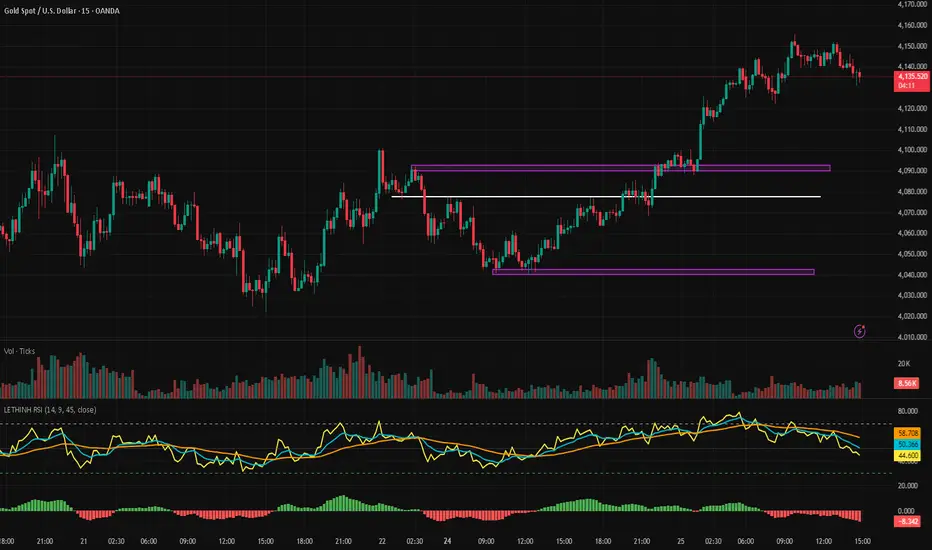
LETHINH RSITitle: RSI + EMA9 + WMA45 Strength Flow Indicator Description: This indicator enhances the traditional RSI by combining it with two dynamic moving averages (EMA9 and WMA45) applied directly to the RSI line. The goal is to help traders visually identify momentum strength, trend confirmation, and potential reversal points with greater accuracy. How It Works: • RSI (14): Measures market momentum and identifies overbought/oversold conditions. • EMA9 on RSI: A fast-response signal line that tracks short-term shifts in buyer/seller strength. • WMA45 on RSI: A slower, smoother indication of long-term momentum flow and trend bias. Key Signals: 1. EMA9 crosses above WMA45: Momentum turning bullish → potential buy signal. 2. EMA9 crosses below WMA45: Momentum turning bearish → potential sell signal. 3. RSI above 50 + EMA9 above WMA45: Strong bullish environment. 4. RSI below 50 + EMA9 below WMA45: Strong bearish environment. 5. RSI approaching 70/30: Warning zones for exhaustion or potential reversals. Use Cases: • Spot momentum reversals earlier than RSI alone. • Confirm entries when price structure and momentum agree. • Filter out false breakouts during low-volatility or choppy conditions. • Strength-based scalping, swing trading, or trend following. Best Timeframes: Works on all timeframes, especially effective on M1–M15 for scalping and H1–H4 for swing trading.Pine Script® indicatorby LEDUCTHINH9819
Auto Trend Channel [Minimal Settings]Auto Trendlines: Automatically draws the latest upper and lower trend channels (Yellow lines). Breakout Signals: Triggers Buy or Sell signals when price breaks the channel bounds with momentum. EMA Filter (Hidden): Uses an internal EMA spread filter (EMA 5 vs EMA 20) to avoid trading during consolidation/choppy markets. No Repaint: Once a trade is triggered, the channel lines are locked to track the specific setup without repainting. Smart Exit: Automatically closes positions based on two conditions: Midline Reset: Price returns to the channel median. Trend Reversal: Price breaks the EMA 5 and engulfs the previous 4 candles' structure. Money Management Dashboard: A built-in panel tracks simulated Profit & Loss (PnL), calculating real-time returns based on a $1,000 start, leverage, and 0.04% trading fees.Pine Script® indicatorby xlevlatl17
Absorption Meter — M15/M5/M3Absorption Meter — EMA200 + Wick + Absorption Combo Absorption Meter is a synthetic orderflow/absorption tool built only on OHLCV data. It plots two lines — Buy Absorption and Sell Absorption — plus optional EMA200-based reversion and trend-continuation signals. The idea is to highlight where aggressive buyers or sellers are likely being absorbed, not rewarded. The script uses a simple delta/CVD proxy (volume signed by candle direction), volume z-scores, candle structure (wicks vs body), VWAP proximity, and distance from EMA200. For each bar it builds two scores from 0–100: • Buy Absorption (green): high when selling pressure is strong (negative delta and CVD slope), volume is above normal, the candle is wicky/inefficient, price is near VWAP, and the bar looks like a stall or has a strong lower wick. This suggests shorts are hitting into bids and being absorbed. • Sell Absorption (red): high when buying pressure is strong (positive delta and CVD slope), volume is above normal, the candle is wicky, price is near VWAP, and the bar looks like a stall or has a strong upper wick. This suggests longs are hitting into offers and being absorbed. I use this mostly as contrarian context: high Buy Absorption near lows is a reason to stop chasing shorts and look for long/cover zones; high Sell Absorption near highs is a reason to stop chasing longs and look for short/profit zones. It is not a stand-alone “buy/sell” signal. On top of the lines, the script can draw arrows and fire alerts when several conditions align: • EMA200 mean reversion (price stretched from EMA200, recent big wick, strong absorption). • Optional base VWAP triggers (absorption near VWAP). • Optional strong distance-only reversions. • Optional trend-bias continuation (on the right side of EMA200 with supportive slope and absorption/wicks). Key settings (short overview): • Z-Score and Volume Z lookbacks: control how “unusual” delta, CVD and volume must be. • ATR Length: used for volatility, gates, and EMA distance. • Weights (Delta, CVD Slope, Volume Z, 1–Body Efficiency, VWAP Proximity): control how much each component contributes to the score. • Gates (Small Move, Wick Size, Soft Factor): control how strict the bar structure must be to count as absorption. • EMA200 / StdDev / distance thresholds: control when EMA reversion logic activates. • Big Wick filters (min wick vs ATR, wick percent, body percent, reclaim rules, min volume Z): define what a real “rejection wick” looks like. • Session filter and cooldown: restrict signals to your session and avoid arrow spam. This is a context tool: it shows where aggressive volume is running into resistance or support so you can make better decisions around chasing, fading, or taking profits.Pine Script® indicatorby polishquant24
PA + Volatility + Volume Confluence (3/3) — v5Volume price action and volatility. It gives you early warning when market is about to move.Pine Script® indicatorby devindersohi117
AkdakTrading1Script using M5 Order Blocks with an FVG and the first blocks of an impulse to take trades with a 1:1 risk-reward. Pine Script® strategyby titouan_vandiestUpdated 6
AKS Squeeze ProReplaced Orange High Compression dots with WHITE High Compression dots.Pine Script® indicatorby stjudepa18
Gold_Strategy_EMA_TradingProEC_v1.4We are pleased to announce a significant update to the execution logic of the Gold Breakouts Strategy, focusing on improved precision and reliability of trade signals. 📝 Summary of Key Changes This version resolves the critical issue of duplicate or redundant trade entries that were being generated on the same bar when the EMA crossover condition was triggered. This caused unnecessary confusion in signal notifications and trade execution. ⚙️ Detailed Technical Implementation Elimination of Redundant Code: We have successfully removed the conflicting entry logic block that previously attempted to execute trades using Pivot levels for Take Profit calculation. By doing this, we eliminate the source of the double entry problem. Consolidated Execution Logic: The strategy now relies on a single, unified execution block. This block exclusively utilizes the robust Fixed TP/SL Ratio calculation as defined in the strategy inputs. Enhanced Flow Control: We improved the conditional flow by using else if for the sell condition (else if cond_venta) immediately following the buy condition (if cond_compra). This vital change guarantees that if a Buy signal is processed on a given bar, the Sell signal logic is skipped entirely, making the execution flow more exclusive and robust against rapid market movements. ✅ User Impact and Benefits Single, Clear Notifications: Users will now receive only one definitive entry notification per signal (either 'sell' or 'buy') at a time. This allows for immediate and confident decision-making. Reliable Trade Execution: The strategy is now significantly more dependable, ensuring that the Stop Loss and Take Profit levels are set correctly and consistently based on the defined risk ratio immediately upon entry.Pine Script® strategyby danielguallich3
RSIT1. What is this indicator? RSIT is a hybrid momentum indicator that combines the classic RSI (Relative Strength Index) . Its goal is to provide a smoother, "noise-free" picture of market movement, filtering out false signals while remaining reactive to price changes. 2. Interpreting the Main Line (RSIT) The indicator window draws a main line that changes color based on the trend direction: Green Line: Rising momentum (Buying pressure dominates). Red Line: Falling momentum (Selling pressure dominates). Zones and Levels The indicator uses fixed levels to define overbought and oversold conditions: Extreme Overbought (180+): Price is very high; a downward reversal is expected (indicated by a red fill). Overbought (150): Warning that the market is "hot." Midline (100): The neutral zone of the trend. Oversold (50): The start of the buying zone. Extreme Oversold (Below 20): Price is very low; an upward reversal is expected (indicated by a green fill). 3. Information Dashboard On the right side of the screen, there is a small table that helps align trends across multiple timeframes (Multi-Timeframe): It lists the timeframes: 1m, 15m, 1H, 4H, 8H, 1D. Green (U - Up): RSIT is rising on that timeframe. Red (D - Down): RSIT is falling on that timeframe. Tip: The strongest signals occur when the majority of the timeframes in the table share the same color. 4. Visual Aids on the Chart The indicator can color the candles and the background of your main chart so you don't have to constantly look at the bottom pane. Candle Coloring (Barcolor): You can set the candle colors to change based on the trend of a specific timeframe (e.g., if you are on a 15-minute chart but want to see the 4-hour trend). How to enable: In the settings under the "Use ... Candle Coloring?" options. Background Coloring: Works similarly; it tints the chart background faint green or red based on the trend of the selected timeframe. 5. RGWaves (Optional) In the settings, you can enable the "Show RGWaves" feature. This is a histogram (bars) that functions similarly to MACD. It confirms momentum: If the bars are green and growing, the trend is strong. If they are red, selling pressure is strong. 6. Divergences The indicator automatically detects divergences (when price and the indicator move in opposite directions). Bullish (White line below price): Price hits a new low, but RSIT is already rising. → Buy Signal. Bearish (White line above price): Price hits a new high, but RSIT is already falling. → Sell Signal. Settings By clicking the gear icon, you can modify the following: Divergence: Toggle the drawing of divergence lines on/off. Candle Coloring: Choose which timeframe determines the candle colors (e.g., check "Use 4H Candle Coloring" to see the 4-hour trend while trading on a lower timeframe). Show RGWaves: Toggle the histogram display. Summary – How to Trade with It? Trend Direction: Check the main line color and the dashboard. If everything is Green, look primarily for buy opportunities. Entry: Wait for the RSIT to return from an extreme zone (e.g., crossing back up from below 20) or when a divergence appears. Exit: If the indicator reaches the opposite extreme zone (e.g., goes above 180), consider closing the position or taking profit.Pine Script® indicatorby scalperhungary0
Sal EMA Cloud Trend Labels + Buy/Sell Signals (Real-Time Only)Sal EMA Cloud Trend Labels + Buy/Sell Signals — Real-Time Trend Precision Unlock cleaner trend detection and faster trade decision-making with the Sal EMA Cloud — a lightweight yet powerful EMA-based trending system designed for intraday and swing traders. This indicator combines the reliability of the EMA trend model with an intuitive visual experience: ✅ Real-Time Buy/Sell Signals Instant label-based alerts appear the moment the EMAs cross — giving you clear momentum-shift entries and exits. ✅ Dynamic EMA Cloud A color-shifting cloud forms between the EMAs, turning green in bullish conditions and red during bearish phases, making trend direction obvious at a glance. ✅ Trend Status Table A compact, auto-updating table displays the current trend ("Bullish," "Bearish," or "Neutral") in the corner of your chart for quick confirmation. ✅ Clean, Minimal Overlay No clutter. Just EMAs, a cloud, and actionable signals that work seamlessly across any timeframe. If you want a straightforward, real-time trend tool that helps you stay on the right side of momentum — this indicator delivers exactly that.Pine Script® indicatorby sjc178910
Altseason IndexDescription of the "Altseason Index" Indicator The Altseason Index is a powerful and visually minimalist tool designed to objectively identify the onset and conclusion of an "altseason" in the cryptocurrency market. Moving beyond subjective speculation, this indicator employs a clear, mathematical methodology by comparing the performance of a broad basket of altcoins against Bitcoin. 🎯 Core Concept and Utility An "Altseason" is a market period where altcoins (cryptocurrencies other than Bitcoin) consistently yield higher returns than BTC. This indicator empowers traders and investors to: Objectively Identify Market Cycles: Precisely pinpoint when capital is actively rotating from Bitcoin into altcoins and vice versa. Make Data-Driven Decisions: Adjust their strategy in a timely manner: increasing exposure to altcoins during an altseason or rotating back into BTC upon its conclusion. Avoid Emotional Pitfalls: Steer clear of FOMO (Fear Of Missing Out) and base decisions on hard data rather than market noise. ⚙️ How the Calculation Works 1. Asset Selection: The indicator tracks the performance of 15 leading altcoins across various market segments (Layer 1s, DeFi, Meme, Payments), ensuring a representative sample. 2. Performance Comparison: For each altcoin, the percentage price change over the user-defined lookback period (default: 90 days) is calculated. This performance is then compared to BTC's performance over the same period. 3. Counting the "Outperformers": The index counts the number of altcoins that have "outperformed" BTC. 4. Calculating the Index: The Altseason Index value is the percentage of altcoins in the basket that are outperforming BTC. For example, a value of 60% means that 9 out of the 15 coins performed better than Bitcoin. 🛠️ Indicator Settings The settings are kept simple and intuitive, allowing you to customize the indicator to your strategy: Lookback Period (days) (Default: 90): - Defines the time horizon for the performance calculation. - Shorter Periods (30-60 days) react faster to new trends but may produce more false signals. - Longer Periods (90-180 days) provide smoother and more reliable signals, capturing sustained macro-trends. Altseason Threshold (%) (Default: 75%): - This is the key parameter that defines what index value constitutes an official "altseason." - A threshold of 75% means an altseason is declared when at least 11 out of the 15 altcoins (75%) are outperforming BTC. - You can increase the threshold (e.g., to 85%) for more conservative and stronger signals, or decrease it (e.g., to 65%) for earlier entries. 📊 Interpreting the Readings and Signals The indicator uses a clear color-coding system and levels for easy interpretation: 🔴 < 30%: "BTC SEASON" Bitcoin is dominating. The market is in risk-off mode or a state of anticipation. Growth is concentrated in BTC. ⚪ 30% - 49%: "NEUTRAL" A transitional phase. The market is uncertain. Some alts show strength, but there is no unified trend. 🔵 50% - 74%: "BULLISH" Growing strength in altcoins. Capital is beginning to rotate actively. This can be an early stage of an altseason. 🟢 ≥ 75% (or your custom threshold): "ALTSEASON" The active altseason phase. The vast majority of altcoins are rising faster than BTC. This is the period of maximum potential returns for alts. Signal Markers: Green Dot: Signals the potential start of an altseason (the index crosses above the threshold). Red Dot: Signals the potential end of an altseason (the index crosses below the threshold). ℹ️ Information Panel The chart displays two clean information panels: 1. Main Info Label: Current index value (e.g., ⟠ 80%). Market status (ALTSEASON, BULLISH, etc.). The ratio of outperforming altcoins (11/15 alts). 2. Dominance & Market Cap Panel: Alts: Altcoin Dominance (the market cap share of all coins except BTC). BTC: Bitcoin Dominance. Market: Total cryptocurrency market capitalization in billions of USD. This helps assess the overall market context (bullish/bearish). 💎 Conclusion The Altseason Index is your strategic companion for navigating the crypto markets. It transforms the complex task of identifying market cycles into a simple and visual process. Use it to confirm broad market trends, identify potential entry and exit points, and, most importantly, to maintain discipline in your trading strategy by filtering out noise and emotion. Disclaimer: This indicator is a tool for analysis and does not constitute investment advice. All trading decisions are taken at your own risk.Pine Script® indicatorby ALEKSEI_MAKSIMOV48
Thirdeyechart Global Gold PercentageThe global gold percentage – Percentage Change Indicator is a TradingView tool developed to help traders monitor multiple currency pairs and precious metals in one glance. This indicator was coded personally, using custom formulas to calculate the percentage change for each symbol over selected timeframes, making it unique and fully tailored to individual analysis needs. Users can input any symbols they wish to track as a comma-separated list, making it highly flexible. The script automatically calculates percentage changes for Daily (D), 1-Hour (H1), and 4-Hour (H4) timeframes. Positive changes are highlighted in blue and negative changes in red, allowing for an instant visual representation of market movements. The table updates in real-time, giving traders immediate feedback without needing to switch between charts. Designed with simplicity and functionality in mind, this indicator is ideal for intraday traders, swing traders, or anyone who wants to keep an eye on multiple markets efficiently. It works for currency pairs, metals like gold (XAUUSD, XAUJPY), or any TradingView-available symbol. The table is positioned at the top-right corner of the chart and automatically adapts to the number of symbols entered. This script is purely informational and educational, providing a clear view of price movements but not offering buy or sell signals. Traders should perform their own analysis and risk management before making any trading decisions. Disclaimer / Copyright: © 2025 Thirdeyechart. All rights reserved. This indicator is for educational and informational purposes only. The author is not responsible for any trading losses or financial decisions made based on this script. Redistribution, copying, or commercial use of this code without permission is strictly prohibited.Pine Script® indicatorby Spiderweb1116
1分K 爆量高點 + MACD延遲空單 + 爆量後回補 + 關鍵壓力觀察器(整合版)Based on the short-term trading habits of major players, identify specific timeframes by analyzing 1-minute candlestick charts with high volume and MACD indicators to predict reversals. When the price just breaks through the opening neckline (blue line) (9:00-9:10) and a signal appears, avoid placing orders or place orders too small. It's necessary to observe volume increases and decreases in conjunction with the price action. Increased volume often indicates a loss. Major players typically use 1% or 1.5% stop-loss orders. The stop-loss line (purple line) is designed at 1.65%, with each position's stop-loss point at 1.65%. The dark blue area represents the 3-day average price, with an upper limit of 2% and a lower limit of 0.5%. Observe the price reaction when it touches this level (resistance or breakout). For signals above 7%, it's best to use short selling. 依據短衝主力習性抓取特定時間1分K爆量、MACD判斷轉折 剛過開盤頸線青線(9:00~9:10)一點點就出訊號時不下部位、部位下少 需搭配籌碼K觀看量增、量減 , 如果量增容易輸 主力洗處損喜歡洗1%、1.5% , 停損線紫線設計1.65% , 每個部位停損點1.65% , 深藍色區間為3日平均價位 , 上界 2%、下界 0.5% 可觀察價位碰到此處的反應(遇壓or突破) 7%以上出訊號最好使用融券Pine Script® indicatorby puma99988Updated 35
RRE HARSI4951✅ Buy Signal RSI crosses above 49 Heikin Ashi green (ha_close > ha_open) ✅ Sell Signal RSI crosses below 51 Heikin Ashi red (ha_close < ha_open) Everything else in your code remains unchanged.Pine Script® indicatorby ramrajenterprisesUpdated 21
Delta Zones Smart Money Concept (SMC) UT Trend Reversal Mul.Sig.🚀 What's New in This Version (V5 Update) This version is a major overhaul focused on improving trade entry timing and risk management through enhanced UT Bot functionality: Integrated UT Trailing Stop (ATR-based): The primary trend filter and moving stop-loss mechanism is now fully integrated. Pre-Warning Line: A revolutionary feature that alerts traders when the price penetrates a specific percentage distance (customizable) from the UT Trailing Stop before the main reversal signal fires. "Ready" Signal: Plots a "Ready" warning label on the chart and triggers an alert condition (UT Ready Long/Short) for pre-emptive trade preparation. V5 Compatibility: All code has been optimized for Pine Script version 5, utilizing the modern array and type structures for efficient Order Block and Breaker Block detection. 💡 How to Use This Indicator This indicator works best when confirming signals across different components: 1. Identify the Trend Bias (UT Trailing Stop) Uptrend: UT Trailing Stop line is Green (Focus only on Buy/Long opportunities). Downtrend: UT Trailing Stop line is Red (Focus only on Sell/Short opportunities). 2. Prepare for Entry (Warning Line) Action: When you see the "Ready" label or the price hits the Pre-Warning Line (Dotted Orange Line), this is your alert to prepare for a trend flip, or to tighten the stop on your current trade. 3. Confirm the Entry (Multi-Signals) Look for a primary entry signal that aligns with the desired trend: High-Conviction Entry: Wait for the UT Buy/Sell label (confirmed trend flip) AND a Combined Buy/Sell arrow (confirmed by your selected Oscillator settings). High-Liquidity Entry: Look for a Delta Zone Box forming near an active Order Block or Breaker Block (SMC zones), and then confirm with a UT or Combined Signal. 4. Manage Risk (Trailing Stop) Always set your initial Stop Loss (SL) either just outside the opposite Order Block or at the UT Trailing Stop level itself. If the price closes back across the UT Trailing Stop, exit your position immediately, as the trend bias has officially shifted. Features & Components 1. Delta Zones (Liquidity/Wick Pressure) Identifies periods of extreme buying or selling pressure based on wick-to-body ratios and standard deviation analysis. Plots colored pressure boxes (Buy/Sell) to highlight potential exhaustion points or institutional activity. 2. Smart Money Concepts (SMC) Automatically detects and plots Order Blocks (OBs) and Breaker Blocks (BBs) based on confirmed Market Structure Breaks (MSBs). Includes Chop Control logic to remove less reliable Breaker Blocks. 3. UT Bot Trailing Stop & Warning Line UT Trailing Stop (ATR-based): Plots a dynamic trend line (Green/Red) that acts as a moving stop-loss and primary trend filter. Ready/Warning Signals: Alerts traders (via the "Ready" label and orange lines) when the price enters a "Pre-Reversal Zone" near the Trailing Stop. 4. Multi-Indicator Confirmation (Filters) Includes customizable signals based on the crossover/crossunder of RSI, CCI, and Stochastic indicators against configurable Overbought/Oversold levels. Allows selection of combination signals (e.g., RSI & CCI, All Combined, etc.) for high-conviction entries.Pine Script® indicatorby angkoon4763Updated 11639
Tom Basso ETR HedgeSimple hedge regime indicator inspired by Tom Basso’s hedging approach described at enjoytheride.world It combines Keltner Channels, Bollinger Bands, and Donchian Channels using 50-bar “IN” signals to turn the hedge ON and 21-bar “OUT” signals to turn the hedge OFF. When any 50-bar lower band is broken to the downside, the background turns red to indicate hedge mode, and when price recovers above any 21-bar upper band, hedge mode turns off. Use this on a broad market index (SPX/ES/SPY, etc.) to time when you should be hedged versus unhedged, not as a standalone entry/exit trading system. Pine Script® indicatorby MoMoPower9
STARKPROFITS SCALPER 2.0señales compra y venta..tendencia y estructura del mercado.se basa en tendenciaPine Script® indicatorby PedroRamirezSilva29
SuperEMA RSI Strategy [wjdtks255]Indicator Description and Trading Guide for “SuperEMA RSI Strategy ” Indicator Name: SuperEMA RSI Strategy Description The SuperEMA RSI Strategy combines fast and slow Exponential Moving Averages (EMA) to identify key trend changes, enhanced with the Relative Strength Index (RSI) to filter momentum strength. It plots clear buy and sell signals based on EMA crossovers while highlighting trend zones with colored backgrounds for quick visual reference. This multi-timeframe compatible indicator is suitable for stocks, cryptocurrencies, and other markets. How to Use the SuperEMA RSI Strategy Buy Signal: Enter a long position when the short-term EMA crosses above the long-term EMA, indicated by a green circle below the price bar. Confirm the trend with a green background and consider RSI values showing sufficient momentum (typically RSI above 50). Sell Signal: Enter a short position when the short-term EMA crosses below the long-term EMA, indicated by a red circle above the price bar. Confirm the bearish trend with a red background and verify momentum weakening (typically RSI below 50). Trend Confirmation: Use the background color-shaded zones to identify prevailing trend strength and avoid counter-trend trades. RSI Application: Optionally enable RSI display to avoid overbought/oversold entries by watching for levels above 70 (overbought) or below 30 (oversold). Additional Tips Adjust EMA and RSI parameters to suit different timeframes or asset volatility. Combine this indicator with volume analysis and other technical tools for enhanced signal reliability. Implement well-defined stop-loss and take-profit levels to manage risk effectively. Pine Script® indicatorby wjdtks25518