Trading Sessions - SonarlabThe Trading Sessions indicator shows the most significant trading sessions for the Forex market, such as London, New York and Asian.
The sessions are presented as colored boxes on the chart, thereby clearly indicating open and close times of a particular session, as well as its trading range.
How is this Forex market session indicator used?
Traders normally use trading sessions to determine the volatile hours throughout the day, since the trading activities vary from one stock exchange to another.
London and New York market trading sessions are considered to be the most volatile, especially during the 4-hour overlap.
There are also strategies aiming only at the opening of the London session or those that allow trading only during the Asian session.
Backtesting
When testing out your strategy this Indicator can be handy to use while backtesting in Tradingviews replay mode. Only backtest the sessions you will normally trade.
Settings:
For each session:
Time beginning - end
Show session range or only beginning
Colors
Overlay type: BOX/ Background/ High - Low
Display settings statistics
ADR
Mid line (50%)
Range
Tradingsessions

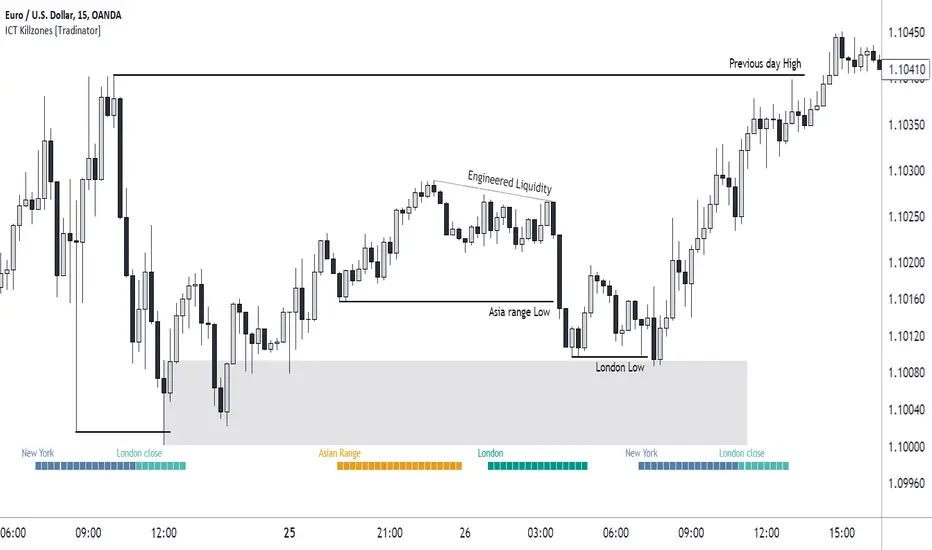
ICT Killzones [28Trades]Indicator plots weekdays and killzones of the most important trading sessions.
The times of each killzone come from the education material of Inner Circle Trader.
Asia killzone: 00:00 - 05:00
London open killzone: 07:00 - 10:00
New York killzone: 12:00 - 14:00
London close killzone: 15:00 - 17:00
GMT+0
It's not depended on your tradingview account timescale/setting, so the killzones always stay at the right place in the chart whether your timesetting is UTC or UTC+5.
It's made so that it automatically detects if a market is closed during weekends. Because of this, it works well for crypto as well as forex markets. The difference between this indicator and others is that this one is plotted on the actual chart instead of an oscillator below the chart, which gives a much cleaner chart in my opinion.
Settings:
Show day of week
show killzones
Hide indicator above specific timeframe
Choose where to display the weekdays or killzones, top or bottom of the chart
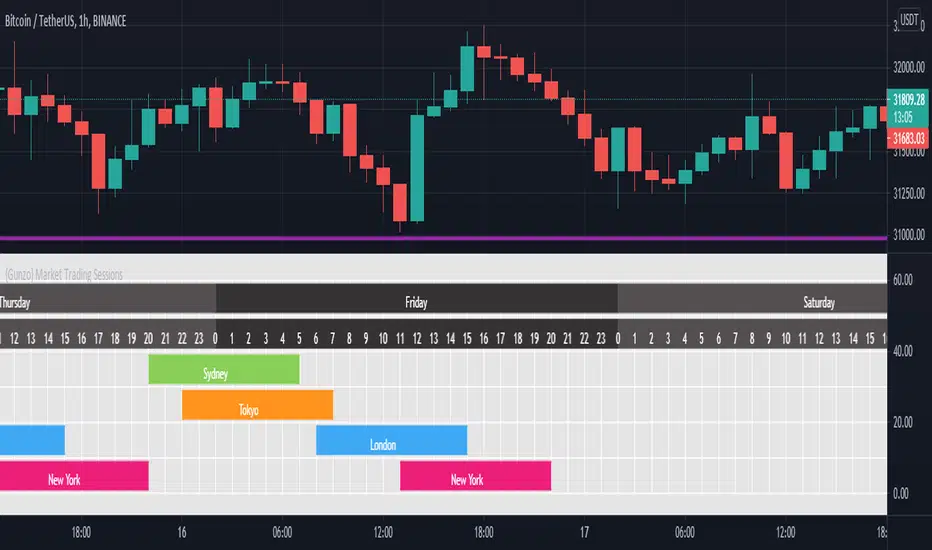
{Gunzo} Market Trading Sessions (Tokyo, London, New York)Market Trading Sessions is a tool designed to help traders to find the best times of the day for price action trading. It displays non-overlapping visuals for the major trading sessions : Oceania, Asia, Europe, and USA.
OVERVIEW :
This tool has been designed to match all the following requirements that I needed for optimal usage :
Display opening and closing of main markets
See clearly market sessions (non-overlapping colors)
Display Sydney session if wanted
Display GMT hours and days
Visually pleasing design and colors
Highly configurable
As I had trouble finding a script matching all these criteria, I created this tool and I'm sharing it with the TradingView community, hoping you will find it useful too.
SETTINGS :
Display market sessions on weekends : Display theoretical market sessions times on the weekend which can be useful for non forex markets.
Display session for Oceania\Sydney : Display "Oceania\Sydney" trading session
Display session for Asia\Tokyo : Display "Asia\Tokyo" trading session
Display session for Europe\London : Display "Europe\London" trading session
Display session for USA\New York : Display "USA\New York" trading session
Display session names : Display names of the session on the visual
Oceania color : Configurable color for the "Oceania\Sydney" sessions
Asia color : Configurable color for the "Asia\Tokyo" sessions
Europe color : Configurable color for the "Europe\London" sessions
USA color : Configurable color for the "USA\New York" sessions
Background color : Configurable color for the table background
Border color : Configurable color for the table borders
Text color : Configurable color for the table text
Header color : Configurable color for the table header (even days)
Header color (alternate) : Configurable color for the table header (odd days)

Session Volatility CalculatorHey traders!
This script calculates the average volatility of trading sessions.
You specify a start date, an end date, and a session time (eg. market open, Asian session etc)
The script then scans through all the price action on your chart and calculates the average price movement during that specified period.
What Is It For?
I created this script for my own purposes when developing certain strategies and testing certain ideas.
The purpose of this script is to give you an idea of how much price tends to move during certain times of day for certain markets.
You could think of it as a "session's average true range".
In crypto and forex this might be how much price tends to move on certain pairs during the Australian/Asian session, or the European session, or the overnight U.S. session etc.
In stocks this might be how much a symbol tends to move during the first hour of the day or the last hour of the day.
The point of calculating this information is for better understanding how markets move during certain times of day.
It's not a perfect science obviously since some days can be wilder than others depending on what fundamental events are developing, but it's useful information to have for times when there are no expected volatility-inducing events.
This info can help with optimizing targets and stop loss placement for certain day-trading strategies, and just generally getting an idea of what kinds of moves you might reasonably expect out of overnight positions or certain times of day etc - or at least that's what I use it for.
Settings
Hover your mouse over the "i" symbol to get more information on the script's settings, but here's a brief description:
Start Date: The date to begin calculating from (set to 1000 by default so it scans the entire chart).
End Date: The date to stop calculating (set to 2099 by default so it scans the entire chart)
Time Session: This is the time session during the day that you want to analyze.
Color Background: If turned on, this setting changes the background color to highlight the session.
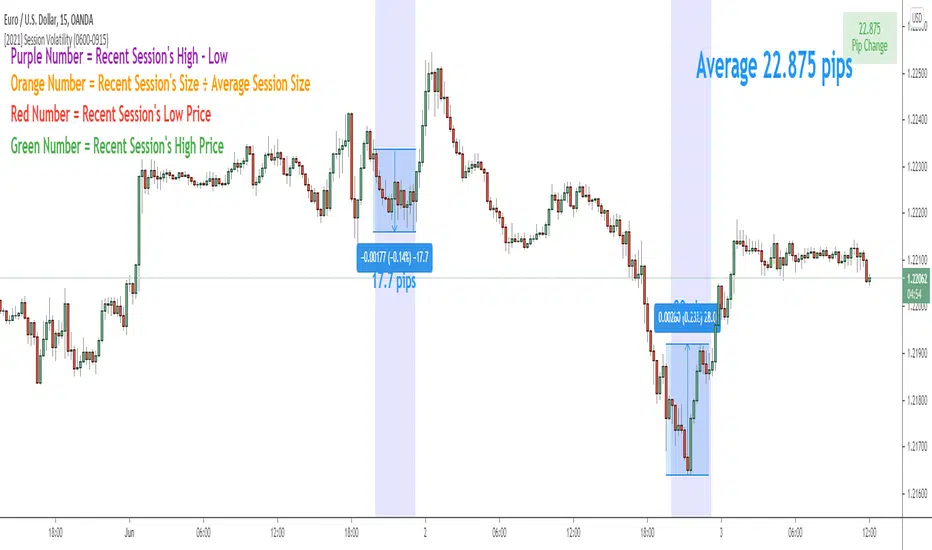
Indicator Values
The indicator outputs a handful of values onto your chart. This is what the colors correspond to:
Top-Right Box: The average price range during the given time of day over historical price action.
Green Number: The recent session's highest price.
Red Number: The recent session's lowest price.
Purple Number: The recent session's price range (high - low).
Orange Number: The recent session's range ÷ the average (outputs a relative % of the average).
SFL Session OpensThis is a simple script that allows you to show the start of a trading session with a vertical line and label.
Currently, 3 major sessions are supported (Tokyo, London and NY) and there is an option to define a custom session too.
Per session, you can configure the open hour and minute, whether you want to enable it and the color of the line/label.
Give it a thumbs up if you like it. Enjoy!

Forex/Crypto/Custom Market SessionsCredit goes to TradeMasterSavis for providing the original code
I merge the 2 sessions together allowing you to toggle between the two. I also add a 3rd custom session type and the ability to change the duration of each trading session. This would solve any problems ran into the case of Daylight savings time switch or if you just want different session duration.
