RSI BandsPlots adaptive ATR bands around the 27-EMA to approximate RSI overbought and oversold zones directly on price. Provides a clean visual reference for RSI-like extremes without displaying the RSI itself.Pine Script® indicatorby SQU1NTZ11
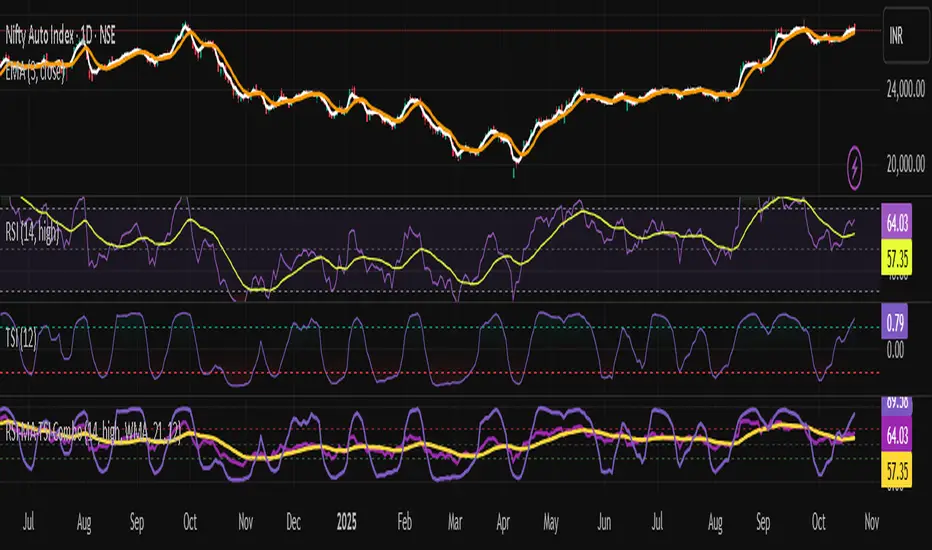
RSI + TSI✅ All 3 indicators in one pane ✅ RSI and RSI MA with standard zones (30, 50, 70) ✅ TSI scaled to 0–100 range for alignment with RSI ✅ Color-coded TSI fill for quick trend recognition (green = bullish, red = bearish) ✅ Compatible with TradingView v6Pine Script® indicatorby ektush12116
RSI Prior DayLagged RSI indicator showing the prior day's RSI(14) value for easy divergence detection. Plot it alongside current RSI to spot bullish/bearish signals. Ideal for swing traders scanning for momentum shifts.Pine Script® indicatorby Sapporo252
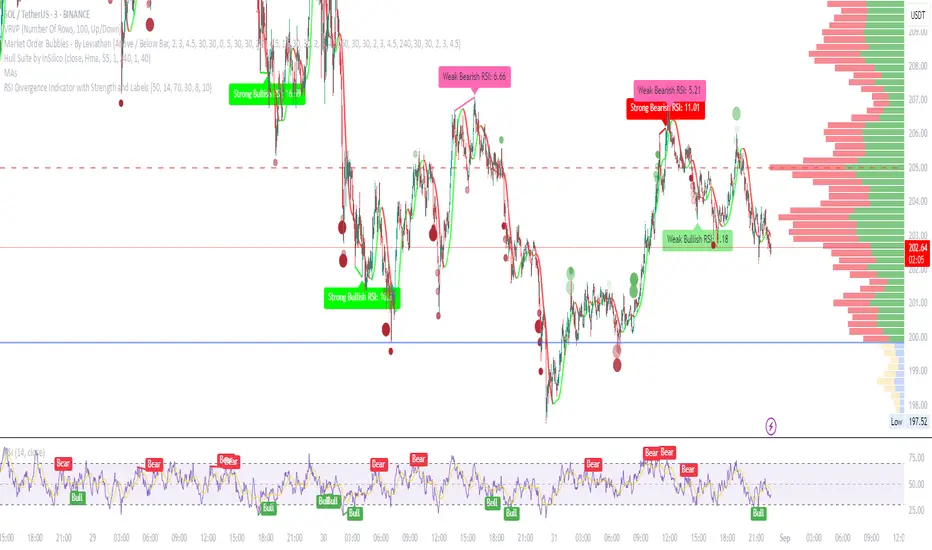
RSI Divergence Indicator with Strength and LabelsHere's a complete Pine Script (version 5) for a TradingView indicator that detects and plots bullish and bearish RSI divergences. This is based on a proven method that tracks price and RSI swings while RSI is in oversold/overbought territories, then checks for mismatched highs/lows within a configurable bar distance.Pine Script® indicatorby andrewrovers156
Multi-Timeframe RSIRSI Divergence (Time-Based Engine) This script is a powerful and highly customizable tool designed to automatically detect and display RSI divergences from up to three independent, user-defined timeframes directly on your chart. It eliminates the need to manually switch between timeframes to find these critical trading signals, allowing you to see long-term and short-term divergences all in one place. The engine is built to be flexible, supporting both regular (reversal) divergences and hidden (trend-continuation) divergences. It's designed for traders who rely on divergence analysis as a core part of their strategy. Key Features Multi-Timeframe (MTF) Analysis: Configure and display divergences from up to three different timeframes simultaneously (e.g., show 4-Hour, Daily, and Weekly divergences on your 1-Hour chart). Each timeframe operates independently with its own settings. Regular & Hidden Divergence: The script can detect both standard regular divergences that signal potential reversals and hidden divergences that suggest a trend may continue. Configurable Pivot Strength: You have full control over the sensitivity of pivot detection. The 'Left Strength' and 'Right Strength' settings allow you to define what qualifies as a significant price pivot, filtering out market noise. Bar Count Filter: Refine your signals by setting the minimum and maximum number of bars allowed between two pivots. This ensures you only see divergences that fit your specific strategic timeframe. Dedicated Alerts: Each of the three timeframes has its own "Enable Alerts" toggle. When a new divergence line is drawn on the chart for a specific timeframe, a corresponding alert can be triggered, ensuring you never miss a potential setup. Full Visual Customization: Tailor the look and feel of the indicator to your preference. Each timeframe has unique color settings for its bullish and bearish lines, allowing for easy visual identification. You can also toggle the visibility of various chart markers to keep your view clean. How to Use 1. Add the indicator to your chart. 2. Open the Settings panel. 3. For each timeframe you wish to use (1, 2, or 3), check the "Enable Timeframe" box. 4. Select the desired Timeframe, RSI Length, and Pivot Strength for each active engine. 5. Adjust the Min/Max Bars filter to match your trading style. 6. If you want to receive notifications, check the "Enable Alerts" box for the desired timeframe(s). Then, create an alert using TradingView's alert manager, selecting the indicator and choosing the "Any alert() function call" option.Pine Script® indicatorby nickbonenkamp22109
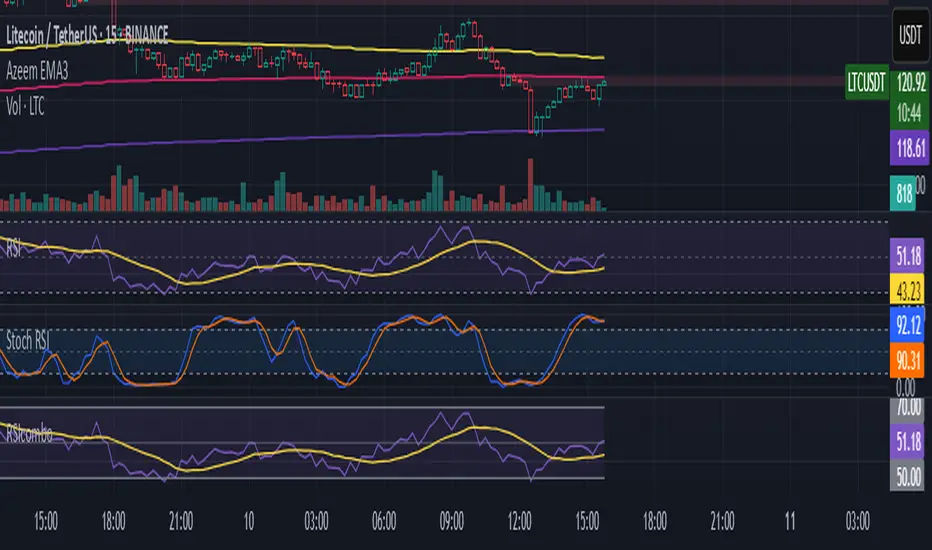
RSI/Stoch RSI ComboIt shows both rsi and stoch rsi as one indicator. You need to select which one using checkbox.Pine Script® indicatorby azeembutt346
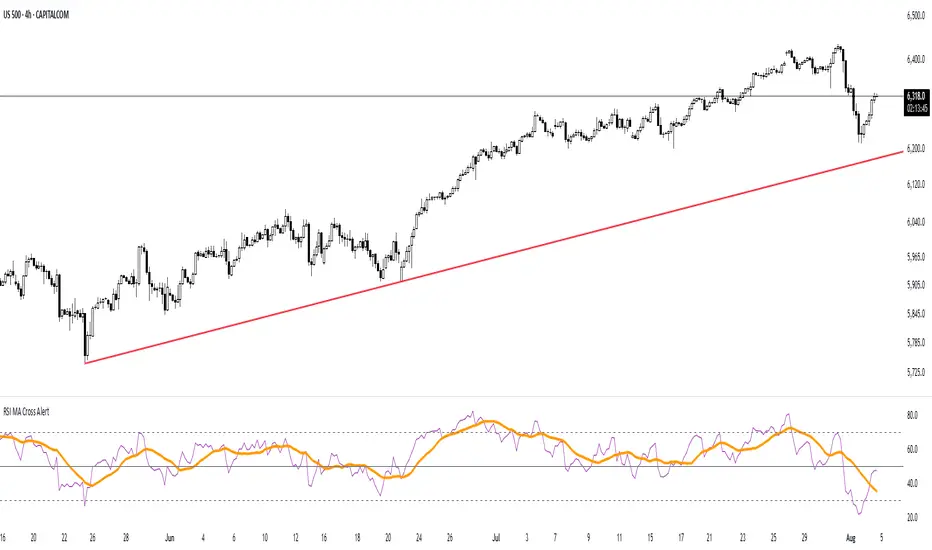
RSI MA Cross AlertAlerts when RSI-based Moving Average crosses above 50. Can be used on any symbol and timeframe. Displays RSI, RSI-MA, and levels 30/50/70.Pine Script® indicatorby seby927911
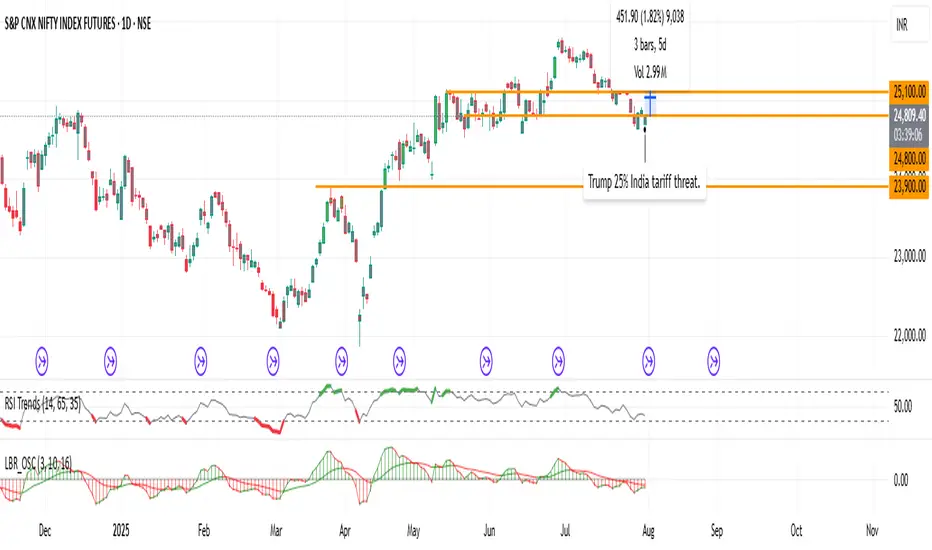
RSI TrendsColor chart with RSI colors Simple RSI which colors green candle when RSI above 65, red when below 35 and grey when in between. Pine Script® indicatorby pratikmehta26046
RSI + VWAP Strategy by vipindaskr🔍 This script combines RSI and VWAP for intraday trend-based entries. ✅ *Buy Signal:* - Price above VWAP - RSI > 60 - Green background + up triangle shown ❌ *Sell Signal:* - Price below VWAP - RSI < 40 - Red background + down triangle shown 📈 Ideal for Nifty 50 intraday traders using 5-minute chart. Developed by vipindaskr 💻Pine Script® indicatorby vipindaskr2261
RSI Mansfield +RSI Mansfield+ – Adaptive Relative Strength Indicator with Divergences Overview RSI Mansfield+ is an advanced relative strength indicator that compares your instrument’s performance against a configurable benchmark index or asset (e.g., Bitcoin Dominance, S&P 500). It combines Mansfield normalization, adaptive smoothing techniques, and automatic detection of bullish and bearish divergences (regular and hidden), delivering a comprehensive tool for assessing relative strength across any market and timeframe. Originality and Motivation Unlike traditional relative strength scripts, this indicator introduces several distinctive improvements: Mansfield Normalization: Scales the ratio between the asset and the benchmark relative to its moving average, transforming it into a normalized oscillator that fluctuates around zero, making it easier to spot outperformance or underperformance. Adaptive Smoothing: Automatically selects whether to use EMA or SMA based on the market type (crypto or stocks) and timeframe (intraday, daily, weekly, monthly), avoiding manual configuration and providing more robust results under varying volatility conditions. Divergence Detection: Identifies four types of divergences in the Mansfield oscillator to help anticipate potential reversal points or trend confirmations. Multi-Market Support: Offers benchmark selection among major crypto and global stock indices from a single input. These enhancements make RSI Mansfield+ more practical and powerful than conventional relative strength scripts with static benchmarks or without divergence capabilities. Core Concepts Relative Strength (RS): Compares price evolution between your asset and the selected benchmark. Mansfield Normalization: Measures how much the RS deviates from its historical moving average, expressed as a scaled oscillator. Divergences: Detects regular and hidden bullish or bearish divergences within the Mansfield oscillator. Timeframe Adaptation: Dynamically adjusts moving average lengths based on timeframe and market type. How It Works Benchmark Selection Choose among over 10 indices or market domains (BTC Dominance, ETH Dominance, S&P 500, European indices, etc.). Ratio Calculation Computes the price-to-benchmark ratio and smooths it with the adaptive moving average. Normalization and Scaling Transforms deviations into a Mansfield oscillator centered around zero. Dynamic Coloring Green indicates relative outperformance, red signals underperformance. Divergence Detection Automatically identifies bullish and bearish (regular and hidden) divergences by comparing oscillator pivots against price pivots. Baseline Reference A clear zero line helps interpret relative strength trends. Usage Guidelines Benchmark Comparison Ideal for traders analyzing whether an asset is outperforming or lagging its sector or market. Divergence Analysis Helps detect potential reversal or continuation signals in relative strength. Multi-Timeframe Compatibility Can be applied to intraday, daily, weekly, or monthly charts. Interpretation Oscillator >0 and green: outperforming the benchmark. Oscillator <0 and red: underperforming. Bullish divergences: potential relative strength reversal to the upside. Bearish divergences: possible loss of momentum or reversal to the downside. Credits The concept of Mansfield Relative Strength is based on Stan Weinstein’s original work on relative performance analysis. This script was built entirely from scratch in TradingView Pine Script v6, incorporating original logic for adaptive smoothing, normalized scaling, and divergence detection, without reusing any external open-source code.Pine Script® indicatorby Fussion_TraderUpdated 1178
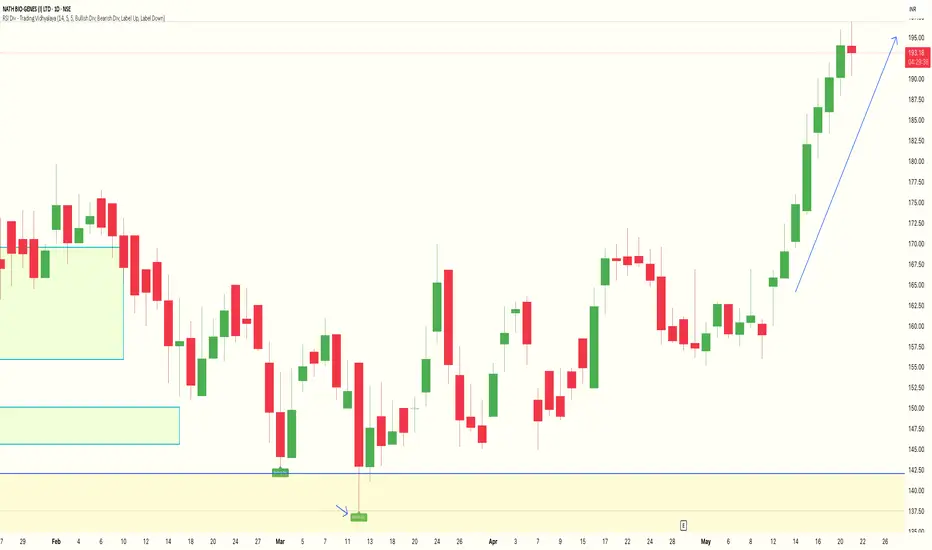
RSI Divergence Indicator - Trading VidhyalayaThis indicator automatically identifies RSI-based bullish and bearish divergences and visually marks them directly on the candlestick chart, making it easier for traders to spot potential reversals. ✅ Key Features: Bullish Divergence When the price makes a lower low, but the RSI makes a higher low, the indicator highlights the candle with a green arrow or label to signal potential upward reversal. Bearish Divergence When the price makes a higher high, but the RSI forms a lower high, the indicator marks the candle with a red arrow or label to indicate a possible downside move. Real-time Detection Divergences are plotted in real-time, helping traders react quickly to changing market conditions. Candlestick Overlay Signals are shown directly on the chart, rather than below in a separate panel, allowing for faster and clearer decision-making. 📊 Benefits: Helps in identifying early trend reversals Works well with other indicators like MACD, Moving Averages, or Volume Great for both beginners and advanced traders Saves time by automating divergence spotting, reducing manual errorsPine Script® indicatorby k_kaushikUpdated 11116
RSI MACD Combined Color StrategyOverview This indicator combines RSI and MACD signals to create a powerful visual trading system, inspired by TrendSpider's AI Strategy Coder examples. It colors candles based on the alignment of three key technical conditions, providing clear visual signals for potential trend strength and direction. Technical Components Core Conditions RSI (Relative Strength Index) > 50 Indicates bullish momentum when price is trading above the centerline Traditional indicator of trend strength MACD Line > Signal Line Shows positive momentum Classic signal for potential upward movement MACD Line > 0 Confirms bullish territory Indicates overall positive momentum Color Coding System 🟢 Green Candles: All three conditions are met Strongest bullish signal Suggests high probability trading opportunities ⚪ Grey Candles: One or two conditions are met Neutral or transitioning market Suggests caution or waiting for stronger confirmation 🔴 Red Candles: No conditions are met Bearish signal Suggests potential downward pressure How to Use This Indicator For Entry Signals Look for transitions from red or grey to green candles Green candles suggest strong bullish alignment Consider entering long positions when candles turn green For Exit Signals Watch for color transitions from green to grey or red Consider taking profits when candles change from green to grey Consider stop losses when candles turn red Risk Management Use color transitions as part of your broader strategy Don't rely solely on color changes for trading decisions Combine with other technical analysis tools and risk management practices Customizable Parameters RSI Length (default: 14) MACD Fast Length (default: 12) MACD Slow Length (default: 26) MACD Signal Length (default: 9) Best Practices Use multiple timeframes for confirmation Look for confluences with support/resistance levels Consider volume and market context Start with default settings and adjust based on your trading style Backtest different parameter combinations Notes This indicator works best in trending markets Grey candles can indicate transition periods Consider market conditions and volatility when interpreting signals Credits Inspired by TrendSpider's AI Strategy Coder examples and adapted for TradingView using Pine Script v5. Disclaimer This technical indicator is for informational purposes only. Always conduct your own analysis and consider risk management principles before making trading decisions. Past performance does not guarantee future results.Pine Script® indicatorby StratFactory11101
RSI/MFI Ultimate MAHello! Today, I want to discuss a special indicator that I've developed. centers around a weighted moving average based on RSI/MFI. 1. Development Purpose The primary goal of this indicator is to provide clearer insights into bullish and bearish signals in the market. It applies a weight to the RSI (Relative Strength Index) and MFI (Money Flow Index) values to offer more sensitive and predictive trend signals than traditional moving averages. 2. Usefulness This indicator aids traders in identifying market volatility and bullish or bearish trends more easily. It is particularly responsive to market volatility, providing more accurate information for trading decisions. 3. Real-World Usage Examples When applied to actual market data, this indicator clearly delineates bullish or bearish sections with its weighted moving average line. For instance, an upward trending moving average line indicates a bullish signal, while a downward trend suggests bearish momentum. 4. Meaning of Parameter Values option: Allows choosing between RSI or MFI, each analyzing different market signals. osc_len: Adjusting the oscillator length alters sensitivity. ma_len: Setting the moving average length helps to modulate responsiveness to market fluctuations. weight: Changing the weight fine-tunes the sensitivity of the moving average line. By adjusting these parameters, the indicator can be customized to suit various market conditions. Wishing you a successful trading day. Thank you!Pine Script® indicatorby TRJAKE_kr55324
RSI Box Strategy (pseudo- Grid Bot)This is a strategy intended primarily for algorithmic traders. It's a pseudo-grid bot that uses a dynamic, volume-weighted grid that only updates when the RSI meets certain conditions. It's also a breakout strategy, whereas normal grid bots are not (typical grid bots sell when a higher grid is reached, whereas this strategy sells when a lower grid is breached under specific conditions). This strategy also sells 100% of pyramiding orders on close. In a nutshell, the strategy updates its grid to the volume-weighted highest/lowest values of your given source ("src" in the settings) each time that there is a RSI crossunder/crossover. From this range it produces an evenly-spaced grid of five lines, and uses the current source to determine which grid line is closest to the source. Then, if the source crosses over the line directly above the current line, it enters a buy order. If the source crosses under the line directly below the current line, it enters a sell order. You can configure shorts, source, RSI length, and overbought/oversold levels in the settings. For the strategy results below: fees are at 0.1% per trade, with order size 1% of equity and a max pyramiding value of 33. For a greater R/R profile, you can increase the order size, which will increase drawdown but potentially yield better results.Pine Script® strategyby wbburgin417
RSI + Fibonacci HH LL Support Resistance I have integrated my past scripts and brushed them up further. This tool allows for support/resistance, stop loss, take profit, and trend analysis using RSI and Fibonacci ratios. For example, the Fibonacci ratio is used as follows l1 = m - dist * 0.618 l2 = m - dist * 1.618 l3 = m - dist * 2.618 l4 = m - dist * 4.235 l5 = m - dist * 6.857 l6 = m - dist * 11.089 When the Fibonacci ratio reaches 2.618 or higher and the RSI smoothed by the 5-day EMA is oversold/overbought, the bar color is changed by a gradation. We have tried to make the design as beautiful and good-looking as possible. You can also hide the lines to suit your own preference. Example usages are here: BTCUSDT 1Hour Chart Using Fibonacci numbers BTCUSDT 15min Chart, for Scalping Here, to set the highest and lowest prices one hour ago, "4" is substituted as the calculation: 15 minutes x 4 = 60 BTCUSDT 15min Chart, for Scalping To set the highest and lowest prices 4 hours ago , "4" is substituted as the calculation: 15 minutes x 16 = 240 BTCUSDT 15min Chart, for Scalping To draw yesterday's high and low as support/resistance lines, I substituted the number "96" as 1440/15=96. BTCUSDT 1min Chart, for Scalping Substituted "60" to trail the highest and lowest prices over a 60-minute period on a 1-minute chart, and removed lines to beautify BTCUSDT 1day Chart, for Long-Term Investers This is an example of using "90" because it is a 1-day chart and assumes that 3 months = 90 days in order to trail the highest and lowest prices over a 3-month period and no lines. My past scripts are here: RSI + FIB HH LL StopLoss Finder/Contrarian Trades Fibonacci HH LL TRAMA Band Pine Script® indicatorby FibonacciFluxUpdated 243
RSI Momentum Trend ScreenerIntroducing The RSI Momentum Trend Screener, to have the ability to scan 40 symbols at once The screener is based on RSI Momentum Trend Indicator It will show Positive Or Negative based on the symbol condition. You can change the values on the screener, symbols, activate/disable symbols and change table position and color Pine Script® indicatorby TZack88Updated 2222 1.1 K
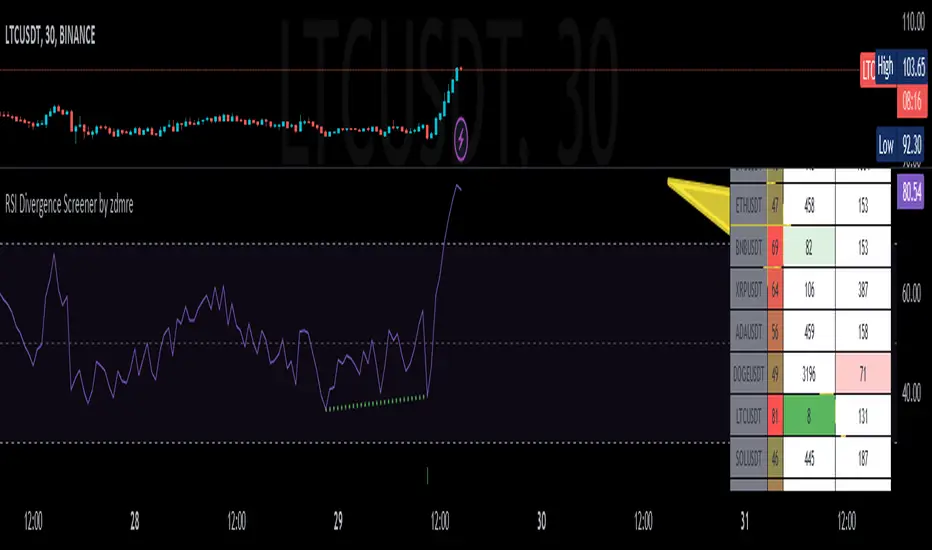
RSI Divergence Screener by zdmreThis screener tracks the following for up to 20 assets: -All selected tickers will be screened in same timeframes (as in the chart). -Values in table indicate that how many days passed after the last Bullish or Bearish of RSI Divergence. For example, when BTCUSDT appears Bullish-Days Ago (15) , Bitcoin has switched to a Bullish Divergence signal 15 days ago. Thanks to @QuantNomad and @MUQWISHI for building the base for this screener. *Use it at your own risk Note: Screener shows the information about the RSI Divergence Scanner by zdmre with default settings. Based indicator: Pine Script® indicatorby zdmreUpdated 1414937
RSI with Keltner Channel (+EMA Ribbon)Note that the EMA Ribbon is not embedded into the custom RSI with KC. In the future I plan to embed it. The EMA Ribbon I use is the following: This is my very first attempt at modifying an indicator. I basically attempted to add a Keltner Channel around RSI. This was used as an alternative channel to the standard Bollinger Band. KC goes hand-in-hand with the EMA Ribbon. KC also helps to better pinpoint relative-overbought/oversold conditions. In my belief, the 20-80 levels don't behave as overbought/oversold levels. An exponential chart would always be overbought. So a Keltner Channel could in theory (and in practice) give us greater understanding on chart analysis. This custom indicator is a bodge . It has lots of extra calculations that can be removed. I post this rough indicator for the community to give feedback on how I can improve it, or perhaps give an idea to some of you. Please don't judge me, I wouldn't post it but lately some have asked me about it. In the future I would like to embed an EMA ribbon in this RSI indicator, just like I did in the following idea. During this period, I don't really have the time to fix this indicator to my standards. So I will leave it as is for the foreseeable future. If you have the will and knowledge however, feel free to built upon this indicator and share it! Tread lightly, for this is hallowed ground. -Father Grigori PS. In this indicator, I would replace all the moving averages with an EMA Ribbon "average".Pine Script® indicatorby akikostas2292
RSI Impact Heat Map [Trendoscope]Here is a simple tool to measure and display outcome of certain RSI event over heat map. 🎲 Process 🎯Event Event can be either Crossover or Crossunder of RSI on certain value. 🎯Measuring Impact Impact of the event after N number of bars is measured in terms of highest and lowest displacement from the last close price. Impact can be collected as either number of times of ATR or percentage of price. Impact for each trigger is recorded separately and stored in array of custom type. 🎯Plotting Heat Map Heat map is displayed using pine tables. Users can select heat map size - which can vary from 10 to 90. Selecting optimal size is important in order to get right interpretation of data. Having higher number of cells can give more granular data. But, chart may not fit into the window. Having lower size means, stats are combined together to get less granular data which may not give right picture of the results. Default value for size is 50 - meaning data is displayed in 51X51 cells. Range of the heat map is adjusted automatically based on min and max value of the displacement. In order to filter out or merge extreme values, range is calculated based on certain percentile of the values. This will avoid displaying lots of empty cells which can obscure the actual impact. 🎲 Settings Settings allow users to define their event, impact duration and reference, and few display related properties. The description of these parameters are as below: 🎲 Use Cases In this script, we have taken RSI as an example to measure impact. But, we can do this for any event. This can be price crossing over/under upper/lower bollinger bands, moving average crossovers or even complex entry or exit conditions. Overall, we can use this to plot and evaluate our trade criteria. 🎲 Interpretation Q1 - If more coloured dots appear on the top right corner of the table, then the event is considered to trigger high volatility and high risk environment. Q2 - If more coloured dots appear on the top left corner, then the events are considered to trigger bearish environment. Q3 - If more coloured dots appear on the bottom left corner of the chart, then the events are considered insignificant as they neither generate higher displacement in positive or negative side. You can further alter outlier percentage to reduce the bracket and hence have higher distribution move towards Q4 - If more coloured dots appear on the bottom right corner, then the events are considered to trigger bullish environment. Will also look forward to implement this as library so that any conditions or events can be plugged into it.Pine Script® indicatorby TrendoscopeUpdated 2323577
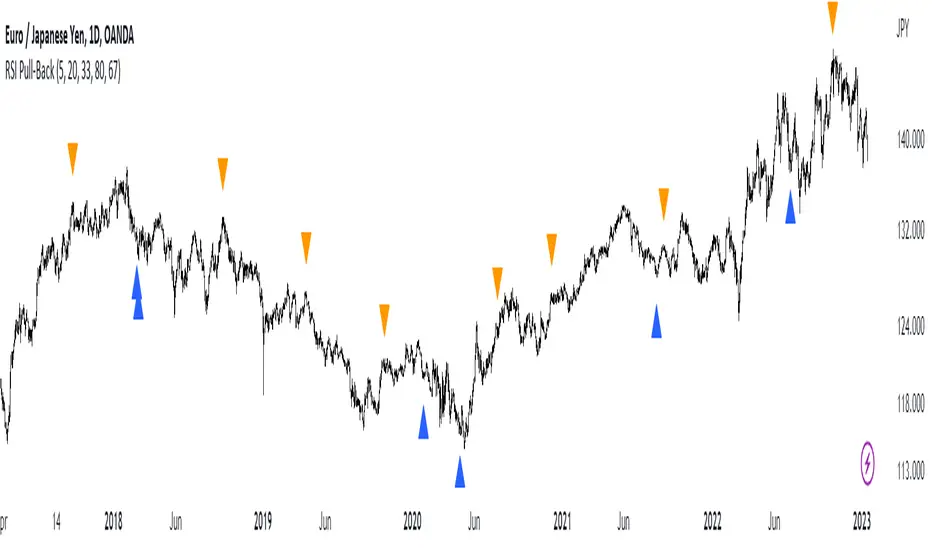
RSI Pull-BackA pull-back occurs whenever the price or the value of an indicator breaks a line and comes back to test it before continuing in the prevailing trend. The RSI has oversold and overbought levels such as 20 and 80 and whenever the market breaks them returns to normality, we can await a pull-back to them before the reversal continues. This indicator shows the following signals: * A bullish signal is generated whenever the RSI surpasses the chosen oversold level then directly shapes a pull-back to it without breaking it again. * A bearish signal is generated whenever the RSI breaks the chosen overbought level then directly shapes a pull-back to it without surpassing it again.Pine Script® indicatorby Sofien-Kaabar33346
RSI + Stothis one can be used for over-bought and oversold 1d time frame is the best time frame for using this indicator RSI measures the speed and magnitude of a security's recent price changes to evaluate overvalued or undervalued conditions in the price of that security. The RSI can do more than point to overbought and oversold securities. It can also indicate securities that may be primed for a trend reversal or corrective pullback in price. It can signal when to buy and sell. T traditionally, an RSI reading of 70 or above indicates an overbought situation. A reading of 30 or below indicates an oversold condition. Pine Script® indicatorby MaleeshaGamage29
RSI + Moving AverageSimple regular RSI Indicator that plots a Moving Average (Hull, SMA, EMA, RMA, etc) that you specify the MA and length. Contains Over Bought and Over Sold areas that you can customize color and zone. Plots signals of the RSI crossing up over the over sold area or down below the over bought area. Plots crosses of the RSI crossing the Moving Average.Pine Script® indicatorby mojotv111211
RSI Improved strategySet a Horizontal Ray at the price that relates highest / lowest RSI . It 's more clear to decide when to open long / short position manually. It's a scalping strategy that works in 15min chart(basically works in most of timeframe , if you don't look it as a scalping strategy), when RSI hits Highest / Lowest value , the strategy will open a Long / Short position. The Default Risk Reward Ratio was 1 (1600 points : 1600 points) you can adjust it in settings You guys can look it as a RSI alert indicator Think before you do , use it wisely. Thanks a lot! There is a lot of useless words in Pine if you wanna look it please ignore it.Pine Script® strategyby jimmy30110Updated 4458