My Greatest Mistake Yet BITCOINI do believe in the lengthen cycle and diminishing returns. All timeframes are lengthened by a factor of around 3 from 2016. Not sure if this plays out but I think the chart looks pretty cool.Longby NotASmaartPerson884
CLM2022: A 1-year Forecast Further to the earlier idea, we are now seemingly approaching the final extension zone, and with another 15% increase, the odds for mean reversion become much better. The market seems to be in an exciting area and is definitely worth our attention. Staying tuned for further developments on this one. by Zoen_Trieste228
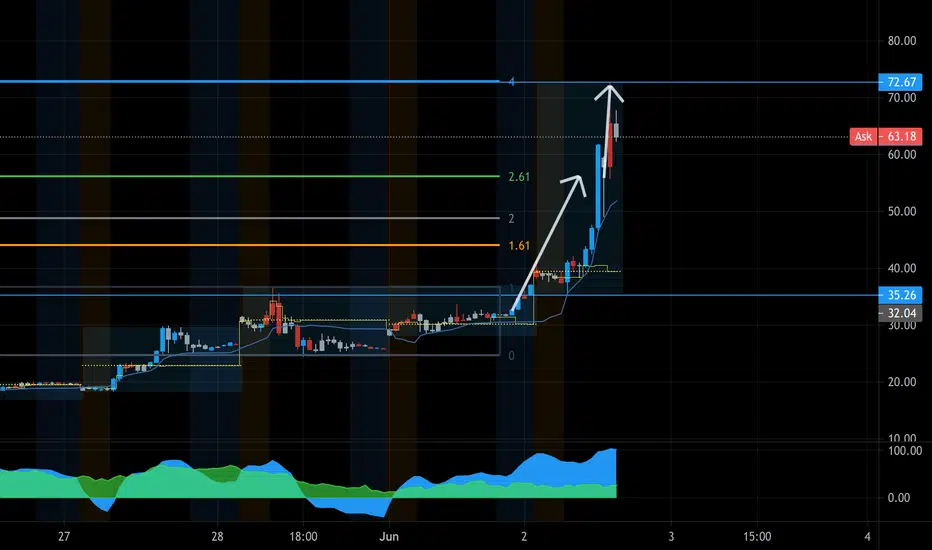
Flat on AMC 72$ was a good target, about 4x of prior correctionLooking for re–entires, AMC is hot till most shorts are covered...by responsibletrad8r1
Bitcoin Worst Senario....It seems bitcoin cant hold the 4H Ascending trend line and going to down into 23k range....Shortby UnknownUnicorn21777967114
Bitcoin Magic Trend LineLong Near the showed magic Trend line has good Riward/Risk Ratio.....Longby UnknownUnicorn21777967Updated 3
6J1 1hr and 15 min divergenceTarget is at a red dot on the 1 hr, other information is on the chartLongby LixxChartzUpdated 0
BTCUSD: Got it for 1/2 price?Not long ago, BTC exchanged hands at levels above $60k, and now we are seeing it being offered half of that price. This massive decline is the perfect moment for the dip buyers to step in, but caution is advised as this range is new, and an extended chop is probable. I will try to update this once in a while. Let us see how it unfolds. by Zoen_TriesteUpdated 121225
AMAT making bullish run with MA Cross above 50MARetrace from last run shows this can reach 155 by end of Jun.by scw00080
CHINYThis Analysis was Hand Made.. support and resistance lines.. horizontal lines are Support/Resistance . Vertical lines are time pivots . Appreciate your Comments. GLby Magic_xD3
moving into Mercury and Venus + gap fill + important datesThis chart shows Mercury and Venus planetary lines and how price reacted to both of their harmonics so far ( opposition 180 degrees ) It also shows the Mercury box set at opening price. A touch at the 1.618 down, a move up into the gap is to be expected keeping all geometry and dynamic Gann planetary lines in mind. Longby NasserHumoodUpdated 5511
DOGEUSD: Mapping the Next Bullish WaveFurther to the last idea on this pair, we are now mapping the next potential wave higher. This wave is very coveted and, consequently, has crippled probability; however, the fractal nature of the post-ATH correctional formation evidenced through the repetitive waves is indeed very fascinating and worth our attention. Enjoy! Longby Zoen_TriesteUpdated 5519
Long termGood Opportunity for long term investment. support and resistance lines.. horizontal lines are Support/Resistance . Vertical lines are time pivots . Appreciate your Comments. GLLongby Magic_xD3
Colorful Gann AnglesUsually, I don't use much color in my analysis, but these Gann box angle setups were too good not to be complemented with a little color. The colorful triangles help show a clear start and end of a pattern or trend.by PrestonAnalytics222
ETHUSD Break throughA very positive outlook for ETHUSD. Breakthrough is imminent, till 3600 after which a retracement to 61.8 is possible.Longby Riz_Ezreal1
EURGBPIf you liked the idea, the analysis please click on like and follow up, and you will receive everything new and exclusive The analysis used William Delbert Gann And astronomical analysis And my own method that I have adopted in analyzing the price movement is very special Shortby IraqiHawk1
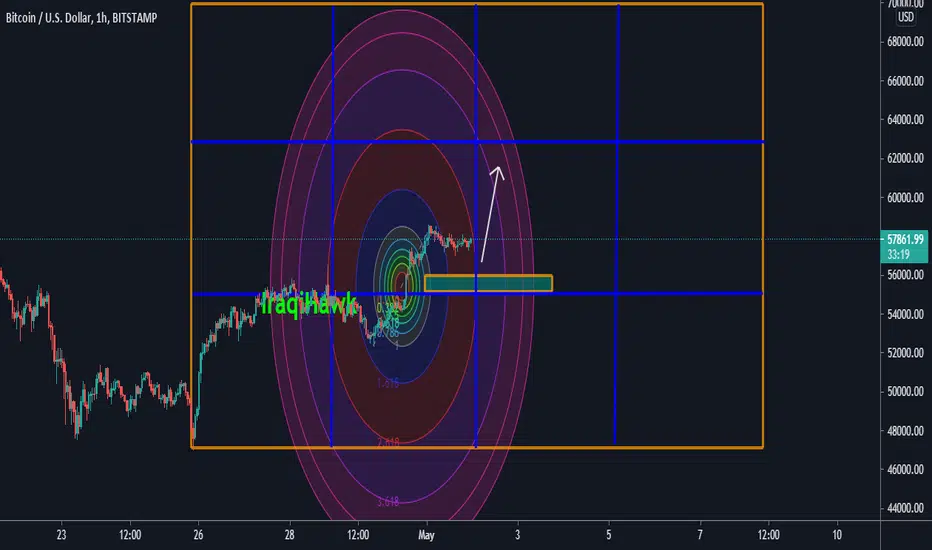
BTCUSDIf you liked the idea, the analysis please click on like and follow up, and you will receive everything new and exclusive The analysis used William Delbert Gann And astronomical analysis And my own method that I have adopted in analyzing the price movement is very special Longby IraqiHawk2
Bitcoin to 130k+ path to follow until September 2021Lets see how BTC follows my 8x8 gannbox....Longby Aletheia3698
Gann Box - How to set upQuick rundown of setting up a gann box. Steps below also; 1. Pick a TF (Minimum 1HR ) Example here on 4HR 2. Lock price to bar ratio 3. Find key pivot high or low 4. Turn on magnet, and select the 'Gann Square' tool 5. draw the square from your pivot point, until you go beyond the current price AND hit one of these key fixed time intervals (see number at the bottom right corner of the Gann Square to see your interval) - 45, 90, 180, 360, 720 etc - (in short, doubling from 45, then doubling the interval every time) 6. Next step is getting the ratio correct on your Gann Square. In the Gann Square settings, there is the option to change the ratio ('Price/Bar ratio'). a. Here are the ratios you must use (in order of importance); - 1, 2, 5, 10, 20, 40, and, as a last resort, 2.5. b. Ideally, you want the ratio to be as low as possible. However, with Bitcoin, price is so high and volatile that we need to look at bigger ratios. In this example I've used an interval of 1,440, and ratio of 40 to get my template set up. c. There will then be coins that a ratio of 1 will be cause your Gann square template to be way too big, these will be on low value coins. I have checked, and you can divide your key ratio by 10 to achieve a relatively normal sized Gann square (examples will be shared). So you can take a ratio of 2, and divide by 10 to give you 0.2. If still too big, divide by 10 again to give you 0.02. Just make sure you stick to the key ratio numbers. 7. Finally, select the Gann box tool, and draw from the same pivot point, and drag it to line up with your Gann square corner to corner. Once your Gann box is set, you can remove the Gann square. Education03:55by petemartin95Updated 3360
September Sun Cycle points upLong into the .618*.618, volatility day as labeled in the chart is on May 1st. ( Pivotal low/High or target) Failure to maintain the previous low can result in a pullback to the 90degrees static square of 9 to retest structure.Longby NasserHumood223