PEG Ratio Screener ColumnCreating a column for PEG so I can easily rank stocks of interest based on whether their PEG is >1, 1, or <1. Pine Script® indicatorby matthewdukesmith3
PEGY Ratio (Robust) Using the PEG but incorporating Dividends in order to find value investing opportunities by better understanding growth vs. forward P/E.Pine Script® indicatorby matthewdukesmith1110
PEGY Ratio (Div Adj PEG)Identifying the PEGY (Dividend Adjusted PEG) to find value investment opportunities. Pine Script® indicatorby matthewdukesmith6
2 EMA Cross Signals – AL / SATIt gives signals at EMA crossovers. It gives buy and sell signals. You can change the EMA settings. It is very good for trend following.Pine Script® indicatorby Bafrali555513
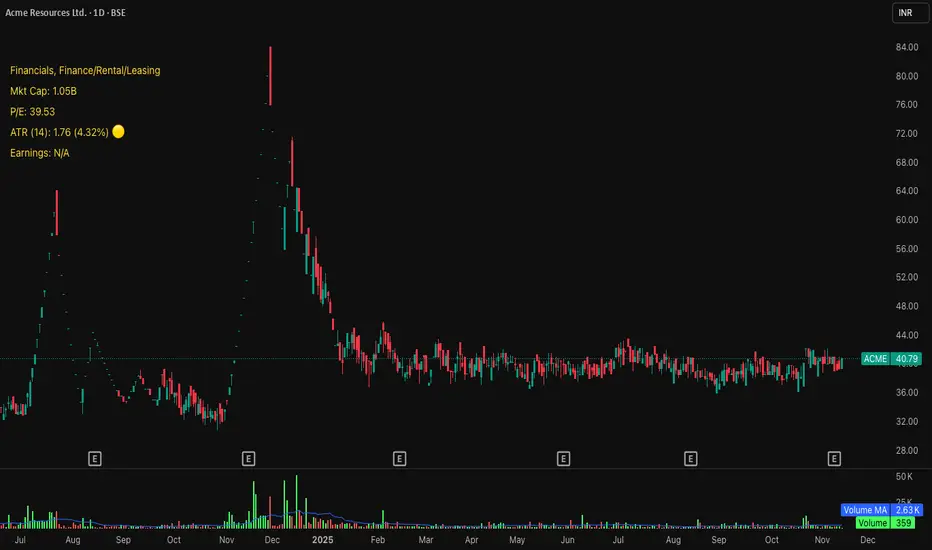
Michael's Custom Watermark🔷 MICHAEL'S CUSTOM WATERMARK INDICATOR ━━━━━━━━━━━━━━━━━━━━━━━━━━━━━━━━━━━━━━━ 📊 OVERVIEW A comprehensive chart watermark overlay that displays essential fundamental and technical information for stocks in a clean, customizable table format. Perfect for traders who want quick access to key metrics without cluttering their charts. ━━━━━━━━━━━━━━━━━━━━━━━━━━━━━━━━━━━━━━━ ✨ KEY FEATURES 📊 Fundamental Data Display — Shows Industry, Sector, Market Cap, and P/E Ratio 📅 Earnings Information — Displays next earnings date with countdown timer 📈 ATR Volatility Indicator — 14-day ATR with color-coded visual alerts (🔴🟡🟢) 🎨 Auto Theme Detection — Automatically adjusts text color based on chart background ⚙️ Fully Customizable — Position, colors, size, and displayed metrics all adjustable 🏢 GICS Sector Mapping — Heuristic-based sector classification aligned with industry standards ━━━━━━━━━━━━━━━━━━━━━━━━━━━━━━━━━━━━━━━ 🎯 WHAT MAKES THIS INDICATOR UNIQUE? Unlike basic watermarks, this indicator provides: Real-time fundamental data integration Smart theme-aware color adaptation for both light and dark charts Configurable volatility alerts using ATR thresholds Earnings countdown feature to never miss important dates Optimized display that only shows relevant data for the current symbol type ━━━━━━━━━━━━━━━━━━━━━━━━━━━━━━━━━━━━━━━ 📖 HOW TO USE 1. BASIC SETUP Add the indicator to your chart. By default, it displays in the top-left corner with all features enabled. 2. POSITIONING Vertical Location: Top, Middle, or Bottom Horizontal Location: Left, Center, or Right Vertical Offset: Fine-tune position with 0-50 pixel offset from top 3. CUSTOMIZATION OPTIONS TEXT APPEARANCE: Auto Text Color — Enable to automatically adapt text color to your chart theme Manual Color — Set a fixed text color if auto-color is disabled Text Size — Choose from Huge, Large, Normal, or Small Theme Colors — Customize text color for light and dark backgrounds separately DATA DISPLAY TOGGLES: Show Industry & Sector — Display heuristic-based GICS-aligned sector and industry classification Show Market Cap — View market capitalization in T/B/M format Show P/E Ratio — Display Price-to-Earnings ratio (stocks only) Show ATR (14-Day) — Display Average True Range with percentage and visual indicator Show Next Earnings — Display upcoming earnings information Show Earnings Countdown — Show days remaining until next earnings (requires earnings display) 4. ATR VOLATILITY ALERTS Configure custom thresholds to monitor volatility: Red Threshold — ATR percentage that triggers red alert 🔴 (default: 6%) Yellow Threshold — ATR percentage that triggers yellow alert 🟡 (default: 3%) Green — Shows automatically when ATR is below yellow threshold 🟢 ━━━━━━━━━━━━━━━━━━━━━━━━━━━━━━━━━━━━━━━ 📐 UNDERSTANDING THE DISPLAY 🏢 SECTOR & INDUSTRY Shows the GICS sector classification followed by the specific industry. The indicator uses heuristic-based mapping to align TradingView sectors with standard GICS classifications. Note that this mapping is based on keyword detection and industry analysis, so while generally accurate, it may not perfectly match official GICS classifications in all cases. 💰 MARKET CAP Displays market capitalization using standard abbreviations: T = Trillion B = Billion M = Million 📊 P/E RATIO Shows the trailing twelve-month Price-to-Earnings ratio. Only displayed for stocks when enabled. Shows "N/A" if data is unavailable. 📈 ATR (14-DAY) Displays the 14-period Average True Range in both absolute value and percentage terms, with a color-coded indicator: 🔴 Red: High volatility (above red threshold) 🟡 Yellow: Moderate volatility (between yellow and red thresholds) 🟢 Green: Low volatility (below yellow threshold) 📅 EARNINGS Shows earnings information in three formats: "X days remaining" — When countdown is enabled and earnings date is known "Upcoming" — When date is in the future but countdown is disabled "Recently Reported" — When earnings just occurred "N/A" — When no earnings data is available ━━━━━━━━━━━━━━━━━━━━━━━━━━━━━━━━━━━━━━━ ⚙️ TECHNICAL DETAILS SUPPORTED INSTRUMENTS: Optimized for stocks with full fundamental data Works with other instruments (crypto, forex, futures) but only displays applicable metrics Automatically suppresses irrelevant data (e.g., P/E for non-stocks) PERFORMANCE: Lightweight overlay with minimal resource usage Updates only on last bar for efficiency No historical recalculation needed COMPATIBILITY: Pine Script v6 Works on all timeframes Compatible with all chart types Auto-adapts to theme changes ━━━━━━━━━━━━━━━━━━━━━━━━━━━━━━━━━━━━━━━ 💡 TIPS & BEST PRACTICES Enable Auto Text Color for seamless theme switching between light and dark modes Adjust vertical offset to avoid overlap with price action in high-volatility periods Use ATR thresholds appropriate to your trading style and asset class Disable features you don't use to keep the watermark clean and focused Position in corners to maximize chart viewing space Use smaller text size for multi-panel layouts ━━━━━━━━━━━━━━━━━━━━━━━━━━━━━━━━━━━━━━━ 🔧 TROUBLESHOOTING "N/A" SHOWING FOR P/E RATIO: This is normal for non-stock instruments May occur for stocks with negative earnings Check if fundamental data is available for the symbol EARNINGS SHOWING "N/A": Earnings data may not be available for all stocks Check TradingView's data coverage for your symbol TEXT COLOR NOT VISIBLE: Enable Auto Text Color feature Manually set text color to contrast with your chart background Adjust custom light/dark text colors in settings ━━━━━━━━━━━━━━━━━━━━━━━━━━━━━━━━━━━━━━━ ⚠️ DISCLAIMER This indicator is for informational purposes only. The fundamental data displayed is sourced from TradingView's data providers. Always verify critical information before making trading decisions. Past performance is not indicative of future results. ━━━━━━━━━━━━━━━━━━━━━━━━━━━━━━━━━━━━━━━ If you find this indicator helpful, please give it a boost 🚀 and share your feedback in the comments! Version: 1.0 Pine Script Version: v6 Created by: Michael Pine Script® indicatorby ehudm14
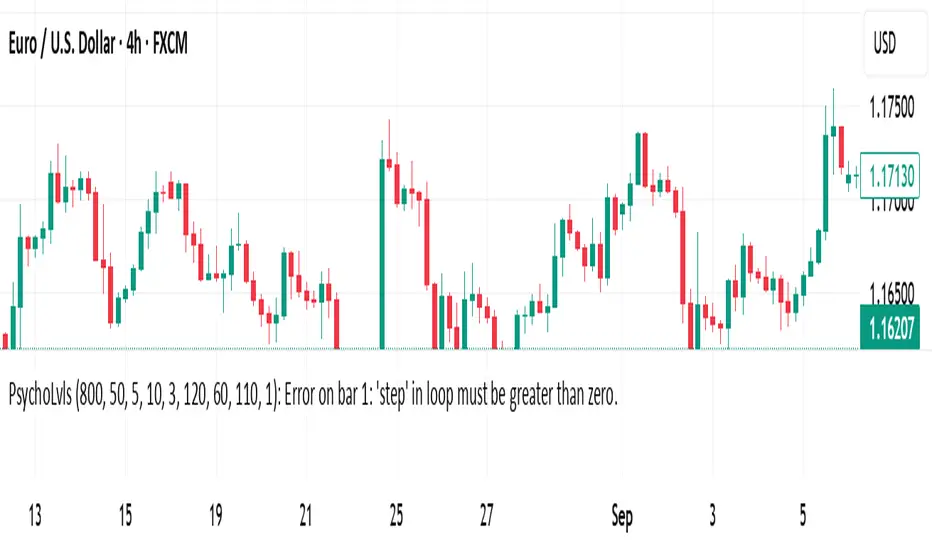
Psychological Levels (Zones + Alerts) - StableThis technical indicator plot support and resistance levels based on the psychological numbersPine Script® indicatorby kennwes_okoth5
Smart Trail Signals NO CONDITIONSSmart Trail Signals Indicator Overview This is a trend-following indicator that uses a dynamic trailing stop system to identify bullish and bearish trends. It adapts to market volatility using ATR (Average True Range) and provides visual signals when the trend direction changes. Core Components Smart Trail System: Calculates dynamic support (trail_up) and resistance (trail_down) levels Adjusts trail levels based on price movement and volatility Maintains trend direction until price crosses the opposite trail level Key Parameters: Length (14): Period for ATR calculation Multiplier (2.0): Distance of trail from price relative to ATR Sensitivity (1-5): Fine-tunes how quickly the trail adapts to price changes How It Works Trend Detection: Monitors whether price is above the support trail (bullish) or below the resistance trail (bearish) Trail Movement: In uptrends: Support trail rises with price but never decreases In downtrends: Resistance trail falls with price but never increases Signals: Diamond shapes appear when trend flips: Green diamond below bar = bullish trend change Red diamond above bar = bearish trend change Visual Aids: Trail line changes color (lime for uptrend, red for downtrend) Candles colored green (bullish), red (bearish), or gray (neutral) Best Use Cases Identifying trend reversals on any timeframe Following strong directional moves Setting dynamic stop-loss levels Works 24/7 on all instruments (stocks, crypto, forex) RetryClaude can make mistakes. Please double-check responses. Sonnet 4.5Pine Script® indicatorby ppavank594
GME FloorThis indicator plots the actual cash and equivalents floor of GMEPine Script® indicatorby UltraSoNiceUpdated 57
Rons Custom WatermarkRon's Custom Watermark (RCW) This is a lightweight, all-in-one watermark indicator that displays essential fundamental and technical data directly on your chart. It's designed to give you a quick, at-a-glance overview of any asset without cluttering your screen. Features The watermark displays the following information in a clean table: * Company Info: Full Name & Market Cap (e.g., "AST SpaceMobile, Inc. (18.85B)") * Symbol & Timeframe: Ticker and current chart period (e.g., "ASTS, 1D") * Sector & Industry: The asset's classification. * Technical Status (MA): Shows if the price is Above or Below the SMA (with a 🟢/🔴 emoji). * Technical Status (EMA): Shows if the price is Above or Below the EMA (with a 🟢/🔴 emoji). * Earnings: A countdown showing "X days remaining" until the next earnings report. * (Optional) Volatility: The 14-day ATR value and its percentage of the current price.Pine Script® indicatorby irthetraders1111
GLD Levels on GC## GLD Levels on GC - Advanced Gold Trading Indicator The GLD Levels indicator is a sophisticated trading tool designed specifically for gold traders who want to visualize key psychological price levels from the GLD ETF directly on their Gold futures (GC) charts. This indicator automatically scales GLD price levels to match Gold futures pricing, providing crucial support and resistance levels that institutional and retail traders watch closely. ### Key Features - Real-Time GLD Price Integration : Pulls live GLD ETF prices and displays them as scaled levels on GC charts - Dual Level System : Shows both whole number levels (e.g., $180, $181, $182) and half levels (e.g., $180.5, $181.5, $182.5) - Smart Instrument Detection : Automatically works on GLD, GC (Gold futures), and MGC (Micro Gold futures) with proper scaling - Customizable Colors : Full control over line and label colors for both whole number and half levels - Historical Extension : Lines extend 100 bars back and 50 bars forward for comprehensive chart analysis - Dynamic Level Selection : Always shows the 10 closest levels (5 above, 5 below) to current price - Clean Label System : Optional price labels with "GLD: $XXX" format for easy identification ### How It Works The indicator fetches real-time GLD ETF prices and calculates the nearest whole number and half-increment levels. When used on Gold futures charts (GC/MGC), it automatically applies the appropriate conversion ratio to scale GLD levels to futures pricing. This provides traders with the psychological levels that matter most in the gold market. ### Customization Options - Show GLD Price Label : Toggle the current GLD price display - Show Whole Number Levels : Enable/disable whole dollar level lines - Show Half Levels : Enable/disable $0.50 increment levels - Whole Number Level Color : Customize the color for whole dollar levels (default: white) - Half Level Color : Customize the color for half-dollar levels (default: gray with transparency) ### Perfect For - Gold Futures Traders : GC and MGC contract traders who need GLD-based support/resistance levels - Multi-Timeframe Analysis : Works across all timeframes from scalping to swing trading - Institutional Level Tracking : Monitor the same levels that large funds and ETF traders watch - Risk Management : Use levels for stop-loss placement and profit target identification - Market Structure Analysis : Identify key psychological levels that often act as magnets for price action ### Trading Applications - Support & Resistance : Use GLD levels as dynamic support and resistance zones - Entry Points : Look for bounces or breaks at key whole number and half levels - Profit Targets : Scale out positions at significant GLD psychological levels - Stop Loss Placement : Position stops beyond key levels for better risk management - Breakout Trading : Monitor for decisive breaks above/below major GLD levels ### Why GLD Levels Matter for Gold Futures GLD is the world's largest gold ETF with massive institutional participation. The psychological levels in GLD often translate directly to Gold futures markets due to arbitrage relationships and cross-market trading. This indicator bridges that gap by showing you exactly where these critical levels sit on your Gold futures charts.Pine Script® indicatorby WizardCharts_com8
Weekly Fibonacci Pivot Signals (4H) - S1/R1 & S3/R3 rulesThis Indicator used weekly price range to calculate the pivot R1,R3,S1 and S3 ,when price crossed and closed below R3 in 4H timeframe the indicator gives sell signal, when the price crossed and close above the S3 the indicator gives buy signal. This indicator can give approximately 50% win Rate .Pine Script® indicatorby kennwes_okoth8
Market Extreme Zones IndexThe Market Extreme Zones Index is a new mean reversion (valuation) tool focused on catching long term oversold/overbought zones. Combining an enhanced RSI with a smoothed Z-score this indicator allows traders to find oppurtunities during highly oversold/overbought zones. I will separate the explanation into the following parts: 1. How does it work? 2. Methodologies & Concepts 3. Use cases How does it work? The indicator attempts to catch highly unprobable events in either direction to capture reversal points over the long term. This is done by calculating the Z-Score of an enhanced RSI. First we need to calculate the Enhanced RSI: For this we need to calculate 2 additional lengths: Length1 = user defined length Length2 = Length1/2 Length3 = √Length Now we need to calculate 3 different RSIs: 1st RSI => uses classic user defined source and classic user defined length. 2nd RSI => uses classic user defined source and Length 2. 3rd RSI => uses RSI 2 as source and Length 2 Now calculate the divergence: RSI_base => 2nd RSI * 3 - 1st RSI - 3rd RSI After this we need to calculate the median of the RSI_base over √Length and make a divergence of these 2: RSI => RSI_base*2 - median All that remains now is the Z-score calculations: We need: Average RSI value Standard Deviation = a measure of how dispersed or spread out a set of data values are from their average Z-score = (Current Value - Average Value) / Standard Deviation After this we just smooth the Z-score with a Weighted Moving average with √Length Methodology & Concepts Mean Reversion Methodology: The methodology behind mean reversion is the theory that asset prices will eventually return to their long-term average after deviating significantly, driven by the belief that extreme moves are temporary. Z-Score Methodology: A Z-score, or standard score, is a statistical measure that indicates how many standard deviations a data point is from the mean of a dataset. A positive z-score means the value is above the mean, a negative score means it's below, and a score of zero means the value is equal to the mean. You might already be able to see where I am going with this: Z-Score could be used for the extreme moves to capture reversal points. By applying it to the RSI rather than the Price, we get a more accurate measurement that allow us to get a banger indicator. Use Cases Capturing reversal points Trend Direction - while the main use it for mean reversion, the values can indicate whether we are in an uptrend or a downtrend. Advantages: Visualization: The indicator has many plots to ensure users can easily see what the indicator signals, such as highlighting extreme conditions with background colors. Versatility: This indicator works across multiple assets, including the S&P500 and more, so it is not only for crypto. Final note: No indicator alone is perfect. Backtests are not indicative of future performance. Hope you enjoy Gs! Good luck!Pine Script® indicatorby MisinkoMaster319
Previous Day H/L/CYour good old Previous day High, Low and Closing lines. I made this so you don't have to! lolPine Script® indicatorby wladcggmap71
Bar RangeI use this to complement the daily ATR bars. It is interesting to see how much the stock has actually moved vs the ATR movement.Pine Script® indicatorby wladcggmap76
Macro Flow Assistant — Full Clean Levels public versionpublic easy macro flow tracker. important levels only marked. trend bias.Pine Script® indicatorby jacob145727
Presidential ScannerThe Presidential Scanner is an advanced analysis tool that combines state-of-the-art algorithmic calculations with the processing of economic and macroeconomic data in real time. Thanks to its intelligent technology, it detects high-potential market revenue, offering clear, profitable and highly operationally effective signals.Pine Script® indicatorby presidentialfunds231193
BulletProof - iTrend Regularity Adaptive Moving AverageThis Pine Script (version 5) implements an enhanced version of the Trend Regularity Adaptive Moving Average (TRAMA) indicator, and overlays it on TradingView charts. Named "iTRAMA", it adapts a moving average to market trends by detecting regularity in price extremes, making it more responsive to trend changes while reducing lag compared to traditional moving averages.Pine Script® indicatorby CapitalHoldings3M18
BulletProof - iTrend Regularity Adaptive Moving AverageThis Pine Script (version 5) implements an enhanced version of the Trend Regularity Adaptive Moving Average (TRAMA) indicator, and overlays it on TradingView charts. Named "iTRAMA", it adapts a moving average to market trends by detecting regularity in price extremes, making it more responsive to trend changes while reducing lag compared to traditional moving averages.Pine Script® indicatorby CapitalHoldings3M5
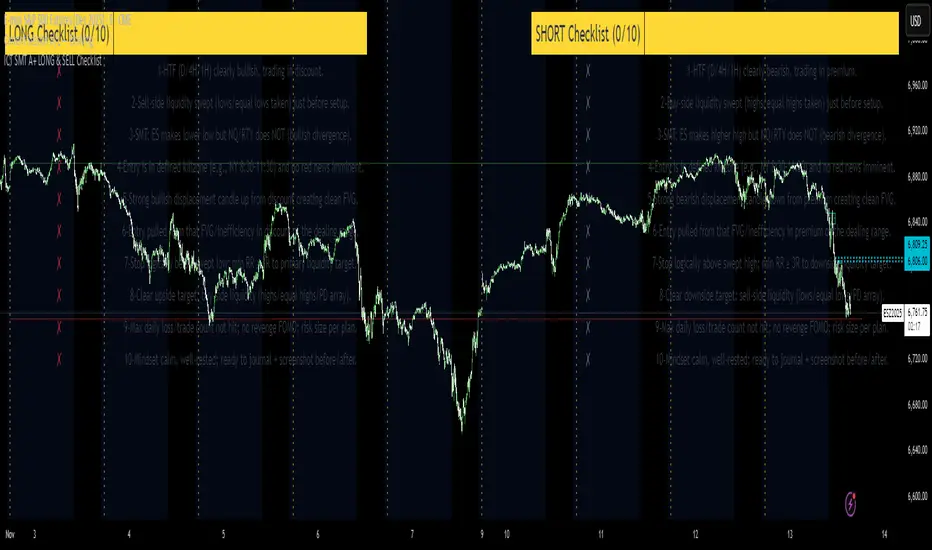
ICT SMT A+ LONG & SELL ChecklistTrade Checklist. Once all items checked color changes from yellow to green. Pine Script® indicatorby DaLondonBoy8811
Crypto Radar — Spot Signal This script is designed to help traders avoid rushing into a trade too early or at the wrong time. Designed this way, it's a great help.Pine Script® indicatorby temperino764
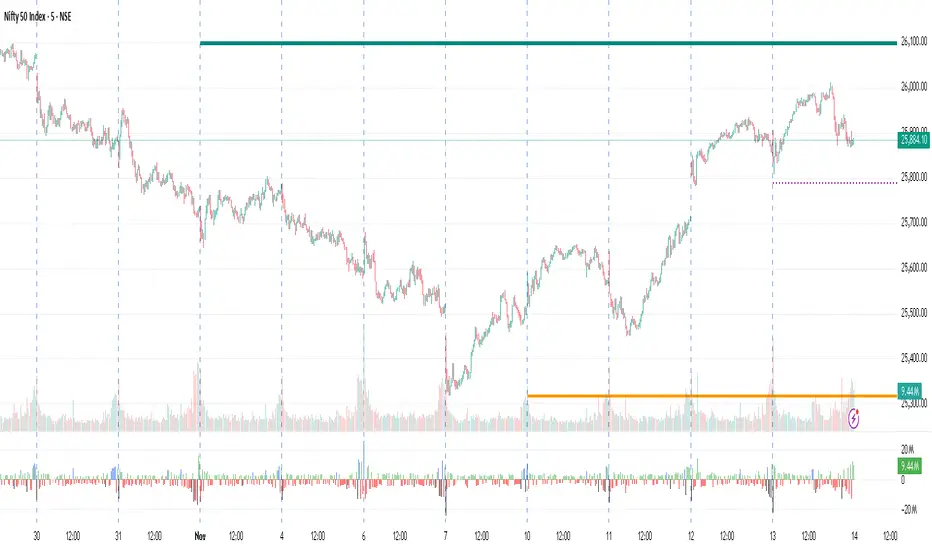
Monthly, Weekly Open + Daily Pivot (Broken Lines, fixed)monthly open line weekly open and daily pivot This TradingView indicator plots three key reference levels on your chart: Monthly Open Line – shows the current month’s opening price. Weekly Open Line – shows the current week’s opening price. Daily Pivot Line – shows the pivot level based on the previous day’s high, low, and close. Each line resets at the start of its new period (month, week, or day), so the lines are broken, not continuous. You can fully customize visibility, color, and thickness for each line. It helps traders quickly see market bias and important support/resistance levels for better intraday or swing trading decisions.Pine Script® indicatorby vmdss2119
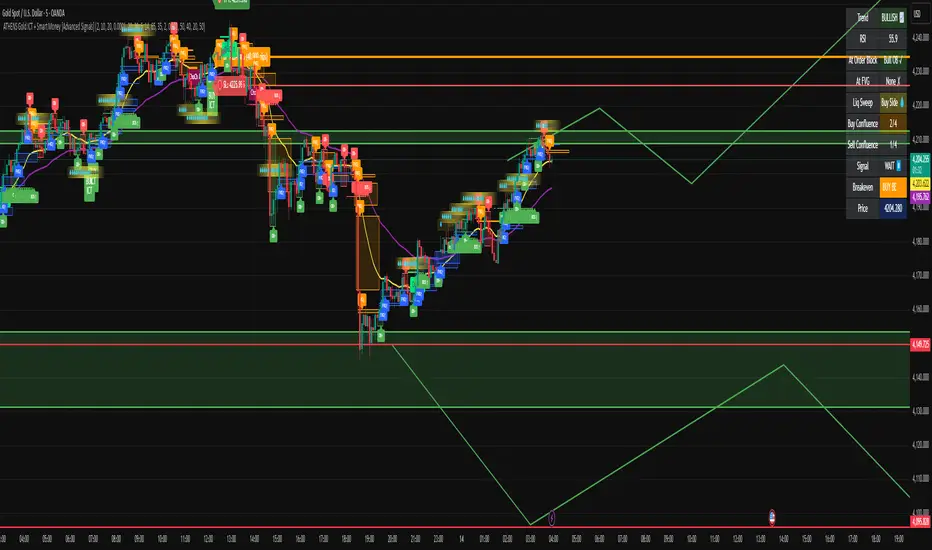
ATHENS Gold ICT + Smart Money [Advanced Signals]🎯 ADVANCED ICT + SMART MONEY CONFLUENCE INDICATOR This indicator combines Inner Circle Trader (ICT) concepts with Smart Money theory to deliver high-probability trading signals based on institutional order flow and market structure. ━━━━━━━━━━━━━━━━━━━━━━━━━━━━━━━━━━━━━━━━ ⚡ KEY FEATURES: ✅ ICT CONFLUENCE SYSTEM (0-4 Score) • Order Blocks (Institutional Entry Zones) • Fair Value Gaps (Price Imbalances) • Liquidity Sweeps (Stop Hunt Detection) • Market Structure (BOS & ChoCh) ✅ SMART SIGNALS • Signals only trigger with minimum confluence • Customizable requirements (OB/FVG/Liquidity) • Filters out low-quality setups • Higher win rate potential (65-85%) ✅ VISUAL COMPONENTS • Order Blocks (OB+ / OB-) • Fair Value Gaps (FVG↑ / FVG↓) • Liquidity Zones (💧 markers) • Break of Structure (BOS) • Change of Character (ChoCh) ✅ PERSISTENT TP/SL LINES • Entry, Stop Loss, TP1, TP2 • Automatically calculated from OB levels • Lines extend across chart canvas • Clear risk:reward visualization ✅ SMART DASHBOARD • Real-time confluence score • Component status (OB/FVG/Liquidity) • Trend direction & RSI • Signal strength indicator ━━━━━━━━━━━━━━━━━━━━━━━━━━━━━━━━━━━━━━━━ 🎯 HOW IT WORKS: The indicator scores each setup based on 4 key components: 1️⃣ ORDER BLOCK PRESENCE • Bullish OB = Last bearish candle before strong move up • Bearish OB = Last bullish candle before strong move down • Price must be in OB zone 2️⃣ FAIR VALUE GAP (FVG) • Gap between 3 candles indicating imbalance • Price tends to fill these gaps • Bounce from FVG = high probability entry 3️⃣ LIQUIDITY SWEEP • Price sweeps recent high/low • Retail stop losses triggered • Smart money enters opposite direction 4️⃣ MARKET STRUCTURE • Bullish = HH + HL • Bearish = LH + LL • Confirms trend direction CONFLUENCE SCORE: - 4/4 = Excellent (75-85% win rate) - 3/4 = Good (65-75% win rate) - 2/4 = Moderate (55-65% win rate) - 1/4 = Weak (avoid) ━━━━━━━━━━━━━━━━━━━━━━━━━━━━━━━━━━━━━━━━ ⚙️ CUSTOMIZABLE SETTINGS: SIGNAL REQUIREMENTS: - Require Order Block (ON/OFF) - Require FVG (ON/OFF) - Require Liquidity Sweep (ON/OFF) - Minimum Confluence (1-4) VISUAL SETTINGS: - Show/Hide OB, FVG, BOS, ChoCh - Adjustable lookback periods - Customizable colors - Line extension length RISK MANAGEMENT: - Risk:Reward ratio (1:1 to 5:1) - Stop Loss buffer (%) - Auto TP/SL calculation - Clear old lines option ━━━━━━━━━━━━━━━━━━━━━━━━━━━━━━━━━━━━━━━━ 📈 RECOMMENDED SETTINGS: CONSERVATIVE (High Quality): - Require OB: ON - Require FVG: ON - Min Confluence: 3/4 - Result: 1-2 signals/day, 70-80% win rate BALANCED (Recommended): - Require OB: ON - Require FVG: OFF - Min Confluence: 2/4 - Result: 2-4 signals/day, 60-70% win rate AGGRESSIVE (More Signals): - Require OB: OFF - Require FVG: OFF - Min Confluence: 2/4 - Result: 3-6 signals/day, 55-65% win rate ━━━━━━━━━━━━━━━━━━━━━━━━━━━━━━━━━━━━━━━━ 🎯 BEST PRACTICES: ✅ Trade 3/4 or 4/4 confluence signals only ✅ Confirm with higher timeframe (H4/Daily) ✅ Trade during kill zones (London/NY open) ✅ Use proper position sizing (1-2% risk) ✅ Wait for all components to align ✅ Respect stop losses ✅ Take partial profits at TP1 ❌ Don't trade 1/4 confluence signals ❌ Don't ignore liquidity sweeps ❌ Don't trade against higher TF trend ❌ Don't overtrade (quality > quantity) ━━━━━━━━━━━━━━━━━━━━━━━━━━━━━━━━━━━━━━━━ ⚡ SIGNAL TYPES: 🟢 BUY SIGNAL (Green Triangle) - Appears when bullish confluence met - Label shows "BUY ICT" - Blue entry line + Red SL + Green/Lime TPs - Long opportunity 🔴 SELL SIGNAL (Red Triangle) - Appears when bearish confluence met - Label shows "SELL ICT" - Blue entry line + Red SL + Green/Lime TPs - Short opportunity ━━━━━━━━━━━━━━━━━━━━━━━━━━━━━━━━━━━━━━━━ 📊 SUITABLE FOR: - Gold (XAUUSD) - Optimized - Forex pairs (Major pairs) - Indices (US30, NAS100, SPX500) - Crypto (BTC, ETH - adjust settings) Recommended Timeframes: - 15M - Primary for scalping - 5M - Entry refinement - 1H - Swing trading - H4/Daily - Trend confirmation ━━━━━━━━━━━━━━━━━━━━━━━━━━━━━━━━━━━━━━━━ ⚠️ DISCLAIMER: This indicator is for educational purposes only. Past performance does not guarantee future results. Always: - Practice on demo account first - Use proper risk management - Never risk more than you can afford to lose - Seek professional financial advice - Understand that trading carries risk ━━━━━━━━━━━━━━━━━━━━━━━━━━━━━━━━━━━━━━━━ 🎓 BASED ON: - ICT (Inner Circle Trader) Concepts - Smart Money Theory - Order Flow Analysis - Institutional Trading Zones - Market Structure Theory ━━━━━━━━━━━━━━━━━━━━━━━━━━━━━━━━━━━━━━━━ 📢 FEATURES SUMMARY: ✅ Confluence-based signals (not random) ✅ Order Blocks + FVG + Liquidity integration ✅ Persistent TP/SL lines (scroll-friendly) ✅ Smart dashboard (real-time info) ✅ Customizable requirements ✅ High-probability setups ✅ Professional trading approach ✅ Works on multiple assets ✅ Clean visual presentation ✅ Beginner to advanced friendly ━━━━━━━━━━━━━━━━━━━━━━━━━━━━━━━━━━━━━━━━ Trade smart. Trade with confluence. 🎯 #ICT #SmartMoney #OrderBlocks #FVG #Gold #Forex #TradingStrategy #ConfluencePine Script® indicatorby AthensBySahanUpdated 22711
Market Breadth - [JTCAPITAL]Market Breadth - is a comprehensive crypto market strength and sentiment indicator designed to visualize the overall bullish or bearish alignment across 40 major cryptocurrencies. By combining multi-asset Exponential Moving Average (EMA) comparisons and smoothing techniques, it offers a clean, aggregated view of the broader market trend—helping traders quickly assess whether the market is dominated by bullish momentum or bearish pressure. The indicator works by calculating in the following steps: Symbol Selection and Data Retrieval The script monitors 40 leading cryptocurrencies based on Market Cap. Each asset’s daily close price is requested using a 1D timeframe. This ensures that every data point reflects the same temporal resolution, allowing the indicator to evaluate global crypto strength rather than individual token volatility. EMA Comparison per Asset For each asset, two Exponential Moving Averages (EMAs) are calculated: A short-term EMA with period emalength (default 10). A long-term EMA with period emalength2 (default 20). Each coin receives a score of +1 when the short-term EMA is greater than the long-term EMA (indicating bullish structure), or -1 when it is below (indicating bearish structure). This binary scoring system effectively converts individual price action into a directional sentiment measure. Market Breadth Aggregation All 40 individual scores are summed into a single composite value called scores . If many assets have bullish EMA alignment, the total score becomes strongly positive. If the majority show bearish alignment, the total score turns negative. This step transforms scattered price data into one unified market breadth metric—quantifying how many assets participate in the same directional trend. Smoothing the Breadth Line To reduce short-term noise and isolate trend direction, the aggregated score is smoothed using an EMA of length = smoothlen (default 15). The resulting smoothed line helps identify sustained shifts in collective sentiment rather than temporary fluctuations. Visualization and Color Coding When scores > 0 , the market breadth is bullish and the histogram is colored blue. When scores < 0 , the breadth turns bearish and the histogram is purple. The same logic applies to the smoothed line and background color, offering an instant visual cue of market mood transitions. Buy and Sell Conditions: The indicator itself does not trigger direct buy/sell signals but rather acts as a market regime filter . Traders can use it as follows: Buy Filter: When the smoothed value is above zero and rising, the majority of assets confirm an uptrend — this favors long setups or trend continuation entries. Sell Filter: When the smoothed value is below zero and falling, bearish alignment dominates — ideal for short setups or defensive risk management. Optional filters could include combining this with RSI or volume-weighted momentum indicators to confirm breadth-based reversals. Features and Parameters: emalength – Defines the short-term EMA length used for individual asset trend detection (default 10). emalength2 – Defines the long-term EMA length (default 20). smoothlen – Defines the smoothing EMA length for the total market breadth line (default 15). 40 asset inputs – User-editable symbols allow full customization of which cryptos are tracked. Dynamic color backgrounds – Visual distinction between bullish and bearish phases. Specifications: Exponential Moving Average (EMA) EMA is a type of moving average that places more weight on recent price data, responding faster to market changes compared to SMA. By comparing a short-term and long-term EMA, the indicator captures momentum shifts across each asset individually. The crossover logic (EMA10 > EMA20) signals bullish conditions, while the opposite indicates bearish momentum. Market Breadth Market Breadth quantifies how many assets are participating in a directional move. Instead of tracking a single coin’s trend, breadth analysis measures collective sentiment. When most coins’ short-term EMAs are above long-term EMAs, the market shows healthy bullish breadth. Conversely, when most are below, weakness dominates. Smoothing (EMA on Scores) After summing the breadth score, the result is smoothed with an additional EMA to mitigate the inherent volatility caused by individual coin reversals. This second-level smoothing transforms raw fluctuations into a readable, trend-consistent curve. Color Visualization Visual cues are integral for intuitive interpretation. Blue Shades: Indicate bullish alignment and collective upward momentum. Purple Shades: Indicate bearish conditions and potential risk-off phases. The background tint reinforces visual clarity even when the indicator is overlaid on price charts. Background Logic By applying the same color logic to the chart’s background, users can instantly recognize the prevailing market phase. Use Cases As a trend confirmation filter for other indicators (e.g., trade only in the direction of positive breadth). As a divergence tool : when price rises but breadth weakens, it may signal a topping market. As a macro sentiment monitor : perfect for assessing when the crypto market as a whole transitions from bearish to bullish structure. Summary “ Market Breadth - ” transforms the chaotic price movements of 40 cryptocurrencies into a single, powerful visual representation of overall market health. By merging EMA cross analysis with market-wide aggregation and smoothing , it provides traders with a deep understanding of when bullish or bearish forces dominate the ecosystem. It’s a clean, data-driven approach to identifying shifts in crypto market sentiment — a perfect companion for trend-following, macro analysis, and timing portfolio exposure. Enjoy!Pine Script® indicatorby JTCapitalNLUpdated 133