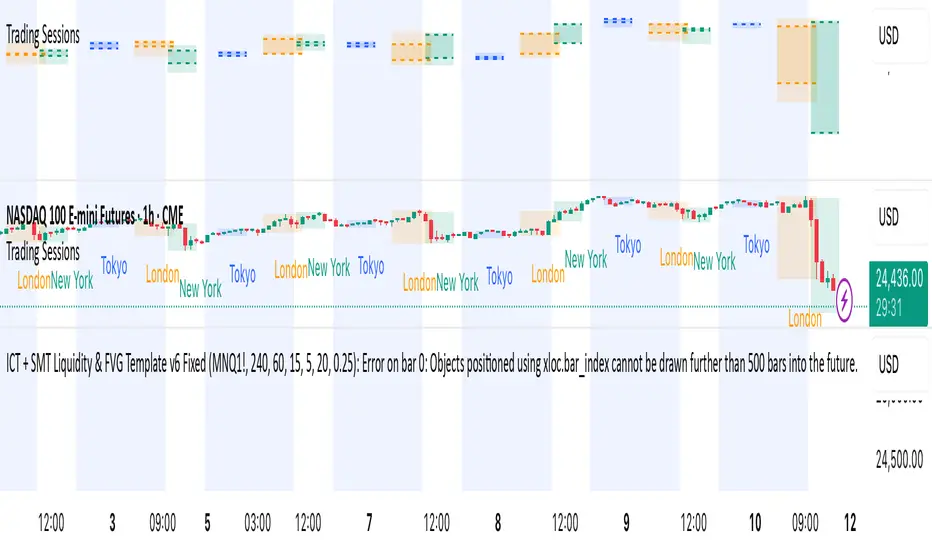
ICT + SMT Liquidity & FVG Template mnqict concepts with smt divergence for mnq. marking out liquidity sweeps, sessions, highs and lows.Pine Script® indicatorby adamali1913
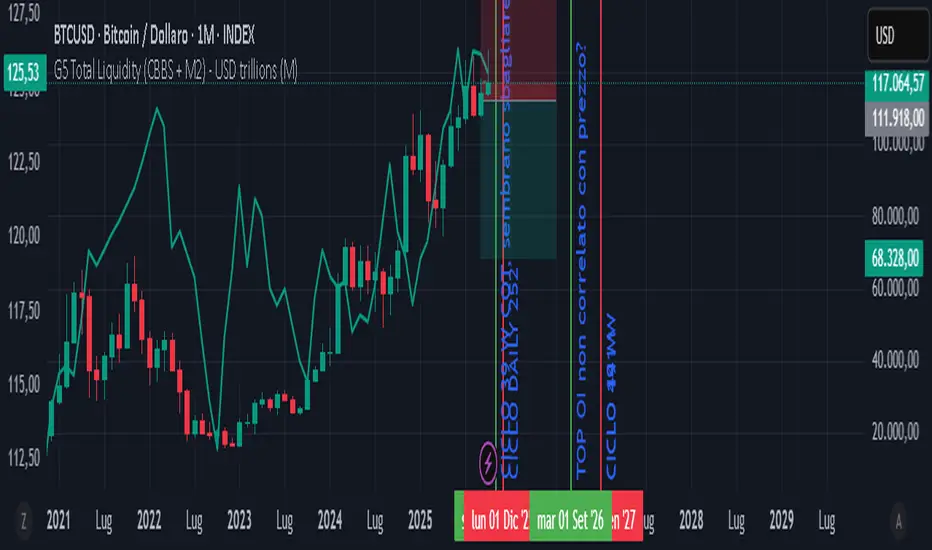
GLOBAL LIQUIDITY PROXY, G5 Total Liquidity (CBBS + M2) - USDG5 Total Liquidity (CBBS + M2) - USD G5 (US, CN, EU, JP, GB) Somma Balance Sheet Central Banks e M2 convertiti in USD Pine Script® indicatorby tarabolixUpdated 29
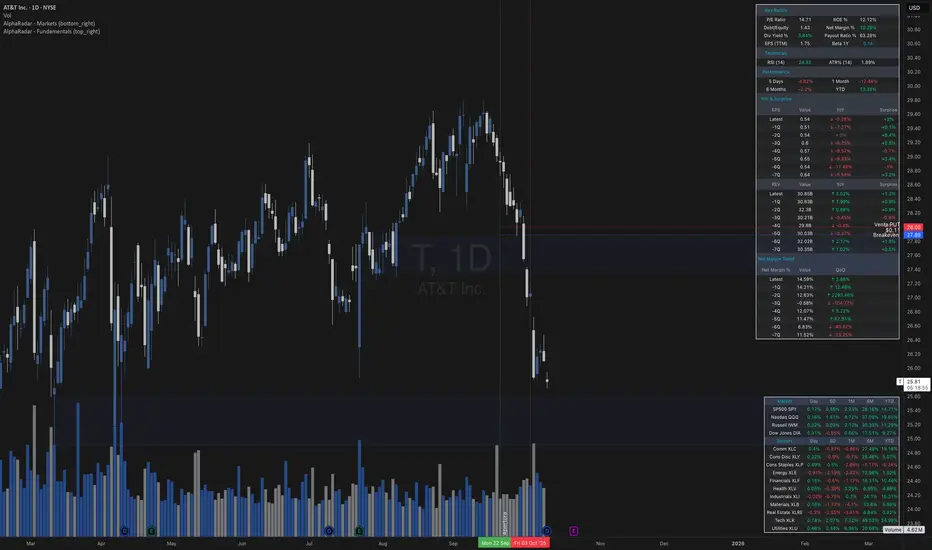
AlphaRadar - Fundamentals📊 MG ALPHA - FUNDAMENTALS PANEL ⚠️ IMPORTANT 🔴 This indicator MUST be used ONLY on DAILY (1D) timeframe. It will not work correctly on other timeframes. Overview: Comprehensive fundamental analysis panel displaying key metrics, earnings history, and profitability trends in a single view. Features: - Key Ratios: P/E, ROE, Debt/Equity, Net Margin (TTM), Dividend Yield, Payout Ratio, EPS (TTM), Beta 1Y - Technicals: RSI (14), ATR% (14) - Performance: 5D, 1M, 6M, YTD returns - Earnings & Revenue: 8 quarters of EPS/REV with YoY growth and analyst surprises - Net Margin Trend: 8 quarters showing profitability evolution (QoQ changes) Color Signals: 🟢 Green: ROE >20%, Debt <0.5, Positive surprises, Rising margins 🔴 Red: ROE <10%, Debt >2, Negative surprises, Declining margins 🟡 Yellow: Payout Ratio 80-100% (caution) Best For: Fundamental analysis, earnings monitoring, long-term investing, company comparisons. Notes: - Data from TradingView financial database - Auto-updates with new earnings releases - Works best with US stocks (NYSE, NASDAQ) - Free to use 🔔 Remember: Use DAILY (1D) charts only!Pine Script® indicatorby MG-Alpha14
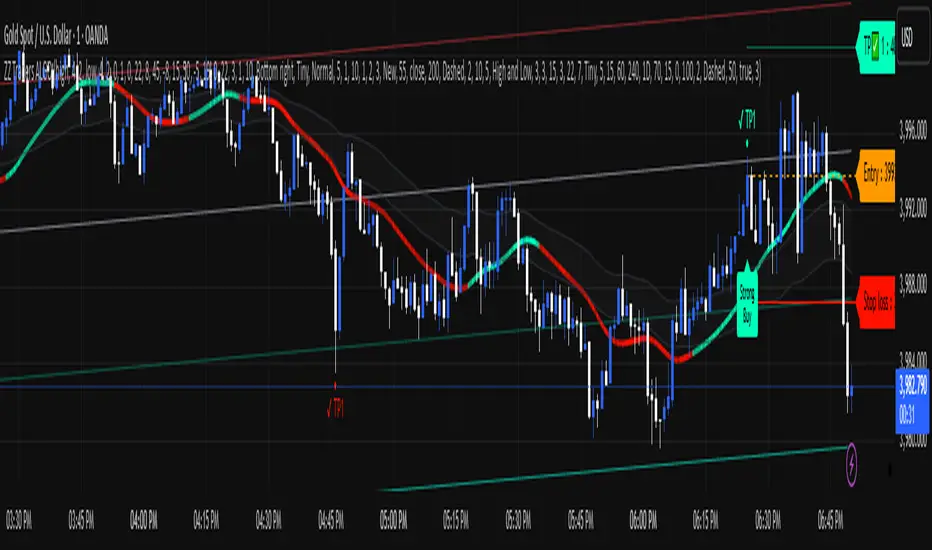
ZZ TRADERS📌 ZZ Traders ALGO – Smart Trading Companion for Every Timeframe Introducing "ZZ Traders ALGO" – a precision-built, multi-timeframe algorithm designed for GOLD traders who value accuracy, efficiency, and real-time insights. 🔹 Universal Timeframe Compatibility: Works seamlessly across all timeframes – from scalping the 1-minute chart to analyzing long-term trends on the daily and weekly levels. 🔹 Optimized for XAU/USD (Gold): Specially tuned to capture the unique volatility and price behavior of gold. Get smarter entries and exits with confidence. 🔹 Algorithmic Insights: Built on advanced price action and custom logic to detect potential reversals, trend strength, and key market zones. 🔹 Simple Yet Powerful: Clean visuals, minimal noise – just the signals that matter. Designed for both beginner and experienced traders. 🔹 Ideal for Scalping, Intraday & Swing Trading: Whether you're in and out quickly or holding positions, ZZ Traders ALGO adapts to your style. 📈 Developed by Professional Traders, for Traders – because precision matters. 📩 For inquiries or access, contact me on WhatsApp: +92 300 8339822Pine Script® indicatorby zztraderszaryab17
ZZ Traders ALGO📌 ZZ Traders ALGO – Smart Trading Companion for Every Timeframe Introducing "ZZ Traders ALGO" – a precision-built, multi-timeframe algorithm designed for GOLD traders who value accuracy, efficiency, and real-time insights. 🔹 Universal Timeframe Compatibility: Works seamlessly across all timeframes – from scalping the 1-minute chart to analyzing long-term trends on the daily and weekly levels. 🔹 Optimized for XAU/USD (Gold): Specially tuned to capture the unique volatility and price behavior of gold. Get smarter entries and exits with confidence. 🔹 Algorithmic Insights: Built on advanced price action and custom logic to detect potential reversals, trend strength, and key market zones. 🔹 Simple Yet Powerful: Clean visuals, minimal noise – just the signals that matter. Designed for both beginner and experienced traders. 🔹 Ideal for Scalping, Intraday & Swing Trading: Whether you're in and out quickly or holding positions, ZZ Traders ALGO adapts to your style. 📈 Developed by Professional Traders, for Traders – because precision matters. 📩 For inquiries or access, contact me on WhatsApp: +92 300 8339822Pine Script® indicatorby zztraderszaryab15
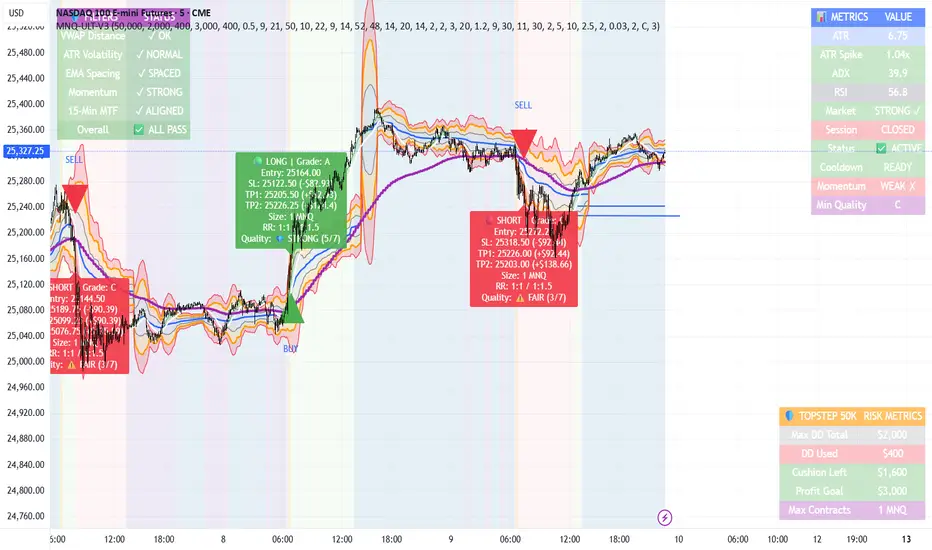
MNQ TopStep 50K | Ultra Quality v3.0MNQ TopStep 50K | Ultra Quality v3.0 - Publish Summary 📊 Overview A professional-grade trading indicator designed specifically for MNQ futures traders using TopStep funded accounts. Combines 7 technical confirmations with 5 advanced safety filters to deliver high-quality trade signals while managing drawdown risk. 🎯 Key Features Core Signal System 7-Point Confirmation: VWAP, EMA crossovers, 15-min HTF trend, MACD, RSI, ADX, and Volume Signal Grading: Each signal is rated A+ through D based on 7 quality factors Quality Threshold: Adjustable minimum grade requirement (A+, A, B, C, D) Advanced Safety Filters (Customizable) Mean Reversion Filter - Prevents chasing extended moves beyond VWAP bands ATR Spike Filter - Avoids trading during extreme volatility events EMA Spacing Filter - Ensures proper trend separation (optional) Momentum Filter - Requires consecutive directional bars (optional) Multi-Timeframe Confirmation - Aligns with 15-min trend (optional) TopStep Risk Management Real-time drawdown tracking Position sizing calculator based on remaining cushion Daily loss limit monitoring Consecutive loss protection Max trades per day limiter Visual Components VWAP with 1σ, 2σ, 3σ bands EMA 9/21 with cloud fill 15-min EMA 50 for HTF trend Comprehensive metrics dashboard Risk management panel Filter status panel Detailed trade labels with entry, stops, and targets ⚙️ Default Settings (Balanced for Regular Signals) Technical Indicators Fast EMA: 9 | Slow EMA: 21 | HTF EMA: 50 (15-min) MACD: 10/22/9 RSI: 14 period | Thresholds: 52 (buy) / 48 (sell) ADX: 14 period | Minimum: 20 ATR: 14 period | Stop: 2x | TP1: 2x | TP2: 3x Volume: 1.2x average required Session Settings Default: 9:30 AM - 11:30 AM ET (adjustable) Avoids first 15 minutes after market open Customizable trading hours Safety Filters (Default Configuration) ✅ Mean Reversion: Enabled (2.5σ max from VWAP) ✅ ATR Spike: Enabled (2.0x threshold) ❌ EMA Spacing: Disabled (can enable for quality) ❌ Momentum: Disabled (can enable for quality) ❌ MTF Confirmation: Disabled (can enable for quality) Risk Controls Minimum Signal Quality: C (adjustable to A+ for fewer/better signals) Min Bars Between Signals: 10 Max Trades Per Day: 5 Stop After Consecutive Losses: 2 📈 Expected Performance With Default Settings: Signals per week: 10-15 trades Estimated win rate: 55-60% Risk-Reward: 1:2 (TP1) and 1:3 (TP2) With Aggressive Settings (Min Quality = D, All Filters Off): Signals per week: 20-25 trades Estimated win rate: 50-55% With Conservative Settings (Min Quality = A, All Filters On): Signals per week: 3-5 trades Estimated win rate: 65-70% 🚀 How to Use Basic Setup: Add indicator to MNQ 5-minute chart Adjust TopStep account settings in inputs Set your risk per trade percentage (default: 0.5%) Configure trading session hours Set minimum signal quality (Start with C for balanced results) Signal Interpretation: Green Triangle (BUY): Long signal - all confirmations aligned Red Triangle (SELL): Short signal - all confirmations aligned Label Details: Shows entry, stop loss, take profit levels, position size, and signal grade Signal Grade: A+ = Elite (6-7 points) | A = Strong (5) | B = Good (4) | C = Fair (3) Dashboard Monitoring: Top Right: Technical metrics and market conditions Top Left: Filter status (which filters are passing/blocking) Bottom Right: TopStep risk metrics and position sizing ⚡ Customization Tips For More Signals: Lower "Minimum Signal Quality" to D Decrease ADX threshold to 18-20 Lower RSI thresholds to 50/50 Reduce Volume multiplier to 1.1x Disable additional filters For Higher Quality (Fewer Signals): Raise "Minimum Signal Quality" to A or A+ Increase ADX threshold to 25-30 Enable all 5 advanced filters Tighten VWAP distance to 2.0σ Increase momentum requirement to 3-4 bars For TopStep Compliance: Adjust "Max Total Drawdown" and "Daily Loss Limit" to match your account Update "Already Used Drawdown" daily Monitor the Risk Panel for cushion remaining Use recommended contract sizing 🛡️ Risk Disclaimer IMPORTANT: This indicator is for educational and informational purposes only. Past performance does not guarantee future results All trading involves substantial risk of loss Use proper risk management and position sizing Test thoroughly in paper trading before live use The indicator does not guarantee profitable trades Adjust settings based on your risk tolerance and trading style Always comply with your broker's and TopStep's rulesPine Script® indicatorby elivgorelick33769
Crypto ETFs AUM📘 Description: BTC ETFs AUM Tracker This indicator tracks the Assets Under Management (AUM) and daily inflows/outflows of the main U.S.-listed Bitcoin ETFs, allowing you to visualize institutional capital movement into Bitcoin products over time. It helps traders correlate institutional capital movement with Bitcoin price behavior. 🧩 Overview The script adds up the daily AUM changes from selected Bitcoin ETFs to estimate the total net inflow/outflow of capital into spot BTC funds. It also accumulates those flows over time to display the total aggregated AUM balance, giving you a clearer sense of market direction and institutional sentiment. Two display modes are available: Balance view: plots the cumulative sum of net inflows (total ETF AUM). Inflows view: shows daily inflows (green) and outflows (red) as histogram columns, together with a smoothed moving average line. ⚙️ Inputs Explained Base Settings Base Multiplier (base_multi) – Scaling factor applied to all AUM values. Leave at 1 for USD units, or adjust to display values in millions (1e6) or billions (1e9). Smoothing (c_smoothing) – Period length for the simple moving average used to calculate the smoothed mean inflow/outflow line. Show Balance (showBalance) – When enabled, displays the total cumulative AUM balance (sum of all net inflows over time). Show Inflows (showInflows) – When enabled, displays the daily inflows/outflows as colored columns. ETF Selection You can toggle which ETFs are included in the calculation: BIT (BlackRock) GBTC (Grayscale) FBTC (Fidelity) ARKB (ARK/21Shares) BITB (Bitwise) EZBC (Franklin Templeton) BTCW (WisdomTree) BTCO (Invesco Galaxy) BRRR (Valkyrie) HODL (VanEck) Each switch determines whether the ETF’s AUM and daily flow data are included in the total calculation. 📊 Displayed Values Green Columns → Positive daily net inflows (AUM increased). Red Columns → Negative daily net outflows (AUM decreased). Orange Line → Smoothed moving average of net flows, used to identify persistent inflow/outflow trends. Blue Line (if enabled) → Total cumulative AUM balance (sum of all historical flows). 💡 Usage Notes Works best on daily timeframe, since ETF data is typically updated once per trading day. Not all ETFs have identical data history; missing data points are automatically skipped. The indicator doesn’t represent official fund NAV or guarantee data accuracy — it visualizes TradingView’s public financial feed. You can combine this tool with price action or on-chain metrics to analyze institutional Bitcoin flows. Note: Some ETF data may not be available to all users depending on their TradingView data subscription or market access. Missing values are automatically skipped. 🧠 Disclaimer This script is for educational and analytical purposes only. It is not financial advice, and no investment decisions should be based solely on this indicator. Data accuracy depends on TradingView’s financial data sources and exchange reporting frequency.Pine Script® indicatorby mks17228
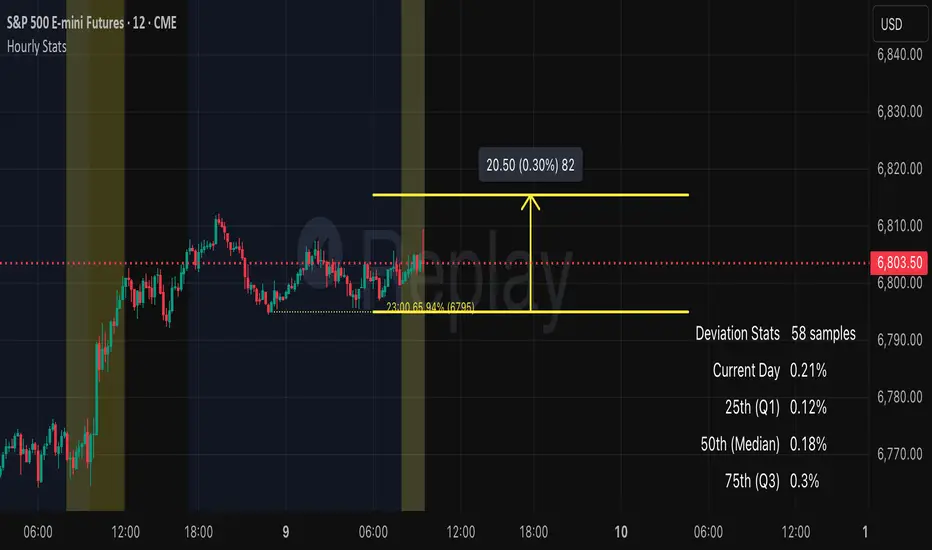
Auto Hourly StatsCredit to wheresbing for the original version. Mine simply provides: - automatically calculates retrace stats, no need to input anything. - Also cleaned up the ui a bit - ability to toggle between hourly data independent of chart timeframes Pine Script® indicatorby Nejjie73-Pack_TraderUpdated 23
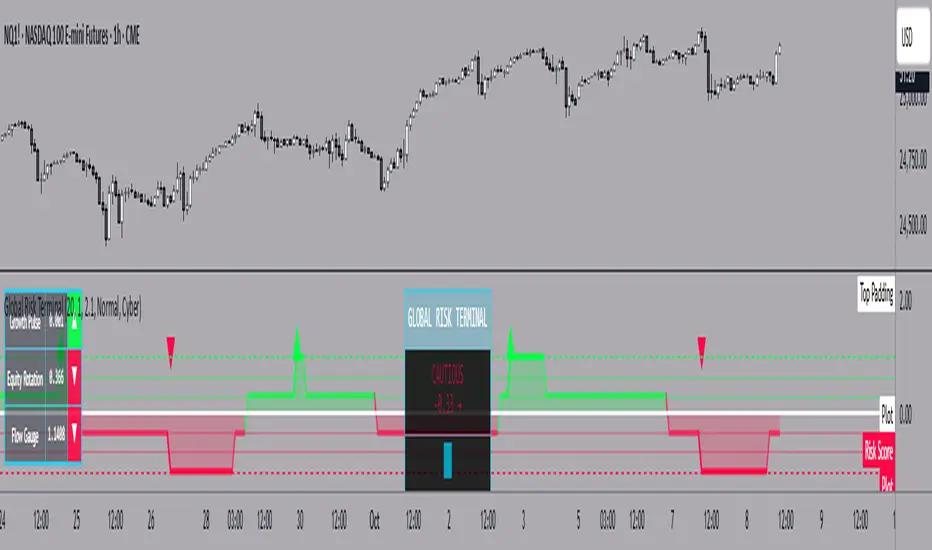
Global Risk Terminal – Multi-Asset Macro Sentiment IndicatorDescription: The Global Risk Terminal is a sophisticated macro sentiment indicator that synthesizes signals from three key cross-asset relationships to produce a single, actionable risk appetite score. It is designed to help traders and investors identify whether global markets are in a risk-on (growth-seeking) or risk-off (defensive) regime. The indicator analyzes the behavior of commodities, equities, bonds, and currencies to generate a comprehensive view of market conditions. Indicator Output: The Global Risk Terminal produces a normalized risk score ranging from -1 to +1: Positive values indicate risk-on conditions (growth assets favored) Negative values indicate risk-off conditions (safe-haven assets favored) Core Components: Growth Pulse (Copper to Gold Ratio, HG/GC) Purpose: Measures investor preference for industrial growth versus safe-haven assets. Interpretation: Rising ratio → Copper outperforming gold → Risk-on environment Falling ratio → Gold outperforming copper → Risk-off environment Flat ratio → Transitional market phase Technical Implementation: Dual moving average slope method (fast MA default 20, slow MA default 40). Positive slope = +1, negative slope = -1, flat slope = 0 Equity Rotation (Russell 2000 to S&P 500 Ratio, RTY/ES) Purpose: Tracks rotation between small-cap and large-cap equities, revealing market risk appetite. Interpretation: Rising ratio → Small-caps outperforming → Strong risk-on Falling ratio → Large-caps outperforming → Defensive positioning Technical Implementation: Dual moving average slope method (same as Growth Pulse) Flow Gauge (10-Year Treasury to US Dollar Index, ZN/DXY) Purpose: Captures liquidity conditions and cross-asset capital flows. Interpretation: Rising ratio → Treasury prices rising or USD weakening → Liquidity expansion, risk-on environment Falling ratio → Treasury prices falling or USD strengthening → Liquidity contraction, risk-off environment Technical Implementation: Dual moving average slope method Composite Risk Score Calculation: Analyze each component for trend using dual moving averages Assign signal values: +1 (risk-on), -1 (risk-off), 0 (neutral) Average the three signals: Risk Score = (Growth Pulse + Equity Rotation + Flow Gauge) / 3 Optional smoothing with exponential moving average (default 3 periods) to reduce noise Interpreting the Risk Score: +0.66 to +1.0: Full risk-on – favor cyclical sectors, small-caps, growth strategies +0.33 to +0.66: Moderate risk-on – mostly bullish environment, watch for fading momentum -0.33 to +0.33: Neutral/transition – markets in flux, signals mixed, exercise caution -0.66 to -0.33: Cautious risk-off – favor defensive sectors, reduce high-beta exposure -1.0 to -0.66: Full risk-off – strong defensive positioning, prioritize safe-haven assets How to Use the Global Risk Terminal to Frame Trades: Aligning Trades with Market Regime Risk-On (+0.33 and above): Look for buying opportunities in cyclical stocks, high-beta equities, commodities, and emerging markets. Use long entries for swing trades or intraday positions, following confirmed price action. Risk-Off (-0.33 and below): Shift focus to defensive sectors, large-cap quality stocks, U.S. Treasuries, and safe-haven currencies. Prefer short entries or reduced exposure in risky assets. Entry and Exit Framing Use the risk score as a macro filter before executing trades: Example: The risk score is +0.7 (strong risk-on). Prefer long positions in equities or commodities that are showing bullish confirmation on your regular chart. Conversely, if the risk score is -0.7 (strong risk-off), avoid aggressive longs and consider short or defensive trades. Watch for threshold crossings (+/-0.33, +/-0.66) as potential inflection points for adjusting position size, stop-loss levels, or sector rotation. Confirming Trade Decisions Combine the Global Risk Terminal with price action, volume, and trend indicators: If equities rally but the risk score is declining, this may indicate a fragile rally driven by few leaders—trade cautiously. If equities fall but the risk score is rising, consider counter-trend entries or buying dips. Risk Management and Position Sizing Strong alignment across components → increase position size and hold with wider stops Mixed or neutral signals → reduce exposure, tighten stops, or avoid new trades Defensive regimes → rotate into stable, low-volatility assets and increase cash buffer Framing Trades Across Timeframes Use the indicator as a strategic guide rather than a precise timing tool. Even without the MTF table: Daily trend alignment → Guide swing trade bias Shorter timeframe price action → Refine entry points and stop placement Example: Daily chart shows +0.6 risk score → identify high-probability long setups using intraday technical patterns (breakouts, trend continuation). Sector and Asset Rotation Risk-On: Focus on cyclical sectors (financials, industrials, materials, energy), small-caps, high-beta instruments Risk-Off: Focus on defensive sectors (utilities, consumer staples, healthcare), large-caps, safe-haven instruments Alert Integration Set alerts on the risk score to notify you when markets move from neutral to risk-on or risk-off regimes. Use these alerts to plan entries, exits, or portfolio adjustments in advance. Customization Options: Moving Average Length (5–100): Adjust sensitivity of trend detection Score Smoothing (1–10): Reduce noise or see raw risk score Visual Themes: Six preset themes (Cyber, Ocean, Sunset, Monochrome, Matrix, Custom) Display Options: Show or hide component dashboards, main header, risk level lines, gradient fill, and component signals Label Size: Tiny, Small, Normal, Large Alert Conditions: Risk score crosses above +0.66 → Strong risk-on Risk score crosses below -0.66 → Strong risk-off Risk score crosses zero → Neutral line Risk score crosses above +0.33 → Moderate risk-on Risk score crosses below -0.33 → Moderate risk-off Data Sources: HG1! – Copper Futures (COMEX) GC1! – Gold Futures (COMEX) RTY1! – Russell 2000 E-mini Futures (CME) ES1! – S&P 500 E-mini Futures (CME) ZN1! – 10-Year U.S. Treasury Note Futures (CBOT) DXY – U.S. Dollar Index (ICE) Notes and Limitations: Works best during clear macro regimes and aligned trends Use with price action, volume, and other technical tools Not a standalone trading system; serves as a macro context filter Equal weighting assumes all three components are equally important, but market conditions may vary Past performance does not guarantee future results Conclusion: The Global Risk Terminal consolidates complex cross-asset signals into a simple, actionable score that informs market regime, portfolio positioning, sector rotation, and trading decisions. Its user-friendly layout and extensive customization options make it suitable for traders of all experience levels seeking macro-driven insights. By framing trades around risk score thresholds and combining macro context with tactical execution, traders can identify higher-probability opportunities and optimize position sizing, entries, and exits across a wide range of market conditions. Pine Script® indicatorby joeljohnrussell36
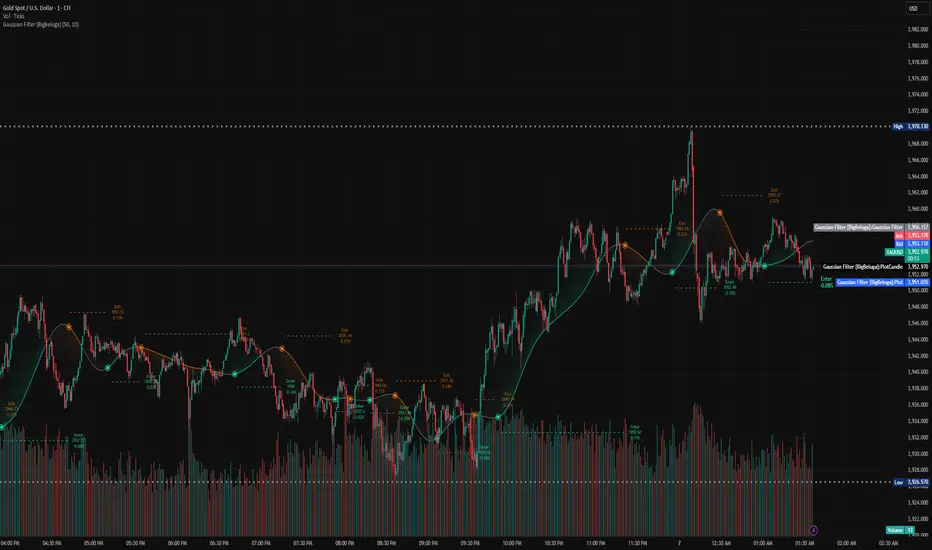
Gaussian Filter [BigBeluga] Irshad KhanYou can create Alert on Long and short . you can easily get alert on trade . Pine Script® indicatorby AAAD198324
DCA with the Money Supply Index DCA with the Money Supply Index (MSI) by zdmre This strategy is based on the Money Supply Index (MSI) by zdmre and enhances it with two functional options for users: a DCA (Dollar-Cost Averaging) approach and a signal-based buy/sell mode. It’s designed to help traders and investors make data-driven, disciplined entry decisions based on monetary supply trends. 🧠 Concept Overview The Money Supply Index (MSI) provides insight into how liquidity (money supply) influences market movements. This strategy builds upon that foundation by allowing users to either: Accumulate positions over time using DCA, based on favorable MSI conditions. Execute a single buy and sell trade, optimized for bull market conditions. ⚙️ Inputs Explained General Parameters Start Bar Index / Stop Bar Index Defines the range of bars (historical data) for backtesting or strategy visualization. Long DCA Activates the DCA mode. If unchecked, the strategy operates in single-entry/single-exit signal mode. Trading Signal Enables signal-based entries and exits when the MSI reaches predefined thresholds. DCA Parameters Entry Value The MSI value that triggers a DCA buy event. When the MSI crosses below this value, the strategy considers it a favorable moment to deploy the saved capital. Saved Amount The amount of money set aside regularly (e.g., monthly) for investment. This simulates the DCA effect by accumulating capital and deploying it when conditions are optimal. Data Inputs Money Supply The data source for the Money Supply Index (default: ECONOMICS:USM2). Relational Symbol The market instrument to compare against the money supply (default: NASDAQ_DLY:NDX). This allows the strategy to measure liquidity impact on a specific market. Chart Display Options You can toggle these metrics on the chart for better visualization: Entry Price (green) – The price level of executed buys. Cash Balance (yellow) – Remaining uninvested capital. Invested Capital (red) – Total amount currently invested. Current Value (blue) – The current valuation of the investment. Profit (purple) – The total realized and unrealized profit. Trades on Chart / Signal Labels / Quantity – Enables trade markers, signal text, and position size visualization. 📈 How the Strategy Works 1️⃣ DCA Mode In DCA mode, the strategy simulates periodic savings and only invests when the MSI indicates favorable liquidity conditions (based on the Entry Value). This approach aims to achieve the best possible average entry price over time — a powerful strategy for long-term investors seeking stable accumulation with reduced emotional bias. 2️⃣ Signal-Based Mode In signal mode (with DCA disabled), the strategy performs one buy and one sell trade based on MSI turning points. It’s most effective during bull markets, where liquidity expansion supports upward momentum. This mode helps identify high-probability entry and exit zones rather than averaging in continuously. 💡 Additional Notes This strategy includes helpful metrics to monitor your personal investment performance — showing invested capital, cash reserves, and profit in real-time. The goal is to combine macroeconomic insight (money supply) with disciplined execution and capital management. ⚠️ Disclaimer This strategy is for educational and research purposes only. It does not constitute financial advice. Always conduct your own analysis before making investment decisions.Pine Script® strategyby MightyCologne3
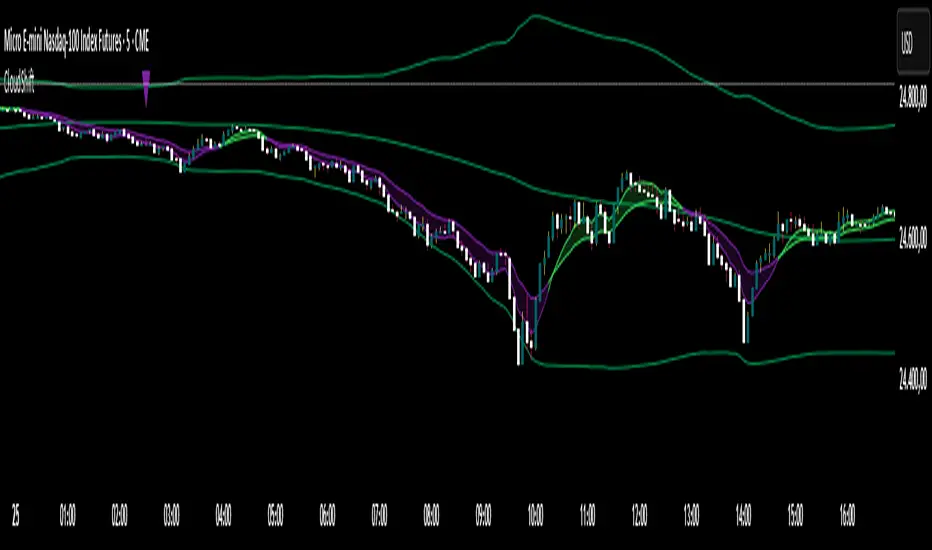
CloudShiftCloudShift + Bollinger Bands This version of CloudShift now includes fully optimized Bollinger Bands with all three dynamic lines: Upper Band: Highlights expansion during volatility spikes. Lower Band: Identifies compression and accumulation zones. Centerline (Basis): A smooth reference of the moving average, providing better visual balance and directional context. The bands are drawn with thin, clean lime lines, designed to integrate perfectly with the cloud logic — keeping your chart minimalist yet powerful. This update enhances the CloudShift indicator by providing a clear visual framework of market volatility and structure without altering its original logic. Recommended for use on: NASDAQ, S&P 500, and other high-volatility futures. Recommended timeframe: 5–15 minutes.Pine Script® indicatorby THEGREATNAPLESTRADERX24
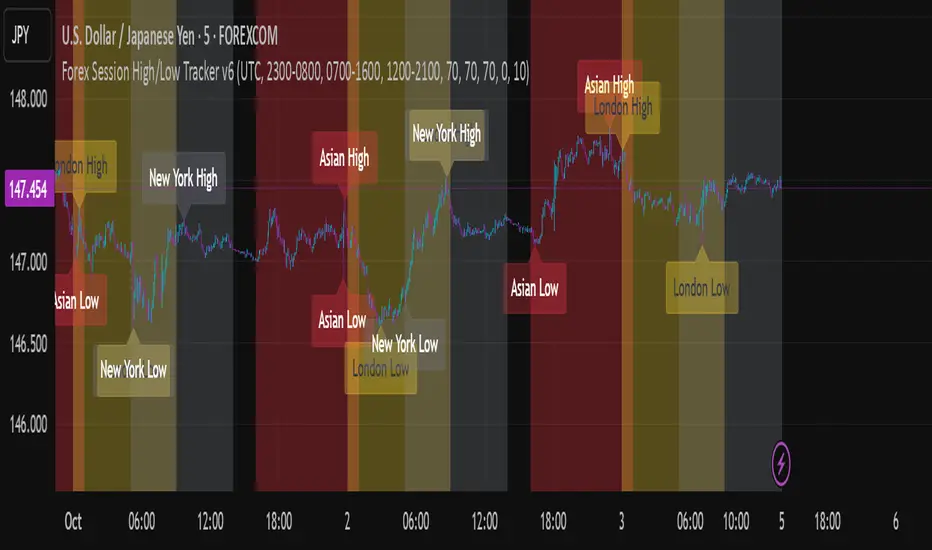
Forex Session High/Low TrackerThis indicator maps out each Forex session along with their relative highs and lows.Pine Script® indicatorby Ctshasalltherest52
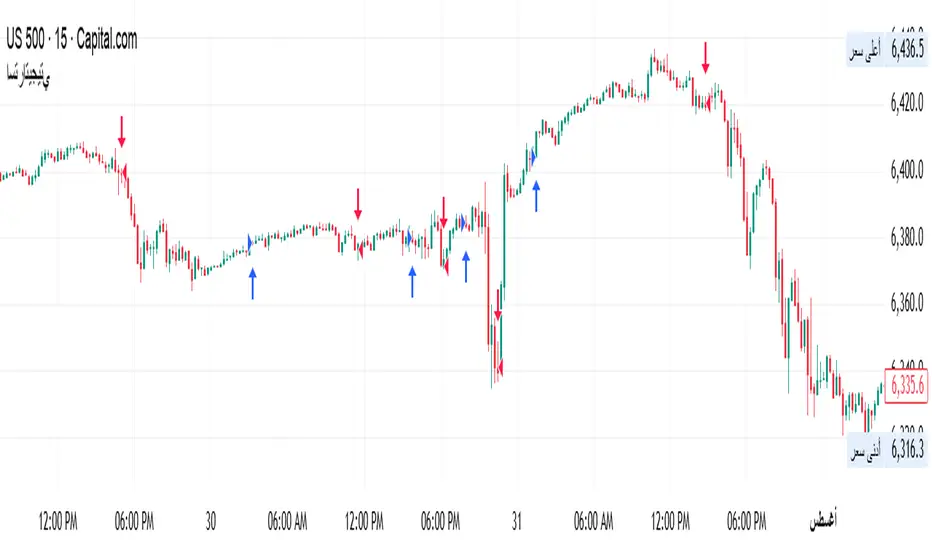
MOUSA-MCan you help identify the buy and sell zones It makes it easier to follow the index.Pine Script® strategyby mousa-M16
BTC Price Spread Heatmap (Coinbase vs Binance (chart symbol))Observation was made about price spread varying among exchanges. Original event took place Oct 4-5th. BIN/BTC was about 1K lower than COIN/BTC. Implemented a visualization to capture specifically Binance and coinbase spread comparison. This may lend as a tool to help build a case if there is a correlation. At this time Binance holds 43.1% of the market share and coinbase a mear 5.5%...Pine Script® indicatorby HyptoCrypto_1
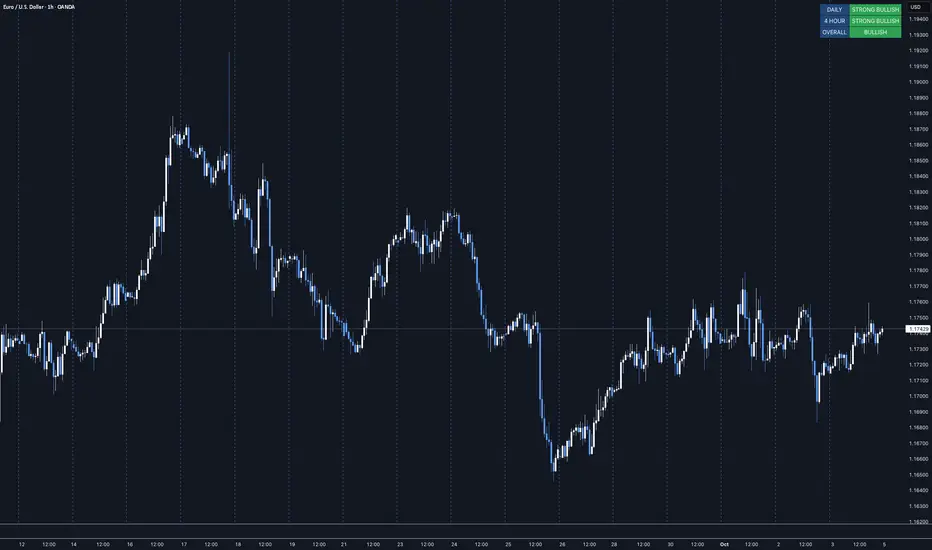
MTF Trend Dashboard LITE (Daily & 4H)Overview The MTF Trend Dashboard LITE by G.C provides instant directional clarity between the Daily and 4-Hour timeframes using refined EMA (9 / 21) logic. It’s built for traders who want simple, accurate trend confirmation without switching between multiple charts. Why It Matters One of the biggest causes of trading errors is timeframe conflict — seeing a bullish setup on one chart and a bearish signal on another. This tool solves that problem by showing both the Daily and 4H structure side-by-side, using objective EMA-based logic. When both agree, bias is strong. When they conflict, it’s a signal to wait. Core Features • Two-timeframe dashboard ( Daily + 4H ) • Non-repainting EMA (9 / 21) logic • Color-coded states ( Bullish / Bearish / Neutral ) • Lightweight and easy to read • Adjustable panel position: Top Right / Top Left / Bottom Right / Bottom Left How to Use Add the indicator to any chart. Wait for both timeframes to align before entering trades. Mixed signals often indicate sideways or transitional markets. Combine with your existing trading strategy for confirmation. Trend Condition Glossary ▲ STRONG BULLISH – EMA(9) well above EMA(21) and both sloping upward. Strong upward momentum with price above both EMAs. BULLISH – EMA(9) above EMA(21) but weaker slope or price confirmation. Moderate uptrend or early recovery. NEUTRAL – EMAs crossing or flat. Market lacks structure — consolidation or indecision. ▼ BEARISH – EMA(9) below EMA(21) with limited slope. Mild correction or early reversal. ▼ STRONG BEARISH – EMA(9) below EMA(21), both sloping down, price below both. Strong downtrend, clear seller control. Who It’s For Traders who want a clean, no-noise confirmation tool to simplify directional bias decisions in swing and intraday setups. Disclaimer This indicator is for analytical and educational purposes only. Always trade with discipline, patience, and sound risk management.Pine Script® indicatorby Gurhan_c2219
BFM Yen Carry to Risk Ratio (Dynamic Rates)Shows risk of yen carry trade unwinding. Based on cost to borrow from Japan to buy us stocks compared to interest rate in USA.Pine Script® indicatorby bitcoinfundmgr7
r - g Oscillator | Norm + Sigma-BandsThe r–g Oscillator measures the macro-liquidity regime by tracking the gap between real interest rates (r) and nominal GDP growth (g). It approximates real rate pressure using the 10-Year Treasury yield minus the 5-Year/5-Year forward inflation expectation, and compares that to either Real or Nominal U.S. GDP YoY growth. Green (g > r): Expansionary backdrop — growth outpaces real yields; liquidity tailwinds. Red (r > g): Contractionary backdrop — real rates restrictive; liquidity headwinds. The σ-bands (standard-deviation envelopes) highlight statistically extreme expansions or contractions in the r–g spread. The “sweet-spot” shading marks moments when r–g breaks strongly above/below zero — early-cycle thrusts or late-cycle stress. Optional normalization rescales r–g between –1 and +1 to compare across cycles. Use: Track shifts in the macro tide rather than short-term waves. Sustained green phases typically align with bull-market environments; red phases often coincide with tightening cycles or recessions. Combine with faster liquidity or breadth measures (e.g., WRESBAL ROC) for tactical confirmation.Pine Script® indicatorby kWhDealer_1
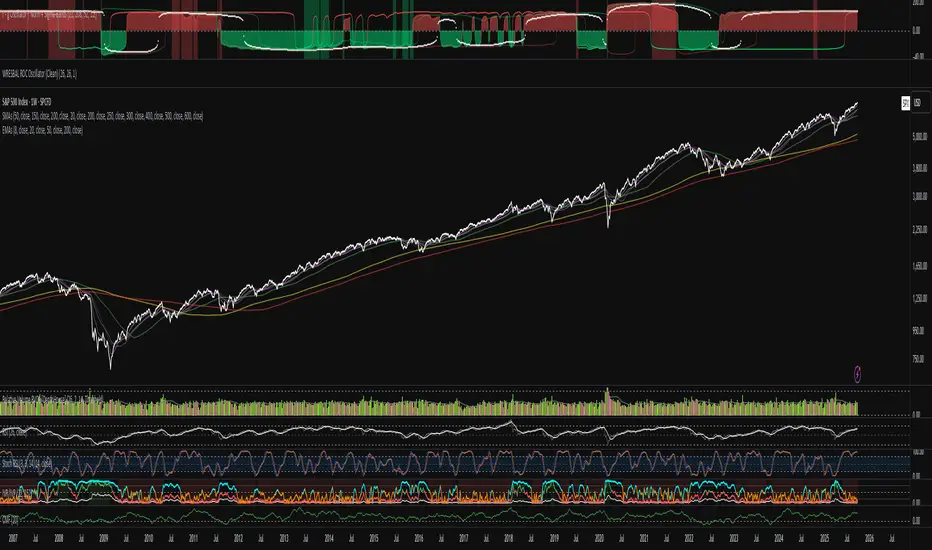
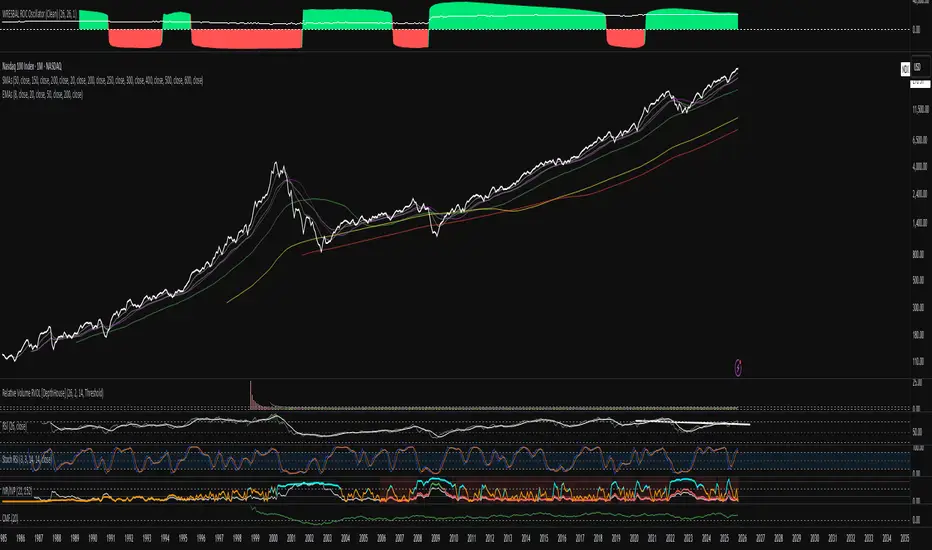
WRESBAL ROC Oscillator (Clean)This indicator tracks the rate of change in Federal Reserve reserve balances (WRESBAL) to visualize shifts in systemic liquidity. It measures how quickly reserves are expanding or contracting over a chosen lookback window (default 26 weeks), then smooths the result to highlight durable macro trends rather than short-term noise. Green = expanding reserves → liquidity easing → risk-asset support Red = contracting reserves → liquidity tightening → headwind for risk assets The oscillator is designed for macro context rather than short-term trading. It correlates strongly with major equity and credit cycles, often leading inflection points in the S&P 500 and Nasdaq by several weeks. Use it to identify transitions between QE (quantitative easing) and QT (quantitative tightening) regimes and to gauge the liquidity environment driving broad market behavior.Pine Script® indicatorby kWhDealer_1
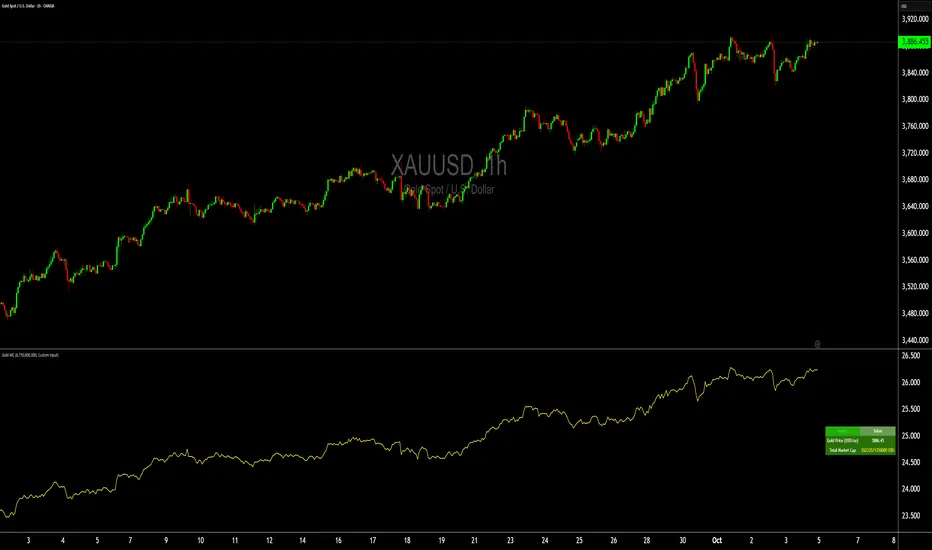
Gold Total Market Cap By Wave Trader Gold Total Market Cap (Updated 2025) Overview This indicator calculates and visualizes the total market capitalization of gold in real-time, based on the current XAUUSD spot price and the estimated above-ground gold supply. It transforms the raw gold price into a scaled "market cap" view (in trillions USD), helping traders contextualize gold's global value—often compared to stocks, crypto, or fiat reserves. As of October 2025, gold's cap hovers around $26–27T, underscoring its status as a premier safe-haven asset. How It Works Core Formula: Market Cap = Gold Price (USD/oz) × Total Supply (troy oz), scaled to trillions for chart readability. Supply Data: Defaults to the World Gold Council (WGC) mid-2025 estimate of ~218,000 metric tonnes (~7.01B troy oz), but customizable for scenarios like historical or projected figures. Plotted as a smooth yellow line below the price pane, mirroring gold's price movements but in cap terms. Key Features Dynamic Label: A real-time label on the yellow line displays the exact market cap (e.g., "26.8") for instant reference, styled like popular TradingView cap indicators. Reference Line: Horizontal dashed line at 25T USD to highlight key thresholds (e.g., surpassing Bitcoin's cap). Info Table: Top-right panel shows current gold price and full market cap (e.g., "26.8T USD") for quick stats. Overlay-Free: Designed for a separate pane to avoid cluttering your main XAUUSD chart. Data Sources & Customization Relies on live XAUUSD close prices from TradingView. Supply input: Switch between "WGC Mid-2025" (default) or custom values—ideal for sensitivity analysis (e.g., adding future mining output). No external API calls; fully self-contained for fast performance. Usage Tips For Gold Traders: Spot divergences between price momentum and cap growth to gauge overbought/oversold conditions. Portfolio Context: Compare to S&P 500 cap (~$50T) or BTC (~$2T) by adding multi-symbol alerts. Timeframes: Best on daily/weekly for long-term trends; works on 1H+ for intraday macro views. Alerts: Set notifications for cap milestones (e.g., "Gold Cap > 28T") via TradingView's alert system. Track gold's "infinite market cap" evolution—because unlike stocks, gold's supply grows slowly, amplifying price impact. Updated for 2025 data; feedback welcome! 🚀Pine Script® indicatorby Wave-Trader36
Chart-prepFxxDanny Chart-Prep A practical multi-tool script for clean and structured chart preparation. ✨ Features Weekly Close Levels Automatically plots the previous week’s close and the week before that, with clear styling to distinguish current and past levels. Trading Sessions Colored session boxes for the three key market sessions: Asia (20:00–23:00 UTC-4) Europe (02:00–05:00 UTC-4) New York (08:00–11:00 UTC-4) Each session box automatically adapts to the session’s high/low range and only keeps the last 5 visible to avoid clutter. Previous Day’s High & Low Plots the prior day’s high and low with lines that extend into the current session. Up to 10 days are kept on the chart. Daily & Weekly Separators Vertical lines to visually separate days (dotted) and weeks (solid, colored). Anchored to a rolling price window so the Y-axis scaling stays clean and unaffected. ✅ Benefits Stay focused with key price levels and session ranges marked automatically. No need for manual drawing or constant adjustments. Optimized performance – old objects are automatically removed. No axis distortion from “infinite” lines or boxes.Pine Script® indicatorby FxxDannyUpdated 19
CoT Bias Tracker [DOSALGO]Unlock a powerful new dimension in your market analysis with the CoT Bias Tracker . This advanced tool goes beyond price charts to reveal the positioning of the market's largest players, allowing you to track the "smart money" and make more informed trading decisions. By harnessing the weekly Commitment of Traders (CoT) report, this indicator automatically fetches, processes, and displays the net positioning of Commercials (Hedgers), Non-Commercials (Large Speculators), and Retail traders. Its standout feature is the unique dual-asset analysis for Forex pairs, which automatically breaks down a pair like EURUSD into its Base (EUR) and Quote (USD) components, giving you a crystal-clear view of the capital flows driving the market. Stop guessing the trend and start tracking the institutional bias that truly matters. Key Features 📈 Complete CoT Data Analysis: Automatically fetches and displays the latest weekly net positions for three key market participants: Commercials, Non-Commercials, and Retail Traders. 🌍 Unique Forex Pair Analysis: The only tool you'll need for Forex. It intelligently separates pairs (e.g., AUDJPY) into their Base (AUD) and Quote (JPY) currencies and displays a full CoT analysis for each, revealing which currency is truly in demand. 📊 Advanced Bias Dashboard: A comprehensive and fully customizable dashboard provides an at-a-glance summary of the market's sentiment, including current positions, weekly changes, and both short-term and long-term bias readings. 🧠 Conviction Analysis: This indicator goes deeper than just net positions. By analyzing the relationship between positioning changes and Open Interest, it gauges the conviction behind a move, distinguishing between a "Strong Long" (new money entering) and a "Weak Long" (short covering). 🚀 POIV Metric: Includes the Position x Open Interest Volume (POIV) metric, an advanced tool for measuring the cumulative force behind positioning changes over time. 📉 Historical Data Plotting: Visualize the net positioning data and its moving average directly on your chart's indicator pane. This is perfect for identifying historical extremes, divergences, and long-term trends in positioning. ⚙️ Automatic Symbol Recognition: The indicator intelligently detects the asset on your chart—from Forex pairs to indices like the S&P 500 and commodities like Gold—and automatically fetches the correct CoT data. 🎨 Full Customization: Tailor the entire tool to your workspace. Control the dashboard's position, size, and colors. Toggle the visibility of any data row or plot to focus only on what matters to you. The Dashboard Explained The dashboard gives you a complete, multi-faceted view of the market's positioning. Participant Groups: Commercials: Often considered the "smart money." They use futures to hedge their business operations and typically fade trends, buying into lows and selling into highs. Non-Commercials: Large speculators like hedge funds and institutions. They are typically trend-followers, and their positioning is a powerful indicator of the current dominant trend. Retail Traders: Small, non-reportable speculators. They are often seen as a contrarian indicator. Net Positions & Change: See the raw net long or short positions from the current and previous week's report, along with the net change to understand the weekly capital flow. S-Term Bias (Short-Term): Based on the weekly net change, this tells you who was buying and who was selling since the last report. L-Term Bias (Long-Term): Compares the current net position to its moving average to define the dominant positioning trend. (Note: This reading is most effective on the Weekly chart timeframe.) Conviction (via Open Interest): Found in the "Open Interest" row under the L-Term Bias column, this powerful metric tells you how positions are changing: Strong Long: New buyers are entering the market with conviction. Weak Long: Existing shorts are covering their positions. Strong Short: New sellers are entering the market with conviction. Weak Short: Existing longs are closing their positions. Use Cases & Strategy Trend Confirmation: Use the positioning of Non-Commercials to confirm the strength and direction of a trend you've identified with technical analysis. Reversal Signals: Look for extreme net positioning levels or divergences between Commercial and Non-Commercial sentiment, which can often precede major market reversals. Forex Strength Analysis: When trading a pair like GBPJPY, use the dashboard to see if Non-Commercials are strongly bullish on GBP while being bearish on JPY. This "double confirmation" can highlight high-probability trade setups. Important Notes Understanding CoT Data: The Commitment of Traders report is released by the CFTC every Friday afternoon (~3:30 PM ET). Crucially, it reflects the positions that were held on the preceding Tuesday. It is a tool for gauging medium- to long-term sentiment, not for intraday signals. Disclaimer: This tool is for analytical and educational purposes only and should not be considered financial advice. All forms of trading involve risk. Always conduct your own research and apply robust risk management.Pine Script® indicatorby DOSALGOUpdated 9939
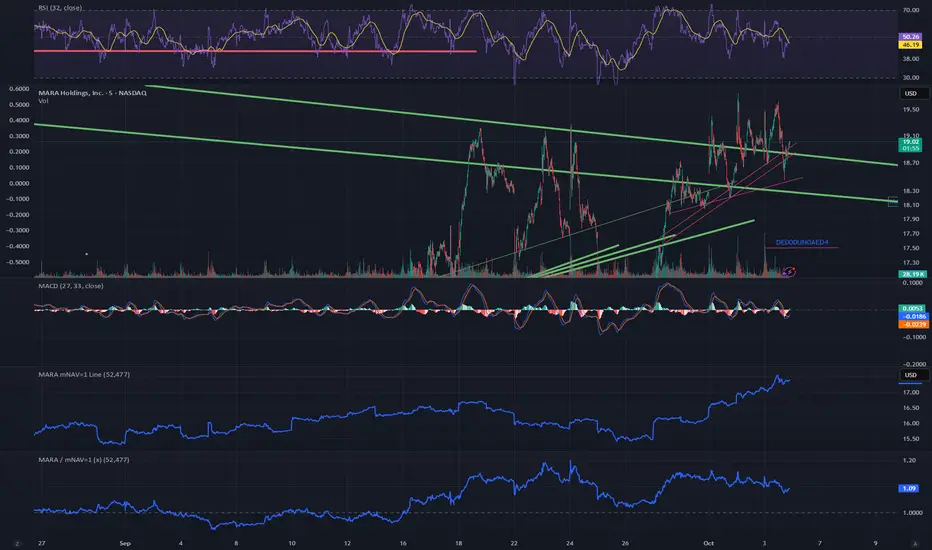
MARA / mNAV=1 (x)What it does This script overlays two signals on the MARA chart: mNAV=1 fair-value line — the MARA price implied by Bitcoin NAV: mNAV1 = (BTC price × BTC holdings) / MARA shares Premium/Discount ratio — how far MARA trades vs. its NAV fair value: Ratio = Close / mNAV1 (1.00 = fair; >1 = premium; <1 = discount) Inputs Shares outstanding (default: 370,460,000) BTC holdings (official or estimated; you can roll forward +25 BTC/day if you want) BTC symbol used for pricing (e.g., BTCUSD, BTCUSDT, BTCUSDTPERP) How to use When Price < mNAV=1 and Ratio < 1.00 → MARA trades at a discount to BTC NAV (potential mean-reversion if BTC is stable). When Price > mNAV=1 and Ratio > 1.00 → premium (premium often compresses during BTC chop/weakness). Rule of thumb (with ~53k BTC and 370.46M shares): +$1,000 BTC ≈ +$0.14 on the mNAV=1 line. Visuals Blue line = mNAV=1 (fair value) plotted directly on the MARA chart. Purple line = Ratio (×) on a separate right-hand scale centered around 1.00. Optional shading: green when Ratio > 1.05 (+5% premium), red when Ratio < 0.95 (−5% discount). Alerts (suggested) Premium > +5%: Ratio > 1.05 Discount < −5%: Ratio < 0.95 Notes This is a proxy for NAV parity; it assumes your BTC holdings input is correct (official last report or your estimate). Choice of BTC symbol matters; use the feed that best matches your workflow (spot, perp, or index). The ratio is most informative when BTC is range-bound; during fast BTC moves MARA can overshoot temporarily.Pine Script® indicatorby jimmyface494